All-in-one SEO software simplifies complex SEO tasks by combining tools for technical audits, keyword research, content optimization, backlink analysis, and rank tracking into a single platform. This saves time, reduces costs, and streamlines workflows. By 2026, these platforms also include advanced features like search intent analysis, AI-driven visibility tracking, and metadata generation.
Here’s what to focus on when choosing the right tool:
- Technical SEO: Ensure it detects crawl errors, monitors Core Web Vitals, and integrates with Google Search Console.
- Keyword Research: Look for search intent classification, competitor gap analysis, and historical ranking data.
- Backlink Analysis: Opt for frequent updates, anchor text analysis, and tools like "Link Intersect."
- Rank Tracking: Multi-location tracking, daily updates, and white-label reporting are key.
- Ease of Use: Prioritize integrations with existing tools (e.g., GA4, Slack) and user-friendly interfaces.
- Pricing: Compare tiers for hidden costs like keyword limits or AI feature add-ons. Annual billing often saves 15%-25%.
For growing businesses, scalability is critical. Start with free trials to test features against your needs and use resources like the Top SEO Marketing Directory for side-by-side tool comparisons.
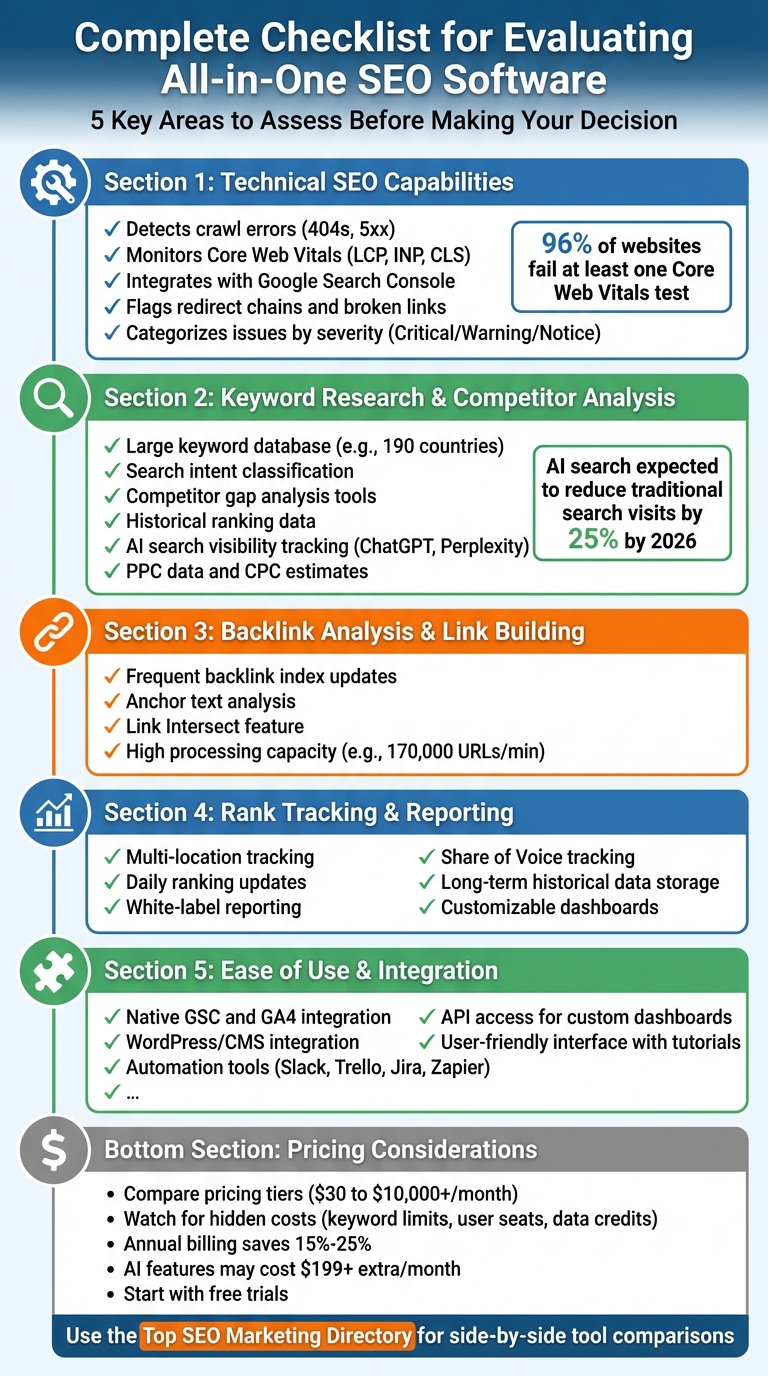
Complete Checklist for Evaluating All-in-One SEO Software: 5 Key Areas
I Built An All-in-one SEO Tool for $24.99/Mo
Checklist for Evaluating All-in-One SEO Software
When choosing an all-in-one SEO tool, it's crucial to assess five key areas: technical SEO, keyword research, backlink analysis, rank tracking, and integration. Here's how to break it down.
Technical SEO Capabilities
Your SEO tool should be equipped to detect crawl errors like 404s and server issues (5xx), manage robots.txt configurations, and flag redirect chains that could slow your site. Integration with Google Search Console (GSC) is a must to confirm which pages are indexed properly.
Monitoring Core Web Vitals is non-negotiable. The tool should track metrics like Largest Contentful Paint (LCP), Interaction to Next Paint (INP), and Cumulative Layout Shift (CLS) for both desktop and mobile. These metrics are essential, especially since 96% of websites fail at least one Core Web Vitals test. Other common issues include broken links (52% of sites), orphan pages (69%), duplicate content (41%), and missing metadata - 70% of sites lack meta descriptions on some pages, while 10% have no title tags. Tools that categorize issues by severity (e.g., "Critical", "Warning", "Notice") make it easier to prioritize fixes.
"Technical SEO is the foundation on which your SEO success relies. Because many of these activities need to occur before your other SEO tactics have a chance of driving results." - Tushar Pol, SEO Expert
Once your technical SEO is in check, it's time to focus on keywords and competition.
Keyword Research and Competitor Analysis
A strong keyword database is essential. For example, SE Ranking covers 190 countries, giving you a global view. Beyond sheer volume, the tool should offer insights like search intent (whether a keyword is informational, commercial, or transactional), along with metrics like search volume, keyword difficulty, and potential click-through rates.
Competitor gap analysis is another vital feature. Tools like "Keyword Gap" can identify keywords your competitors rank for that you're missing, helping you refine your content strategy. Access to historical ranking data is also important for tracking trends over time, not just capturing a single moment. Looking ahead to 2026, advanced platforms are already monitoring AI-driven search visibility - tracking how brands appear in Google AI Overviews, ChatGPT, and Perplexity. With AI search expected to reduce traditional search engine visits by 25% by 2026, staying ahead of these trends is critical.
Don't forget to examine PPC data. Insights like competitor ad copy, cost-per-click (CPC) estimates, and paid traffic metrics can provide a more complete picture of their strategy. During trials, test how efficiently the tool allows you to create content briefs or analyze competitor pages to save time.
After keywords, it’s time to strengthen your link-building strategy.
Backlink Analysis and Link Building Tools
A robust backlink database is key for spotting new opportunities. For instance, Ahrefs processes up to 170,000 URLs per minute, highlighting its strength in link intelligence. Look for tools that frequently update their backlink index to ensure you're working with fresh data.
Pay close attention to anchor text analysis. Overuse of exact-match anchors can raise red flags, so tools that highlight this issue are invaluable. Features like "Link Intersect" can also pinpoint sites that link to your competitors but not to you, giving you a targeted outreach list.
Rank Tracking and Reporting Features
Accurate rank tracking should account for multi-location searches, as rankings can vary significantly by region. Check whether the tool updates rankings daily or weekly - some platforms charge extra for frequent updates. For agencies, white-label reporting can save hours by allowing you to brand automated reports with your logo.
You’ll also want to track your Share of Voice across SERP features like featured snippets, local packs, and AI-generated summaries. Additionally, review how long historical data is stored; some basic plans only retain 3–6 months of data, limiting your ability to analyze year-over-year trends. Look for tools that let you build customized dashboards for client-ready reports without requiring extensive manual adjustments.
Finally, evaluate how well the software fits into your existing workflow.
Ease of Use and Integration
Even the most powerful tool is useless if it’s hard to navigate. Native integrations with Google Search Console (GSC) and GA4 are crucial for connecting technical fixes to traffic changes. For WordPress users, direct CMS integration can streamline updates like meta tags and schema markup.
Automation is another major factor. Integrations with platforms like Slack, Trello, Jira, or Zapier can turn audit results into actionable tasks for your team. For growing businesses, API access is essential for integrating data into custom dashboards or tools like BigQuery.
User-friendliness matters, too. Look for features like in-tool tips, video walkthroughs, and live chat to shorten the learning curve. For example, Moz Pro is often praised for its simplicity, offering a "Priority" score to help beginners focus on high-impact keywords. During trials, assess whether the interface feels intuitive - while Semrush is packed with features, some users find it overwhelming.
"Modern SEO tools are less about raw data and more about how quickly they turn that data into decisions you can trust." - Joe Fares, SEO Tools & Technology Expert
Pricing and Scalability Considerations
Understanding Pricing Models
All-in-one SEO platforms generally come with three pricing tiers: entry-level, mid-tier, and enterprise. These range from as low as $30 per month to over $10,000, depending on the features and scale you need. However, the real cost often includes hidden fees tied to usage limits - things like keyword updates, the number of user seats, or data credits can quickly inflate your expenses.
Opting for annual billing can offer savings of 15%–25%, and in some cases, discounts can reach up to 40%. But watch out for credit-based systems used by tools like Surfer SEO and Ahrefs. If you don’t use all your credits within a billing cycle, they don’t roll over, which means you’re paying for capacity you might not even use. And here’s another cost to keep in mind: many platforms now charge extra for AI-specific features. For instance, tracking brand visibility in tools like ChatGPT or Perplexity can add $199 or more to your monthly bill.
"Hidden pricing, confusing bundles, and multiple add-ons make evaluation frustrating." - Maria Georgieva, Head of SEO, Payhawk
To avoid surprises, always start by reviewing the pricing page instead of jumping straight to a demo. Compare your actual needs - like keywords tracked, pages crawled, and reports generated - against the limits of each tier. This simple step can help you avoid unexpected costs or mid-contract upgrades. Better yet, use the free trial to test the platform with your regular workflows. This will give you a clear picture of whether it simplifies your processes or adds unnecessary complexity.
Scalability for Growing Businesses
While pricing is an immediate concern, scalability is just as important - especially if you’re planning for growth.
Entry-level plans often come with tight limits, such as 1–5 projects or tracking only 500–750 keywords. These caps are easy to outgrow within a year. Moving to higher tiers unlocks advanced features like multi-year data storage, API access, white-label reporting, international site support, and enhanced crawling capabilities for larger websites.
As your team grows, don’t forget to account for additional user costs, which typically range from $50 to $100 per user. For enterprise-level needs, automation becomes a game-changer. Tools like seoClarity’s "ClarityAutomate" allow you to push SEO updates without waiting for developer support. Features like automated keyword clustering can cut manual work by up to 80%, saving both time and resources.
Lastly, think about long-term adaptability. With AI-driven search gaining traction, platforms that monitor AI visibility - like tracking mentions in conversational bots or summaries generated by AI - are becoming increasingly important for staying competitive.
sbb-itb-5be333f
Using the Top SEO Marketing Directory for Software Selection
Once you've reviewed essential features and pricing, the Top SEO Marketing Directory makes the selection process even easier by offering curated insights and side-by-side comparisons.
Overview of the Top SEO Marketing Directory
The Top SEO Marketing Directory is a carefully organized resource designed to simplify the process of choosing SEO software. It provides detailed listings that cover critical functions like technical SEO, keyword research, content optimization, backlink analysis, and rank tracking. With Google handling over 2.3 trillion searches annually, finding the right tool quickly is essential to staying competitive.
The directory categorizes tools based on specific SEO needs. Whether you're looking for advanced crawling tools for developers, platforms tailored to B2B lead generation, or solutions that handle large-scale keyword management, this resource helps you zero in on the right options. This targeted approach complements the checklist framework mentioned earlier, making it easier to match tools to your unique requirements.
How to Use the Directory for Evaluations
Start by using the directory's filtering options to narrow down tools by type, price, or specific features, such as schema validation or log file analysis. For instance, if you're conducting a technical audit, the directory highlights tools built for precision in technical SEO rather than general content-focused platforms. On the other hand, if you're scaling content production, it showcases tools designed to handle large-scale operations efficiently.
The directory also addresses common challenges, like conflicting search volume data. By comparing search volume tools side-by-side, you can identify which platforms deliver the most accurate data for your target region or goals. This insight is invaluable when you're justifying software investments based on ROI.
For ongoing updates, subscribe to the directory's newsletter. You'll receive monthly insights on industry trends, new tools, and exclusive deals on premium software. Use these features to quickly align your software choices with your specific SEO strategy.
Benefits of the Premium Plan
For $49/month, the Premium Plan offers access to advanced listings and detailed comparisons, focusing on performance, integrations, and use cases. It includes specialized options tailored to professional needs, such as B2B tools that align keyword intent with lead conversion strategies. This becomes especially important in 2026, as SEO software must now address both traditional SEO and Generative Engine Optimization (GEO) for AI-driven platforms like ChatGPT and Perplexity.
Conclusion
Picking the right all-in-one SEO software isn't about collecting the most features - it’s about finding tools that fit your actual workflow. Think about your core tasks like keyword research, technical audits, backlink analysis, and rank tracking. Then, focus on software that aligns with those needs, rather than getting distracted by flashy features you might never use.
As SEO keeps changing, your tools need to keep up too. By 2026, expect your software to monitor visibility not just on traditional search engines but also on emerging AI platforms like ChatGPT, Perplexity, and Google's AI Overviews. Keep an eye on scalability factors like user seats, keyword tracking limits, and crawl credits - these can drive up costs as your business grows. Also, make sure the software integrates smoothly with tools you already rely on, such as GA4, Google Search Console, or your project management platforms.
"You do not win SEO by owning the most tools, you win by consistently using the right few tools really well." – Joe Fares, SEO Specialist
To see if a tool delivers, take advantage of free trials. Test it by performing real-world tasks like creating a client report or auditing your website. Budget wisely based on where you are in your business journey: solo bloggers might start with tools in the $0–$30/month range, while agencies may need to invest $100–$400 per month for more robust solutions.
For a streamlined selection process, the Top SEO Marketing Directory (https://marketingseodirectory.com) offers side-by-side comparisons and filters tailored to your needs, budget, and team size. Whether you need advanced crawling capabilities or support for high-volume content projects, this resource helps you pinpoint the best fit. Their $49/month Premium Plan focuses on performance, integrations, and practical use cases to match your growth goals, making it easier to adapt to SEO’s ever-changing landscape.
FAQs
What limits matter most when scaling an all-in-one SEO tool?
When evaluating SEO tools, it's crucial to weigh performance, data depth, and feature relevance. Tools overloaded with features can become sluggish or overly complicated, while those with limited data may not provide the insights needed for advanced strategies. High costs or complex implementation can also make scaling difficult. The best choice is a platform that strikes a balance - offering robust features, smooth integration, and efficiency to drive growth without compromising usability or valuable insights.
How can I spot hidden costs in SEO software pricing?
When evaluating SEO software, it’s important to dig deeper than the advertised price to uncover any hidden costs. Look closely at the pricing structure for things like advanced analytics, API access, extra user licenses, upgrades, or premium support that might come with additional charges.
Make sure to ask vendors directly about all possible fees, including renewal terms and potential price hikes. Pay attention to how bundled features compare to add-ons, so you’re fully aware of any expenses that could grow over time.
How do I test an SEO platform during a free trial?
To make the most of an SEO platform's free trial, it’s smart to approach it with a clear plan. Start by defining your goals - whether it’s improving keyword research, running site audits, or streamlining your SEO workflow. Pinpoint the features that matter most to your needs.
Next, put the platform’s core functions to the test by performing real-world tasks. For instance, try analyzing your website's performance, exploring keyword opportunities, or running a competitor analysis. As you do this, pay attention to how intuitive the user interface feels and whether the platform fits smoothly into your existing workflow.
Finally, use the trial period to compare this tool with others. Does it save you time? Are the insights actionable and meaningful? By thoroughly evaluating these aspects, you’ll know if the platform is worth the investment before making a commitment.