Local mobile SERP tracking focuses on monitoring how businesses rank in search results on mobile devices for specific locations. This method is crucial because mobile search rankings can vary significantly based on precise geographic areas, like neighborhoods or zip codes. With 59% of web traffic coming from mobile devices and 76% of local searches leading to visits within a day, understanding mobile-specific rankings is essential for businesses aiming to attract local customers.
Key takeaways:
- Mobile search results differ from desktop, with only 11% of keywords ranking the same across both.
- Local Pack (map results) and SERP features like Knowledge Panels dominate mobile searches.
- Google’s mobile-first indexing prioritizes the mobile version of your website for rankings.
- Tools simulate searches by location to track performance and identify visibility gaps.
- Metrics like Local Pack position, review quality, and page load speed influence rankings.
Local SEO Rank Tracking (Smartest Way to Track Google Maps)
Key Components of Local Mobile SERP Tracking
Mobile vs Desktop Local Search Tracking: Key Differences
Location Signals and Mobile-First Indexing
When it comes to mobile search engines, two types of location signals come into play: automatic geo-location (using GPS, cell towers, Wi-Fi, or IP addresses) and manual geo-modification (when users specify a location, like typing "plumber in Brooklyn"). This automatic sharing of location data allows Google to serve up highly relevant local results.
The accuracy of these signals is incredibly important. Because mobile searches rely on such precise location data, tracking visibility on a broader, city-wide scale might overlook key details at the hyper-local level.
On top of this, mobile-first indexing ensures that Google prioritizes the mobile version of a website when determining its rankings. As Raven Tools explains:
The Google algorithm assesses the mobile experience of any website ahead of the desktop experience before indexing it in the SERPs.
This means that factors like how fast a site loads on mobile and how responsive it is can make or break its rankings - not just on mobile but across all devices.
Here’s why this matters: 4 out of 5 consumers use search engines to find local information, and 74% of adult smartphone users turn to their phones for location-based searches. Mobile users aren’t just casually browsing - they’re actively looking for businesses they can visit or contact right away.
Now, let’s dive into how mobile tracking differs from desktop tracking and why it matters.
Mobile vs. Desktop Tracking Differences
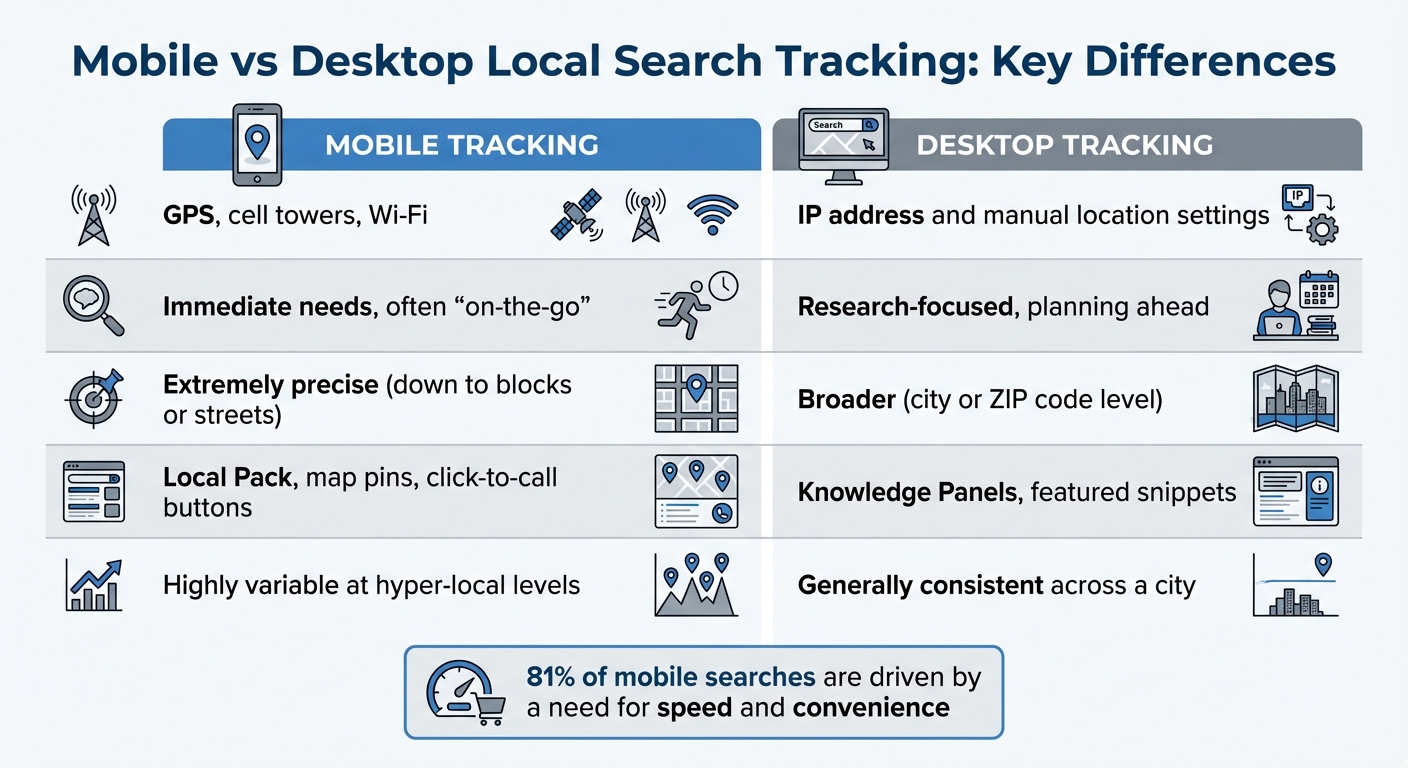
Mobile tracking and desktop tracking operate on completely different wavelengths. And if you're relying solely on desktop data, you could be missing the bigger picture. Here’s a breakdown of the key differences:
| Feature | Mobile Tracking | Desktop Tracking |
|---|---|---|
| Primary Signal | GPS, cell towers, Wi-Fi | IP address and manual location settings |
| Searcher Intent | Immediate needs, often "on-the-go" | Research-focused, planning ahead |
| Location Accuracy | Extremely precise (down to blocks or streets) | Broader (city or ZIP code level) |
| Key SERP Features | Local Pack, map pins, click-to-call buttons | Knowledge Panels, featured snippets |
| Ranking Sensitivity | Highly variable at hyper-local levels | Generally consistent across a city |
Here’s a striking statistic: 81% of mobile searches are driven by a need for speed and convenience. Mobile users want quick answers and easy access to businesses, which makes precise mobile tracking essential for understanding their behavior.
Core Metrics to Track in Local Mobile SERP
Local Pack and Google Maps Rankings
The Local Pack, the prominent map listing that highlights three businesses, plays a crucial role in local search rankings. It's worth noting that about 19% of all search results include a Local Pack, often positioned above the #1 organic result for searches with local intent.
To effectively track your Local 3-Pack performance, use geo-grid rankings and heatmaps to visualize your visibility across neighborhoods. Pay close attention to Google Business Profile (GBP) actions such as driving directions, calls, website clicks, and messages. Maintaining over 50 reviews with an average rating of 4 stars or higher is equally important. This level of tracking can directly enhance your local mobile visibility.
Additionally, monitor metrics like review frequency, overall star ratings, and customer sentiment to stay competitive within the Local Pack.
Knowledge Panel and SERP Features
SERP features are nearly ubiquitous, appearing in almost all search results, with mobile interactions accounting for 60% of the activity. On mobile devices, Knowledge Panels are prominently displayed at the very top of the screen, instantly positioning your brand as credible and authoritative.
Featured Snippets, often referred to as Position 0, are critical for capturing high-intent queries and voice search traffic. In fact, over 40% of voice search answers are sourced directly from these snippets. Keep an eye on your presence in People Also Ask boxes and emerging AI Overviews (formerly known as the Search Generative Experience), which aggregate information from multiple sources at the top of mobile SERPs. With nearly 58–60% of searches resulting in zero clicks, appearing in these features can significantly boost brand recognition and trust.
Mobile-Specific Ranking Variations
Mobile rankings are highly dynamic, influenced by the searcher's precise location. BrightLocal explains this well:
"What makes Google local rankings different is that they change based on where someone is. For example, if you're searching for a restaurant, the results will be different depending on whether you're searching from downtown or a few miles away."
Track mobile-specific click-through rates (CTR) for local keywords, as a single mobile page view often leads directly to an in-person visit. Segment your data by device type - mobile, tablet, desktop - to account for layout differences and mobile-specific SERP features. Google Search Console is an invaluable tool for filtering performance data by device and query, especially for "near me" or city-specific searches.
Page load speed is another critical metric. Google considers a load time under two seconds as optimal, and exceeding this threshold can lead to a noticeable increase in bounce rates for mobile users. Also, track your visibility in mobile carousels, image packs, and video results, which are increasingly relevant for how-to and product-related local searches. As of September 25, 2025, Google has limited search data collection to the first 10 results per page, which impacts rank tracking beyond these positions.
These metrics provide a solid foundation for simulating mobile searches and staying ahead of evolving SERP trends.
sbb-itb-5be333f
How Local Mobile SERP Tracking Works
Simulating Mobile Searches by Location
Tracking tools replicate mobile searches by pinpointing exact geographic coordinates - from a broad country level down to a specific ZIP code or even a street address. This ensures that a business ranking #1 in one ZIP code isn’t overlooked in another area just a couple of miles away.
These tools can simulate searches across more than 50 devices, covering both desktop and mobile, while accounting for differences between iOS and Android results. Many platforms use a "central pin" approach, testing search results from a primary address along with other points in the surrounding area. This method captures neighborhood-level variations.
For local businesses like restaurants or repair shops, narrowing the focus to ZIP codes instead of just cities reveals specific areas where the business might not appear in search results. Advanced tools even use mobile user agents, such as SemrushBot-Mobile, to crawl and analyze websites exactly as a mobile search engine would. These simulation techniques provide a foundation for detailed SERP performance analysis.
Collecting and Analyzing SERP Data
Data collection extends far beyond the traditional "blue link" rankings. Tools measure your Actual Rank, which includes placements in Map Packs, Knowledge Graphs, and People Also Ask sections, alongside metrics like "Pixels from the Top" - the distance your result appears from the top of a mobile screen. This is crucial because heavy ad placement or prominent SERP features can push organic results further down, even if your rank is technically #3.
Some tools go a step further by capturing full-length screenshots of the SERP, allowing you to review exactly what users saw at any given time. Competitive benchmarking is another key feature, helping you identify "real" search competitors - who may not always align with your physical business rivals - and track their visibility for the same local keywords. Certain platforms, like those with a proprietary Moxie Score, even quantify total brand presence on a SERP, factoring in non-traditional results such as Map Packs and Knowledge Graphs. This comprehensive data lays the groundwork for analyzing trends over time.
Reporting and Tracking Trends Over Time
Building on precise simulations and robust data collection, ongoing reporting tracks how local mobile SERP performance evolves. For example, Semrush Position Tracking monitors rankings daily for the first 60 days of a campaign, then shifts to weekly updates (typically on Wednesdays) for up to 140 weeks. This approach balances frequent monitoring with long-term historical tracking.
For highly competitive keywords, daily tracking is recommended to stay on top of fluctuations, while more stable keywords can be monitored weekly or monthly to conserve resources. It’s also essential to keep an eye on keyword cannibalization, where multiple pages from your site compete for the same query. This can confuse search engines and weaken your rankings.
How to Use Tracking Results
Finding Visibility Gaps and Opportunities
Tracking tools can help uncover where your business is thriving locally - and where it’s not. Trend reports are particularly useful for spotting visibility gaps. Tools with geo-grid heatmaps, like Local Falcon or BrightLocal, simulate searches from various locations within a city. These heatmaps show which neighborhoods see your listing and which don’t, based on search rankings. For example, areas with high rankings typically appear green on the grid, while low rankings are marked in red. Adjusting the zoom level on these tools can help define the exact boundaries of your visibility.
Another key metric to monitor is Share of Local Voice (SoLV), which compares your keyword visibility to that of your competitors. A low SoLV score highlights areas where you’re falling behind. It’s important to track both explicit keywords (like "plumber in Boston") and implicit ones (like "plumber near me"), as Google often displays different Map Packs for each.
"Proper tracking is the single most important element in your local business digital marketing stack." - Nick Pierno, Director of Custom Projects, Whitespark
If your business is getting high impressions but low clicks, that’s a red flag. It means people are seeing your listing but aren’t finding it engaging enough to click. This might be a cue to refresh your Google Business Profile with better photos, updated descriptions, or more engaging Q&A sections. Also, keep an eye on rankings during both business and off hours - Google factors in whether your business is open when determining rankings. These insights can guide updates to your local SEO strategy and Google Business Profile.
Improving Google Business Profile and Local SEO
Once you’ve identified gaps, it’s time to act. Start by optimizing your local listings and service pages. For example, match competitors’ review counts and use similar categorizations on your Google Business Profile. Effective local SEO tracking can directly lead to better ROI.
If your business isn’t showing up in certain areas, consider creating service area pages tailored to those neighborhoods or nearby towns. For pages with high bounce rates, tweak the content - add local landmarks to headings or include visuals that resonate with the community.
Use UTM parameters on your Google Business Profile link (e.g., ?utm_source=google&utm_medium=organic&utm_campaign=gmb-listing) to track traffic from your profile in Google Analytics. This allows you to measure leads specifically generated from your local listing.
Set up alerts for ranking drops of more than three positions. Quick responses to these changes can help you stay ahead of competitors or adapt to Google algorithm updates. Also, ensure your NAP (Name, Address, Phone) information is consistent across more than 150 directories. Even minor inconsistencies can hurt your rankings, so automated monitoring tools can be a lifesaver here. Finally, manage reviews actively - set alerts for ratings under four stars and respond within two hours to minimize any negative impact on your local rankings.
Conclusion
Tracking local mobile search engine results pages (SERPs) is a must for any business aiming to stay visible when customers search on their phones. With mobile-first indexing now the standard, keeping an eye on these rankings is even more crucial. Mobile users are often on the go, and search rankings can shift significantly depending on location.
The tools and strategies outlined in this guide can help you uncover your business's local presence and highlight areas that need attention. By monitoring key metrics like Map Pack position, distance in pixels from the top, and Share of Voice, you can spot visibility gaps and take action to close them. These metrics not only help refine your SEO strategy but also provide clear evidence of the return on your investment.
"Local SEO is not something that you start and finish, but rather a continuum that you need to constantly be working to maintain and improve." – Local Falcon
Optimizing based on these insights leads directly to better local performance. Regular monitoring connects ranking improvements to measurable revenue, helping you quantify the value of each ranking position using the formula:
Traffic × Conversion Rate × Lead-to-Sale Rate × Revenue per Sale. This approach removes the guesswork and provides stakeholders with solid, data-backed results.
Whether you're using grid-based heatmaps, keeping tabs on competitors, or adapting to AI-driven search platforms like ChatGPT, the objective remains clear: stay visible where your customers are searching. Local mobile SERP tracking gives you the insights to make that happen.
For more strategies and expert tool recommendations, check out Top SEO Marketing Directory.
FAQs
Why is tracking local mobile search results important for businesses?
Tracking local mobile search results is a game-changer for understanding how customers discover your business on their favorite devices. With mobile-first indexing now prioritizing mobile experiences over desktop, search rankings on smartphones often differ from what you’d see on a desktop. By monitoring mobile search engine results pages (SERPs) at a city or even neighborhood level, businesses can view search results just as users do. This helps pinpoint variations caused by location or device type and refine local SEO strategies accordingly.
Digging into location-specific results allows businesses to turn raw traffic data into meaningful insights. Knowing which keywords, map-pack positions, or local listings are driving actual leads helps focus time and resources on strategies that deliver results. Plus, regular tracking ensures businesses stay ahead of algorithm changes, competitor moves, or shifts in customer preferences - keeping their brand visible exactly where it counts.
To make this process easier, many businesses lean on trusted resources like the Top SEO Marketing Directory to find reliable tools and services for tracking local mobile SERPs and managing broader SEO efforts.
What is mobile-first indexing, and how does it impact local search rankings?
Mobile-first indexing means that Google prioritizes the mobile version of your website when crawling, indexing, and ranking pages. Considering that the majority of local searches happen on smartphones, elements like page speed, responsive design, and mobile-friendly structured data are key to improving your visibility in local search results.
A sluggish or poorly optimized mobile site can negatively impact your local rankings - even if your desktop site is top-notch. To stay ahead in local search, businesses need to focus on mobile-specific features such as quick load times, mobile-first schema, and ensuring their site aligns with Google’s mobile-friendly guidelines. A strong mobile user experience is crucial for securing a spot in the local Map Pack or 3-pack results.
How is mobile SERP tracking different from desktop tracking?
When it comes to tracking search engine results pages (SERPs) on mobile devices, there are three major differences compared to desktop tracking:
- Mobile-first indexing: Google now prioritizes the mobile version of a website when determining rankings. This means your site’s position on mobile can differ quite a bit from its desktop ranking.
- Unique mobile SERP layouts: Mobile search results have their own flavor. You’ll often see features like local packs, map snippets, AMP pages, and "People Also Ask" sections. On the other hand, desktop results tend to include more ads and richer snippets thanks to the wider screen layout.
- Device-specific tracking: Tools designed for SERP tracking emulate specific devices, such as iOS or Android, since search results can vary based on the type of device being used.
These distinctions highlight why understanding mobile SERP performance is so important - it gives you a clearer picture of how your site stacks up in mobile searches.