Schema markup is the key to optimizing your content for voice search. By providing structured data, it helps search engines understand your content better and increases your chances of being the one answer spoken by voice assistants like Alexa, Siri, and Google Assistant.
Here’s what you need to know:
- Voice Search Growth: Over 50% of internet searches are now voice-based, with 8.4 billion voice assistants in use globally.
- Why Schema Matters: Websites with schema markup are 35% more likely to be chosen as the spoken answer. Featured snippets, powered by schema, account for 80% of voice search results.
- Key Schema Types:
- LocalBusiness: Essential for "near me" searches.
- FAQPage: Perfect for answering common questions.
- HowTo: Ideal for step-by-step instructions.
- Speakable: Highlights text for voice playback.
- Product: Powers voice commerce by sharing pricing and availability.
- Implementation: Use JSON-LD format, validate with top SEO tools, and ensure your schema matches visible content.
Voice search prioritizes concise, accurate answers. Schema markup ensures your content is optimized to meet these demands, making your site more likely to be featured in voice results.
How Structured Data & Schema Work for AI Search with Jarno van Driel
sbb-itb-5be333f
Key Schema Types for Voice Search
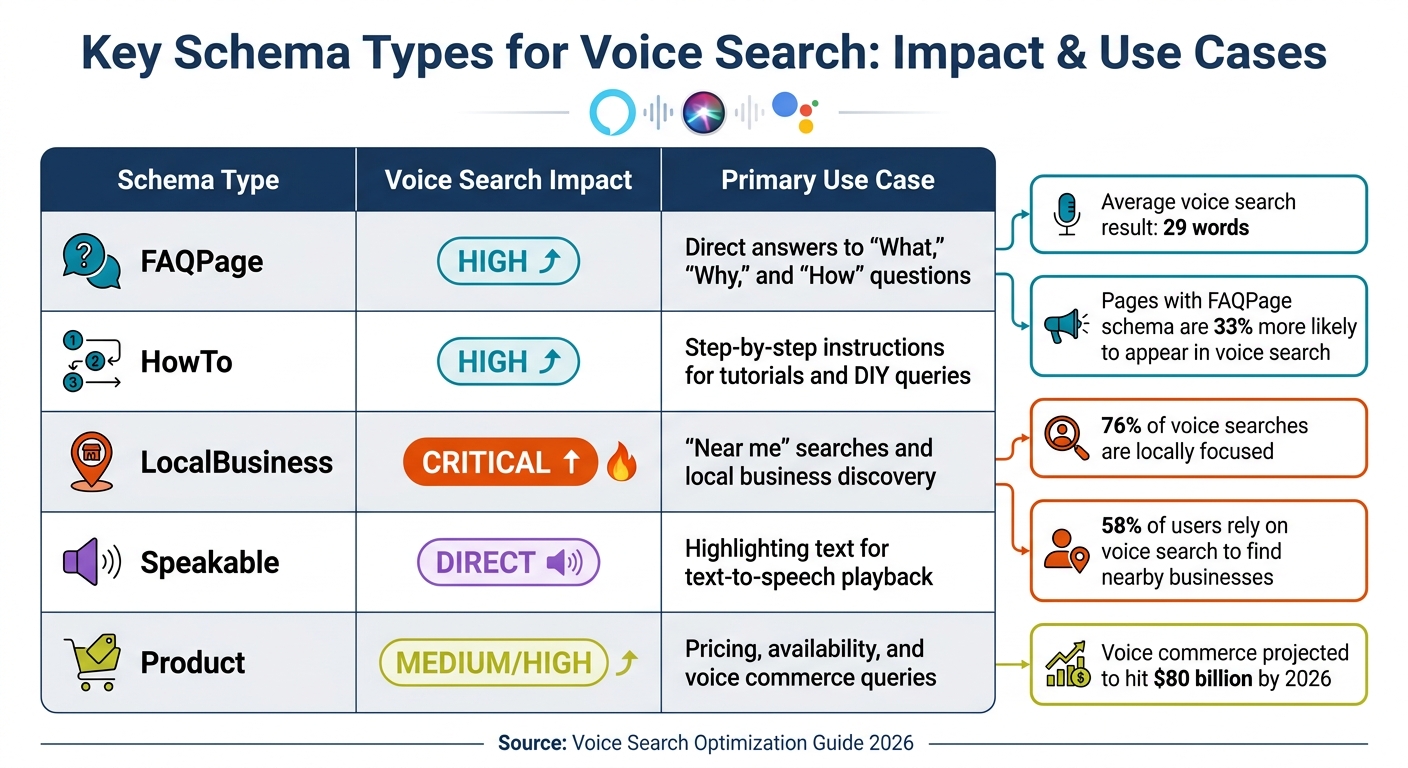
Schema Types for Voice Search Optimization Comparison Chart
Some schema types are particularly effective at boosting your chances of being featured in voice search results. Below are five key schema types that play a major role in how voice assistants extract and deliver spoken responses. Each serves a specific purpose, helping you tailor your content for voice-driven queries.
LocalBusiness Schema
LocalBusiness schema is essential for capturing searches with local intent. Did you know that about 76% of voice searches are locally focused, and 58% of users rely on voice search to find nearby businesses? When someone says, "Hey Google, find a dentist near me", voice assistants pull structured data like Name, Address, Phone number, operating hours, and location details.
To make the most of this, ensure your business details are consistent across platforms like Google Business Profile, Bing Places, and Apple Maps. This consistency helps voice assistants provide accurate, reliable answers to users.
FAQPage Schema
FAQPage schema is a perfect match for the question-and-answer style of voice search. Even though FAQ rich results are no longer prominent in traditional search, this schema remains a key signal for voice assistants. Here's a fun fact: the average voice search result is just 29 words long. So, when creating FAQ content, aim to keep "acceptedAnswer" fields concise and easy to read aloud.
Also, make sure your content is visible as plain HTML text and not hidden behind JavaScript toggles. Pages using FAQPage schema are 33% more likely to show up in voice search results.
"Schema markup is the single most consistently underleveraged tactic I encounter... one well-implemented FAQPage schema block away from earning the accordion display that would push their CTR past the pages ranked above them." - Rohit Sharma, SEO Specialist
HowTo Schema
HowTo schema is made for "How do I..." queries. It organizes step-by-step instructions into a voice-friendly format, making it ideal for tutorials, DIY projects, and other process-driven content. This schema is especially useful when users need hands-free guidance - think cooking recipes, home repairs, or assembling furniture.
Speakable Schema
Speakable schema is designed specifically for text-to-speech functionality. It highlights short, digestible sections of content - usually 2–3 sentences - that voice assistants can read aloud naturally. To make this work effectively, keep the text under 30 seconds of reading time, avoid technical jargon, and include clear author information. Minimizing ads on these pages also improves usability.
Product Schema
Voice commerce is growing fast, with projections hitting $80 billion by 2026. Product schema plays a crucial role in this space by providing structured data about pricing, availability, and reviews. It helps voice assistants answer shopping-related questions like "How much does this cost?" or "Is this item in stock?"
Summary Table
Here’s a quick overview of the impact and best use cases for each schema type:
| Schema Type | Voice Search Impact | Primary Use Case |
|---|---|---|
| FAQPage | High | Direct answers to "What", "Why", and "How" questions |
| HowTo | High | Step-by-step instructions for tutorials and DIY queries |
| LocalBusiness | Critical | "Near me" searches and local business discovery |
| Speakable | Direct | Highlighting text for text-to-speech playback |
| Product | Medium/High | Pricing, availability, and voice commerce queries |
Using these schema types ensures your content is optimized to be the go-to answer for voice assistants. In the next section, we’ll dive into how you can implement these schema types effectively.
How to Implement Schema Markup
Adding schema markup to your site involves three primary steps: creating the code in JSON-LD format, optimizing for voice search, and validating your implementation.
Using JSON-LD for Schema Implementation
JSON-LD (JavaScript Object Notation for Linked Data) is the preferred method for integrating schema markup into a website. Since 2015, Google has recommended this format because it separates structured data from HTML, making it easier to manage, debug, and scale.
To implement JSON-LD, embed a <script type="application/ld+json"> tag within the <head> or <body> section of your HTML. Each JSON-LD block starts with @context (usually set to https://schema.org) and @type to define the entity, followed by key-value pairs that match Schema.org properties to your data.
Why bother? Pages with rich results enjoy an 82% higher click-through rate compared to those without. Structured data also boosts AI overview selection rates by 73% and contributes to 60% of AI-generated citations.
For more advanced setups, consider using the @graph structure. This method links multiple entities - like your Organization, Author, and Article - within a single JSON-LD block using @id references. This approach reduces parsing errors by AI engines by 45%.
"JSON-LD is no longer optional. It's a foundation for how your content is understood and surfaced across both traditional search results and AI-driven discovery systems." - Salt Agency
Accuracy in syntax is non-negotiable. A missing comma or an incorrect bracket can break your script. Numeric fields must be actual numbers (e.g., 4.8, not "4.8"), and prices should exclude currency symbols (e.g., 29.99, not "$29.99"). Dates must follow the ISO 8601 format (e.g., 2026-05-12), and Schema.org properties are case-sensitive, so double-check everything.
Once your JSON-LD is in place, shift your focus to optimizing for voice search.
Best Practices for Voice Search Schema
Optimizing for voice search requires a different approach than traditional SEO. Voice assistants aim to deliver direct, conversational answers, so your schema must reflect this intent.
First, only mark up content that’s visible to users. Adding schema to hidden content violates Google’s guidelines and risks penalties.
For voice-friendly content, focus on schema types like FAQPage, HowTo, and Speakable. These are designed for conversational queries and are often pulled directly by AI engines to provide spoken answers. For FAQPage schema, keep your acceptedAnswer fields short and to the point.
The SpeakableSpecification schema is particularly important. It highlights sections of your content (using CSS selectors) that voice assistants should read aloud. For instance, in January 2026, a project management SaaS platform implemented FAQPage and SpeakableSpecification schemas on 47 support pages, leading to an 89% increase in voice search visibility.
To ensure consistency, create an Entity Registry - a centralized record of all your entities, such as brands, products, and people. This ensures uniform schema properties and @id values across your site, which builds trust with AI crawlers and avoids data conflicts.
Other tips:
- Use absolute URLs for images and profile links (e.g.,
https://example.com/image.jpg). - Update the
dateModifiedfield in your Article schema whenever you refresh content to signal freshness to AI engines.
These steps will position your site as a strong candidate for voice search answers. Once implemented, the next step is to validate your schema.
Testing and Validating Schema Markup
As schema markup enhances voice search accuracy, regular validation is critical to maintaining these benefits. Updates to your CMS, developer changes, or content edits can introduce errors, so ongoing monitoring is essential.
Validation involves three stages:
- Google’s Rich Results Test: Check if your page qualifies for rich results.
- Schema Markup Validator: Identify technical issues in your schema.
- Google Search Console: Monitor real-world data and detect site-wide problems.
When errors arise, prioritize fixes based on their impact. Start with template-wide issues affecting multiple pages, then address high-traffic URLs, and finally tackle individual long-tail content. Pay close attention to critical errors, such as missing required properties, which can prevent rich results from appearing.
A March 2025 case study demonstrated that implementing comprehensive schema markup led to a 156% increase in organic traffic. This highlights the importance of not just fixing errors but also addressing warnings. These warnings often provide additional context, helping AI engines better understand and surface your content in voice search results.
Common Schema Markup Mistakes to Avoid
Even the most carefully implemented schema can go wrong. A simple formatting mistake, a missing field, or mismatched data can prevent your pages from appearing in voice search results. Since voice assistants rely heavily on featured snippets and rich results, these errors can effectively block your content from conversational search opportunities.
Typical Errors in Schema Implementation
The most common schema issues fall into three main categories: syntax errors, content mismatches, and structural problems. Syntax errors - like trailing commas, missing braces, or using single quotes instead of double quotes - can cause "Unparsable structured data" errors, making it impossible for Google to read your schema properly. Even a single misplaced comma can break an entire JSON-LD block.
Content mismatches are another major problem. For instance, if your schema lists a product price as "$29.99" but the page displays "$34.99", Google might flag this as misleading and disqualify your entire site from rich results.
"Schema only works when it matches reality. Keep data truthful, visible, and current, and machines will trust you more often".
Structural issues include missing required properties like price and availability for Products or address and telephone for LocalBusiness. Another common mistake is using plain text instead of the correct Schema.org URL, such as writing "In Stock" instead of https://schema.org/InStock for the availability property. Additionally, nested objects like Offer need to be placed inside the Product schema, not alongside it.
Marking up hidden content is a violation of schema guidelines. For example, if your FAQ answers are hidden behind untriggered accordions or require JavaScript to display, using FAQPage schema could be flagged as deceptive. Similarly, duplicate schema blocks - often caused by multiple plugins or themes - can confuse search engines about which data is authoritative.
Here’s a quick reference table summarizing common errors and their fixes:
| Error Type | Common Example | Fix |
|---|---|---|
| Syntax | Trailing comma in JSON | Remove the comma after the last item in an array or object |
| URL Format | "availability": "InStock" |
Use "availability": "https://schema.org/InStock" |
| Nesting | Offer outside Product | Nest the Offer object inside the Product schema |
| Price Format | "price": "$29.99" |
Use "price": "29.99" and include "priceCurrency": "USD" |
| Visibility | FAQ schema for hidden text | Ensure all marked-up questions and answers are visible on the page |
How to Troubleshoot Schema Issues
Fixing schema errors is essential to maintaining visibility in voice search. Once your schema is in place, use a three-stage validation process: Rich Results Test, Schema Markup Validator, and Search Console monitoring. If errors appear in Search Console, go to the "Enhancements" section to locate affected pages. Prioritize fixes based on their impact - start with high-revenue pages like Product Detail or Location pages, then address high-traffic URLs, and finally, focus on individual long-tail pages. After making corrections, use the "Validate Fix" button in Search Console to request a recrawl; this process usually takes one to three weeks.
For syntax issues, tools like JSON linters (e.g., jsonlint.com) can help you pinpoint the exact line causing the problem. To avoid content mismatches, ensure your schema data syncs with your CMS or Product Information Management (PIM) system so that visible content and structured data always match.
Outdated data, such as an old dateModified property or stale prices, can erode trust with AI assistants. Pages with updated dateModified values are cited approximately 1.8 times more often by AI. Regularly audit all schema-linked URLs - including images, sameAs social profiles, and itemCondition links - to ensure they return a 200 status code instead of a 404.
To avoid conflicts, consolidate your schema sources by disabling extra plugins so only one authoritative JSON-LD block exists per entity. Using the @graph structure with stable @id values can also help prevent issues when multiple schema types are on the same page. Lastly, remember that voice assistants have stricter performance requirements than standard search. Pages with a Largest Contentful Paint (LCP) over 2 seconds are often excluded from voice results, no matter how accurate the schema is.
Advanced Voice Search Optimization Strategies for 2026
As we move into 2026, refining your voice search optimization requires more than just basic schema. With the integration of voice search and Generative Engine Optimization (GEO), the structured data that powers AI Overviews also fuels voice assistant responses.
Using Schema for Featured Snippets
Featured snippets continue to dominate as the go-to source for voice search answers. Guy Sheetrit, CEO of Over The Top SEO, sums it up perfectly:
"Winning the featured snippet is, in many cases, equivalent to winning the voice result".
In fact, 40.7% of voice search answers originate from position zero.
To secure these snippets, structure your content strategically. Place a concise, 40–50 word answer directly after an H2 or H3 heading. These headings should reflect natural, conversational questions, as voice search queries typically range from 7 to 10 words - longer than the 2 to 4 words common in text searches. Implementing FAQPage and HowTo schema remains essential, even though some visual rich results have been retired. Use the @graph JSON-LD format to embed multiple schema types, like nesting FAQPage within an Article, to provide more detailed context.
For text-to-speech playback, apply SpeakableSpecification to highlight 20–30 second sections (roughly 2–3 sentences). Pages that appear as rich results enjoy an 82% higher click-through rate, and brands featured in AI Overviews see a 35% boost in organic clicks. Keep in mind that voice assistants have strict speed requirements; your page must load in under 2 seconds (Largest Contentful Paint) to qualify for voice search results.
Once your content is optimized for snippets, the next step is to track performance systematically using Google's analytics tools.
Tracking Performance with Google Tools
Measuring your success in featured snippets requires a focused approach using Google's tools. While Google Analytics 4 doesn’t offer a specific "voice" tag, you can use proxy metrics. Filter Google Search Console queries for longer phrases (5+ words) and question-based terms like "who", "what", and "how". Additionally, use the "Search Appearance: Featured Snippet" filter in the Performance report to monitor your position zero rankings.
Search Console’s Enhancements report is crucial for keeping an eye on the health of your FAQPage and HowTo schema, even if they don’t trigger visual rich results. The URL Inspection Tool helps confirm that Googlebot is correctly processing your structured data - especially important for sites using JavaScript to dynamically inject schema. For validation, use the Rich Results Test to catch errors and the Schema.org Validator to ensure compatibility with AI and large language models (LLMs). Running these validations quarterly ensures your content aligns with Google’s evolving guidelines.
Track how often your brand is cited in AI Overviews. Structured data acts as a reliable anchor for generative AI responses, which are increasingly used in voice search. Content that combines text, images, and structured data has a 156% higher chance of being selected for AI Overviews compared to text-only content. Whenever you update or add schema, submit a new sitemap through Search Console to speed up re-indexing and data collection.
Finally, test your target phrases on platforms like Google Assistant, Siri, and Alexa to evaluate how accurately your brand is cited and how well your answers perform. Keep an eye on "conversational completion rates", which measure how often users are satisfied with a voice response without needing to rephrase their query. This kind of real-world feedback is invaluable for fine-tuning your schema and content strategies.
Conclusion and Key Takeaways
How Schema Markup Improves Voice Search Results
Schema markup changes the way voice assistants handle your content by giving them the clarity they need to confidently reference your business. As Search Engine Land explains:
"Voice assistants don't want to guess. They want to be sure they're giving the right answer... Structured data gives them that confidence".
Websites using schema markup are 35% more likely to show up in voice search results and experience 60% higher click-through rates from voice-based queries. Specifically, FAQPage and HowTo schema significantly boost the chances of appearing in featured snippets, where 41% of voice answers originate.
Here’s how it works: schema acts like a "name tag" for your content, turning plain text into machine-readable data. This ensures AI assistants can extract information without any guesswork. For example, LocalBusiness schema supports "near me" searches, while Speakable schema highlights text optimized for text-to-speech playback.
Next Steps for Businesses
To take advantage of these benefits, follow these steps:
- Audit Your Schema: Focus on FAQPage, LocalBusiness, and Product markup to align with best practices.
- Use JSON-LD: Stick with Google's preferred format for seamless processing by voice assistants.
- Answer Key Questions: Structure your content to address natural queries like "who", "what", "where", "when", "why", and "how." Aim for concise answer blocks of 40–50 words for better voice playback.
- Validate Regularly: Use Google's Rich Results Test to ensure your markup is error-free and avoid losing visibility.
- Keep NAP Data Consistent: Ensure your Name, Address, and Phone details match across all platforms to prevent confusion in voice search algorithms.
For more tools and expert tips on optimizing schema and voice search strategies, check out the Top SEO Marketing Directory. It’s a great resource for refining your technical SEO efforts.
FAQs
Which schema type should I implement first for voice search?
To boost your presence in voice search results, begin by using the Local Business or Organization schema types. These schemas provide search engines with detailed information about your business, like its name, address, phone number, and operating hours. By doing so, you enhance your chances of appearing in local search results, making it easier for potential customers to find you.
How can I tell if my schema is helping voice search results?
To determine if your schema markup is helping with voice search, focus on your visibility in features like featured snippets, which are frequently used by voice assistants. Keep an eye on rankings for voice-optimized queries, especially those designed with schemas like FAQ or HowTo. Make sure your page loads in under 2 seconds, as slower-loading pages are often excluded from voice search results. Regularly check if your content is showing up in featured snippets for the queries you’re targeting.
Can I use multiple schema types on one page without causing errors?
Yes, you can include multiple schema types on a single page without running into errors. Schema markup is meant to describe different types of content, and using multiple schemas can help search engines better understand your page. This approach can also enhance search results by offering more detailed and varied information.