Local rank reports change by ZIP code because Google re-sorts local results based on where the search starts. It does not use one fixed rank for every person in a city. A business can be #1 in one ZIP code, #4 in the next, and missing a few miles away - with no penalty involved.
Here’s the short version:
- ZIP code tracking tools provide an estimate, not a full view of what every searcher sees
- Distance changes from point to point, even inside the same ZIP code
- Query wording, device type, and Search vs. Maps can all shift results
- Service area settings do not cancel out proximity
- Grid scans beat single-point ZIP scans when I want to see where visibility drops
- One rank is not the story - I need repeat patterns across locations and time
If I want a local rank report I can trust, I keep the setup the same every time: same keyword, same device, same search surface, same location input, and same timing. Then I look at coverage, competitor overlap, and repeat losses by area - not just one position.
That’s the core idea of this article: ZIP code movement usually reflects location-based measurement, not a ranking problem by itself.
What Happens When You Start Tracking Everything? | Whitespark Local Ranking Grids
sbb-itb-5be333f
How Google's local ranking signals create geographic variation
These shifts happen because Google recalculates local results from each search origin, not from one fixed market-wide position. Google uses three main signals: relevance, distance, and prominence. Since each scan changes the location context, the results can change too.
Relevance, distance, and prominence in plain terms
Relevance is about query match. A dentist whose profile clearly lists emergency dental services is a better match for "emergency dentist" than a general medical clinic, even if that clinic is closer. Distance is about proximity to the search origin or a named place. And because the scan origin changes, the distance calculation changes with it. Prominence is about how well-known or authoritative a business appears, based on signals like reviews and links.
For competitor benchmarking, this matters a lot. The same business can look stronger or weaker depending on where the scan begins.
| Signal | Why it varies by location | What a report can reveal |
|---|---|---|
| Relevance | Query wording and named locations change which profiles are the best match | Whether the profile appears for target services and where competitors are more closely matched |
| Distance | The scan origin changes the proximity calculation for every result | Where visibility weakens and which competitors gain a proximity edge |
| Prominence | Competitors may have different review counts, links, and brand recognition across the market | Which businesses consistently outrank others even when proximity is similar |
A drop in rankings across ZIP codes can point to a relevance or prominence gap - not just a distance issue.
Why service-area businesses still see uneven visibility
Listing a service area tells Google where a company operates. It does not make the business physically close to every customer in that territory. That distinction trips people up all the time.
A business based in one location will usually show better visibility near its verified address and weaker results farther away, even if those places sit inside its listed service area. So a business may serve a broad area on paper, but win visibility in only part of it. Service coverage and ranking proximity are not the same thing.
ZIP code, exact coordinate, and named place in the query are not the same tracking input
These three inputs test different search contexts. Mix them together, and you'll get rank differences that don't mean much.
| Tracking input | What it represents | How it affects measurement |
|---|---|---|
| ZIP code | A broad geographic area represented by a central or provider-defined point | Produces an area-level estimate |
| Exact coordinate | A specific latitude/longitude where a search is simulated | Reveals finer variation across a map grid |
| Named place in the query | A place written into the search, e.g., "Chicago Loop dentist" | Supplies an explicit geographic context Google uses to evaluate distance |
Take this example: searching "dentist" from a coordinate in downtown Chicago is not the same as typing "Chicago Loop dentist." One relies on a search origin. The other adds a named place to the query.
A ZIP-code scan can approximate an area, but it can't stand in for every point inside that ZIP code. For benchmarking, compare only reports that use the same input type. Use the same search origin and the same query format every time.
Why devices, queries, and map grids also shift the report
ZIP Code vs. Grid Tracking: Local Rank Report Methods Compared
ZIP code is only part of the picture. Device type, query wording, and scan method can all move local rankings even when nothing about the business has changed. That's why competitor benchmarking needs a fixed setup. If you mix devices, queries, or search surfaces, you're not making a fair comparison.
Mobile versus desktop and Maps versus Search
Mobile searches often use the device's current location. Because of that, proximity can play a bigger role on mobile. Desktop searches may rely on a different location signal, so the same query can produce a different ranking order. That alone can change which businesses show up and where they appear.
So if one report uses mobile and another uses desktop, the comparison can drift fast.
Google Maps and the Google Search local pack are also not the same result set. They should not be compared side by side as if they measure the same thing. Label each result with care. Google Search local pack, mobile is a different metric from Google Maps, desktop, even when the query and ZIP code match.
How query wording changes local competitors
Change the query, and you can change the competitor set with it. Even small wording changes matter.
"Dentist", "emergency dentist", and "dentist near me" usually do not return the same businesses. "Emergency dentist" pushes relevance toward practices that offer same-day or after-hours care. It can also bring in competitors with dedicated service pages or stronger proximity to the search location.
That means rankings should be tracked by query, not rolled into one broad keyword bucket. Otherwise, a position change may not mean visibility changed at all - it may just mean the local result set changed.
What geo-grid scans show that ZIP-code tracking misses
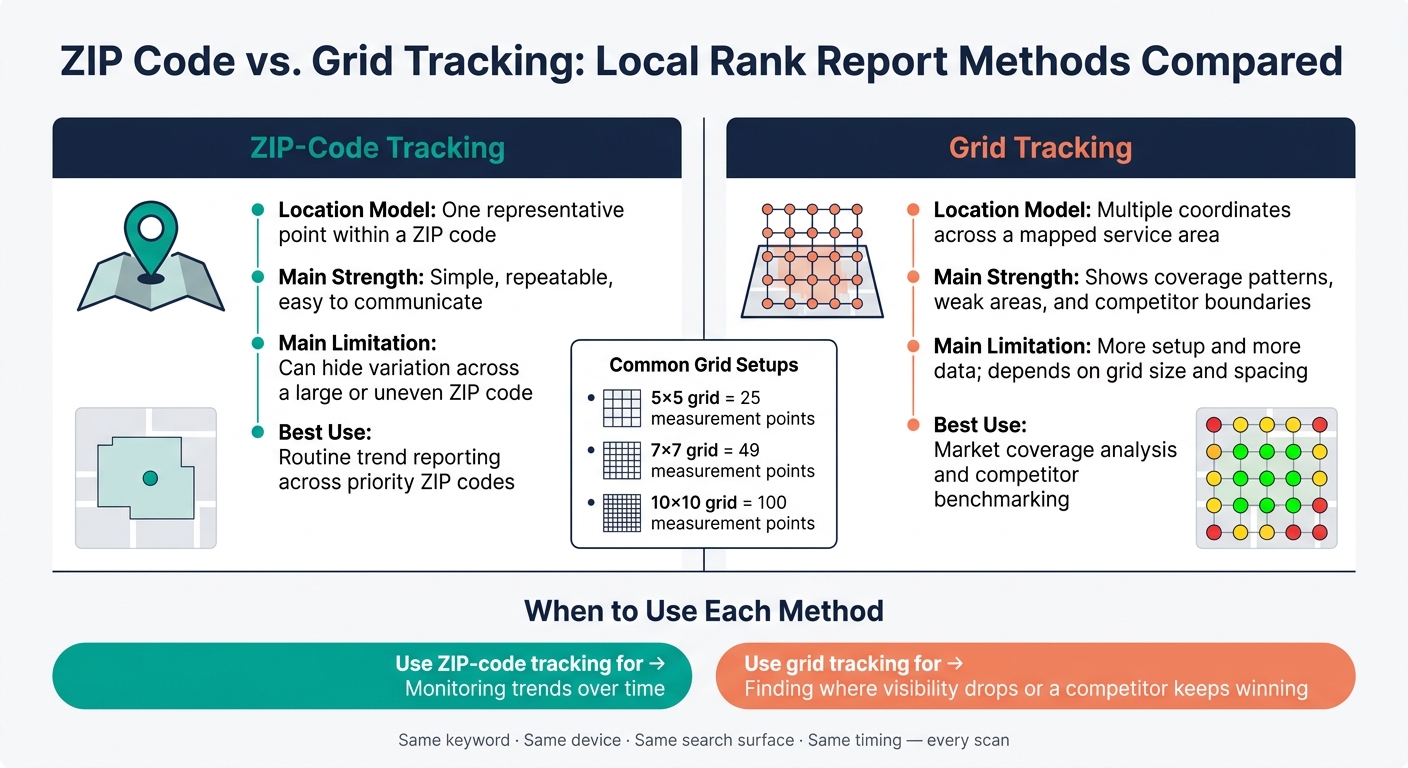
When ZIP-level reporting looks flat, grid scans can show what's happening across the market. ZIP-code tracking reduces an area to a single point. A grid scan runs the same search from many coordinates across a mapped service area. Common setups use a 5×5, 7×7, or 10×10 grid, which creates 25, 49, or 100 measurement points.
That gives you a coverage pattern. A business may rank in positions 1-3 near its office, slip to positions 5-10 a few miles away, and disappear from visible results at the outer edge of its market. Grid scans also show where a rival keeps beating the business across the service area. So this is not just a coverage view - it's a direct benchmarking tool too.
| Tracking method | Location model | Main strength | Main limitation | Best reporting use |
|---|---|---|---|---|
| ZIP-code tracking | One representative point within a ZIP code | Simple, repeatable, easy to communicate | Can hide variation across a large or uneven ZIP code | Routine trend reporting across priority ZIP codes |
| Grid tracking | Multiple coordinates across a mapped service area | Shows coverage patterns, weak areas, and competitor boundaries | More setup and more data; depends on grid size and spacing | Market coverage analysis and competitor benchmarking |
Use ZIP-code tracking for trend monitoring over time. Move to a grid scan when you need to see where visibility starts to fall apart or where a competitor keeps outranking the business across the market.
How to read competitor benchmarking without overreacting
Once grid scans show shifts in visibility, the next step is to read the pattern the right way. A local ranking is a point-in-time result. It is not a market-wide score. One ZIP code gives you one search point under one set of conditions.
That’s why consistency matters so much. Keep the keyword, device, surface, search location, and competitor set the same across every ZIP code. Use that exact setup before you compare who ranks above whom in each area.
If a competitor ranks above the target business, start with a simple question: does the pattern repeat? One loss in one ZIP code may just reflect proximity to that search point, a normal swing, or a different competitor set for that query. In plain terms, one data point can be noise.
The table below shows how to log these findings as observations, not final judgments.
| Search location | Target business | Competitor | Local Pack position | Distance | Interpretation |
|---|---|---|---|---|---|
| ZIP code 78701, Austin, TX | Downtown HVAC Co. | Central Air Services | Target: 2; Competitor: 1 | Competitor is approximately 1.2 miles closer to the search point | Proximity likely explains the higher rank. |
| ZIP code 78704, Austin, TX | Downtown HVAC Co. | Central Air Services | Target: 1; Competitor: 4 | Target is closer to the tested point | The target won visibility near this point. |
| ZIP code 78745, Austin, TX | Downtown HVAC Co. | Southside Heating | Target: not visible; Competitor: 2 | Competitor has a location nearer to the southern search point | Review relevance, prominence, and service-area signals before assigning cause. |
Only dig deeper when the same pattern shows up across multiple scans and lines up with calls, direction requests, or leads.
How to build a reliable local rank report
Once you know ZIP-code shifts are tied to location, the next step is simple: standardize the report so each scan can be compared fairly.
What every report should document
Each report should record the same inputs every time: business name, address or service-area setup, keyword, search engine, device, language, country, search location (ZIP code or GPS coordinates), date and time, result source (Google Search, Google Maps, local pack, or organic), GBP/Maps URL, observed competitors, and grid settings.
That level of detail matters more than it may seem. "Business is Open at Time of Search" is the fifth most important local ranking factor. So a scan run at 8:00 PM can show different results from one run at 10:00 AM in the same place. Same business, same keyword, different timing.
The metrics that matter more than a single rank
Once the inputs are fixed, focus on coverage and competitor overlap, not just one ranking position.
A single ZIP-code centroid gives you only one search point. It does not show visibility across the full service area. That’s the trap. One point can look fine while nearby blocks tell a very different story.
More useful metrics include:
- Top-three coverage: the share of tracked grid points where the business appears in the local pack
- Rank distribution: how often the business lands in position groups like 1-3, 4-10, and "not found"
- Competitor win rate: the share of points where the target business ranks above a specific rival
Track those metrics across repeated scans. Then look for geographic gaps. For example, you may see a pattern where visibility is strong to the east but weak to the west. That kind of spread tells you far more than a single #2 ranking tied to one ZIP code.
Also keep a change log. If you change the grid radius, swap keywords, or adjust the setup in any other way, write it down. Otherwise, it’s easy to mistake a reporting change for movement in the search results.
Conclusion: ZIP-code shifts usually reflect location-based measurement, not a penalty
ZIP-code shifts usually point to location-based measurement changes or proximity weighting, not a penalty. Look at repeated visibility across the full service area, compare that with engagement signals like map impressions, direction requests, and phone click-throughs, and pay attention to patterns that show which rivals keep winning or losing in specific areas before making the call.
FAQs
Why can my business rank differently in nearby ZIP codes?
Your business can rank differently in nearby ZIP codes because Google’s local results react to the searcher’s exact location. Search engines look at signals like GPS, Wi-Fi, cell towers, and IP addresses to decide which nearby results to show.
Because proximity is a major ranking factor, your visibility can shift even within a few miles. A business might show up well in one neighborhood and slip in another. Local competition, the device someone uses, and search intent can also change rankings from one area to the next.
Is ZIP code tracking accurate enough for local SEO reports?
Yes. ZIP code tracking is a useful part of local SEO reporting, but its accuracy depends on how granular your strategy is.
It’s more precise than city-level tracking. But rankings can still shift by neighborhood - or even by block.
For the clearest picture, use ZIP code tracking with automated monitoring, then supplement it with manual checks or grid-based analysis.
When should I use grid tracking instead of a ZIP code scan?
Use grid tracking when you need hyper-local detail beyond broad ZIP code data. ZIP code scans are useful for spotting general areas where your business may be missing from search results.
Grid tracking uses specific GPS coordinates to show visibility across neighborhoods in color-coded heatmaps. It’s especially helpful for multi-location businesses that need street- or block-level detail.