Your Google Business Profile is now your digital storefront, especially with 70% of local searches ending without a click. Keeping your profile optimized is critical for visibility, and even small mistakes, like outdated photos or mismatched NAP (Name, Address, Phone), can hurt your rankings. That’s where GMB audit tools come in.
Here’s a quick overview of the top SEO tools for 2026:
- GMBMantra: Offers a 30-point checklist, competitor analysis, and real-time alerts. Free tier available; paid plans start at $25/month.
- Birdeye: Consolidates directory management, tracks reviews, and provides 18 months of insights. Custom pricing based on business size.
- Semrush: Features multi-directory syncing, AI review responses, and 24 months of data. Plans start at $30/month per location.
- Localo: Weekly audits, AI-driven tasks, and competitor benchmarking. Pricing starts at $39/month.
- GMB Everywhere: A Chrome extension for quick audits and competitor research. Free to start with optional paid features.
Each tool caters to different needs, from small businesses to agencies managing multiple locations. The right tool can save time, improve rankings, and boost local visibility.
Quick Comparison
| Tool | Key Features | Starting Price |
|---|---|---|
| GMBMantra | 30-point audit, real-time alerts, free tier | $25/month |
| Birdeye | Directory management, review tracking | Custom pricing |
| Semrush | Multi-directory syncing, 24 months of data | $30/month per location |
| Localo | Weekly audits, AI tasks, competitor analysis | $39/month |
| GMB Everywhere | Chrome extension, quick audits, free tier | Free, paid options |
Choose the tool that aligns with your needs and budget to keep your Google Business Profile optimized in 2026.
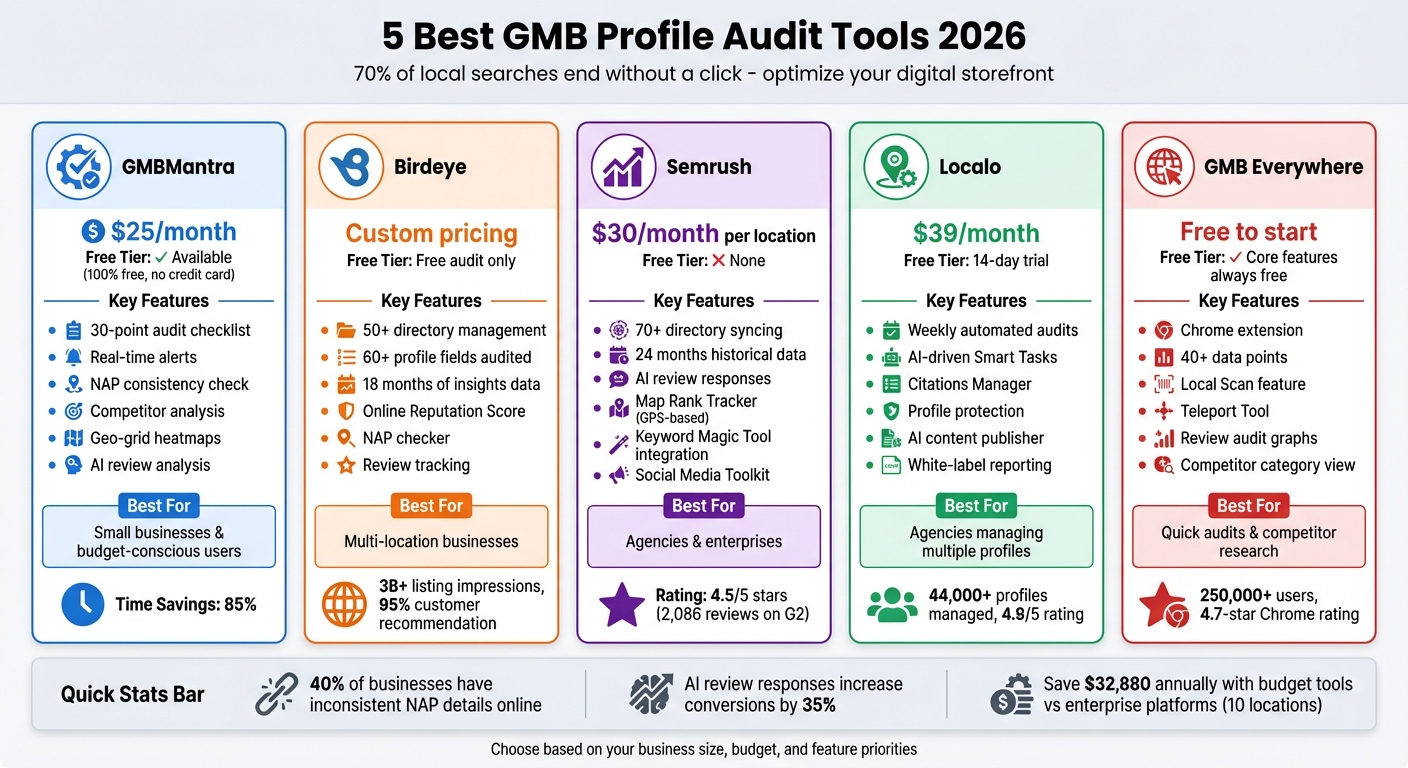
GMB Profile Audit Tools Comparison 2026: Features and Pricing
Local Scan tool of GMBEverywhere.com: Full Demo
sbb-itb-5be333f
1. GMBMantra
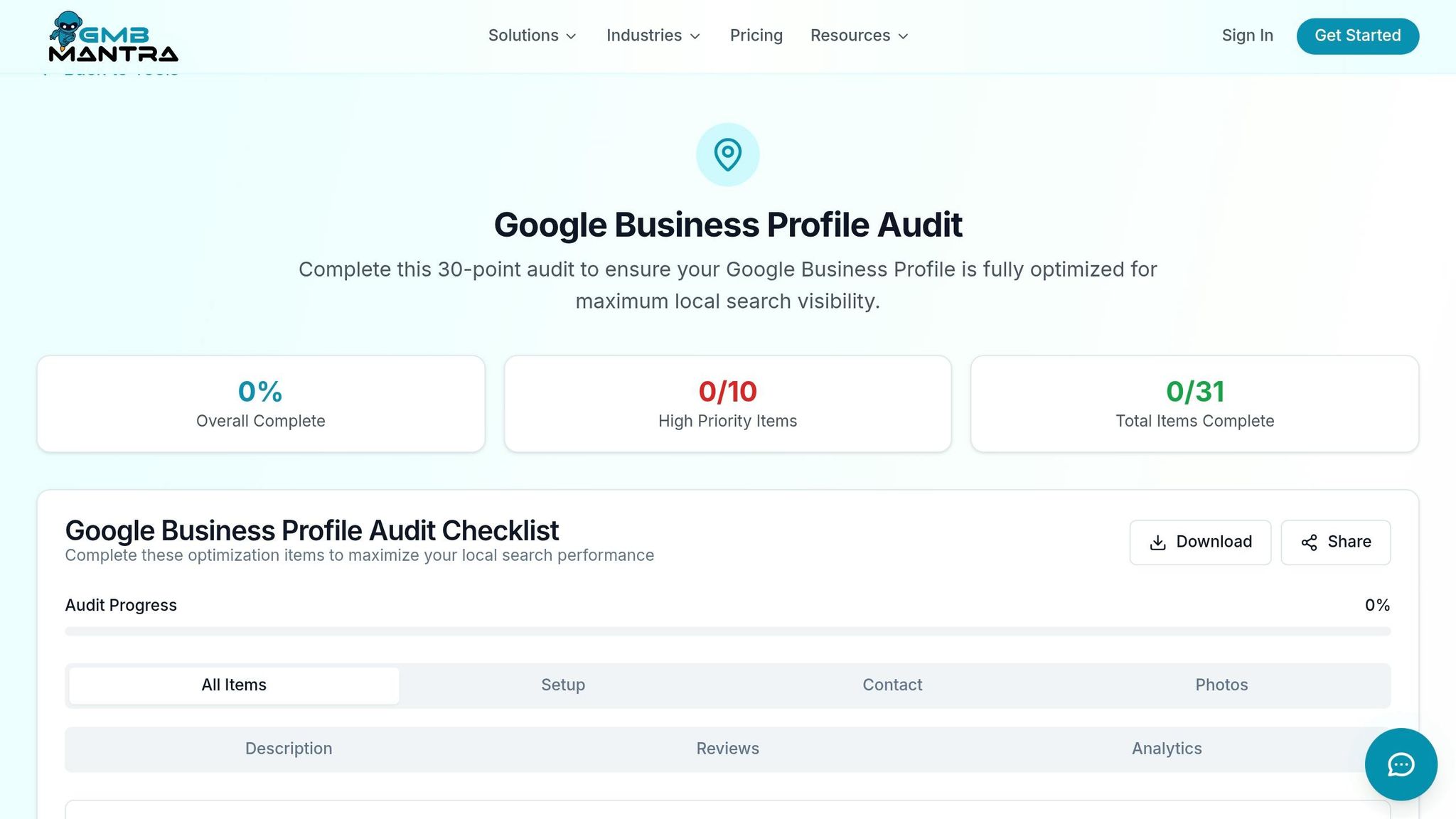
GMBMantra is a platform designed to keep your business profile in top shape. It performs a 30-point audit checklist that evaluates profile completeness, checks the accuracy of primary and secondary categories, reviews business attributes, and analyzes service descriptions. Plus, it keeps an eye on your profile in real time, notifying you of any ranking issues as they arise.
Audit Functionality
One of GMBMantra's key strengths is ensuring NAP (Name, Address, Phone number) consistency across directories and aggregators. Considering that 40% of businesses have inconsistent NAP details online, this feature helps eliminate confusion for Google by automatically syncing your information. The tool also identifies gaps in your profile by comparing it to top-ranking competitors. For example, it flags missing attributes like "Wheelchair accessible" or "Free Wi-Fi", which can improve your visibility. Additionally, its AI-powered review analysis evaluates customer sentiment and automates responses, which has been shown to increase conversions by 35%.
Competitor Analysis Capabilities
GMBMantra goes beyond audits to refine your local strategy with in-depth competitor analysis. Using geo-grid heatmaps, it visualizes your ranking across service areas, helping you understand your local performance. It also benchmarks your review and posting frequency against competitors, providing clear insights into where you stand. Furthermore, it identifies the primary categories used by the top three businesses in your area, enabling you to switch from broad categories like "Contractor" to more specific ones like "Plumbing Service" for better results.
Pricing and Affordability
GMBMantra’s tools are designed to tackle profile errors that can harm your visibility. The platform offers a 100% free tier with no credit card required, giving access to its core 30-point audit and standalone tools. For more advanced features and automated management, paid plans start at $25 per month - a fraction of the $500–$2,000 per location that agencies often charge. By automating tasks, GMBMantra claims to save users 85% of the time they’d otherwise spend on manual profile management, making it a cost-effective alternative to hiring staff, which can cost $2,000–$4,000 per month.
2. Birdeye
Birdeye simplifies managing directory listings by consolidating over 50 directories into a single dashboard. Its Listings Optimization Agent scans your Google Business Profile and other major sites for errors or missed opportunities. This automation saves time by eliminating the need to manually check each directory, ensuring your information is accurate and consistent across platforms.
Audit Functionality
Birdeye performs audits on over 60 profile fields, such as business hours, services, photos, videos, and appointment links. Its NAP (Name, Address, Phone number) checker reviews major directories and niche sites while flagging duplicate listings that could confuse Google's algorithm. The platform also generates an Online Reputation Score, comparing your reviews and ratings against industry benchmarks to provide a clear view of your standing. Additionally, it tracks local keyword rankings and evaluates competitor profiles to help identify impactful local keywords.
Integration with Broader SEO Tools
Beyond audits, Birdeye strengthens local SEO by synchronizing business data across platforms like Google, Facebook, Bing, and industry-specific directories. It also provides access to 18 months of Google Business Profile Insights data, including metrics like calls, website visits, and direction requests. This extended data range offers 30-50% more visibility into trends compared to Google's standard 6-month view.
"With Birdeye, we've increased our number of reviews by nearly 200% YoY, which has greatly contributed to brand lift and recall." - Brandon Dowdy-Ernst, Chief Experience Officer at Smile Workshop
David Magruder from Custom Lawn and Landscape shared that Birdeye helped reduce customer cancellations by over 50% in a single year. These features, combined with its pricing structure, are designed to enhance local visibility.
Pricing and Affordability
Birdeye provides a free Local SEO Audit that evaluates your business presence across 50+ sites without requiring any payment details. Full access to the platform is available through customized pricing based on your business size and locations, determined during a consultation. Impressively, Birdeye supports over 3 billion listing impressions and 200 million website visits annually. Plus, 95% of customers recommend it as a top choice for top SEO tools and marketing resources.
3. Semrush
Semrush provides robust auditing capabilities through its Listing Management tool, which scans your business data across over 70 directories and flags any inconsistencies in your NAP (Name, Address, Phone number) information. Its GBP Optimization feature offers tailored suggestions, such as selecting the best categories for your business and updating hours or contact details. Unlike Google's native dashboard, Semrush delivers 24 months of historical GBP data - four times more than the standard view - making it easier to spot long-term trends. Here's a closer look at its audit tools, competitor analysis features, integrations, and pricing.
Audit Functionality
Semrush simplifies review management by consolidating reviews into one dashboard, tracking star ratings, and even using AI to craft personalized responses. It also monitors unauthorized third-party changes to your listings, allowing you to accept or reject edits directly from a single tab, ensuring your information stays accurate.
Competitor Analysis Capabilities
On top of its audit features, Semrush's Map Rank Tracker uses a GPS-based grid to display your rankings by location, helping you pinpoint areas that need improvement. Its Review Management tool goes a step further by offering competitor analytics. This allows you to compare your review volume and ratings with up to 10 competitors each month. Becky Lane, Director of Marketing at Sam The Concrete Man, shared:
"Semrush has 100% helped us rank our local franchises. It all comes back to credibility".
Integration with Broader SEO Tools
Semrush connects its GBP audits to the Keyword Magic Tool, enabling you to discover and track local search terms at the ZIP code level. Additionally, the platform integrates its Social Media Toolkit with the On-Page SEO Checker, ensuring your website and local profile are optimized around the same keywords. Alex Muller, Marketing Director at Pinnacle Treatment Centers, highlighted the platform’s efficiency:
"How much time does Listing Management save me? Probably weeks of work so far".
This integration creates a unified workflow, aligning your local and organic SEO efforts seamlessly.
Pricing and Affordability
Semrush Local offers two pricing tiers:
- Local Base plan: $30/month per location. Includes GBP audits, AI-generated posts, auto-replies for reviews, and 375 Map Rank Tracker credits.
- Local Pro plan: $60/month per location. Adds advanced features like directory management across 70+ platforms, review generation via SMS and email, competitor review analysis, and 1,225 tracking credits.
Both plans can be used independently or as add-ons to existing Semrush subscriptions. With a 4.5 out of 5-star rating from 2,086 users on G2, Semrush has proven its effectiveness for businesses of all sizes.
4. Localo
Localo goes beyond simple audits to provide ongoing local SEO optimization. It scans Google Business Profiles (GBPs) for missing categories, weak descriptions, and outdated photos that could impact your local search rankings. One of its standout features is its automated weekly audit cycle, which updates recommendations based on current keywords and competitor activity. Michał, the owner of Optyk Nowakowie, shared his experience:
"Localo rapidly elevated my Google Business Profile... From 35th place, I was in the top 10. All I had to do was follow the hints from the user panel."
This consistent monitoring lays the foundation for its detailed audit capabilities.
Audit Functionality
Localo's audit tool generates a complete GBP report in about 20 seconds. It also creates weekly Smart Tasks, which provide step-by-step guidance for improving your profile. By 2026, Localo has been used to manage more than 44,000 Google Business Profiles. What sets it apart is its ability to not only identify issues but also offer AI-driven action items to resolve them [24,25]. Additionally, it benchmarks your profile against competitors, analyzing categories, posts, and images to help you make targeted improvements.
Integration with Broader SEO Tools
Beyond audits, Localo simplifies other local SEO tasks by combining multiple tools into a single workflow. Here’s what it offers:
- Citations Manager: Identifies citation opportunities by spotting where competitors are listed but your business isn’t, helping boost your credibility with Google.
- Protection Feature: Monitors and blocks unauthorized edits to your GBP, ensuring your information stays accurate.
- AI-Powered Content Publisher: Automatically generates and schedules Google Posts to keep your profile active and relevant.
- Website Builder: Quickly creates an optimized website using information from your GBP with just one click.
Pricing and Affordability
Localo’s pricing is designed to be flexible and accessible. It includes a 14-day free trial (no credit card required) and a 30-day money-back guarantee [24,26]. Here’s a breakdown of the plans:
- Single Business Plan: Costs $39/month (billed annually) or $49/month (billed monthly). This plan supports one active GBP with full audit capabilities and weekly Smart Tasks.
- Pro Plan for Agencies: Priced at $149/month (billed annually) or $169/month (billed monthly). It covers up to 60 active profiles and includes 30 optimization seats, along with white-label reporting.
Choosing annual billing saves you 20%, essentially giving you two months free. With a 4.9 out of 5 rating, Localo has helped countless businesses achieve continuous improvement instead of settling for one-time fixes [24,25].
5. GMB Everywhere
GMB Everywhere is a Chrome extension that seamlessly integrates with Google Maps, Google Search, and Local Finder. With over 250,000 users and a 4.7-star rating on the Chrome Web Store, it’s a favorite for quick checks and competitor research without leaving your workflow. By adding audit buttons directly to search results, it eliminates the hassle of switching platforms, making local SEO audits more efficient and accessible. For those looking for a broader range of support, exploring a directory of SEO tools and services can provide additional resources for your strategy.
Audit Functionality
The Basic Audit feature provides over 40 additional data points, clearly separating primary and secondary categories on Google Maps. It also highlights your business's claimed status, location details, and flags any businesses sharing the same address or website. For deeper insights, the Review Audit creates visual graphs showing review trends, calculates ratings, and filters common review keywords. These tools offer a comprehensive view of your business and competitors.
Competitor Analysis Capabilities
With the Local Scan feature, you can perform one-click, side-by-side comparisons of competitors. The Teleport Tool allows you to simulate searches from any location worldwide, helping you understand how rankings vary based on searcher location. Additionally, the extension dives into competitor review growth, common keywords, and posting frequency, giving you the tools to analyze and replicate successful strategies.
Pricing and Affordability
GMB Everywhere follows a "Free to Start" model, with an easy one-click installation. The "View Competitor Category" feature is always free, letting you check primary and secondary categories for any business on Google Maps. For advanced features, paid subscriptions are available with flexible, no-contract options.
Feature and Pricing Comparison
Managing Google My Business (GMB) effectively is crucial in the competitive local search environment of 2026. Comparing features and pricing side by side can help you decide which GMB audit tool fits your needs best.
Tools like GMBMantra and GMB Everywhere offer free, straightforward solutions, while Localo and Semrush provide more advanced features with pricing ranging from $39–$149 and $30–$60 per location per month, respectively. Each tool caters to specific priorities:
- GMBMantra focuses on ongoing profile optimization.
- Semrush includes multi-directory syncing and AI-driven review responses.
- Localo provides weekly audits and competitor comparisons.
- GMB Everywhere specializes in real-time, location-based competitor analysis.
These options cover a wide spectrum of needs, making it easier for both small businesses and large enterprises to find a suitable solution. For example, small businesses might gravitate toward the free offerings of GMBMantra or GMB Everywhere's Chrome extension. On the other hand, local agencies could benefit from Localo's bulk import and white-label features, while multi-location enterprises may lean toward Semrush for its robust directory management, even with its higher cost per location.
"A one-time audit is a starting point, not a maintenance plan." – GMBMantra
To put savings into perspective, a business managing 10 locations with GMBMantra Premium at $25 per month per location could save around $32,880 annually compared to enterprise platforms charging $299 or more per location. However, while cost is an important factor, the ultimate choice should align with your specific needs - whether it's ongoing monitoring, competitor insights, or multi-channel reputation management.
Conclusion
Pick a GMB audit tool that aligns with your specific needs. For small businesses with limited budgets, GMBMantra or GMB Everywhere offer affordable options for tasks like category optimization, competitor analysis, and ongoing monitoring.
Agencies handling multiple profiles may find Localo useful, thanks to its bulk import feature and white-label reporting. On the other hand, Semrush is ideal for teams already using the platform and looking to integrate local SEO into their broader marketing efforts.
"Audit tools are great at finding problems. But the day-to-day management... that's a different job." – GMBMantra
For larger enterprises with a focus on reputation management across multiple platforms, Birdeye could be a better fit. However, businesses managing fewer than 10 locations might see stronger ROI with tools specifically tailored for GMB optimization.
Start with a free baseline audit to identify key areas needing attention, such as photo volume, category accuracy, or review responses. With many local searches now ending without a click, your GMB profile often acts as the final destination rather than just a pathway to your website. Choose a tool that complements your local SEO strategy and helps your digital storefront stand out.
FAQs
How often should I audit my Google Business Profile?
Conducting regular audits of your Google Business Profile is a smart way to keep it in top shape. Many businesses find that checking their profile every quarter works well.
Why is this important? Regular audits help you spot and fix potential issues that might hurt your local search rankings. Plus, they ensure your profile remains current and fully optimized to attract local customers.
Which GMB audit tool is best for multiple locations?
GMB Everywhere is a handy tool for auditing businesses with multiple locations. Its Local Scan feature lets you compare several Google Business Profiles simultaneously, making it an effective solution for managing and evaluating multi-location businesses.
What should I fix first after a GBP audit?
Once you've completed a Google Business Profile (GBP) audit, your first step should be tackling the essentials. Begin by ensuring your profile is complete and accurate. This means:
- Updating outdated business details: Double-check that your business name, address, and phone number (NAP) are correct and consistent across all platforms.
- Resolving duplicate listings: Duplicate profiles can confuse both potential customers and search engines, so it's crucial to clean these up.
- Correcting hours of operation: Make sure your operating hours are up-to-date, especially if they vary during holidays or special events.
By addressing these fundamental issues, you'll not only improve your local search rankings but also align your profile with Google's guidelines. Once these basics are in place, you can confidently move on to more advanced strategies.