Resource pages are curated lists of links on specific topics, often hosted by trusted domains like .edu, .gov, and .org. These pages are perfect for building high-quality backlinks because they provide editorially vetted content, signaling trust to search engines. In 2026, resource pages are even more valuable as search engines and AI models prioritize human-curated content over automated outputs.
Key Takeaways:
- Why Resource Pages Matter: They boost SEO, improve E-E-A-T (Experience, Expertise, Authoritativeness, Trustworthiness), and support AI-driven search visibility.
- Finding Resource Pages: Use Google search operators like
inurl:resourcesorsite:.eduto locate pages. Combine keywords with terms like "useful resources" or "best sites." - Competitor Analysis: Tools like Ahrefs and SEMrush can reveal resource pages linking to your competitors.
- Outreach Tips: Focus on personalized pitches, offer to replace broken links, and target pages with active maintenance.
- Automation Tools: Platforms like Ahrefs, ScrapeBox, and Pitchbox streamline prospecting and outreach.
By using search operators, competitor analysis, and SEO marketing tools, you can effectively secure backlinks from resource pages, boosting your site's authority and visibility.
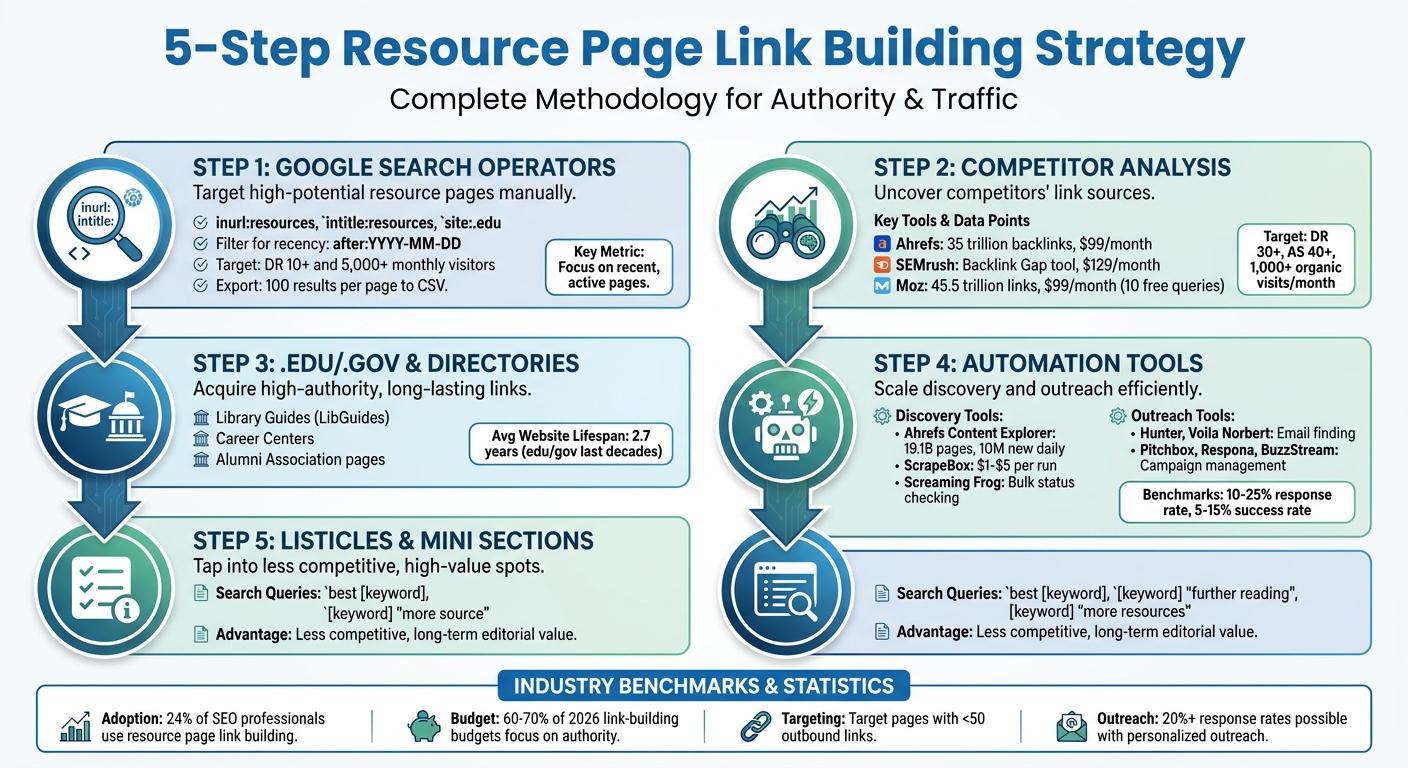
5-Step Resource Page Link Building Strategy for 2026
How to Find Resource Page Link Building Opportunities in Ahrefs [ToD 22]
sbb-itb-5be333f
Step 1: Use Google Search Operators to Find Resource Pages
Google search operators are a powerful way to pinpoint resource pages while filtering out irrelevant results. These operators let you combine your niche keyword with specific footprints often found on resource pages. For example, you can use inurl:resources, intitle:resources, inurl:links, or intitle:links alongside your target keyword to narrow down your search.
As Joshua Hardwick, Head of Content at Ahrefs, puts it:
"Resource page link building is where you get backlinks from webpages that curate and link out to useful industry resources."
It’s important to note that not all resource pages explicitly use the word "resources." Variations like "useful resources", "helpful links", "best sites", or "places to learn" are also common. To target these, use quotation marks to search for exact matches.
Common Search Queries for Resource Pages
To find resource pages effectively, combine your niche keyword with specific search footprints. Here are a few examples of queries that work well:
[keyword] inurl:resourcesorintitle:"[keyword] resources"for standard resource pages.site:.edu [keyword] "links"to locate educational resource pages.site:.gov [keyword] "useful resources"to target government-backed resource pages.[keyword] "best sites"or[keyword] "places to learn"for curated lists and roundups.[keyword] "further reading"or[keyword] "other resources" -intitle:resourcesto find sections within articles.
If your results are too narrow, try broadening your search using the tilde operator (~). For example, searching ~[keyword] inurl:resources can help you uncover related topics. A query like ~health inurl:resources might lead you to pages about fitness, nutrition, or wellness - perfect for industries with overlapping niches.
| Search Intent | Recommended Google Search Operator |
|---|---|
| Standard Resource Page | [keyword] inurl:resources |
| Specific Title Match | intitle:"[keyword] resources" |
| Educational Resources | site:.edu [keyword] "links" |
| Government Resources | site:.gov [keyword] "useful resources" |
| Listicle/Roundup | [keyword] "best sites" |
| Internal Blog Sections | [keyword] "further reading" |
| Related Niche Search | ~[keyword] inurl:links |
Filter and Refine Your Search Results
Once you’ve crafted effective queries, it’s time to refine your results to focus on high-quality resource pages. Use the after:YYYY-MM-DD operator to find recently updated pages. For example, searching "SEO tools" after:2025-01-01 will show pages updated after January 1, 2025, signaling active maintenance by webmasters. To exclude irrelevant results, use the minus sign (-) to filter out certain domains or terms, such as -site:twitter.com or "fitness resources" -site:youtube.com.
You can also refine results further with logical operators like AND, OR, and NOT. For example:
- Use
ANDto require multiple terms in your results. - Use
ORto include variations, like"software OR tool". - Use
NOT(or-) to exclude specific terms, such as[keyword] resources NOT "social media".
If you’re searching for white papers or guides with extensive resource lists, add filetype:pdf to your query.
For faster vetting, set Google to display 100 results per page and use browser extensions to export SERP URLs into a CSV file. Then, evaluate these URLs using SEO analytics tools like the Ahrefs SEO Toolbar or Moz. Focus on sites with a Domain Rating (DR) of 10 or higher and monthly search traffic of at least 5,000 visitors. Avoid URLs from social platforms like Facebook, Pinterest, or Twitter, and prioritize editorial sites.
Finally, manually review each page before adding it to your outreach list. Look for pages that actively link to external, relevant resources and are regularly updated. Tools like the Ahrefs SEO Toolbar or "Check My Links" can help identify broken links on these pages. Offering your content as a replacement for broken links is a smart way to boost your chances of earning a backlink.
Step 2: Analyze Competitor Backlink Profiles
Checking where your competitors earn backlinks is a smart shortcut to finding high-quality resource pages. Instead of starting from scratch with search operators, you can build on the groundwork your competitors have already laid. Think of it as using their efforts to your advantage. Competitor analysis, like Google search operators, helps uncover curated lists but does so more efficiently by leveraging existing data. Tools like Ahrefs, SEMrush, and Moz make this process simple by showing you exactly which sites link to your competitors and identifying resource pages among them.
Backlink Analysis Tools
Competitor analysis expands on manual methods, helping you discover resource pages you might otherwise miss. Here’s a quick look at the top SEO tools and services for this job:
- Ahrefs: Its Site Explorer updates every 15 minutes and boasts data on 35 trillion live backlinks across 19.1 billion web pages.
- SEMrush: The "Backlink Gap" tool lets you compare up to five competitors at once, pinpointing sites that link to them but not to you.
- Moz: With its "Link Explorer", you get access to the widely recognized Domain Authority (DA) metric. Its index spans 45.5 trillion links across 8.7 trillion URLs.
Pricing starts at $99/month for Ahrefs and Moz, and $129/month for SEMrush. Moz also offers 10 free queries per month through its free community account. Each tool uses its own authority metric - Ahrefs employs Domain Rating (DR), SEMrush uses Authority Score (AS), and Moz relies on Domain Authority (DA) - to help you prioritize which link opportunities to pursue.
How to Identify Resource Page Links
Once you’ve gathered competitor backlink data, it’s time to fine-tune your search for resource pages. Begin by entering a competitor's domain into your backlink checker to generate a list of referring domains and pages. Then, filter the results using keywords like "resources", "links", "useful-links", or "tools" to zero in on relevant resource pages. For example, in Ahrefs, you can use the search box to include only referring page URLs containing terms like "resources".
Carlos Silva, Editorial Lead at SEMrush, puts it this way:
"Finding competitor backlinks is step one of better link building. You then need to turn what you learned into action by finding the best link targets."
Focus on dofollow links from domains with strong metrics - like a Domain Rating of 30+ (Ahrefs) or an Authority Score of 40+ (SEMrush) - and at least 1,000 organic visits per month. To take it a step further, use tools like "Link Intersect" or "Backlink Gap" to identify domains that link to multiple competitors but not to your site. These domains are more likely to feature your resource as well. Export your findings to a CSV file and manually review each page to ensure it’s actively maintained and links to relevant, high-quality resources.
Step 3: Target .edu, .gov, and Curated Directories
Expanding your link-building efforts to include .edu and .gov domains, as well as curated directories, can add serious authority to your strategy. Educational and government websites carry a lot of weight because they’re tied to accredited institutions and official agencies. Plus, these sites tend to stick around for decades - far longer than the average website lifespan of 2.7 years. However, relevance is key. A niche-specific resource page on a .com domain can sometimes outperform an unrelated .edu link.
Using the Top SEO Marketing Directory
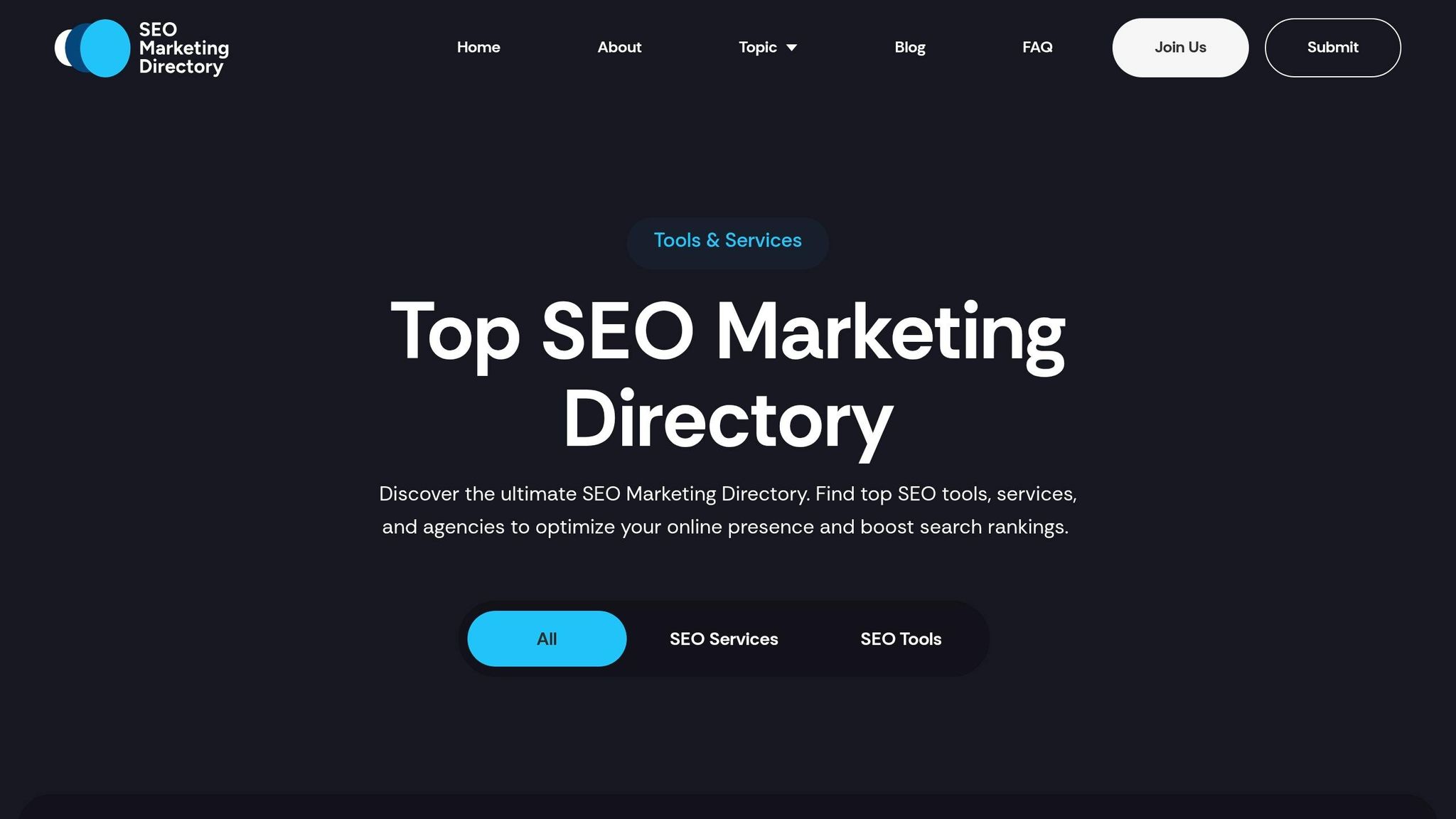
Curated directories, like the Top SEO Marketing Directory, are a great way to streamline your search for high-quality resource pages. Instead of sifting through endless search results, you get access to a pre-vetted list of SEO tools, services, and link-building resources, all neatly organized by category. This directory highlights leading SEO agencies and software providers, complete with analytics and optimization insights, saving you hours of prospecting.
As AI-generated content continues to flood the internet, human-curated authority has become a premium ranking signal in 2026. Being featured in trusted directories like this can strengthen your E-E-A-T (Experience, Expertise, Authoritativeness, and Trustworthiness) signals and boost your visibility in AI-driven search results. Once you've tapped into curated directories, you can move on to identifying resource pages on .edu and .gov domains to further enhance your authority.
Find Educational and Government Resource Pages
To uncover resource pages on .edu and .gov sites, use the same domain filters and keyword strategies outlined earlier (e.g., site:.edu or site:.gov queries). To dig deeper, add specialized queries like inurl:libguides [keyword] to find university library research guides. These guides are curated by librarians, whose primary goal is to connect people with reliable information. As Nick, a link builder at Portent, puts it:
"The job of the librarian is to connect people with information. Libraries publish research guides on every topic imaginable."
Focus on specific university departments that actively maintain resource lists. Productive targets include Library Guides (LibGuides), Career Centers, and Alumni Association pages. For instance, university career centers often feature resource sections linking to industry-relevant content.
A great example is Michigan State University’s resource page for "investing", which includes dofollow, keyword-rich links to third-party blogs and tools aimed at helping students. To ensure you’re finding active and responsive pages, use Google’s after:2025 operator in your searches. This filters out outdated pages that are less likely to engage with outreach efforts.
Step 4: Automate Resource Page Discovery with Link Building Tools
After exploring manual methods and competitor analysis, it's time to step up your game with automation. Manual prospecting can be a grind, but automation tools not only save time - they also improve the quality of your prospects. In fact, Aira's 2022 State of Link Building Report found that 24% of SEO professionals already include resource page link building in their strategies.
Tools for Finding Resource Pages
Ahrefs Content Explorer is a powerhouse, indexing over 19.1 billion web pages and discovering 10 million new pages daily. You can search for terms like "useful links" or "further reading" and then filter results based on metrics like Domain Rating (DR), organic traffic, or referring domains. For example, narrowing your list to pages with a DR of 10+ and at least 5,000 monthly visitors can trim your prospect pool by about 70%.
Semrush shines when it comes to competitor backlink analysis. By examining a competitor’s backlinks and filtering for terms like "resources", you can uncover pages already linking to related content.
Moz Link Explorer offers a massive index of 45.5 trillion links and 8.7 trillion URLs. Its "Link Intersect" tool is especially helpful, identifying resource pages that link to multiple competitors but not to your site. As Anita, VP of Operations at TopSpot, puts it:
"Link Explorer is instrumental in our audits for prospective clients, and Moz Page Authority and Domain Authority communicate link metrics and site strength in a clear fashion."
For bulk prospecting, tools like ScrapeBox and Citation Labs Link Prospector can handle hundreds of Google search operators at once. With scraping costs typically between $1 and $5 per run, these tools are budget-friendly for large-scale discovery. You can also use Screaming Frog to check status codes in bulk, helping you identify broken links across hundreds of URLs.
These tools take the heavy lifting out of discovery, setting you up for efficient outreach.
Tools for Email Outreach
Once your prospect list is ready, connecting with the right people is crucial. Tools like Hunter and Voila Norbert simplify email discovery, helping you find specific contact details for page curators rather than generic "info@" addresses. Personalization is key to boosting response rates.
Platforms like Pitchbox, Respona, and BuzzStream streamline the entire outreach process. They let you create personalized email templates with custom fields (e.g., [Name] or [Section Name]), schedule automated follow-ups, and track campaign performance. Typical benchmarks for resource page outreach include response rates of 10% to 25% and success rates of 5% to 15%, proving the value of automation.
| Tool Category | Specific Tools | Primary Use Case |
|---|---|---|
| Discovery & Analysis | Ahrefs, Semrush, Moz | Identifying high-authority resource pages and analyzing competitor links |
| Automated Scraping | ScrapeBox, Link Prospector | High-volume discovery of niche-specific resource pages |
| Email Finding | Hunter, Voila Norbert | Locating contact information for site owners and curators |
| Outreach Management | Pitchbox, Respona, BuzzStream | Automating email delivery, follow-ups, and relationship tracking |
Step 5: Find Listicles and Mini Resource Sections
Expanding on the resource page strategies, listicles offer an excellent, often overlooked, opportunity for link building. Unlike dedicated resource pages, listicles and mini resource sections are less competitive because they attract fewer link builders. However, they can still provide top-tier editorial links that remain valuable for years. As AI-generated content continues to flood the internet in 2026, human-curated lists carry even more weight for E-E-A-T (Experience, Expertise, Authoritativeness, and Trustworthiness), making them a reliable way to boost your content's credibility. These opportunities, much like resource pages, strengthen your content’s authority.
How to Search for Listicles
Listicles act as curated guides, linking to tools, websites, or resources within a specific niche. To find them, start with straightforward queries like best [keyword] (e.g., "best keto calculators"). For more targeted results, use advanced search operators like intitle:"best" [keyword] + "guide" or "best resources for" [keyword].
If you're using Ahrefs Content Explorer, try "In title" searches for "best [keyword]" and filter results to include pages with a Domain Rating (DR) of 30 or higher. You can also check your competitors’ backlinks to uncover listicles already linking to similar resources. Before reaching out, ensure the page has been updated in the last 6–12 months and draws real organic traffic.
Locate Mini Resource Sections in Blog Posts
Mini resource sections are hidden gems. These are parts of blog posts - like "Further Reading" or "More Resources" - that link to external content, but they’re embedded within the main post rather than being standalone pages. Because they don’t show up in standard "resource" searches, they often go unnoticed. To find them, use specific search phrases like [keyword] "further reading", [keyword] "more resources", [keyword] "favorite tools", or [keyword] "learn more".
Once you spot a potential blog post, check if it links to external websites rather than just its own internal content. To exclude dedicated resource pages from your search and focus on blog posts with embedded sections, add -intitle:resources to your query. When pitching to these sections, look for broken links on the page. Offering your resource as a replacement for any dead links adds immediate value for the editor, increasing your chances of success. These smaller, often overlooked sections can quietly expand your link-building efforts.
| Search Target | Recommended Search Operators |
|---|---|
| Listicles | best [keyword], intitle:"best" [keyword], "best resources for" [keyword] |
| Mini Resource Sections | [keyword] "further reading", [keyword] "more resources", [keyword] "favorite tools" |
| Educational Listicles | site:.edu [keyword] "recommended sites", site:.org [keyword] "links" |
| Non-Traditional Lists | [keyword] "places to learn", [keyword] "best blogs", [keyword] "blog awards" |
Conclusion
Securing top-notch resource page links for link building in 2026 demands a mix of careful planning, thorough analysis, and smart use of automation. Start by leveraging advanced search operators like intitle:resources and site:.edu to uncover curated lists that are open to new links. Add to this by reverse-engineering your competitors' backlink profiles to identify pre-qualified targets - sites already inclined to link to similar content. These strategies seamlessly align with earlier techniques, creating a well-rounded, data-focused approach.
To complement your manual efforts, directories such as the Top SEO Marketing Directory can simplify your search. These directories act as trusted hubs, guiding you to vetted resource pages ideal for securing valuable link placements.
Resource page links continue to offer long-term benefits, thanks to their editorial credibility. Prioritize quality over quantity by targeting pages with fewer than 50 outbound links, consistent traffic, and strong relevance to your niche. With 60–70% of link-building budgets in 2026 expected to focus on authority-building efforts, these human-curated pages remain essential, especially as AI-generated content becomes more prevalent.
Automation tools can also be a game-changer, helping you filter prospects based on quality metrics and streamline follow-ups. Outreach platforms can automate much of this process, with response rates typically around 10% - though well-executed campaigns can achieve rates of 20% or more.
Ultimately, your success depends on having linkable assets, such as original data studies or interactive tools, to attract resource page links. As highlighted earlier, personalized outreach and timely link replacement are key to securing placements. Offer to replace broken links with your content and adhere to submission guidelines provided by resource pages. By blending manual diligence with automation, you can create a sustainable system for acquiring white-hat backlinks that bolster your site's authority well into the future.
FAQs
How can I tell if a resource page is actively maintained?
To determine if a page is actively maintained and relevant, look for signs like recent updates or a clearly visible "last updated" date within the past 6–12 months. Pages that frequently add new links, refresh descriptions, or show signs of activity - such as comments or social media interactions - are often well-monitored and up to date. These clues can help confirm the page's reliability and ongoing relevance.
What should I offer in outreach to get added to a resource page?
To secure a spot on a resource page, provide helpful, relevant content that adds real value to the page. Show how your content complements its theme and enhances the overall quality. Instead of simply asking for a link, position your content as a genuine asset to their audience. Curators are more likely to include resources that align with their mission and offer clear benefits to their readers. Focus on demonstrating how your content meets those needs.
Which quality metrics matter most when choosing resource page targets?
When picking resource page targets, focus on these four essential metrics:
- Topical Relevance: The resource page should align closely with your content's subject matter. This connection ensures the link feels natural and fits seamlessly.
- Editorial Selection: Look for pages where links are chosen thoughtfully by the site owner or editor, rather than being open to anyone. This indicates a higher standard of curation.
- Authority: Prioritize resource pages on websites with strong domain authority. Links from these pages carry more weight for SEO.
- Pre-Qualified Intent: The page should already attract visitors who are genuinely interested in your topic or niche. This increases the likelihood of meaningful engagement with your content.
By focusing on these metrics, you can build links that are not only natural but also valuable for improving your SEO performance.