Want your app to stand out in a sea of millions? Here's the key: Keyword research. With over 70% of app installs starting from a search query, the right keywords in your app's title and description can boost visibility and downloads.
- Why it matters: Keywords signal to app store algorithms when to display your app. Choose wisely, and your app ranks higher in searches. Choose poorly, and it gets buried.
- How to start: Brainstorm 10–20 seed keywords that describe your app's features. Expand by analyzing competitors, autocomplete suggestions, and user reviews.
- Key tips: Prioritize relevance over search volume, focus on medium competition keywords, and update metadata regularly.
Pro Tip: Tools like AppTweak or MobileAction can help refine your strategy. For iOS, make the most of the 160-character metadata limit, and for Google Play, optimize the 4,000-character long description for search indexing.
Bottom line: Keyword research isn't a one-time task. Regularly test, refine, and update your keywords to stay competitive and maximize your app's discoverability.
How to Find Profitable App Store Keywords in 2025
sbb-itb-5be333f
Finding High-Value Keywords for App Titles
Your app title is your most critical keyword asset. Both the Apple App Store and Google Play assign the highest ranking weight to the title compared to any other metadata field. With strict character limits, every word matters. A well-chosen title not only improves your rankings but also engages users, which is a cornerstone of app store optimization (ASO).
Assessing Keyword Relevance and Search Demand
When selecting keywords, relevance should always take precedence over sheer search volume. Using keywords that don't align with your app's purpose might attract downloads, but it can hurt your conversion rates. Users who feel misled are likely to uninstall your app quickly.
"Relevance is the only non-negotiable... High Volume and low Difficulty don't compensate." - Ivan Žgela, SEO and Lead Content Manager, App Radar
After confirming a keyword aligns with your app, assess its SP score to estimate daily impressions. For example, a score of 40 might generate around 2,800 impressions, while a score of 60 could bring in approximately 10,000. If you're working with a newer or indie app, aim for keywords with SP scores between 35–55 and difficulty scores under 35. These provide enough traffic potential without being overly competitive.
A helpful tool for narrowing down options is the Opportunity Score, calculated as (Relevance × Volume) / Difficulty. This formula helps identify keywords with solid demand but manageable competition.
Using Competitor Metadata for Keyword Ideas
Competitor research is a goldmine for keyword inspiration. Analyze the titles and subtitles of 5–10 top-ranking apps in your category. These keywords are often the result of extensive testing and validation.
To take it further, perform a gap analysis. Look for keywords where several competitors rank in the top 10, but your app doesn't appear at all. Another angle is identifying keywords where competitors rank between positions 10–50. These terms show demand but often indicate under-optimized content, giving you a chance to break through. For example, Notion uses the title "Notion - Notes & Tasks" and the subtitle "Wiki, Docs & Projects" to target multiple high-value keywords without repeating any across fields.
Once you've gathered ideas, leverage tools and techniques to refine your keyword strategy.
Tools and Resources for Keyword Discovery
Free methods like app store autocomplete and the "alphabet technique" are great starting points. For the alphabet technique, simply type your seed keyword followed by each letter (e.g., "budget a", "budget b") to uncover long-tail variations.
Paid tools can provide deeper insights. Here's a quick comparison of some popular platforms:
| Tool | Starting Price | Free Tier |
|---|---|---|
| AppTweak | $99/mo | Limited free tools |
| MobileAction | $69/mo | Limited free tier |
| Sensor Tower | $399/mo | None mentioned |
| AppFollow | $59/mo | Limited reports |
| Uprika | $47 (one-time) | 10 keyword scans free |
| RespectASO | Free | Core features free |
Google Trends is another valuable resource, especially for identifying seasonal spikes in keyword demand. For instance, searches for "tax calculator" surge every April, and this trend often carries over to app store queries. If you're seeking additional tools for broader SEO and keyword research, the Top SEO Marketing Directory lists vetted options for analytics, optimization, and more.
Placing Keywords in App Descriptions
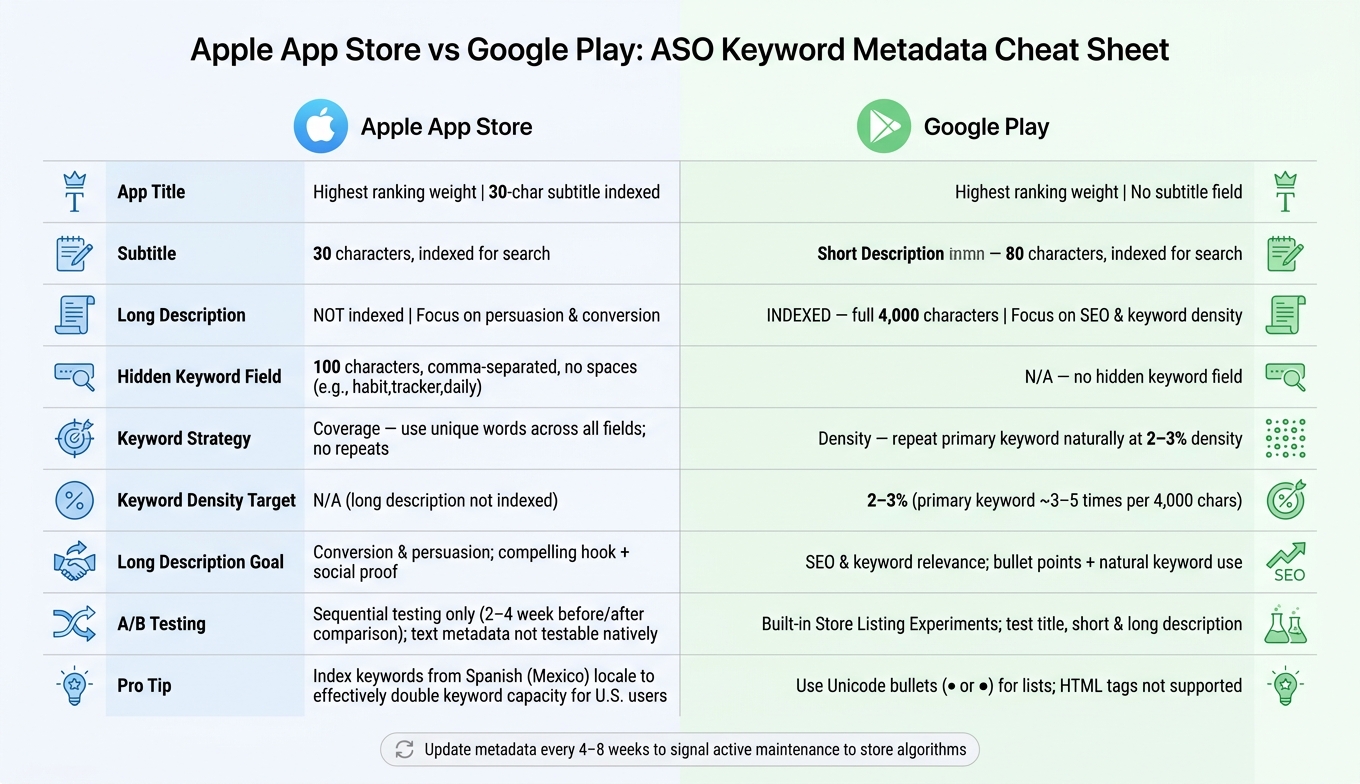
Apple App Store vs Google Play: ASO Keyword Metadata Cheat Sheet
After deciding on your title keywords, the next step is to incorporate them seamlessly into your app descriptions.
Writing a Keyword-Optimized Short Description
On Google Play, the short description - limited to 80 characters - plays a major role in search indexing. To make the most of it, include your main keyword within the first 40 characters, paired with a clear benefit. For instance, AppDrift showcased a fitness app with this example: "Track workouts, build custom plans, and hit your fitness goals with AI coaching."
"The short description should accomplish three things: Include 2-3 target keywords naturally, communicate the primary benefit in plain language, and create urgency or curiosity that encourages a tap." - AppDrift
This space is ideal for targeting secondary, medium-volume keywords that complement your title. On iOS, the Subtitle takes a slightly different approach. With only 30 characters to work with, every word must double as both a keyword signal and a clear benefit for users.
Once you've nailed the short description, focus on optimizing the long description to further enhance your app's visibility.
Using Keywords in the Long Description
Google Play indexes the entire 4,000-character long description, making it a critical part of your app's SEO strategy. Utilizing top SEO marketing tools can help you track these rankings and refine your approach. Start with your primary keyword right at the beginning, then sprinkle it naturally throughout the text. Aim for a keyword density of 2–3%, ensuring the content remains readable and engaging. Use bullet points and concise paragraphs to make the description easy to skim, while weaving in secondary keywords.
"Include your primary keyword 3-5 times across 4,000 characters. That's roughly once every 800-1,300 characters - natural for a well-written description." - Sonar Blog
Avoid exceeding a 5% keyword density, as overuse can trigger spam filters and harm your rankings.
On iOS, the long description isn't indexed for search, so prioritize persuasive copy instead. Begin with a compelling hook, highlight key features and benefits, and include social proof where applicable to drive conversions.
Platform-Specific Metadata Guidelines
Here's a quick comparison of metadata strategies for Apple App Store and Google Play:
| Field | Apple App Store | Google Play |
|---|---|---|
| Long Description Indexed? | No | Yes (4,000 chars) |
| Short Description / Subtitle | Subtitle: 30 chars, indexed | Short Description: 80 chars, indexed |
| Hidden Keyword Field | 100 chars (comma-separated, no spaces) | N/A |
| Keyword Strategy | Coverage (unique words across fields) | Density (natural repetition, 2–3%) |
| Long Description Goal | Conversion & persuasion | SEO & keyword relevance |
For iOS, take advantage of the platform's ability to index keywords from multiple locales, which effectively expands your available keyword space.
On Google Play, use Unicode bullets (• or ●) to format lists in your description, as HTML tags aren't supported. Regularly updating your description - every 4–8 weeks - can also signal to the algorithm that your app is actively maintained, which may contribute to better rankings.
How to Prioritize Keywords Using Key Metrics
Choosing the right keywords is all about balancing relevance, search volume, and difficulty to maximize your app's discoverability. Once you’ve used keyword research tools to compile a list of potential keywords, the next step is to evaluate them based on these three critical factors and how they work together.
Checking Keyword Relevance
Relevance should always be your first filter. Ask yourself: "If someone searches for this keyword and finds my app, will they feel it matches their expectations?" If the answer is no, that keyword isn’t worth keeping.
"If a user searching for that keyword would be confused to find your app, remove it regardless of the numbers." - Sonar Blog
Using irrelevant keywords does more harm than good. When users install your app and then uninstall it quickly, it sends negative signals to store algorithms, which can hurt your rankings. Assign relevance scores to your keywords:
- 7–10: Directly describes your app (e.g., "workout tracker" for a fitness app).
- 4–6: Relates to adjacent features or use cases.
- Below 4: Too broad or unrelated to be useful.
Reviewing Search Volume and Competition
On iOS, Search Popularity (SP) scores range from 5 to 100 and measure the demand for a keyword. The scale is exponential - for example, an SP score of 40 translates to about 2,800 daily impressions, while an SP score of 60 jumps to 10,000 impressions. Keywords with SP scores under 35 are often too low in demand to be worth targeting.
For newer or smaller apps, aim for keywords with an SP score between 35 and 55, paired with a difficulty score under 35. Long-tail keywords like "bodyweight workout tracker for beginners" often outperform broad terms like "fitness app" because they attract users with specific intent, leading to higher conversion rates.
Once you’ve assessed demand, the next step is to consider how competitive the keyword is.
Balancing Keyword Difficulty and Ranking Potential
After narrowing down keywords based on relevance and volume, evaluate how challenging it will be to rank for each one. Difficulty scores indicate the strength of the competition for a keyword:
"The difference between a keyword with difficulty 20 and difficulty 60 can be the difference between page one and page nowhere - even if your app is better than everything above it." - Sonar Blog
Here’s a quick breakdown of difficulty scores:
| Difficulty Score | Label | What It Means in Practice |
|---|---|---|
| 0–15 | Very Easy | Minimal competition; rank with basic optimization |
| 16–30 | Easy | Mostly indie apps; achievable with 100+ reviews |
| 31–45 | Medium | Mix of indie and established apps; need 500+ reviews |
| 46–60 | Hard | Strong competitors; requires high download velocity |
| 61–100 | Very Hard | Dominated by major brands; hard to break through |
As Ivan Žgela, SEO and Lead Content Manager at SplitMetrics, explains: "Relevance is the only non-negotiable of the three. High V and low D don't compensate."
To prioritize effectively, calculate the RVD Score:
(Relevance × Volume) / Difficulty. Focus on the top 20–40 keywords for your app’s title and subtitle. These metrics will guide your keyword strategy and set the stage for A/B testing, which helps refine your approach further.
Testing and Refining App Metadata
Once you've picked your top keywords, the next step is to fine-tune your app's metadata. This process involves regular testing and updates to ensure your keywords are performing as expected. Testing isn't a one-and-done task - successful apps consistently refresh their metadata to stay competitive. Start by using controlled A/B testing to measure the impact of any changes you make.
Running A/B Tests on Keywords
When it comes to testing, Google Play and the App Store have different approaches. Google Play offers built-in A/B testing through its Store Listing Experiments. This tool allows you to test variations of your app's title, short description, and full description directly in the Google Play Console. On the other hand, Apple's App Store limits its Product Page Optimization (PPO) tool to visual elements like icons and screenshots. Unfortunately, text-based metadata like the title, subtitle, or keyword field can't be tested natively on iOS.
"A keyword-optimized title that harms your conversion rate is worse than the original." - Sonar
For iOS, you'll need to take a sequential approach: compare performance before and after a metadata change over a 2–4 week period. Regardless of the platform, the golden rule is to alter only one element at a time. For example, if you change both the title and the short description simultaneously, you won't know which adjustment led to the results. On Google Play, ensure each test variant gets at least 1,000 visitors and runs for a minimum of 7 days to account for differences in weekday and weekend user behavior.
Once your tests are complete, keep a close eye on the results to assess their effectiveness.
Tracking Keyword Rankings and Trends
After updating metadata, give the store algorithms 24–48 hours to re-index your listing. Then, wait another 1–2 weeks for rankings to stabilize before drawing any conclusions. Focus on three metrics for your top 15 keywords: current rank, 7-day change, and 30-day change. These metrics will help you determine whether a keyword is gaining traction, stalling, or losing relevance. Pay close attention to ranking velocity - the speed and direction of movement - rather than just the current rank.
For better timing, plan metadata updates 2–3 weeks ahead of seasonal trends. For instance, update a "workout tracker" app in early January or a "tax calculator" app in late February so the algorithm has time to adjust before search demand spikes.
Updating Metadata Based on Performance Data
Consistency is key when it comes to maintaining your app's metadata. During the first 8 weeks post-launch, review your keywords every 2 weeks to identify which ones are realistically achievable. After this initial phase, switch to a 30-day update cycle where you replace 2–4 underperforming keywords at a time. This approach keeps your metadata fresh without requiring constant overhauls. Every 90 days, conduct a more in-depth review to account for shifts in competitor strategies and market trends.
If a keyword hasn’t shown improvement within 4–8 weeks, swap it out for another. On the flip side, if a keyword in your iOS keyword field starts performing well, consider moving it to the subtitle for greater ranking weight. For iOS, remember to format your keyword field with commas and no spaces (e.g., habit,tracker,daily) to make full use of the 100-character limit. Avoid repeating words from your title or subtitle, as Apple automatically removes duplicates.
"The developers who compound their ASO wins are the ones who show up every 90 days and make small, deliberate changes." - AppScreenshotStudio
Conclusion and Key Takeaways
Recap of the Keyword Research Process
The process of ASO keyword research is all about structure and precision. Start with 10–20 seed terms using top SEO tools, expand your list to 200–500 keyword candidates, and then evaluate each based on relevance, search volume, and difficulty. Once you've identified the strongest options, strategically map them to your metadata fields. Your title and subtitle should house the highest-priority keywords, while secondary terms fit into the iOS keyword field or Google Play's long description.
The stats back this up: over 65% of App Store downloads come from search, and keywords in the title, subtitle, and keyword field contribute to 55%–65% of your organic ranking signal. In short, nailing these fields is non-negotiable - it’s the backbone of your app's visibility.
Final Tips for Better ASO Results
A few practical habits can make all the difference between steady growth and stagnation. For starters, don’t repeat keywords across the iOS title, subtitle, and keyword field. Apple automatically deduplicates them, so repeating terms just wastes valuable character space. Another tip: stick to singular noun forms in the iOS keyword field (e.g., "tracker" instead of "trackers"). Apple’s algorithm already accounts for pluralization, so this lets you include more unique terms.
Here’s a clever trick many overlook: for apps targeting U.S. users, Apple indexes keywords from the Spanish (Mexico) localization. By adding unique English keywords there, you effectively double your keyword capacity without affecting your primary metadata.
"The apps that invest in keyword research systematically will always outperform those that set keywords once and forget about them." - Oğuz Delioğlu, Founder of Appalize
The ASO landscape is also shifting. The focus is moving away from chasing high-volume keywords to prioritizing intent-based phrases. Broad, generic terms are oversaturated, while long-tail keywords like "budget tracker for couples" or "keto calorie tracker with barcode scanner" often convert at two to three times the rate of broader terms. It’s not about targeting the biggest keyword - it’s about targeting the right one.
FAQs
How do I choose keywords if my app has little or no download history?
If your app is just starting out and doesn’t have much download history, targeting high-volume keywords dominated by well-established competitors isn’t the best strategy. Instead, shift your focus to mid-tail (2–3 words) and long-tail keywords. These tend to have less competition and can lead to better conversion rates.
Here’s how to find the right keywords:
- Look for moderate popularity scores: Aim for keywords with a popularity score between 40 and 60. These strike a balance between search volume and competition.
- Use tools and data sources: Store autocomplete suggestions, competitor analysis, and search query data can uncover keyword opportunities you might have missed.
- Simplify research with specialized tools: Keyword research tools can save time and help you spot terms that improve your app’s visibility.
By focusing on these strategies, you can position your app to stand out in a crowded market.
Should I put the same keyword in my title, subtitle, and keyword field?
Reusing keywords in your title, subtitle, and keyword field isn’t needed. Apple’s algorithm already merges these fields and filters out duplicates. So, repeating keywords won’t boost your rankings - it just takes up space you could use more effectively.
Instead, focus on assigning distinct, high-impact keywords to each field. For example, place your primary keyword in the title, a secondary keyword in the subtitle, and use variations in the keyword field to maximize your app's visibility.
How can I improve rankings without hurting installs and conversions?
To improve rankings while maintaining installs and conversions, it's crucial to balance search relevance with user intent. Avoid targeting high-volume keywords that may attract users with low intent, as these users are more likely to uninstall quickly - leading to poor retention rates, which can harm your rankings. Instead, focus on keywords that align closely with your app’s core value.
Additionally, optimize your visuals - like screenshots and videos - to effectively convert users. When you achieve strong conversion rates and better retention, your app's keyword positioning in search algorithms naturally improves.