Want to prove your SEO efforts are driving revenue? Connecting CRM data with SEO analytics is the key to moving beyond vanity metrics like traffic and rankings. By integrating these systems, you can track how organic visitors turn into paying customers, measure revenue per visitor, and calculate ROI with precision.
Key Takeaways:
- SEO ROI Formula: [(Revenue from SEO – Cost of SEO) / Cost of SEO × 100].
- Why It Matters: Traffic alone doesn’t pay the bills. CRM data links organic visits to closed deals, showing SEO’s real impact on revenue.
- Challenges: Disconnected data, poor attribution models, and over-reliance on traffic metrics often lead to inaccurate ROI reporting.
- Solution: Use top SEO marketing tools and CRM systems to track leads, conversions, and customer lifetime value (CLV) from SEO efforts.
- Results: Businesses report 300%+ ROI in 12–18 months, with some achieving 500–1,000% over a few years.
This guide explains how to integrate CRM data with SEO analytics, measure meaningful metrics like revenue per visitor, and shift your focus from traffic stats to dollars earned.
Why Measuring SEO ROI Is Difficult
Disconnected SEO and Sales Data
One of the biggest hurdles in measuring SEO ROI is the separation between website analytics and sales data. Your website metrics, like sessions and page views, are tracked in one system - often Google Analytics - while sales data is housed in another, such as a CRM. This lack of integration creates a blind spot. Google Analytics can show how many people visited your site, but it doesn’t tell you which of those visitors turned into paying customers. On the other hand, CRM tools capture conversions but don’t track the visitor's initial journey, like organic search interactions.
"Tools like Google Analytics make it really easy to see how many website visitors you are getting from your SEO efforts, it's often much harder to track how many leads & customers you are getting." – Dan Shaffer, Sr. Director SEO.com
Without syncing these systems, you’re left with an incomplete picture. For example, Google Analytics might show a spike in organic traffic, but your CRM could show only a handful of new customers, making it difficult to connect SEO efforts to actual revenue.
Missing Attribution Between Traffic and Revenue
Even if you’re tracking both traffic and sales, tying the two together is often tricky. Most attribution models rely on last-click logic, which gives full credit to the final touchpoint before a conversion. Let’s say a potential customer first finds your brand through an SEO blog post in January, clicks through an email campaign in February, and finally converts via a direct visit in March. In this case, SEO would get zero recognition for its role in the customer’s journey.
Additionally, ignoring assisted conversions can significantly undercut SEO’s value. Studies show that failing to account for these interactions can reduce SEO’s attributed revenue by as much as 50%. Organic content often plays a critical role early in the funnel, helping to educate and build trust with prospects. However, last-click models fail to capture that value. To complicate matters further, platforms like ChatGPT don’t always pass clean referral data, which can misclassify organic traffic as "Direct". All of this highlights the need for a more unified approach to tracking, one that connects early engagement to eventual revenue.
Using the Wrong Metrics
Another challenge lies in focusing on the wrong measurements. Metrics like rankings and traffic might look good on paper, but they don’t necessarily translate into revenue. Yet, many businesses still report these “vanity metrics” to executives who are more interested in bottom-line results than page views.
SEO isn’t a quick-turnaround channel. Unlike performance marketing, you can’t just turn it on and expect immediate results. It often takes 3 to 12 months for SEO efforts to show meaningful returns, making short-term traffic reports ineffective for ROI calculations.
"SEO is not a performance marketing channel. You do not switch it on today and see results tomorrow." – Tom Banner, Dynamically
Even a channel with lower traffic can drive more revenue if it converts better. Without tracking which organic visitors become paying customers - or understanding their lifetime value - you’re essentially measuring activity instead of outcomes. In the end, this isn’t just a marketing issue; it’s a data issue.
sbb-itb-5be333f
CRMs for B2B Sales: Tracking SEO Leads
How CRM Data Improves SEO ROI Tracking
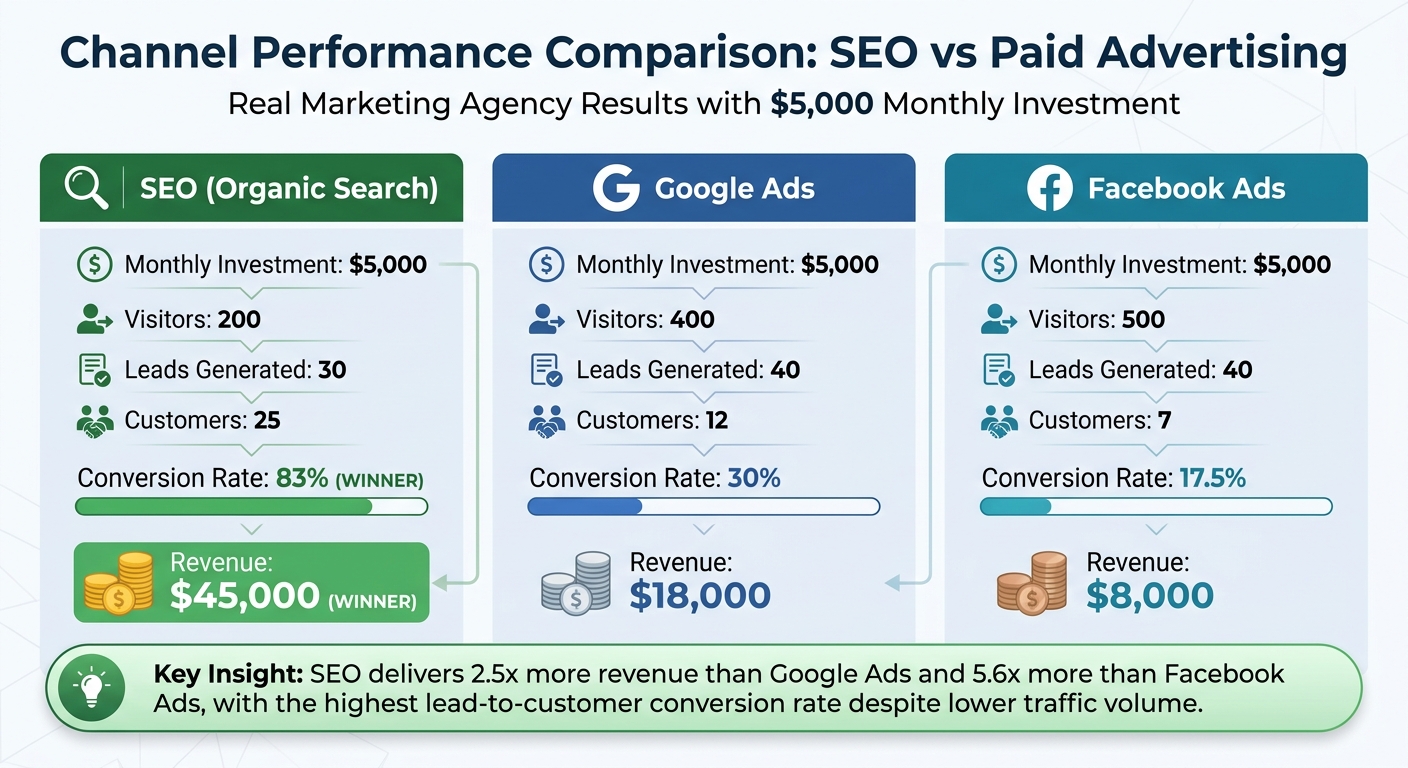
SEO vs Paid Ads: Revenue and Conversion Rate Comparison
CRM data bridges the gap between organic traffic and revenue by connecting visits to dollars earned. It provides a detailed view of the customer journey, from the first click to the final sale, offering a clearer way to measure SEO's impact.
Tracking Organic Visitors Through to Sales
Integrating your CRM with SEO data allows you to track how organic visitors progress into leads, move through your sales funnel, and ultimately convert into paying customers. Hidden form fields can automatically capture key attribution details. Once someone submits a form, this information is stored directly in their CRM record.
Take this example: A marketing agency's CRM revealed that SEO, despite bringing in fewer visitors, delivered an impressive 83% conversion rate, generating $45,000 in revenue. With a $5,000 monthly investment, those 200 organic visitors produced 30 leads and converted 25 of them into customers. In comparison, Facebook Ads brought in only 7 customers ($8,000 in revenue), and Google Ads delivered 12 customers ($18,000 in revenue). SEO’s lead-to-customer conversion rate of 83% far surpassed Facebook Ads’ 17.5% and Google Ads’ 30%.
"Tracking leads and customers from SEO provides the complete picture of marketing performance beyond just website visitors, revealing that SEO often generates more customers and revenue than paid advertising channels despite lower traffic numbers." – Dan Shaffer, Sr. Director, SEO.com
This detailed tracking not only highlights SEO's efficiency but also sets the stage for assessing long-term customer value.
Using Customer Lifetime Value (CLV) in ROI Calculations
CRM data doesn’t just stop at tracking initial sales. It also allows you to factor in Customer Lifetime Value (CLV), giving a more comprehensive picture of ROI. Traditional ROI calculations typically focus on the first transaction, but many customers return for repeat purchases over time. With CRM data, you can measure the full value of customers acquired through organic search, which often paints a much larger revenue picture.
By segmenting CLV by acquisition channel, you can compare the long-term worth of customers from SEO against those from paid channels. This is especially relevant for SEO, which acts as a long-term investment - a well-optimized page can continue generating traffic and revenue for years, unlike paid ads that stop working as soon as you stop funding them. For example, that $45,000 in initial revenue from SEO could grow to $135,000 or more over three years when CLV is included.
Incorporating long-term revenue metrics emphasizes the need to move beyond surface-level traffic stats to focus on metrics tied to actual revenue.
Shifting from Traffic Metrics to Revenue Metrics
Integrating CRM data shifts the focus from traditional SEO metrics like rankings, impressions, or sessions to revenue-based KPIs. Instead of reporting on generic stats, you can measure Revenue Per Organic Visitor, Organic Conversion Rate, and overall ROI. You can even generate reports such as "Revenue from SEO by Landing Page Group" to pinpoint which types of content - blog posts, service pages, or product pages - are driving the most revenue.
This change in perspective is crucial when presenting results to decision-makers. Executives are far more interested in financial outcomes than in vanity metrics. By using CRM data, you can showcase exactly how much revenue each organic visitor contributes, making it easier to demonstrate SEO’s tangible value.
"ROI is revenue relative to investment. Everything else is a leading indicator at best and a vanity metric at worst." – Tom Banner, Dynamically
How to Integrate SEO Data with Your CRM
Bringing SEO analytics into your CRM helps you track every organic visitor - from their first visit to becoming a paying customer. While this might sound technical, it’s all about setting up the right SEO tools and services to capture attribution data and syncing it with your CRM system.
Configure UTM Tracking and GA4 Integration
Start by capturing the GA4 Client ID or a custom User ID when someone submits a form. This ID connects their web session to their CRM record. To make this work, you’ll need to add hidden fields to your forms. These fields, such as "Channel" and "Landing Page", will automatically populate when a user converts.
Once you’re gathering these identifiers, use GA4’s Measurement Protocol to send CRM events back to Google Analytics in real time. For example, when a lead becomes Sales Qualified or closes as "Won" in your CRM, these updates sync directly into GA4. For older data or bulk updates, you can use GA4’s Data Import feature to upload CSV files containing offline events like revenue or customer status. To focus on SEO performance, filter GA4 reports using the "Session source/medium" dimension set to "google/organic". With this setup, you’re ready to sync the data into your CRM.
Connect Your CRM Using API Tools
After configuring your website data, the next step is integrating it with your CRM to streamline attribution. Tools like Heeet work seamlessly with platforms like Salesforce and HubSpot to match organic visits to CRM records, bypassing the need for cookies. These tools rely on server-side tracking, ensuring accuracy even as third-party cookies become less reliable. They also map SEO data - like the specific organic page a visitor landed on - directly to Lead or Contact records in your CRM.
If your CRM doesn’t offer a native connector, middleware tools like Zapier can bridge the gap between your form builder and CRM. For instance, Flare HR in Sydney used Attributer to track "Channel" and "Landing Page" data in Salesforce. This allowed them to see which HR document templates were driving conversions. According to Co-Founder James Windon, this insight led to a 2.4x increase in new leads. By expanding their template library, they achieved a 4x boost in monthly leads with minimal cost.
"Attributer showed us that our SEO efforts were in fact generating customers & revenue and gave us the confidence to double down. We've seen a 4x increase in leads as a result." – James Windon, Co-Founder, Flare HR
Set Up Call and Form Tracking
SEO conversions don’t only happen online - phone calls are often a major source of leads, especially for service-based businesses. To track these, use call tracking software that assigns unique phone numbers to organic visitors and logs calls directly into your CRM.
For form submissions, most attribution tools work with popular form builders. Once set up, each form submission will automatically record key details, like the visitor’s journey, referral source, and pages they visited, into their CRM record. This ensures you capture data for leads who convert through alternative methods, giving you a complete picture of your SEO’s impact.
Key Metrics for Measuring SEO ROI
Once your systems are integrated, it’s time to focus on metrics that tie directly to revenue. By syncing your CRM and SEO data, you can move beyond just tracking traffic or rankings and instead measure how SEO contributes to your bottom line. These metrics help decision-makers connect SEO efforts with revenue outcomes.
Organic Conversion Rate
The Organic Conversion Rate shows the percentage of organic visitors who become leads and eventually turn into paying customers. The formula is simple: (Organic Conversions / Organic Visitors) × 100.
You can break this down into two steps:
- First, track how many visitors convert into leads using GA4.
- Then, monitor how many of those leads turn into customers with your CRM.
This metric gives you insights into both the quantity and quality of organic traffic, showing how effectively your SEO efforts drive qualified prospects through the sales funnel.
Revenue Per Organic Visitor
The Revenue Per Organic Visitor metric calculates how much revenue, on average, each organic visitor generates. To find this, divide the total revenue from organic search by the total number of organic visitors.
This number helps you identify your highest-performing content and assess the value of your SEO investment. It’s a great way to measure the quality of your traffic alongside its volume.
ROI Percentage
The ROI Percentage directly compares the revenue generated from organic search to your SEO expenses. The formula is:
[(Organic Revenue - SEO Costs) / SEO Costs] × 100.
When calculating SEO costs, include everything - agency fees, in-house salaries, software subscriptions, content creation, and technical development time.
A well-optimized SEO campaign can yield impressive results, with some campaigns achieving a 300% ROI - meaning every $1 spent returns $3. To get the most accurate picture, use Customer Lifetime Value (CLV) rather than just focusing on initial purchase revenue. Also, set GA4 to data-driven attribution to ensure SEO gets proper credit in multi-touch journeys. Without this, SEO’s contribution might be underestimated by 30–50%.
| Metric | Formula | Data Source |
|---|---|---|
| Organic Conversion Rate | (Organic Leads or Sales / Organic Visitors) × 100 | GA4 + CRM |
| Revenue Per Organic Visitor | Total Organic Revenue / Total Organic Visitors | CRM + GA4 |
| SEO ROI Percentage | [(Organic Revenue - SEO Costs) / SEO Costs] × 100 | CRM + Financial Records |
Tools and Resources for SEO-CRM Integration
If you're looking to connect your SEO efforts directly to revenue outcomes, the right tools can make all the difference. Here’s a breakdown of some options that simplify integrating SEO data with your CRM.
SEO-CRM Integration Tools
The right tools can bridge the gap between Google Search Console and your CRM, letting you link keyword performance to revenue. Heeet is a standout platform designed specifically for Salesforce and HubSpot. It syncs Google Search Console data with CRM records every hour, helping you track which keywords and content generate not just traffic, but actual revenue and pipeline opportunities.
"Heeet is a must-have for SEO analytics in Salesforce. I can see exactly which pages are driving leads, revenue… and the reporting makes it easy to measure ROI and compare with other channels without juggling multiple tools." – Fátima Muñoz Peribáñez, Head of SEO
Another option is CRM-native connectors available on platforms like the Salesforce AppExchange or HubSpot Marketplace. These connectors integrate seamlessly with your CRM, keeping data secure and within your existing system. Some of these integrations can be set up in less than 90 minutes. Other tools worth exploring include GA Connector, Hockeystack, Calibermind, Ruler Analytics, Funnel.io, and Dreamdata.
When choosing tools, focus on those that offer server-side tracking to maintain accurate attribution even as third-party cookies become less effective. Tools that map keywords to revenue are particularly valuable, as they reveal which search queries are directly linked to closed deals.
Finding Tools Through Top SEO Marketing Directory
For a more comprehensive search, the Top SEO Marketing Directory (https://marketingseodirectory.com) is a great resource. This directory is specifically curated to help businesses find SEO tools and services that integrate seamlessly with platforms like Salesforce and HubSpot.
Look for tools labeled with "Keyword-to-Revenue Attribution" to identify solutions that track search queries from clicks to closed deals. For B2B businesses, prioritize tools that can consolidate interactions from multiple stakeholders into a single opportunity, giving you a clearer picture of account-level performance. The directory also highlights solutions that automate syncing Google Search Console data with CRM opportunities, ensuring you can directly measure which keywords contribute to revenue.
Conclusion
Tracking SEO ROI doesn't have to feel like guesswork. By connecting your CRM data with organic search performance, you move beyond vanity metrics like traffic and rankings. Instead, you’ll focus on revenue, customer acquisition costs, and pipeline contributions. This approach uncovers the entire journey - from search query to closed deal - showing that SEO often delivers higher-quality leads than paid channels, even when traffic volume is lower.
The numbers tell the story. Studies consistently find that organic search leads convert at significantly higher rates than many paid channels. For example, B2B SaaS and Financial Services industries have reported 3-year SEO ROIs of 702% and 1,031%, respectively. Most businesses break even within 7 to 14 months, and the returns only grow as content continues to attract traffic without ongoing costs.
Taking this a step further, integrating your CRM with SEO data is a game-changer. This process involves setting up hidden fields, UTM tracking, and API connections between your website and CRM. While it requires some effort, the results are worth it. You’ll pinpoint which keywords and content directly lead to customers, not just clicks. As Adam Kelly from NP Digital Australia explains:
"Optimizing for raw traffic volume is a legacy mindset that hides real commercial performance. The new mandate is to build an acquisition engine that influences buyers and protects your profit and loss (P&L) long before the transaction."
To get started, consider using specialized SEO-CRM integration tools. The Top SEO Marketing Directory offers a curated list of tools to help automate the connection between organic search and revenue data. Look for tools that ensure accurate attribution, especially as third-party cookies are phased out. This integration tackles the challenge of disconnected SEO and sales data head-on.
Once the technical setup is complete, you’ll have the metrics you need to make smarter investment decisions. For example, one analysis demonstrated that SEO generated $45,000 in revenue compared to $18,000 from Google Ads and $8,000 from Facebook Ads. With clear data like this, allocating your budget becomes much simpler. Start with one integration tool, track your first set of leads through to close, and let the results guide your strategy.
FAQs
What’s the simplest way to connect GA4 sessions to CRM leads?
Integrating GA4 with your CRM is a straightforward way to track the complete customer journey and connect online interactions with offline conversions. You can achieve this by either importing CRM data directly into GA4 or syncing the two systems through an API. This setup enables GA4 to identify when a session leads to a sale or a new lead. The result? Better attribution and a clearer picture of your SEO ROI.
How do I attribute revenue to SEO when the deal closes months later?
To tie revenue back to SEO efforts, especially for deals that close months after the initial lead, you need reliable tracking methods. Using tools like CRMs and SEO attribution software can help you follow the journey of SEO-driven leads from their first interaction to the final sale.
Adding tracking codes to your website is another key step. These codes capture critical SEO data, such as keywords and referral URLs, which link your initial SEO strategies to eventual revenue - no matter how long the sales cycle takes.
Which SEO costs should I include in my ROI calculation?
To accurately calculate your ROI from SEO efforts, make sure to account for all related expenses. This includes the total campaign costs, any agency fees, and the salaries of team members directly involved in SEO activities. Including these factors will give you a more comprehensive understanding of your investment and the returns it generates.