When I change URLs, I map each old page to a relevant destination and use a direct 301 or 308 redirect. I update links, canonicals, and sitemaps using SEO marketing tools at the same time, then check indexing, traffic, and conversions. This reduces risk, but rankings can still shift as Google recrawls the site.
My checklist covers 5 steps:
- Plan: Inventory URLs, assign owners, and save 3-6 months of performance data.
- Map and test: Check every redirect and destination. Use
404or410when a removed page has no suitable replacement. - Launch together: Publish redirects and site updates, check tracking, and submit the new sitemap.
- Monitor: Test the full redirect map within 1 day, then track search results, leads, sales, and revenue.
- Keep redirects active: Leave them in place for <u>at least 1 year</u>, and longer while old links still bring visitors.
The goal isn't just working redirects. I want visitors to reach the right pages and keep completing the actions that matter to your business.
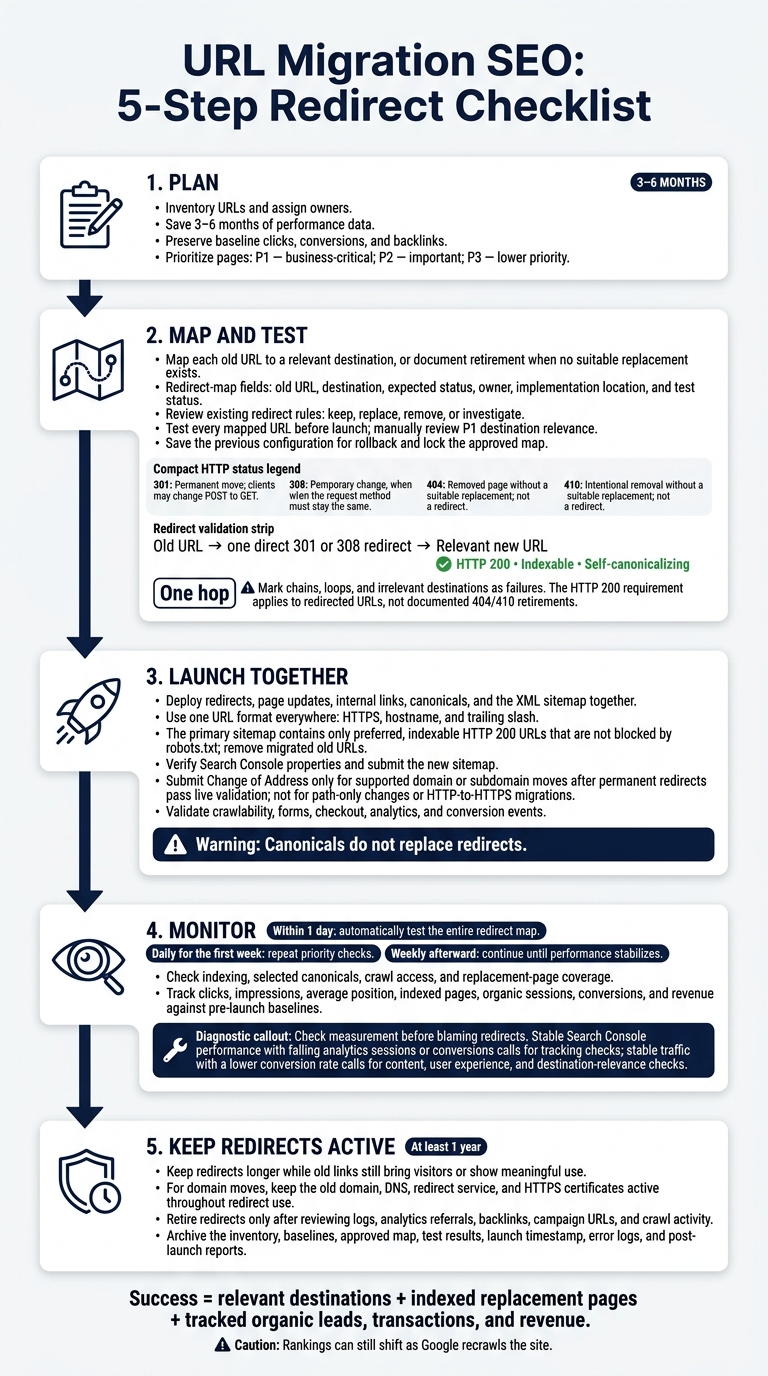
URL Migration SEO: 5-Step Redirect Checklist
Do URL structure changes affect SEO?
sbb-itb-5be333f
2. Create and Test Your Redirect Map
Use your URL inventory to assign destinations, status codes, and test results before launch.
List Destinations and Page Priorities
Build a redirect map with old URL, destination, expected status, owner, implementation location, and test status. Include baseline clicks, conversions, and backlinks to prioritize pages and protect search equity. Give each source URL one clear outcome. Multiple sources can point to the same destination if that page covers their content well.
Label each row P1 - business-critical, P2 - important, or P3 - lower priority based on those metrics. Review every P1 destination for matching search intent, topic, and user purpose. A working URL alone isn't enough.
Import existing redirect rules and mark each as keep, replace, remove, or investigate. This keeps legacy URLs visible during review.
Choose the Right HTTP Status
Google recommends server-side permanent redirects, including 301 and 308, for permanent URL changes. Choose the status that fits the URL change, rather than accepting your platform's default.
| Status | Migration use |
|---|---|
| 301 | Standard choice for permanent moves; clients may change POST to GET |
| 308 | Permanent moves when the request method must stay the same |
| 302 | Temporary changes, not permanent migrations |
| 404 | Removed page without a suitable replacement; not a redirect |
| 410 | Intentional removal without a suitable replacement; not a redirect |
Set Up Direct Redirects and Test Rules
Update legacy redirects if their destinations are moving. Test specific exceptions before broad patterns. Also test query strings, encoded characters, capitalization, trailing slashes, and hostname or protocol variations. Check that broad rules leave unrelated pages untouched.
Run automated checks against every mapped URL in a test environment that mirrors production. Record the source status, exact Location header, hop count, final URL, and response.
Each redirect must reach its intended destination in one hop, return a 200 response, and land on an indexable page that self-canonicalizes. Manually review P1 content for relevance.
Fix failures and mark rows Passed only after they pass testing. Lock the approved map, save the previous configuration for rollback, and use the approved map in the launch checklist.
3. Launch Redirects and Site Updates Together
Update Internal Links and Canonical Tags
Deploy redirects and site updates together, using the locked redirect map as the source of truth. The launch should include redirects, page updates, internal links, canonicals, and the XML sitemap.
Replace old URLs in navigation, footers, breadcrumbs, contextual links, related modules, and asset references. Update URLs in structured data, hreflang, pagination, Open Graph, feeds, and mobile references. Remove staging URLs and unintended noindex directives from production pages. Keep staging environments blocked or protected until launch.
Use one URL format everywhere: HTTPS, hostname, and trailing slash. Preferred, indexable pages should use self-referencing canonicals that match their sitemap entries.
Canonicals identify preferred versions of duplicate pages. They do not replace redirects.
Update Sitemaps and Google Search Console
Publish a primary XML sitemap containing only preferred, indexable URLs that return HTTP 200 and aren't blocked by robots.txt. Remove migrated old URLs and update the Sitemap: reference in robots.txt if needed.
For large migrations, a temporary, separate old-URL sitemap can help crawlers find moved pages and help you track migration coverage. It should not replace the new sitemap.
Verify the relevant Google Search Console properties and submit the new sitemap. For supported domain or subdomain moves, submit Change of Address after you've verified both properties and the permanent redirects pass live validation. Don't use it for path-only changes or HTTP-to-HTTPS migrations.
Use a Launch Checklist
| Pre-launch | Deployment | Immediate validation |
|---|---|---|
| ☐ Approve the locked redirect map | ☐ Activate direct permanent redirects | ☐ Retest every mapped URL |
| ☐ Prepare links, canonicals, and sitemaps | ☐ Publish updated pages, canonicals, and internal links | ☐ Crawl live pages and inspect key URLs |
| ☐ Save baselines and rollback procedures | ☐ Publish and submit the sitemap; submit any applicable Change of Address request | ☐ Verify crawlability and conversion tracking |
Before activating redirects, confirm that important destination pages are publicly accessible, contain the intended content, and have no accidental crawl or indexing blocks.
After deployment, test forms, checkout flows, analytics, and conversion events - not just whether pages load. Keep redirects active for at least 1 year, preferably longer. Keep the old domain, DNS, redirect service, and HTTPS certificates active until redirect traffic stops.
Then move to live indexing, traffic, and conversion checks.
4. Monitor Indexing, Traffic, and Conversions
Check Live Redirects and URL Indexing
Use the approved redirect map as your post-launch audit checklist. Test the entire map automatically within the first day. Record each old URL’s status, planned destination, final URL, and redirect hops. Flag chains, loops, unexpected responses, and destinations that don’t match the original page. Check high-value pages manually. Repeat priority checks daily for the first week, then weekly until performance stabilizes.
Monitor the old and new Search Console properties separately. Keep any temporary old-URL sitemap for monitoring only. Use URL Inspection to check replacement pages’ indexing status, selected canonicals, crawl access, and rendered content. Run the live test when cached results don’t reflect recent fixes. Check the Page indexing and Sitemaps reports for replacement-page coverage and processing errors. Old redirected URLs should gradually leave the index as their replacements get indexed.
Diagnose Traffic and Conversion Drops
If crawl checks pass, determine whether the drop comes from rankings or measurement. Compare early post-launch results with matching pre-launch periods and, when available, the same period last year. Review clicks, impressions, average position, indexed pages, organic sessions, conversions, and revenue.
Group old landing pages with their replacements, then segment results by directory, device, country, and brand versus nonbrand queries. Account for seasonality, promotions, algorithm updates, and tracking changes. Don’t use a fixed decline threshold.
Check measurement before blaming redirects. If Search Console performance stays stable but analytics sessions or conversions fall, check tags, consent mode, channel attribution, landing-page scripts, forms, checkout paths, and CRM integrations.
If traffic stays stable but conversion rate drops, review page content, user experience, pricing, availability, page speed, and destination relevance. For search losses that persist, inspect affected URLs and server logs for missing or irrelevant redirects, crawl blocks, noindex, outdated links or canonicals, redirected URLs in the primary sitemap, and inconsistent URL formats. Compare structured-data and hreflang references with the baseline, especially when losses affect 1 country or language.
Select Tools and Migration Support
If your team has limited capacity, choose top SEO tools and resources that automate these checks. Look for full-site crawling, bulk redirect tests, canonical and robots checks, Search Console analysis, and scheduled monitoring.
5. Conclusion: Keep Redirects Active and Track Results
Once post-launch checks stabilize, archive the migration record: URL inventory, baseline exports, redirect map, test results, launch timestamp, error logs, and post-launch reports. Before closing the project, confirm that every important old URL has a destination or a documented retirement. Use direct server-side 301 or 308 redirects. Update internal links, canonicals, structured-data URLs, and XML sitemap entries to point to the new URLs.
Keep redirects active for at least 1 year, and longer if old URLs still have backlinks, bookmarks, campaign links, or referral traffic. For domain moves, keep the old domain and redirect host active throughout. Use post-launch data to decide when redirects can be retired without losing traffic. Remove a redirect only when logs, analytics referrals, backlinks, campaign URLs, and crawl activity show no meaningful use.
Measure the migration by whether replacement pages are indexed and by post-launch organic leads, transactions, and revenue. Pay particular attention to revenue-producing pages. If losses persist, assign an owner, document the fix, and rerun the test.
FAQs
How long can rankings fluctuate after a URL change?
The timeline depends on site size and crawl frequency. Search engines need time to process permanent 301 redirects and transfer ranking signals. Some SEO value may be lost during the transition.
Google Search Console data typically runs 3 to 4 days behind. Validating indexing fixes can take 2 weeks or longer for larger sites. Neither timeline tells you when rankings will stabilize.
Should I migrate all URLs at once or in stages?
The right approach depends on your site architecture and risk tolerance. You can migrate the entire site at once, but migrating in stages gives you time to test and adjust based on performance data and user intent. It also lets you catch and fix broken redirect chains or indexing errors early, before they cause major traffic losses.
Whichever schedule you choose, update all 301 redirects and canonical tags to preserve SEO value.
When should I roll back a URL migration?
Consider rolling back recent changes if persistent 5xx server errors point to server crashes or misconfigurations. Before you roll back, use the URL Inspection Tool in Google Search Console to confirm the error still occurs. Also, check that your server has enough CPU and RAM to handle traffic.
A rollback can help troubleshoot critical server-side issues that appear after a migration or update.