If your B2B site runs in more than one market, translation alone is not enough. You need tools and rules that keep pages synced, protect term usage, support local SEO, and route high-risk content through the right reviewers.
Here’s the short version:
- I’d treat website localization as a site workflow, not a one-time language task.
- The stack usually has three parts: a TMS/CAT setup, a CMS connector or proxy, and QA/term control tools.
- Review should match page risk:
- Pricing, legal, regulated claims: human review + legal sign-off
- Product pages, UI, docs: subject-matter or native review
- Blog content: AI draft + editor check
- SEO has to be built in early:
- hreflang
- XML sitemaps
- locale-based URLs
- local keyword mapping
- localized metadata
- Tool choice depends on:
- site size
- number of locales
- update volume
- engineering support
A few numbers stand out. 67% of B2B buyers expect a localized website. Teams with a solid TM workflow often cut costs by 40%–60% from Year 1 to Year 3. And MTPE often lands around $0.04–$0.12 per word, while human translation often runs $0.10–$0.30 per word.
So if I were picking a stack, I’d keep it simple:
- Small sites: plugin or proxy
- Mid-sized teams: TMS-led workflow with TM and glossaries
- Enterprise teams: deeper permissions, audit trails, compliance routing, and reporting
The main idea is simple: pick tools by job, set clear owners, and keep every locale tied to the source so pages don’t drift out of date.
How To Translate Your Website Into Multiple Languages Using AI (SEO-Ready)
sbb-itb-5be333f
Core categories of website localization tools
B2B localization stacks usually sit in three layers: translation, site integration, and review. Each layer has a specific job, a clear owner, and a set place in the workflow, often supported by specialized SEO marketing tools.
Translation management systems, CAT tools, and AI-assisted translation
A Translation Management System (TMS) is the day-to-day engine behind a serious localization program. It stores translation memory (TM), manages glossaries, assigns work to vendors, and tracks workflow status across every language and content type. Teams that use a solid TM workflow often see localization costs fall by 40–60% between Year 1 and Year 3.
Computer-Assisted Translation (CAT) tools usually live inside a TMS, though standalone options exist. Professional linguists and language service providers (LSPs) use them to translate segment by segment, with TM matches and glossary suggestions built into the process .
To move faster and spend less, many teams use machine translation with human post-editing (MTPE). The AI creates a first draft, then a human editor cleans it up . MTPE usually costs $0.04–$0.12 per word, while fully human translation tends to cost $0.10–$0.30 per word. The TMS then sends each piece of content to the right engine, editor, and approver.
Once that workflow is in place, there’s still one practical issue: content needs a clean route between the website and the localization stack.
CMS connectors, localization plugins, and translation proxies
That route usually runs through the CMS or a translation proxy.
CMS connectors and localization plugins - like WPML or Polylang Pro for WordPress - let editors handle localized pages right inside the CMS admin area, without filing an engineering ticket . After developers finish the initial setup, marketing teams usually take over these integrations.
Translation proxies sit between the website and the visitor. They translate pages without changing the source code. That makes them fast to launch and light on developer time, which is why marketing teams and growth leads often manage them. The downside is less control. Proxies can add latency, create SEO issues if setup goes wrong, and make custom locale logic harder to manage .
A simple rule of thumb helps here:
- Choose a connector when content lives in the CMS.
- Choose a proxy when you need no-code translation.
Visual review, QA, and terminology control tools
Once content leaves the CMS, the next problem is how it looks in each market.
A translation can be correct and still wreck the page. German and Finnish text typically runs 20–35% longer than English equivalents, which can break fixed UI layouts. RTL languages like Arabic need close layout checks too. Visual QA tools let reviewers inspect translated pages in context and catch layout breaks, cut-off strings, and rendering problems before launch .
Terminology control tools keep glossaries and termbases in line across every translated asset. They stop product names from being translated the wrong way and help keep brand voice steady from one market to the next . In most teams, brand or product marketing owns the termbase, SEO owns keyword mapping, and QA owns final review.
"Shared ownership without a clear final decision-maker usually creates slow launches and inconsistent terminology." - Rishi Anand
How B2B localization workflows should operate
Once your stack is set up, localization should work like a repeatable loop for every release. The goal is simple: keep content moving without manual handoffs.
Content intake, extraction, and synchronization
Start by connecting your CMS or code repo to your TMS so content syncs on its own. When your TMS plugs straight into your CMS or code repository, like GitHub or GitLab, new and updated strings get detected and extracted without manual work. That cuts out copy-paste steps, which are often where version mix-ups and missed segments creep in.
Not all content needs the same urgency. Put homepage, pricing, core solution pages, and conversion forms at the front of the line. Those revenue pages should move through the pipeline before blogs and lower-stakes content. That way, the pages closest to pipeline and sales stay current in every market while less urgent pages catch up.
It also helps to keep all text in one source of truth instead of maintaining separate page copies for each locale. When the source changes, that update flows to every language at the same time instead of kicking off a manual re-translation cycle market by market.
"Most localization programs don't break at launch - they break at scale." - Brandon Paton, CEO, Localize
Approval flows for marketing, product, and legal content
Once content enters the pipeline, the approval path should match the risk. A blog post and a pricing page shouldn't face the same review process.
A simple way to handle this is a tiered review model based on content risk:
| Content Type | Risk Level | Review Required |
|---|---|---|
| Pricing pages, legal copy, regulated claims | High | Mandatory human + legal sign-off |
| Feature pages, product UI, help docs | Medium | Native-language or subject-matter review |
| Blog posts, glossary entries | Low | AI draft with editorial QA |
High-risk content needs legal sign-off. Product pages need expert review. Lower-risk content can move with editorial QA. To keep things clean, use role-based permissions and audit trails so every sign-off is tracked.
Continuous localization with translation memory and glossaries
After approval, translation memory and glossaries help keep future updates in line. TM reuses approved segments, and glossaries lock in product and compliance terms. Put together, they make change management easier.
When the source content changes, the system flags only the updated segments instead of sending the full page back for translation. That keeps localized pages from drifting behind English and avoids a full retranslation cycle every time a product page gets updated.
Multilingual SEO setup inside the localization workflow
Build international SEO into localization from day one. If you leave it until launch, hreflang, canonicals, and keyword work turn into a messy cleanup job.
Once your localization workflow is set, SEO rules should move through that same pipeline:
| SEO Task | Ownership & Validation |
|---|---|
| Hreflang tags | SEO / Development - technical audit only |
| XML sitemaps | Development - automated |
| URL structure | Development - automated post-setup |
| Metadata (titles/descriptions) | SEO / Marketing - CTR and tone review required |
| Keyword research | SEO / Marketing - intent mapping required |
| Internal linking | SEO / Content - locale consistency check required |
| Brand glossary | Localization / Marketing - initial setup review required |
| Legal/compliance copy | Legal Review - mandatory |
URL structure, hreflang, and locale-aware sitemaps
Start with site architecture. Then line up your indexing signals.
For many B2B and SaaS teams, subfolders like example.com/fr/ are the simplest default. They keep authority under one root domain and are usually easier to manage than subdomains or country-code top-level domains (ccTLDs).
ccTLDs can make sense for brands that need strong local trust signals. The tradeoff is more operational work.
Hreflang often fails for simple reasons: missing self-references or missing return links. Each page in a localized cluster needs:
- A self-referencing tag
- Reciprocal links to every other language version
- An
x-defaulttag for fallback routing
Automating hreflang through your CMS or TMS is usually safer than handling it by hand. XML sitemaps should also update automatically when a new locale goes live.
Localized metadata and market-specific keyword targeting
After the architecture is in place, localize what search engines and buyers see first.
Map keywords to local search intent before you translate the copy. Title tags, meta descriptions, and H1 headers should match how people search in that market, not just echo the English source. That means doing country- and language-specific keyword research during content planning.
Automation can help with draft metadata. But before launch, someone still needs to review click-through appeal and brand tone. A direct translation may be accurate, but that doesn't mean it will earn the click.
Using Top SEO Marketing Directory during SEO tool research
When you're reviewing vendors, use Top SEO Marketing Directory to shortlist tools for technical SEO, keyword research, and content optimization during vendor research.
How to choose the right tool stack by site size and complexity
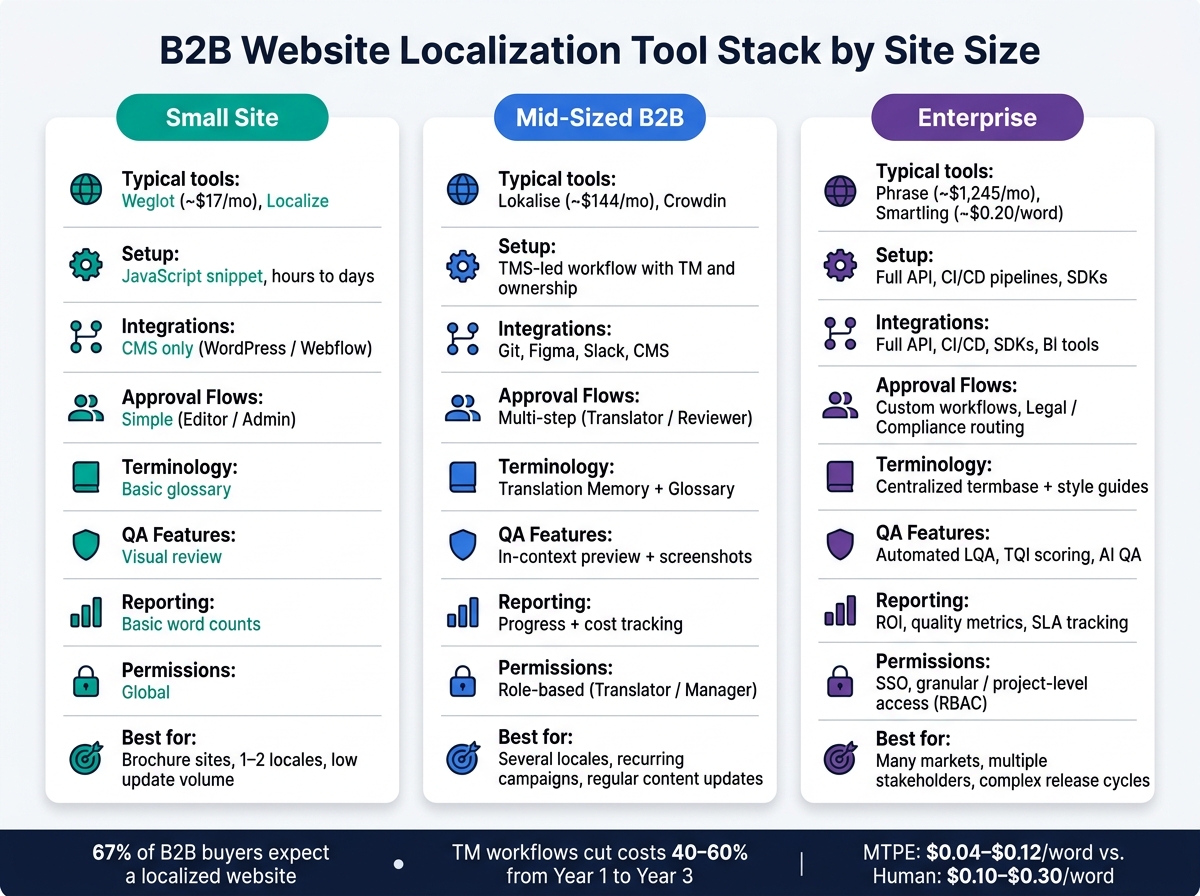
B2B Website Localization Tool Stack by Site Size
Pick localization tools based on site complexity, how often content changes, and how much engineering help you have. First, lock down the workflow. Then choose the stack that fits the size of the site and how releases happen. After intake, review, and SEO needs are clear, you can choose tools that support that way of working.
The stack should also fit engineering capacity. A JavaScript tag gets you live fast. Repo integration takes more time, but it gives you deeper control.
Small sites with limited locales and low update volume
For brochure sites or early-stage B2B teams going after one or two extra markets, the main goal is simple: move fast without piling on overhead. If content changes rarely and you only have a few locales, a lightweight proxy or plugin usually does the job.
Tools like Weglot, which starts at about $17/month, or Localize can be added with a JavaScript snippet and are often set up in a few hours to a few days.
Keep the first rollout tight. Start with:
- Homepage
- Solution pages
- Proof assets
Translating the full blog archive before you've even checked market demand is an easy way to burn budget.
If updates stay light, a small stack keeps things simple.
Mid-sized B2B sites with recurring campaigns and content updates
Once you're running several locales and pushing content on a regular basis, a proxy or basic plugin can start to bend under the load. This is where it helps to shift from one-off batches to a TMS-led workflow with TM and clear ownership.
That’s usually the moment to step up to a dedicated TMS like Lokalise or Crowdin. Lokalise starts at about $144/month.
TM cuts repeat work and helps keep approved terms in line across pages and campaigns. Just as important, ownership needs to be spelled out. Who owns terminology? Who checks SEO? Who signs off on launch QA? If nobody knows, things slip.
When approvals, releases, and locale count start stacking up, governance becomes the main issue.
Enterprise sites with many markets, stakeholders, and release cycles
At the enterprise level, the hard part isn't just translation. It's control. Phrase's Team plan starts around $1,245/month, and Smartling uses a usage-based model at about $0.20/word for human translation.
At this stage, focus on:
- RBAC
- SSO
- Audit trails
- Compliance routing
- SLA reporting
Those aren't nice extras. They're part of how large teams keep launches on track when many groups are involved.
The checklist below lines up the main criteria across all three tiers:
| Criteria | Small Site | Mid-Sized B2B | Enterprise |
|---|---|---|---|
| Integrations | CMS only (WordPress/Webflow) | Git, Figma, Slack, CMS | Full API, CI/CD, SDKs, BI tools |
| Approval Flows | Simple (Editor/Admin) | Multi-step (Translator/Reviewer) | Custom workflows, Legal/Compliance |
| Terminology | Basic glossary | Translation Memory + Glossary | Centralized termbase + style guides |
| QA Features | Visual review | In-context preview + screenshots | Automated LQA, TQI scoring, AI QA |
| Reporting | Basic word counts | Progress + cost tracking | ROI, quality metrics, SLA tracking |
| Permissions | Global | Role-based (Translator/Manager) | SSO, granular/project-level access |
Key takeaways for B2B website localization tool selection
Use the table to line up tool depth with locale count, update cadence, and approval load. Choose tools by job: translation management, CMS integration, QA, and SEO marketing services. Then build approval flows and QA checks into every release cycle.
Not every locale needs the same level of spend. A tiered setup often makes more sense:
- Full human review for Tier 1 markets
- AI plus spot review for Tier 2
- AI-only for Tier 3
That way, costs stay tied to revenue potential instead of spreading the same effort across every market.
FAQs
How do I know if a proxy or CMS connector is the better fit for my site?
It depends on your technical resources, site scale, and performance needs.
Use a translation proxy if you need a fast launch, have limited developer bandwidth, or run a static marketing site. Use a CMS connector or plugin if you want translation management inside your editorial workflow, tighter SEO control, or support for complex content and TMS integration.
When should a B2B team move from a simple plugin to a full TMS?
Move from a simple CMS plugin to a full Translation Management System (TMS) once your site is no longer small and static, and you're working with more than one or two target languages.
A TMS makes more sense when localization turns into regular work instead of a one-off project. It helps you manage translation memory, keep glossary usage consistent, coordinate reviews across teams, and connect straight to your codebase or content pipeline.
How can I keep localized pages in sync with the source site?
Move away from manual updates and use a continuous localization workflow. Connect your translation platform to your CMS or code repository so new content and string changes are picked up, translated, and published on their own.
At the same time, set clear ownership for terminology and define an SLA for updates. Add two-way sync and automated QA checks so you can catch drift, broken links, and formatting issues before anything goes live.