Publishing is the easy part. Getting people to see the content is the hard part. If I were picking from this list today - August 28, 2026 - I’d sort the tools by channel first, not by feature count.
Here’s the short version:
- StoryChief - best when I need to publish one piece across blog, email, and social
- Buffer - best for low-cost social scheduling
- Hootsuite - best for teams that need approvals, listening, and account control
- HubSpot Content Hub - best when I want content tied to CRM and pipeline
- Mailchimp - best for email and SMS automation
- Outbrain - best for paid content promotion on publisher sites
- Quuu Promote - best for extra organic social reach
- Zapier - best for connecting tools and automating handoffs
- Top SEO Marketing Directory - best for finding SEO vendors and tools
A few numbers stand out from the article: teams using AI workflow automation report 3x-5x faster content production cycles, and 76% of companies report positive ROI from marketing automation within the first year. That tells me one thing: if your team still distributes content by hand, you’re giving up time and reach.
The article’s main point is simple. No single tool does everything well. Social teams need one set of tools. Email-first teams need another. Multi-brand operators often need a workflow layer on top.
How to Automate Content Distribution to Multiple Platforms using AI Agent
sbb-itb-5be333f
Quick comparison
| Tool | Best for | Main channels | Starting price |
|---|---|---|---|
| Top SEO Marketing Directory | choosing an SEO agency | SEO tools/agencies | Free |
| StoryChief | Multi-channel publishing | Blog, email, social | Contact for pricing |
| Buffer | Social scheduling | LinkedIn, X, Facebook, Instagram, Pinterest | $5-$6/channel/month |
| Hootsuite | Social management | 35+ social networks | $99/month |
| HubSpot Content Hub | CRM-linked distribution | Blog, email, social | Tiered pricing |
| Mailchimp | Email and SMS | Email, SMS | Free / $400/month Premium |
| Outbrain | Paid amplification | Publisher native ads | CPC / CPA |
| Quuu Promote | Organic social reach | X, LinkedIn, Facebook | About $40-$50/month |
| Zapier | Workflow automation | 7,000+ app connections | Free / $19.99/month |
If I had to sum it up in one line, it would be this: pick the tool that fits your main channel, then add a workflow layer only if the handoffs are slowing the team down.
What to Look for in a Content Distribution Automation Tool
Pick SEO marketing tools based on the channels you already use and the jobs you want to automate. A tool can look great in a demo and still be a bad fit if it doesn't match your team’s publishing flow.
| Channel | Reach Potential | Ease of Automation | Primary KPI |
|---|---|---|---|
| Search and AI answers | 5/5 | 4/5 | Non-branded clicks / AI mentions |
| Email Newsletters | 3/5 | 5/5 | Revenue per send |
| Syndication Networks | 4/5 | 5/5 | Referral signups |
| Social (LinkedIn B2B) | 4/5 | 3/5 | Pipeline influenced |
| Communities/Q&A | 3/5 | 3/5 | Accepted answers and upvotes |
Source: SEOPro AI Composite Scoring, 2026
Email and newsletter distribution
Focus on tools with lifecycle journeys, subject-line testing, send-time optimization, and blog-to-newsletter repurposing. Those features save time and help teams get more out of each send. That matters because email marketing still returns over $30 for every $1 spent.
Social publishing and scheduling
For social, look for bulk scheduling, a unified inbox with sentiment filters, channel-specific formatting rules, evergreen recycling, AI remixing into new formats, and approval flows that keep review in the loop.
A good way to think about it: social posts rarely fail because the idea was bad. More often, the process breaks - wrong format, late approval, or no follow-up in the inbox.
Paid and organic syndication
On the syndication side, look for native placement support, real-time creative testing, canonical tag preservation to avoid duplicate-content issues, and reporting that connects distribution spend to pipeline.
If your team has a paid reach budget, don't split distribution from measurement. You want both in the same system or at least tied together in a clean way.
Communities and reposting workflows
For communities and reposting, watch for thread monitoring, relevance alerts, and AI-assisted answer drafting based on existing content .
That setup helps teams move fast without starting from scratch every time a useful question pops up.
CMS and workflow automation
For CMS and workflow automation, direct CMS publishing, role-based approvals, and trigger-based routing are must-haves. The goal is simple: send content to the right site automatically without manual file copying. That matters a lot for multi-site operators and portfolio companies that need a system that can scale across brands and teams .
Use these filters to compare the tools below.
1. Top SEO Marketing Directory
Use this directory when you need to find SEO tools and agencies for your distribution stack. Top SEO Marketing Directory is a curated directory of SEO tools, software, and agencies built to help teams improve rankings and organic traffic.
Pricing model
| Plan | Price | Best For |
|---|---|---|
| Basic | Free | Directory listings |
| Premium | $49/month | Expanded listings and filters |
| Enterprise | Custom | Custom enterprise pricing |
Best for teams that need a fast SEO vendor shortlist.
2. StoryChief
Use StoryChief when one piece of content needs to move across your blog, email, and social channels without manual reposting. It’s a multi-channel publishing platform built to automate publishing across blog, email, and social.
Channel coverage
StoryChief covers three core distribution pillars - blog/CMS publishing, email newsletters, and social media. Those are the places where version drift, missed handoffs, and extra copy-paste work tend to pile up.
Automation workflow depth
StoryChief supports the full editorial flow: collaborative review, approvals, and publishing to multiple destinations. Its built-in AI editor helps repurpose and reformat content, and the centralized calendar gives teams one place to see what’s scheduled.
The main draw here is workflow automation. It is not a full-funnel demand gen system.
It does not replace HubSpot or Marketo for lead scoring, CRM orchestration, or ABM.
Pricing model
StoryChief uses tiered pricing. AI credits and add-ons may cost extra.
Best fit for lean teams or portfolio companies
StoryChief fits teams that need standardized multi-channel publishing across several contributors and sites. In plain terms, it makes more sense for publishing-heavy teams than for sales-led demand programs.
3. Buffer
Buffer is best for simple social media scheduling. If your team lives on social and wants the lightest tool in this group, Buffer is the pick for those seeking top SEO tools and services to streamline their workflow.
Channel coverage
Buffer lets you schedule posts for Instagram, Facebook, X, LinkedIn, and Pinterest. It does not include native email, a CMS, paid syndication, or community publishing.
Automation workflow depth
The core workflow is simple: Buffer’s queue auto-fills your posting slots, so you’re not building every post from scratch. Its AI Assistant helps write platform-specific captions, and the browser extension lets you pull in content from the web as you go. Approvals and analytics also support multi-user review.
If you want to connect Buffer to the rest of your stack, use Zapier for WordPress-to-social publishing or Slack alerts.
Pricing model
Buffer’s free tier supports up to three social channels. Paid plans start at $5-$6 per channel per month.
Best fit for lean teams or portfolio companies
Buffer makes sense for solo marketers and small in-house teams that want a clean, low-friction social workflow. It also fits portfolio companies that need to manage multiple brand accounts with simple permissions.
If your team needs tighter control, more policy layers, or broader social governance, you’ll likely outgrow Buffer and need a heavier platform next.
4. Hootsuite
If Buffer is the light option, Hootsuite is the control-heavy one. It works best for teams that need social governance, monitoring, and tight multi-account control. It fills the gap when basic scheduling stops being enough. That makes it a good match for teams running many brands, regions, or social accounts.
Channel coverage
Hootsuite supports 35+ social networks from one dashboard and includes 100+ integrations. It doesn't natively handle email, CMS publishing, or paid syndication, so many teams pair it with Mailchimp for email and a separate CMS tool for blog work.
Automation workflow depth
Hootsuite goes deeper on process than lighter tools. It includes multi-stage approval workflows and a centralized content library for approved assets and brand guidelines. Its social listening tools track mentions, keywords, hashtags, and competitors in real time.
It also includes a Unified Social Inbox that pulls replies and messages into one place, with sentiment filters to help teams sort what needs attention first. On the analysis side, Competitor Analytics lets teams benchmark up to 20 profiles per network for hashtag and posting-time insight.
Pricing model
Hootsuite's Professional plan starts at $99/month for one user and 10 social accounts. Business and Enterprise plans use custom pricing for added governance and analytics. For lean teams, the math is pretty simple: buy it only if you'll use listening, approvals, and governance on a regular basis.
Best fit for lean teams or portfolio companies
Hootsuite fits enterprise marketing teams and agencies like WebFX that need strict approval workflows and competitor tracking. For portfolio companies, granular permissions help keep access steady across teams, regions, and campaigns. Teams that just want simple scheduling should pass.
5. HubSpot Content Hub
HubSpot Content Hub is built for teams that want distribution tied straight to CRM and lifecycle automation. It brings content creation, publishing, and distribution into one place, which is a big deal if your team is tired of stitching tools together.
Channel coverage
The platform supports blogs, email newsletters, social channels like LinkedIn, Facebook, Instagram, and X, plus gated content. So if you want to publish and distribute from the same system, it fits that use case well.
Automation workflow depth
Content Remix can take one asset and turn it into versions for different channels. That saves time when you need to stretch a webinar, guide, or post across email, social, and blog formats.
Its workflows can also trigger publishing, nurturing, and follow-up based on content actions. On top of that, CRM integrations tie content clicks back to pipeline and conversion tracking. That means you’re not just asking, “Did people click?” You can also see whether those clicks moved toward revenue.
Pricing model: Tiered plans. More advanced automation and CRM features are on higher tiers.
Limits: Best for teams that want one system for content, distribution, and CRM-connected follow-up. It can feel too heavy if you just need simple social scheduling or single-channel distribution.
Best fit for lean teams or portfolio companies
This is a strong fit for B2B teams and portfolio companies that want content, distribution, and CRM data in one workflow.
If your team only needs email distribution, a lighter tool is usually enough.
6. Mailchimp
If HubSpot is the all-in-one option, Mailchimp is the leaner, email-first choice. It stays focused on owned channels - email and SMS. That makes it a strong fit when automation in channels you control matters more than broad content coordination.
Automation workflow depth
Journey Builder covers the core flows most teams need: nurture sequences, cart recovery, re-engagement, and SMS follow-ups. Mailchimp also includes AI subject-line scoring, send-time optimization, and multivariate testing. Its built-in CRM supports segmentation.
Pricing model
Mailchimp's free plan supports up to 500 contacts, and the Premium plan starts at $400/month. One thing to watch: billing includes inactive subscribers. So if your list is big but a lot of those contacts aren't engaged, costs can climb fast.
Best fit for lean teams or portfolio companies
Mailchimp fits SMBs, e-commerce brands, and SaaS growth teams that want email and SMS automation without a heavy setup process. It can also work as a standard email and SMS layer across brands or business units when deliverability and ease of use matter more than deep CRM integration.
For social publishing or CMS-to-newsletter automation, pair it with Zapier or a dedicated workflow tool.
7. Outbrain
For paid amplification beyond email and social, Outbrain gives you a different kind of distribution. It's a paid native advertising platform that places content as sponsored recommendations on publisher sites like CNN, The Guardian, and Le Monde. So the main question is simple: do you want access to that publisher network?
Channel coverage
Outbrain is limited to its own native advertising network. Your content shows up as sponsored content inside publisher recommendation widgets on high-traffic news and media sites, based on reading behavior and engagement signals.
Automation workflow depth
Outbrain automatically tests headlines, images, and targeting. It also supports post-click optimization to help drive better traffic quality, plus conversion tracking for downstream actions like form submissions and purchases.
Pricing model
Outbrain uses CPC and CPA bidding and doesn't charge a monthly fee. Most campaigns need about $50-$100 per day for optimization to work well.
Best fit for lean teams or portfolio companies
Outbrain makes the most sense for teams with a paid amplification budget and content that already converts - lead magnets, long-form editorial, or landing pages tied to a specific funnel stage. For portfolio companies, it's often best used as a performance channel to scale content that's already working, not as a broad distribution layer.
8. Quuu Promote
Quuu Promote adds another layer of organic social reach. It uses opt-in human sharers to help distribute content across social channels. The focus is narrow by design: blog posts, podcasts, and evergreen articles. It does not handle email, CMS workflows, or paid syndication, so it works best as a reach extender - not as your main publishing or automation system.
Channel coverage
Quuu Promote supports X, LinkedIn, and Facebook through a network of 50,000+ opt-in sharers organized by topic.
Automation workflow depth
The automation kicks in mostly after you submit content. Each submission is manually reviewed first. After approval, the system matches it to relevant topics and distributes it automatically. Monthly reports show shares and clicks.
Pricing model
Plans start at about $40-$50 per month. There are also agency tiers for teams that manage more than one client. Quuu Promote also usually offers a 7-day trial.
Best fit for lean teams or portfolio companies
Quuu Promote makes the most sense alongside tools like Buffer or Hootsuite. It helps teams push content past their own follower base without changing how they publish. That makes it a solid fit for lean teams and portfolio companies with evergreen content to promote.
9. Zapier
Zapier is the integration layer for content distribution. It links your CMS, email platform, social channels, and internal apps into one automated flow. That makes it a good fit when distribution happens across separate tools instead of inside one platform.
Channel coverage
Zapier connects with 7,000+ apps across CMS, email, social, and Slack, but it does not publish natively.
Automation workflow depth
Zapier is about orchestration. A publish trigger can send a post to social, email, and Slack in one workflow. You can also use conditional logic to branch by content type. For example, a post tagged "case study" can go to LinkedIn while skipping other channels.
That matters most when one content trigger needs to hit several channels fast, without someone pushing the same update by hand in each tool.
Pricing model
The free tier covers 100 tasks per month with single-step Zaps. That's enough to test the setup, but not enough for full-scale multi-channel distribution. Paid plans start at $19.99/month and add multi-step workflows, premium app access, and higher task limits.
Best fit for lean teams or portfolio companies
Zapier works best for teams that need the same distribution workflow across many brands or sites. It fits portfolio companies and multi-brand teams using niche app stacks that don't connect natively.
The tradeoff is simple: you get more control, but you also take on more setup and more upkeep than with a basic scheduler.
In the comparison below, treat Zapier as the workflow layer, not the destination channel.
Side-by-Side Tool Comparison
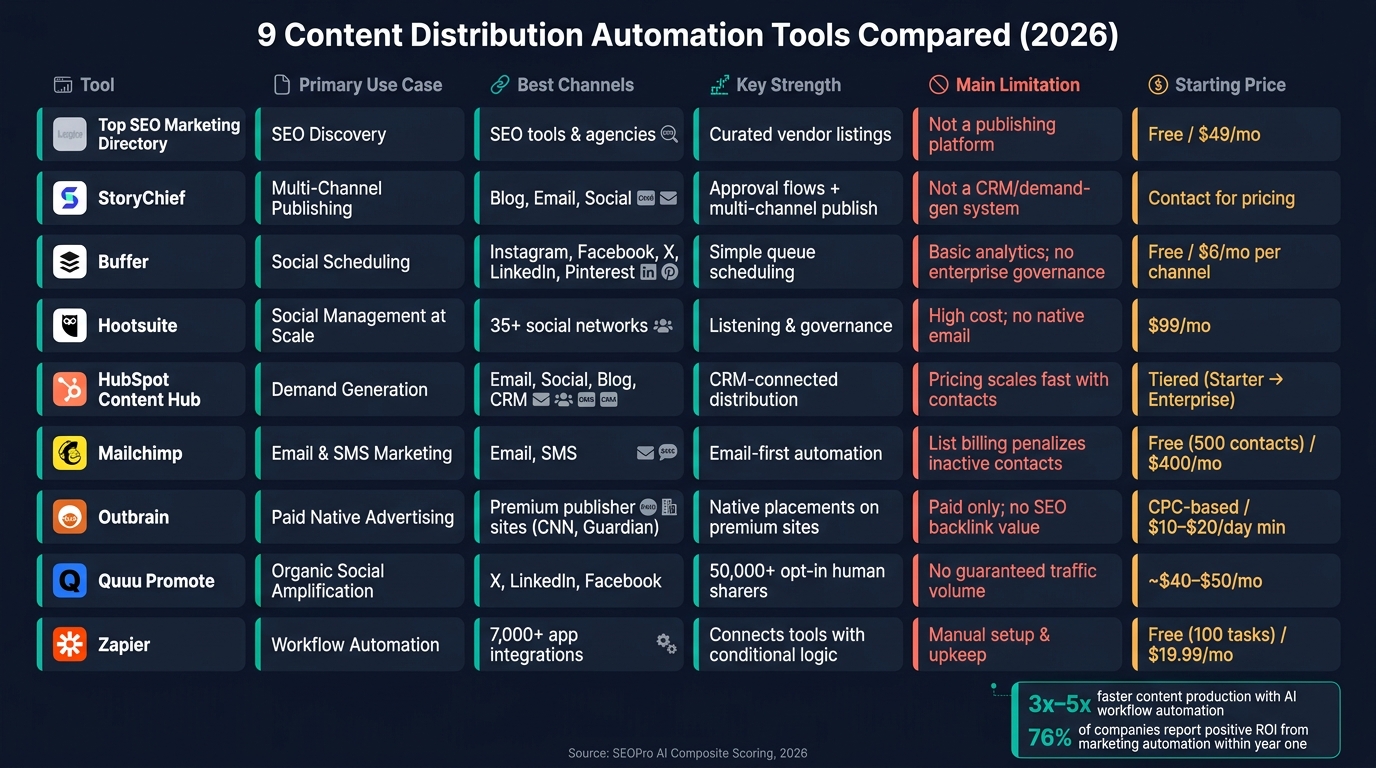
9 Content Distribution Automation Tools Compared (2026)
No single tool handles every distribution channel well. Each one is built for a specific job - SEO discovery, social scheduling, email delivery, paid amplification, or workflow automation. The table below shows each tool’s main role so you can spot which ones fit your stack fast. Start with channel fit, then narrow by team size and budget.
| Tool | Primary Use Case | Use Case | Key Strength | Main Limitation | Starting Price (USD) | Best Shortlist For |
|---|---|---|---|---|---|---|
| Top SEO Marketing Directory | SEO discovery and organic growth | SEO research and vendor discovery | Curated SEO tool and agency listings for vendor discovery | Not a publishing or scheduling platform | Free / $49/month Premium | Mid-market and PE-backed teams |
| StoryChief | Multi-channel publishing | Blog, social, email | Multi-channel publishing with approval flows | Not a full CRM or demand-gen system | Contact for pricing | Editorial and content-heavy teams |
| Buffer | Social scheduling | Instagram, Facebook, X, LinkedIn, Pinterest | Simple queue scheduling | Basic analytics; no enterprise governance | Free / $6/month per channel | Solo marketers and small teams |
| Hootsuite | Social management at scale | Instagram, Facebook, X, LinkedIn, Pinterest | Listening and governance | High cost at enterprise tiers; no native email | $99/month | Social-heavy teams needing oversight |
| HubSpot Content Hub | Demand generation | Email, social, blog, CRM | CRM-connected distribution | Costs scale fast with contact volume | Tiered (Starter / Professional / Enterprise) | B2B teams with full-funnel needs |
| Mailchimp | Email and SMS marketing | Email, SMS | Email-first automation | List-based billing can penalize inactive contacts | Free for up to 500 contacts / $400/month Premium | Teams prioritizing email and SMS |
| Outbrain | Paid native discovery | Premium publisher sites like CNN and The Guardian | Native placements on premium publisher sites | Paid traffic only; no backlinks | CPC-based; $10-$20/day minimum budget | Teams with paid amplification budgets |
| Quuu Promote | Organic social amplification | X, LinkedIn, Facebook | Opt-in human sharers | No guaranteed traffic volume | Approximately $40-$50/month | Teams boosting evergreen content reach |
| Zapier | Workflow automation | Thousands of app integrations | Connects disparate tools with conditional logic | Manual setup and upkeep | Free (100 tasks) / $19.99/month | Portfolio companies and multi-tool stacks |
Some of the differences are pretty simple once you strip them down. Buffer helps you schedule posts. Quuu Promote helps more people see them. HubSpot Content Hub connects distribution to your CRM, while Mailchimp stays focused on email and SMS. Outbrain is for paid reach. Zapier links the rest of the stack together.
That makes tool selection less about finding one platform that does everything and more about picking the right mix for how your team works.
How to Pick the Right Tool for Your Team
Pick the tool that fits how your team works - not the one with the longest feature list. Start with the table, then narrow your choice based on workflow, team setup, and budget.
| Team Type | Main Distribution Need | Best-Fit Tools | Key Tradeoffs |
|---|---|---|---|
| Solo / Small Team | Low cost, simple scheduling | Buffer, Zapier | Limited governance; limited built-in CRM sync |
| Social-Heavy | High volume, approvals, reporting | Hootsuite | Higher monthly cost; steeper learning curve |
| B2B Demand Gen | Lead capture, CRM integration | HubSpot Content Hub, Mailchimp | High setup time; contact-based pricing scales fast |
| WordPress / Multi-site | Reduce publishing friction | StoryChief, Zapier | Requires clean site taxonomy; some CMS lock-in |
| Portfolio Companies | Governance, shared templates | StoryChief, Hootsuite | Can slow execution for smaller sub-brands |
| Paid Amplification | Scaled reach beyond owned audience | Outbrain | Requires ongoing spend; no SEO backlink value |
Solo and very small marketing teams
If your team is small, keep the stack simple. Buffer is a good starting point for social scheduling because it removes extra setup and gets you posting fast. Pair it with Zapier to connect your CMS, email, and social workflows without adding much overhead.
Social-heavy teams
If social is the center of your distribution plan, Hootsuite makes sense. It works well for teams that need approval flows, multi-account management, and social listening in one place. The price is higher, and it takes more time to learn, but that trade can be worth it when several people are posting across brand accounts.
B2B demand generation teams
For B2B demand gen, the choice usually comes down to where leads need to go.
- Best for CRM-connected distribution: HubSpot Content Hub links content engagement to lead scoring and pipeline.
- Best for email-first distribution: Mailchimp is simpler to set up when email is your main channel.
On both platforms, contact-based pricing can climb fast, so costs can change quickly as your list grows.
WordPress and multi-site operators
StoryChief helps cut down on copy-paste work when you're publishing to multiple CMS destinations. Zapier can handle routing between WordPress, email, and social when the systems don't connect cleanly on their own. The main issue to watch is taxonomy. If categories, tags, and naming rules vary from site to site, distribution gets messy fast.
Portfolio companies standardizing workflows
For portfolio companies, governance matters more than raw feature count. StoryChief's approval flows and Hootsuite's permission controls help multi-brand teams keep messaging in line and protect brand safety. That can slow things down a bit for smaller sub-brands, but it gives operators more control where it counts. Use Top SEO Marketing Directory to shortlist SEO vendors when organic growth is part of the distribution stack.
Teams with paid amplification budgets
Outbrain extends reach through native placements on premium publisher sites. It uses CPC-based pricing with minimum daily budgets typically between $10 and $50. Paid native can put content in front of more people, but it only makes sense when the asset is already strong enough to scale.
Conclusion
These tools serve different jobs. There’s no one-size-fits-all stack.
The right pick comes down to your main channel - owned growth, paid reach, social volume, or CMS automation. Start with the channel that matters most, automate that first, and only add more once the system is steady. Match the tool to the channel, then to the team.
For portfolio companies, governance matters if you want multi-brand distribution to stay in sync. Approvals, permissions, and centralized workflows help keep brands aligned.
If organic growth is part of your mix, Top SEO Marketing Directory is a useful shortlist for SEO tools, software, and agencies.
FAQs
How do I choose the right tool for my main channel?
Start by auditing your distribution. Look at where your audience already spends time and where your brand is under-indexed.
Then pick the tool based on your main content format and your goals. Use Sight AI for end-to-end SEO and AI visibility. Go with Buffer or Publer if your plan is social-first. Choose CoSchedule if you need one place to manage your marketing calendar.
Need app integrations that get more involved? Zapier can tie those systems together.
The main thing is simple: pick tools that cut manual bottlenecks, support your channel KPIs, and fit the way your team already creates and ships content.
Do I need one platform or a multi-tool stack?
It depends on your goals and how much moving parts you need to handle. An all-in-one platform makes life simpler by putting email, social, and blog publishing in one dashboard.
A multi-tool stack often gives you more depth in specific areas, like SEO automation or PR placement. That’s why many advanced teams mix and match specialized tools, then use connectors like Zapier to link everything together.
Which tool is best for a small marketing team?
It comes down to what your team is trying to do.
Buffer makes sense for lean teams and solo operators that want simple social media scheduling without extra clutter. CoSchedule is a better fit if you want one calendar that pulls together blog, email, and social campaigns.
If organic search growth is the main goal, RankHub SEO Autopilot is a practical, cost-effective pick for automating keyword research, content generation, and publishing.