Crawlability is a key factor in your website's SEO performance. If search engines can't access or navigate your site properly, your pages won't get indexed or ranked, no matter how optimized your content is. A crawlability audit helps identify and fix issues like blocked pages, server errors, and wasted crawl budgets, ensuring bots can efficiently navigate your site.
Key Takeaways:
- Crawlability ensures search engines can access and understand your content.
- Indexability determines if your pages appear in search results.
- Common issues include blocked pages, duplicate content, and poor site structure.
- Use top SEO tools like Google Search Console, Screaming Frog, and Semrush for audits.
- Focus on fixing server errors, optimizing internal linking, and managing crawl budgets.
- Regular audits are crucial to maintaining SEO health.
By addressing crawlability issues, you can improve your site's visibility, drive more organic traffic, and maximize your SEO efforts with professional SEO marketing services.
How to Run a Full Technical SEO Audit in Semrush and Fix the Top Issues Step by Step
sbb-itb-5be333f
Preparing for a Crawlability Audit
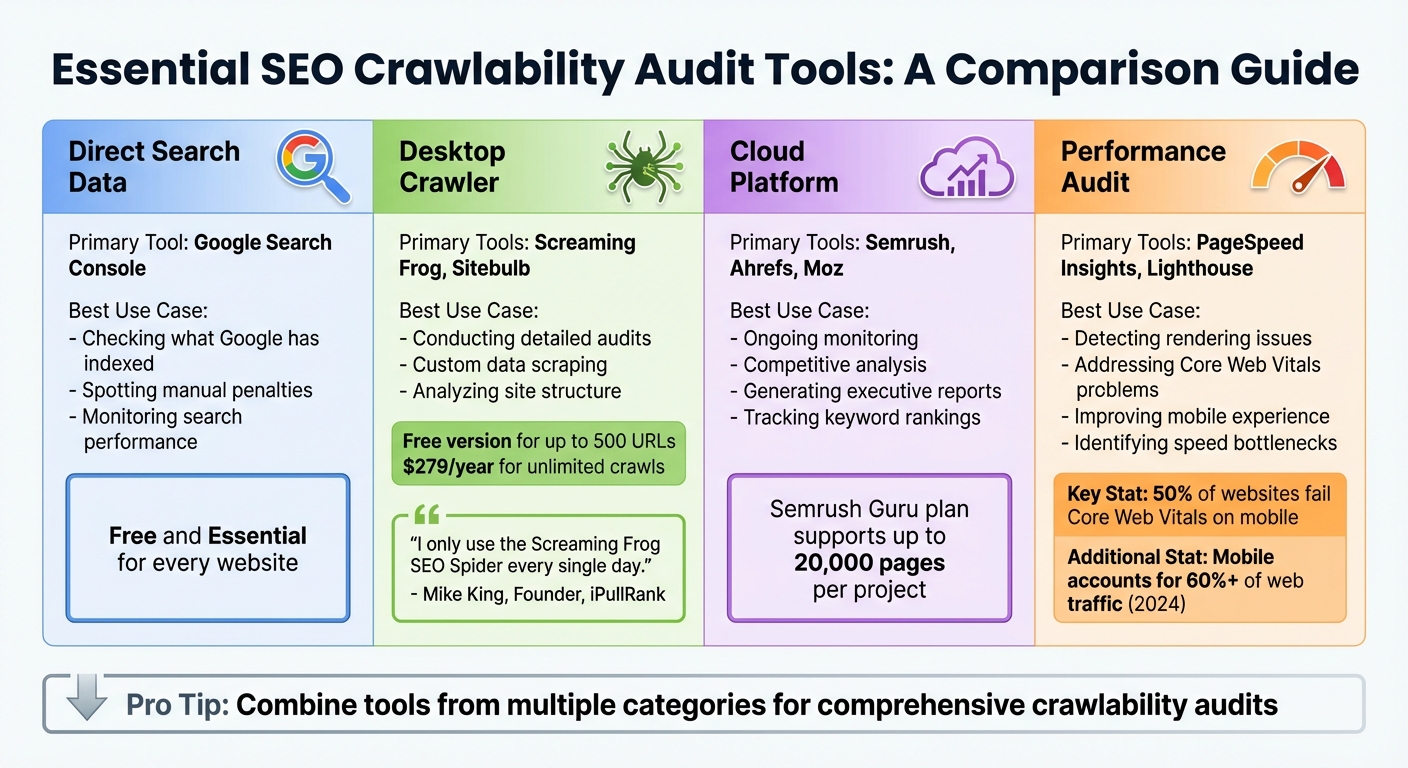
SEO Crawlability Audit Tools Comparison Guide
Tools and Resources You'll Need
To conduct a thorough crawlability audit, you'll need the right tools. Google Search Console is a must-have - it shows you what Google has indexed, highlights sitemap status, and flags any robots.txt issues.
For crawling your site, choose between a desktop crawler like Screaming Frog or a cloud-based platform such as Semrush or Ahrefs. Desktop crawlers, like Screaming Frog, rely on your computer's resources and let you customize tasks like JavaScript rendering and XPath data extraction. Screaming Frog offers a free version for up to 500 URLs, while the paid license costs $279 per year for unlimited crawls. On the other hand, cloud-based tools like Semrush and Ahrefs operate remotely, making them ideal for scheduled monitoring. For example, Semrush's Guru plan supports audits of up to 20,000 pages, while Ahrefs offers free site audits through their Webmaster Tools.
"Out of the myriad of tools we use... I only use the Screaming Frog SEO Spider every single day." - Mike King, Founder, iPullRank
Don't overlook performance audit tools like PageSpeed Insights and Lighthouse. These tools measure Core Web Vitals - key metrics that influence how efficiently bots can render and crawl your pages. It's worth noting that about 50% of websites still fail Core Web Vitals assessments on mobile devices, even as mobile accounts for over 60% of web traffic as of early 2024.
| Tool Category | Primary Examples | Best Use Case |
|---|---|---|
| Direct Search Data | Google Search Console | Checking what Google has indexed and spotting manual penalties |
| Desktop Crawler | Screaming Frog, Sitebulb | Conducting detailed audits and custom data scraping |
| Cloud Platform | Semrush, Ahrefs, Moz | Ongoing monitoring, competitive analysis, and generating executive reports |
| Performance Audit | PageSpeed Insights, Lighthouse | Detecting rendering issues and addressing Core Web Vitals problems |
Having the right tools is step one. Next, you'll need to configure them to mimic how search engines interact with your site.
Setting Up Your Audit
Once you've chosen your tools, it's time to configure them for accurate results. Start by adjusting your crawler to simulate search engine behavior. For instance, set the crawler to use a "Googlebot" user-agent string instead of its default. Some servers deliver different content based on the user-agent, so this step ensures you're seeing what Google sees. If your site uses services like Cloudflare or Sucuri for bot protection, whitelist your audit tool's IP ranges to avoid unnecessary 403 errors.
For sites built with modern frameworks like React or Angular, enable JavaScript rendering to ensure the crawler can process dynamic content.
Define the scope of your crawl based on your site's size and priorities. For larger sites, focus on high-impact areas such as product categories or XML sitemap URLs. This approach helps uncover issues like orphan pages without wasting resources on low-priority sections.
"The real value of a SEMrush technical SEO audit isn't the crawl itself. It's setting it up right, reading the output with clear eyes, and knowing which findings will move rankings." - Jack Johnson, Operations Director, Rhino Rank
Finally, make sure your tool's page limit matches or exceeds the number of indexed pages in Google Search Console. This ensures your audit covers everything that matters.
How to Conduct a Crawlability Audit
Once your audit environment is set up, the next step involves running a crawl, analyzing the results, and comparing the findings to indexation data.
Running a Full Site Crawl
Start by configuring your crawler to emulate Googlebot by setting the correct user-agent. If your site uses frameworks like React or Angular, make sure JavaScript rendering is enabled so dynamic content is included in the crawl.
Set the crawl to begin at the homepage, following internal links, and use your XML sitemap to help identify orphaned pages. Depending on your goals, you may choose to ignore robots.txt to uncover unintentionally blocked pages. Exclude tracking parameters (like session IDs or UTM codes) to avoid wasting crawl budget and creating duplicate content.
Gather key data points such as HTTP status codes, metadata, header tags, canonical tags, and internal link counts. Pay close attention to crawl depth - important pages should be within three clicks of the homepage. Keep in mind that for larger sites (10,000+ pages), up to 30% of crawl coverage can be lost to duplicate, low-quality, or blocked URLs.
Analyzing Crawl Data
Once the crawl is finished, dive into the data to identify potential issues. Start with HTTP status codes. Look for 404 errors that disrupt user experience, 5xx server errors that block access, and redirect chains longer than two hops, which can slow down crawling. Address server errors first, as these can prevent search engines from accessing your site entirely.
Review your internal linking to locate orphaned pages - those with no inbound links - and fix broken internal links to ensure link equity flows properly. Studies show that between 40% and 60% of a site's pages are often orphaned. Also, check for conflicting directives, such as "noindex" tags or robots.txt rules, that may unintentionally block valuable content.
Next, evaluate canonicalization. Look for missing, duplicate, or conflicting canonical tags that might confuse search engines about which page version to prioritize. Ensure your XML sitemap URLs align with the crawled canonical URLs and verify there are no format errors or non-indexable pages included.
Finally, analyze Core Web Vitals alongside your crawl data. For example, pages with a Largest Contentful Paint time under 2.5 seconds can see a 24% boost in organic click-through rates. On the flip side, 53% of mobile users leave pages that take longer than three seconds to load.
Comparing Crawl Data with Indexation Data
Crawl data reveals your site's structure, while Google Search Console (GSC) shows what Google has actually indexed. Export both datasets and compare them to identify orphan pages (indexed but lacking internal links) and non-indexed pages (crawled but not indexed). Use tools like VLOOKUP to match URLs from your crawl to "Excluded" pages in GSC.
Check the "Last Crawled Date" in GSC's Indexed Pages report. If high-value pages haven't been crawled in over 60 days, it could mean Google no longer considers the content relevant. These pages might need stronger internal linking or a content update.
"Google is no longer crawling every page on your site equally... if Google isn't crawling them, it likely isn't indexing or ranking them either." - Alex Chris, Digital Marketing Consultant, Reliablesoft
Also, investigate pages marked "Crawled – currently not indexed" in GSC. This often points to thin content or weak internal linking. For instance, in early 2025, a retail site discovered 150 product pages excluded from Google's index due to an outdated "noindex" tag in a category template. Once corrected, these pages began appearing in search results.
Lastly, use the URL Inspection tool to confirm that Google's selected canonical matches your declared one. If there are mismatches - caused by redirects or sitemap issues - Google may ignore your signals. Aim for at least 95% of your primary canonical pages to be successfully indexed. With these insights, you can tackle any crawlability issues identified during your technical SEO audit.
Fixing Crawlability Issues
Once you've pinpointed crawlability issues, the next step is to fix them. Start by tackling critical technical errors, then shift your focus to improving your site's structure and making better use of your crawl budget. Use the insights from your audit to prioritize fixes, addressing the most pressing issues first.
Resolving Technical Errors
Server errors should be your top concern. Frequent issues like 500, 502, 503, or 504 errors indicate server instability, which can discourage search engines from crawling your site altogether. Work closely with your hosting provider or development team to resolve these problems quickly.
Double-check your robots.txt file to ensure it only blocks nonessential directories. A single mistake, such as Disallow: /, can prevent search engines from crawling your entire site.
For example, in 2025, a nonprofit sensory learning center used the Search Atlas OTTO SEO tool to address technical issues like broken links and navigation problems. Their efforts led to a 111% increase in organic traffic and a 75.5% boost in organic keywords, eventually securing the #1 ranking for their target keyword.
Fix redirect loops and chains by using 301 redirects for permanent changes. Avoid 302 redirects unless absolutely necessary. Additionally, enable server-side or dynamic rendering for JavaScript frameworks to ensure search engine bots can access all critical content.
Once you've addressed these technical errors, you can shift your attention to optimizing your site's structure.
Optimizing Site Architecture
A well-organized site structure not only improves crawl efficiency but also enhances user experience. Following the three-click rule - ensuring every important page is accessible within three clicks from the homepage - can help search engines prioritize these pages. Pages buried deeper in the structure often get less attention from crawlers and lose out on link equity.
Use tools like Screaming Frog to identify pages with a crawl depth of 4 or higher. Bring these pages closer to the homepage by incorporating them into your main navigation, hub pages, or category landing pages. A great example of this is Dr. David McInnis Orthodontics (dmsmile.com). Between 2024 and 2025, they restructured their site to align with search intent and SEO best practices. Over six months, they saw a 472% increase in organic traffic and a 380% rise in patient inquiries, with over 250 high-intent keywords landing on Page 1 of Google.
Internal linking plays a crucial role as well. Adding 3–5 contextual internal links with descriptive anchor text helps search engines understand the relevance of the linked pages. Implementing breadcrumb navigation with structured markup (BreadcrumbList) further clarifies your site's structure for both users and bots.
"Technical SEO is the foundation everything else is built on... it's the part that separates websites that rank from websites that don't."
- Saqib Naveed Mirza, Founder, 2tentech
Improving Crawl Efficiency
Large websites often waste up to 70% of their crawl budget on low-value pages or duplicate content. Start by blocking unnecessary patterns in your robots.txt file - such as session IDs, internal search results, or administrative paths like /admin or /cart.
Faceted navigation is another common issue, as it can create countless URL variations through filter combinations (e.g., color, size, price). To avoid wasting your crawl budget, block low-priority combinations in your robots.txt file or use canonical tags to point back to the main category page. For pages that are permanently removed, use a 410 (Gone) status code instead of a 404. This tells search engines to stop requesting the URL entirely.
Your XML sitemap should only include URLs that return a 200 status, are canonical, and are indexable. Segmenting your sitemap by content type - like products, blog posts, or landing pages - can help prioritize the crawling of high-value pages. For example, in early 2025, an Austin-based DUI Law Firm used automated SEO tools from OTTO to optimize their site. Within four weeks, all their local map pins ranked in the top 3 or top 5 positions, resulting in an 88% improvement in local search rankings.
Finally, work on improving server performance. Reduce TTFB (time to first byte) and resolve 5xx errors. Aim for a TTFB of under 500 ms for the origin server or under 200 ms when using a CDN. A faster server response allows search engines to crawl more pages without overwhelming your server, effectively increasing your crawl capacity.
Monitoring and Ongoing Maintenance
Once you've addressed crawlability issues, the next step is ensuring those improvements stick. Without consistent monitoring, problems can resurface and derail your progress. In fact, sites that neglect ongoing maintenance often see an average 12% drop in organic traffic each quarter. Technical issues don’t announce themselves - you need systems in place to catch them early.
Setting Up a Regular Crawl Schedule
Regular technical audits are essential. Tools like Moz Pro and SEMrush can automate weekly scans to detect issues such as broken links or redirect chains. For websites with frequent updates or large inventories, complement these weekly scans with monthly checks on Core Web Vitals, crawl statistics, and coverage errors. Additionally, conduct audits after major events like site migrations, significant updates, or algorithm changes. Quarterly full-site audits are also important to uncover deeper structural issues that might go unnoticed in routine scans.
"A technical SEO audit is not a one-off hygiene task - it is an operational rhythm."
If your site uses bot protection tools like Cloudflare, make sure to whitelist the IP ranges of your audit tools. Configure your crawler to use a Googlebot user-agent to mimic how search engines interact with your site. This approach ensures your audits align with real-world search engine behavior.
Tracking Key Performance Indicators
Once your audit schedule is in place, focus on tracking metrics that reflect crawl health and indexation. Aim for over 95% of prioritized canonical pages to be indexed. Monitor the number of pages crawled daily and ensure a high ratio of successful (200 OK) responses to errors. Keep an eye on 4xx and 5xx errors, as sudden spikes often indicate pressing issues. For performance, target the following metrics:
- Largest Contentful Paint (LCP): Under 2.5 seconds
- Interaction to Next Paint (INP): Under 200 milliseconds
- Cumulative Layout Shift (CLS): Below 0.1
Set up automated alerts in Google Search Console or your audit tools to flag significant changes in indexed pages or error rates. These alerts help you address issues before they escalate.
Using the Top SEO Marketing Directory
The Top SEO Marketing Directory (https://marketingseodirectory.com) is a valuable resource for finding specialized SEO tools and services. It features everything from desktop crawlers like Screaming Frog and architecture mappers like Sitebulb to cloud-based monitors like SEMrush and Ahrefs. The directory also connects you with professional services for quarterly audits and monthly checks on Core Web Vitals and index coverage.
For advanced needs, such as log file analysis to optimize your crawl budget, the directory offers listings of services tailored to these tasks. Basic directory access is free, while advanced features start at $49 per month. This makes it easier to combine software tools and professional oversight, helping you avoid the traffic losses that often result from unmonitored sites.
Conclusion
Key Takeaways
A crawlability audit isn’t just about fixing errors - it’s about uncovering the obstacles that prevent search engines from accessing your content. Without proper crawlability, even the best content can remain hidden from search engines. As Christina Perricone, Senior Manager at HubSpot, explains:
"Crawlability is the foundation of your technical SEO strategy."
One common issue is the loss of crawl coverage to duplicate or low-value pages. Another is the lack of internal links, which leaves some pages hidden from search engine bots. These patterns highlight why regular audits are essential. Sites that neglect ongoing technical monitoring risk an average 12% drop in organic traffic each quarter.
Start by addressing server errors, accidental robots.txt blocks, and misused "noindex" tags. Once the basics are in place, refine your site structure to ensure important pages are no more than three clicks away from the homepage. As one expert puts it:
"A technical SEO audit is not a one-off hygiene task - it is an operational rhythm."
These insights provide a clear path for improving your site’s crawlability and overall SEO performance.
Next Steps for Better SEO
To stay ahead, commit to quarterly full-site audits and monthly reviews of Core Web Vitals, crawl statistics, and coverage errors. Use Google Search Console to set up automated alerts for indexation issues, and aim for at least 95% of your key canonical pages to be indexed.
For additional help, check out the Top SEO Marketing Directory. It’s a great resource for finding crawl tools, cloud-based monitors, and expert services for tasks like log file analysis. Basic access is free, while advanced features start at $49 per month. This directory can connect you with everything you need to keep your optimization efforts on track.
FAQs
What’s the difference between crawlability and indexability?
When it comes to SEO, crawlability and indexability are two essential concepts that often get mixed up, but they play very distinct roles.
- Crawlability is all about how easily search engine bots can locate and move through your website’s pages. Think of it as the bots’ ability to explore your site’s structure and content.
- Indexability, on the other hand, determines whether the pages that bots discover can actually be stored in the search engine’s database and shown in search results.
Here’s the catch: If your site isn’t crawlable, search engines won’t even find your pages. And if it isn’t indexable, even the pages that bots find won’t show up in search rankings. Both need to work together to ensure your content has a shot at being seen by users.
How do I find pages Google crawls but doesn’t index?
Google Search Console can help you find pages flagged with statuses like "Crawled – Currently not indexed" or "Discovered – currently not indexed." These labels mean Google has either crawled the page or found it but hasn’t added it to its index.
To address this, start by investigating potential problems such as:
- Thin content: Pages with little or no valuable information.
- Duplicate content: Content that’s too similar to other pages on your site or elsewhere.
- Noindex tags: Tags that tell search engines not to index the page.
- Crawl budget limits: When Google prioritizes other pages over yours due to resource constraints.
Once issues are identified, take action. Focus on improving the quality of your content, fixing technical errors, and strengthening internal linking. These steps can make it easier for Google to index your pages effectively.
How often should I run a crawlability audit?
Running a crawlability audit on a regular basis is essential to ensure your website remains accessible and optimized for search engines. For most websites, doing this at least every quarter works well. However, if you manage a larger site or one that gets updated often, monthly audits are a smarter choice.
Why? Regular checks help you spot problems early, keep crawl efficiency in check, and avoid setbacks that could hurt your site’s performance.