Lazy loading JavaScript does not hurt SEO by itself. My rule: keep key text and links available without clicks or scrolling, and don’t delay the image users see first.
I check 3 things before launch:
- Content access: Can Google see your text, links, and media URLs in its rendered output?
- Page performance: Does deferred loading reduce startup work without delaying clicks or shifting content?
- Indexing: Does Search Console show that the page is indexed? A successful rendering test isn’t proof.
For infinite scroll, I give each content segment its own URL and crawlable links. After launch, I recheck live pages and track loading, response times, and layout shifts separately from indexing.
<u>The goal is less upfront work, not less visible content.</u>
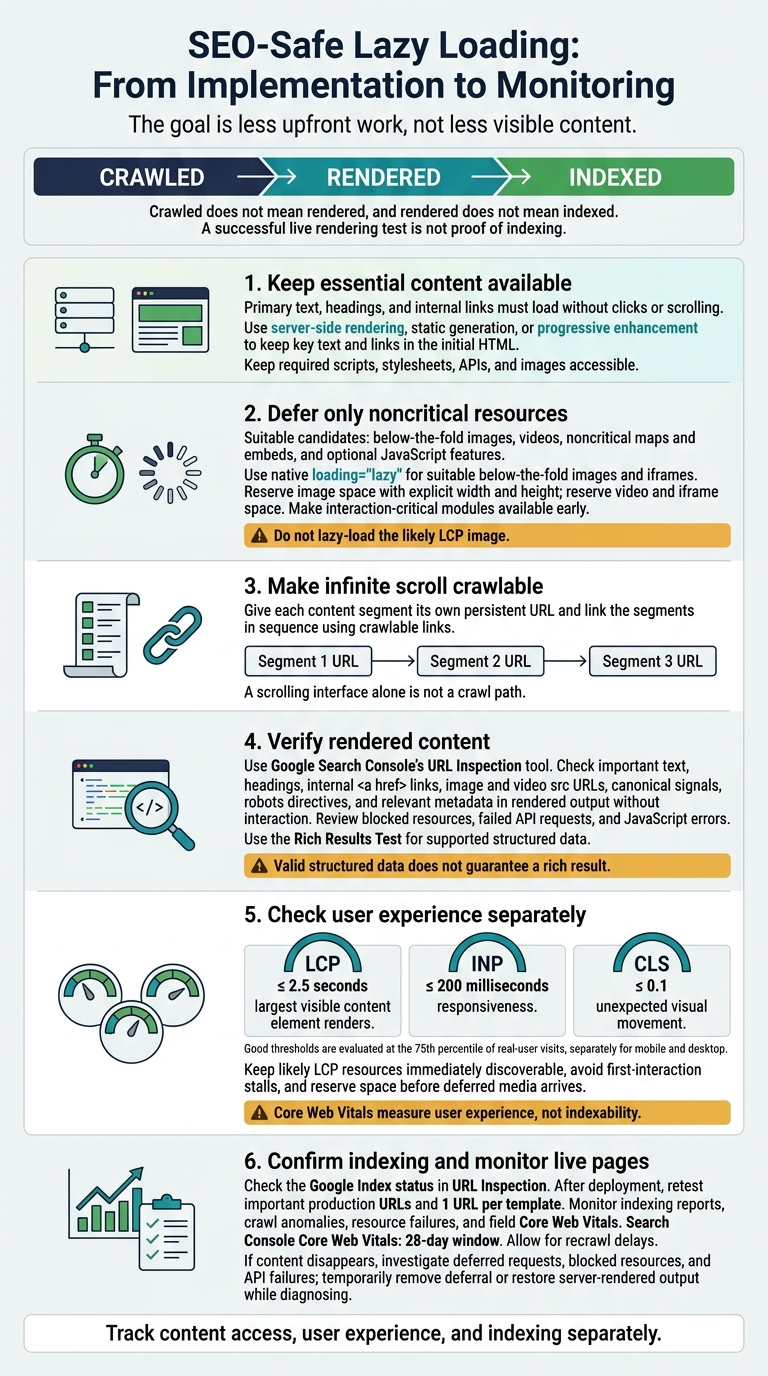
SEO-Safe Lazy Loading: From Implementation to Monitoring
How Google crawls and indexes lazy-loaded content
How Google renders JavaScript
Google crawls HTML first, renders eligible pages in Chromium, then indexes the result. JavaScript can add links and content to the rendered DOM. Rendering happens asynchronously, and Google does not publish a fixed timeout. Failed scripts, slow dependencies, unavailable APIs, or blocked JavaScript and CSS files can leave important content out of the rendered page. If Google cannot render the final DOM, it cannot reliably index that content.
Crawled does not mean rendered, and rendered does not mean indexed. Indexing also depends on content quality, duplication, canonicalization, crawl controls, and other search-system signals. Server-side or static rendering can reduce dependence on Google’s JavaScript execution for content that needs to be broadly discoverable.
Why content should not depend on clicks or scrolling
Content that loads only after a click may go unseen. Google Search does not reliably trigger UI actions to load content. For below-the-fold loading, use IntersectionObserver rather than scroll events. Then use Google Search Console’s URL Inspection tool to check that important text appears in the rendered DOM without interaction.
Making links, images, and structured data discoverable
The same rule applies to every asset Google needs to find. Check the rendered HTML for important text, relevant metadata, and anchors with valid href destinations. Clickable controls alone are not enough.
Images need accessible URLs in src or supported responsive-image markup. For below-the-fold images, use native loading="lazy" so crawlers can still see the real URL. Do not lazy-load the likely LCP image.
Test JavaScript-generated structured data with Google’s Rich Results Test using the public URL. Assets must load for a user who is not logged in, and the markup must match visible page content. The test checks whether Google recognizes the target rich-result type, but valid markup does not guarantee inclusion. Use Rich Results Test to verify detection, then check Search Console after launch for script failures.
sbb-itb-5be333f
Lazy loading demystified
How lazy loading affects Core Web Vitals
Lazy loading helps when it improves performance without hiding important content. Core Web Vitals measure user experience, not indexability. Good scores don't prove Google can discover your content. Keep likely LCP resources immediately discoverable, and prioritize them only when there's a clear reason.
Once content is discoverable, check whether deferred loading helps or hurts performance for actual users.
| Resource type | Potential benefit | Use only for | Principal risk | Implementation condition |
|---|---|---|---|---|
| Below-the-fold images | Less initial downloading and decoding | Images well below the opening viewport | Late appearance during fast scrolling | Use viewport-aware loading and reserve dimensions |
| Videos | Avoids early media downloads | Below-the-fold or user-activated media | Blank player area or slow playback startup | Show a lightweight poster and reserve the player’s aspect ratio |
| Iframes | Reduces early third-party work | Noncritical maps and embeds | Delayed interactions | Reserve space; load near the viewport or on user action |
| JavaScript modules | Reduces startup parsing and execution | Features not needed immediately | First interaction can stall if code is deferred too long | Split code; make interaction-critical modules available early |
Defer only resources users don't need immediately. Loading them later shouldn't shift content or block interaction.
Effects on LCP, INP, and CLS
Largest Contentful Paint (LCP) measures when the largest visible content element renders. Interaction to Next Paint (INP) measures responsiveness. Cumulative Layout Shift (CLS) measures unexpected visual movement.
Good thresholds are LCP ≤ 2.5 seconds, INP ≤ 200 milliseconds, and CLS ≤ 0.1. These are evaluated at the 75th percentile of real-user visits, separately for mobile and desktop.
A web.dev analysis found pages using lazy loading had a median 75th-percentile LCP of 3,546 ms versus 2,922 ms without it.
That comparison doesn't mean every lazy-loading implementation causes a slowdown.
Deferring JavaScript reduces startup work, but downloading and executing it at the moment it's needed can delay feedback. Make essential handlers available early, break lengthy work into smaller tasks, and reserve space before deferred media arrives.
Performance scores and search rankings
Core Web Vitals contribute to Google’s ranking systems, but passing them doesn't guarantee higher rankings. Use field measurements to assess actual user experiences. Search Console’s Core Web Vitals report uses a 28-day window.
Use Lighthouse and performance traces to diagnose delayed requests, long tasks, and layout shifts. Don't treat those diagnostic results as field data.
Track indexing, user experience, and business results separately. After changes, compare field metrics by device and page template, and check conversions and engagement in analytics. Bounce rate, dwell time, and conversions are not direct Google ranking signals.
Before launch, test both field performance and rendered output to check how your implementation handles these tradeoffs.
Testing and implementing lazy loading
Once you’ve planned lazy loading, check that Google can still access the content it needs.
Inspecting Google's rendered output
In Google Search Console, inspect a representative URL. Compare the live rendered output with the server response and final DOM. Important content must appear in Google’s rendered DOM without interaction.
Check text, headings, internal <a href> links, image and video src URLs, canonical signals, robots directives, and relevant metadata. Review resource loads and console errors for blocked files, failed API requests, and JavaScript errors.
Live rendering does not mean indexing. Check the Google Index status in URL Inspection to confirm the page’s actual indexing state. For supported structured data, use the Rich Results Test to check detected items and errors, then test again after deployment. Passing the test does not guarantee a rich result.
Implementation choices that reduce SEO risk
Once you’ve confirmed renderability, choose an implementation that keeps content crawlable. Defer only what Google does not need to see immediately. Keep key text and internal links in the initial HTML through server-side rendering, static generation, or progressive enhancement.
Use native loading="lazy" only for suitable below-the-fold images and iframes. Set explicit width and height to reserve image space and prevent layout shifts. Don’t delay the likely LCP element or put important content behind an interaction. Keep the scripts, stylesheets, APIs, and images Googlebot needs to render the page accessible.
Prelaunch checks and postlaunch monitoring
Before launch, give developers and SEO teams a written pass/fail checklist for each major template. A template passes only when:
- Primary content renders without interaction, links are crawlable, and media URLs are visible.
- Metadata is correct, required resources load, and applicable structured data passes validation.
Save the initial HTML, rendered output, screenshots, and performance baselines. Test with production-like authentication, robots rules, caching, API responses, CDN behavior, and permissions. After deployment, confirm the same signals on live pages.
Staging and production can differ, so check SEO safety under live conditions. Retest important production URLs and 1 URL per template. Under equivalent device and connection conditions, compare rendered content, links, media URLs, metadata, structured data, and resource loads.
Monitor Search Console indexing reports, crawl anomalies, URL Inspection results, and field Core Web Vitals. Allow for recrawl delays. If content disappears, check deferred requests, blocked resources, and API failures. Temporarily remove the deferral or restore server-rendered output while you diagnose the issue. Don’t attribute ranking changes to lazy loading without evidence.
When lazy loading is safe for SEO
After the renderability checks above, lazy loading is safe when it delays noncritical, below-the-fold resources - secondary images, videos, widgets, and optional features - while primary text, headings, and links load without user interaction. Do not lazy-load important links, image URLs, render-blocking resources, or the likely LCP element.
Infinite scroll needs a safeguard: give each content segment its own persistent URL and link the segments in sequence. A smooth scrolling interface does not give crawlers a path through the content.
For business-critical pages, start with revenue pages: product detail pages, category pages, and lead-generation landing pages. Assess indexing separately from performance. A page can be crawlable and still load slowly.
Recheck these pages after changes to the framework, hydration, image delivery, or consent setup - not just lazy loading. These dependencies can delay or block content that needs to load.