Local schema works best when it is simple, exact, and kept in sync. If I want better local SEO signals, I need to use JSON-LD, pick the closest business type, keep my name/address/phone the same across my site and Google Business Profile, and test markup after each change.
Here’s the short version:
- Use JSON-LD because it is easier to maintain and Google supports it.
- Add the main fields: business type, name, address, phone, URL, hours, and map coordinates.
- Use U.S. formatting like two-letter state codes, 5-digit ZIP codes,
US, and+1phone numbers. - Pick the most specific schema type like
Dentist,HairSalon, orPizzeriainstead of onlyLocalBusiness. - Give each location its own
@idso search engines can tell one location from another. - Match schema to visible page content 100% - especially NAP, hours, and review data.
- For multi-location sites, use one brand entity on the homepage and one local entity per location page.
- For service-area businesses, use
areaServedand do not show a street address if customers do not visit that location. - Validate with top SEO marketing tools and 4 checks: JSON syntax, Schema.org rules, Google rich result checks, and Search Console.
- Update markup any time business details change, including holiday hours, phone numbers, closures, or new departments.
A few details matter more than people think. For example, map coordinates should usually include 4 to 6 decimal places, and hour formatting should use 24-hour time like 09:00 to 17:00. Even small mismatches like “St.” vs. “Street” can weaken entity matching.
If I had to boil the whole article down to one point, it would be this: local schema is less about adding more code and more about keeping business data clean, exact, and current.
Core Best Practices for LocalBusiness Schema
Use Required and High-Value Properties Correctly
Start with the fields search engines use to confirm who the business is. Google calls for @type, name, address as a PostalAddress object, and telephone. Other fields that often help include geo, openingHoursSpecification, url, image, sameAs, priceRange, and areaServed.
For U.S. businesses, formatting matters more than many people think. Use the two-letter state code in addressRegion, a five-digit ZIP Code in postalCode, "US" in addressCountry, and the +1 phone pattern, such as +1-312-555-0100. Also, use structured PostalAddress fields instead of dumping the address into one plain-text field.
Hours need the same level of care. Use openingHoursSpecification with 24-hour HH:MM formatting and full day names like "Monday".
For geo, add latitude and longitude with at least four to six decimal places so the business can appear in the right spot on maps.
Choose the Most Specific Business Type and Stable Entity IDs
A common slip-up is using LocalBusiness when a more exact subtype exists. If the business fits a valid subtype, use that instead.
Go with the closest match, not the broad backup. For example:
DentistHVACBusinessAttorneyorLegalServiceHairSalonPizzeria
Only use LocalBusiness when nothing more exact fits.
Each location also needs a stable @id, such as https://example.com/chicago/#localbusiness, so other schema blocks like Service or Review can point to the same entity without repeating the same details.
Match Schema to Visible Page Content and Follow Review Data Rules
Every schema field needs to match what people can see on the page. If the markup says the business is open Monday through Saturday, but the page only shows Monday through Friday, that's a mismatch. And mismatches are one of the main reasons pages lose eligibility for local rich results.
The same idea applies to aggregateRating. Only mark up ratings that are first-party, gathered on your own domain, and visible in the HTML. Using third-party ratings from Yelp or Google in your LocalBusiness markup breaks Google's policies and can lead to a manual action. If the reviews appear only on outside platforms, leave aggregateRating out.
These entity rules shape how you handle single-location and multi-location markup next.
sbb-itb-5be333f
Nested Schema vs Stacked Schema for Local SEO - How to Use Schema for Local SEO
How to Implement Local Schema for Single and Multi-Location Sites
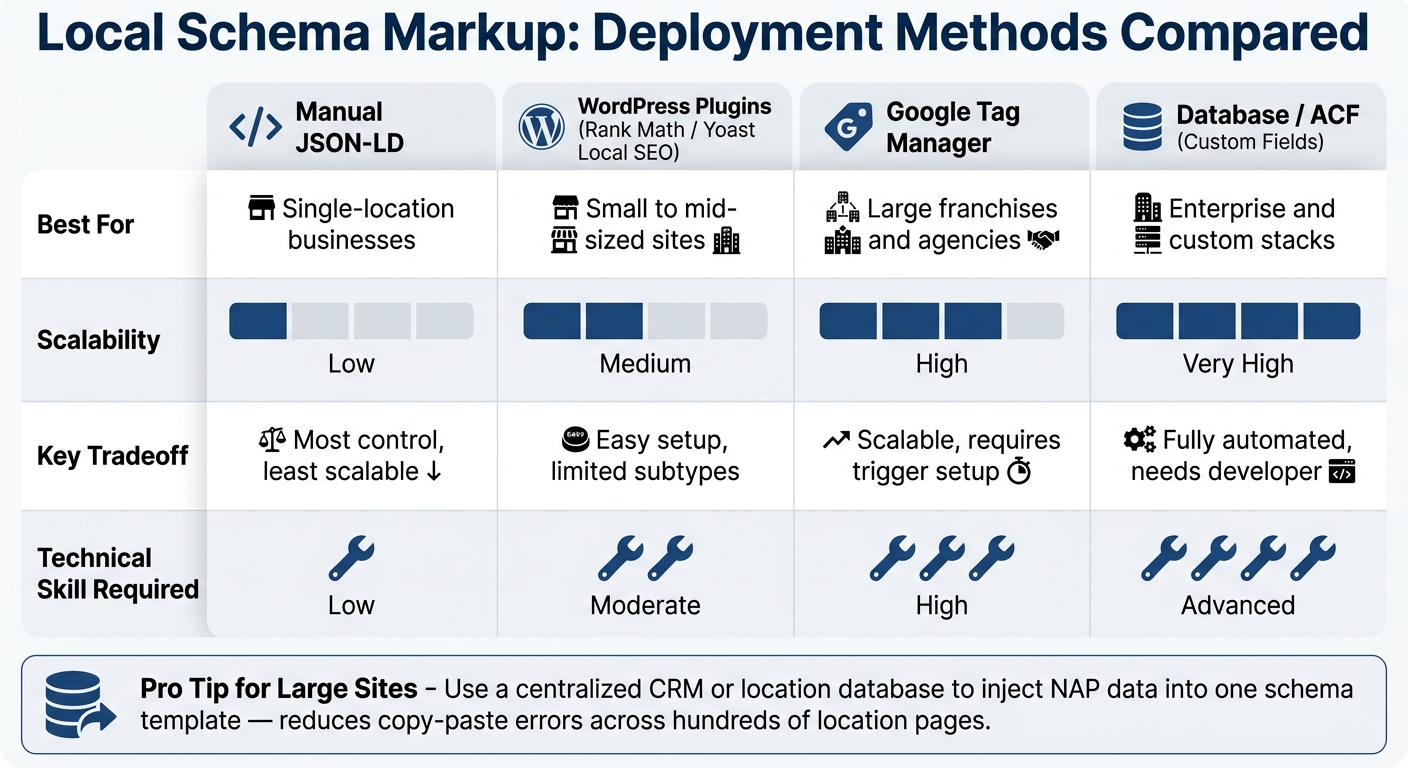
Local Schema Markup Deployment Methods: Which Is Right for You?
Once the core properties are in place, the next step is to match them to your site setup.
Single-Location Setup on a Dedicated Contact or Location Page
For a single-location business, use one LocalBusiness block - or the most specific subtype - on the homepage or a dedicated contact page. Set the @id to the canonical homepage URL so search engines treat it as the main entity for that business.
Keep the business name, address, and telephone exactly the same as the primary location record. Small differences can cause confusion, and that's the last thing you want.
Multi-Location and Department Markup Without Data Overlap
Multi-location sites need a brand-location structure.
Put Organization schema on the homepage for the brand. Then give each location page its own LocalBusiness entity with a unique @id on a URL such as /locations/chicago, along with its own address, phone number, and hours.
Use the parentOrganization property to connect those entities. Each location's schema should point to the parent brand's @id so search engines can see that all locations belong to the same company.
This matters even more when one business sits inside another. A pharmacy inside a grocery store, for example, should have its own LocalBusiness entity with its own phone number and hours instead of being lumped into the main store's markup.
For service-area businesses that don't serve walk-in customers, use the areaServed property with City, State, or GeoCircle references, and leave out the streetAddress field. That setup keeps each location entity separate before validation.
Scalable Deployment Methods for Large U.S. Websites
Once you start dealing with dozens or hundreds of locations, manual JSON-LD can turn into a mess fast. Pick the setup that matches your CMS and the number of locations you manage.
| Deployment Method | Best For | Key Tradeoff |
|---|---|---|
| Manual JSON-LD | Single-location businesses | Most control, least scalable |
| WordPress Plugins (Rank Math, Yoast Local SEO) | Small to mid-sized sites | Easy setup, but limited to supported subtypes |
| Google Tag Manager | Large franchises and agencies | Scalable without touching core code, but requires trigger setup |
| Database/ACF (Custom Fields) | Enterprise and custom stacks | Fully automated, but requires developer resources |
For large organizations, the safest route is a centralized data source such as a CRM or location database that injects distinct NAP data into one schema template. That cuts down on copy-paste mistakes and helps keep each location page lined up with current business information.
Whatever method you use, check every deployed block against the live page content and the business data source of record. After updates, clear cache and resubmit the affected URLs in Google Search Console.
Next, validate the live pages and fix any entity mismatches.
How to Audit, Test, and Maintain Local Schema Markup
After deployment, audit the live pages against the source data.
Audit Pages, Entities, and NAP Consistency
Start with a simple inventory of your SEO tools and services. Every page tied to a physical location should include a LocalBusiness block.
For a single-location site, that usually means the homepage or contact page. For a multi-location site, each branch needs its own dedicated location page, its own @id, and its own schema block. That block should connect back to the site's Organization entity through parentOrganization.
Once you've confirmed coverage, check NAP consistency. This is the big one. The name, address, and phone number in your schema should match the visible page content and your Google Business Profile exactly. Even small differences like "St." vs. "Street" or "Inc" vs. "Incorporated" can create avoidable mismatches.
Also confirm that each page uses the right subtype and a stable @id.
Once coverage is confirmed, test syntax, nesting, and eligibility.
Validate Markup and Fix Common Error Types
A four-tool validation process catches most issues:
| Tool | What It Catches |
|---|---|
| JSONLint | Broken JSON syntax: missing commas, unclosed brackets, mismatched quotes |
| Schema.org Validator | Incorrect nesting, unsupported properties, and type mismatches |
| Google Rich Results Test | Missing required fields, invalid date formats, and rich result eligibility |
| Google Search Console | After-launch regressions, warnings for missing recommended fields, and indexing errors |
Some error types show up again and again in audits.
In openingHoursSpecification, use 23:59 for end-of-day hours instead of 00:00. Why? Because 00:00 can be read as the start of the day, which throws the schedule off.
Phone numbers should use E.164 format, like +1-415-555-0100, instead of local formatting.
And use aggregateRating only for first-party reviews that are visible on the page.
Clear cache and request recrawl in Google Search Console.
Once the markup is live, update it any time business details change.
Set an Ongoing Maintenance Process for Business Changes
Schema is not a set-it-and-forget-it job. If the address changes, the phone number changes, business hours shift, a department is added, a URL changes, or a location closes for a while, the schema needs to change too.
For holiday hours or planned closures, use specialOpeningHoursSpecification with validFrom and validThrough so Google can show the right status.
If you manage many locations, keep a change log tied to your schema templates. Use version control so you can see exactly when each location's markup changed and why. A quarterly audit works well because it helps catch data drift from theme updates, plugin changes, or hour updates before small issues turn into messy ones.
During each quarterly review, confirm that all URLs in your sameAs array still resolve.
Tools, Services, and Final Checklist
What Local Schema Audit Tools Should Help You Verify
Once implementation and upkeep are in place, the next step is picking tools that can check local schema across many pages. And here’s the catch: not every schema tool is made with local SEO in mind.
When you compare options, look at one thing above all else: can the tool verify local entities, NAP details, and Google eligibility?
A solid local schema audit tool should cover these areas:
| Evaluation Criteria | What to Look For | Why It Matters |
|---|---|---|
| Validation Depth | Schema.org and Google rules | Confirms markup is valid and eligible for rich results |
| Multi-Location Support | Bulk URL crawling across hundreds of location pages | Catches template-wide errors before they spread |
| NAP Consistency | Automated comparison of schema vs. GBP and on-page text | NAP mismatches are a primary cause of local pack ranking suppression |
| Property Detection | Flags missing high-value fields such as geo, openingHoursSpecification, image, and priceRange |
Helps maximize rich result eligibility |
| Reporting & Workflow | Exportable issue lists | Speeds up fixes after deployment |
At a basic level, a good tool should spot generic types and NAP mismatches on its own. It should also flag missing areaServed and sameAs fields. Those fields help tie each location to its service area and official business profiles.
Using Top SEO Marketing Directory to Find Local SEO Schema Support
If your team needs outside help, a curated directory can save time. Instead of sifting through a long list of agencies and freelancers, you can focus on providers that already know local schema work.
Top SEO Marketing Directory is a curated resource where you can find technical SEO providers with local SEO expertise to help with schema support at scale.
Conclusion: The Local Schema Practices That Matter Most
The practices that matter most are pretty straightforward:
- Use JSON-LD
- Choose the most specific subtype
- Keep schema identical to visible NAP and GBP data
- Assign stable
@idvalues - Validate after every update
- Revise markup whenever business details change
FAQs
What schema type should I use for my business?
Use the most specific LocalBusiness subtype available on Schema.org, such as Dentist, Restaurant, or Attorney, instead of the generic LocalBusiness type.
If you don’t have a public storefront, use ProfessionalService or Organization. You can also add Service schema for individual offerings and FAQPage schema for relevant Q&A pages. Put it in JSON-LD inside a <script> tag.
Do I need a separate schema block for each location?
Yes. If your business has more than one branch, add one separate LocalBusiness schema block to each branch’s own location page. Then add a sitewide Organization schema block for the main brand.
On each location page, include that branch’s exact:
- address
- phone number
- geo-coordinates
- opening hours
You should also link each branch back to the main brand with the parentOrganization property.
How often should I update local schema markup?
Local schema markup isn't a one-and-done job. You need to update it any time your business details change, like your hours, address, or locations.
It also helps to validate key pages at least once every quarter. And if you make manual changes to your site, check them again right away. That way, you can catch syntax errors or problems caused by plugin, theme, or page layout updates before they turn into bigger headaches.