Visual assets - like app icons, screenshots, and videos - are key to influencing app store performance. While they don’t directly affect rankings, they drive user conversions, which signal relevance to app store algorithms. Here’s why visuals matter:
- First Impressions Matter: The first two screenshots influence 80% of install decisions, and app icons can boost conversions by ±15%.
- AI and Metadata: Since June 2025, Apple’s algorithm reads text in screenshot captions, making them part of your app’s keyword footprint.
- Conversion Boosters: Strong visuals improve click-through rates (CTR) and conversions, indirectly improving rankings.
- Retention Impact: Misleading visuals can hurt retention, which affects rankings negatively.
Key Stats:
- Apps with ratings below 4.0 lose up to 70% of conversions.
- A 1% increase in CTR can improve rankings by 5–15 positions.
- Preview videos can increase conversions by 20–40%, but quality matters.
Visual assets aren’t just about aesthetics - they’re SEO marketing tools for driving downloads, improving rankings, and setting user expectations. Optimize icons, screenshots, and videos to maximize your app’s visibility and performance.
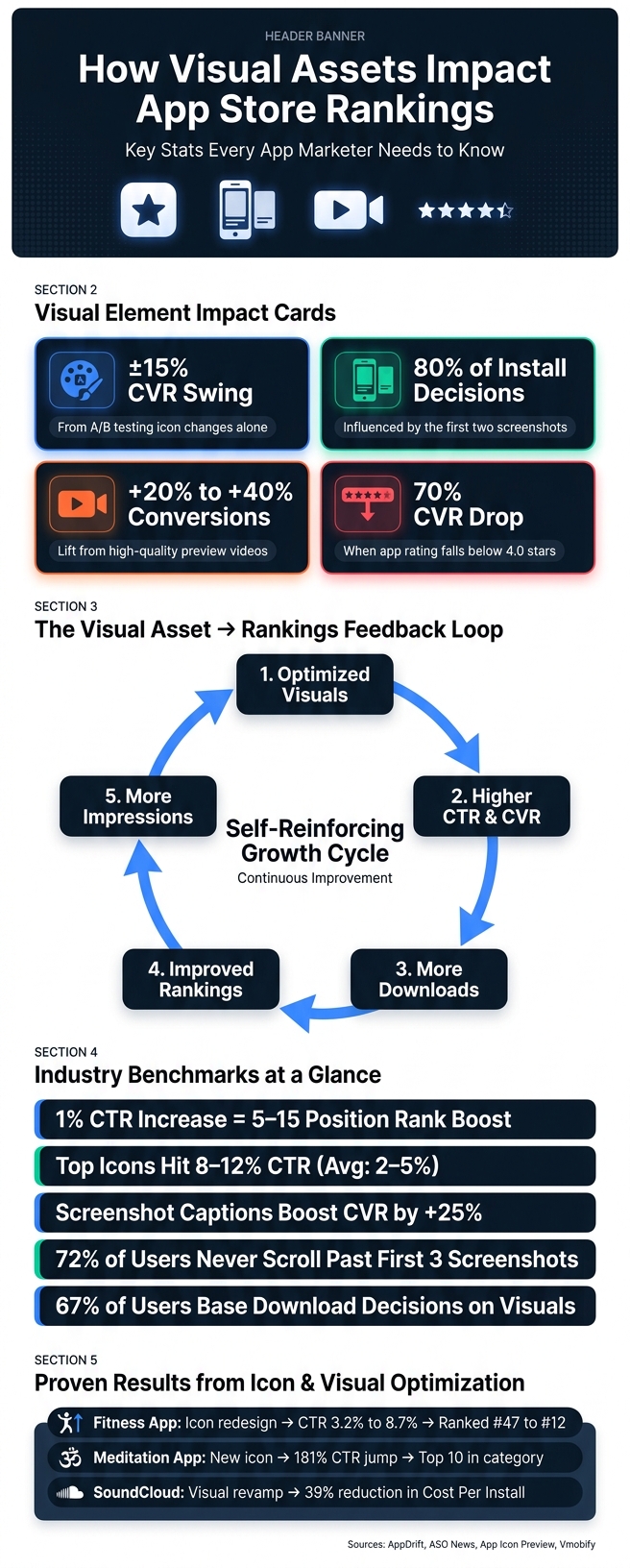
How Visual Assets Impact App Store Rankings: Key Stats & Data
WWDC21: Get ready to optimize your App Store product page | Apple
App Store Ranking Factors and the Role of Visual Assets
App store rankings are influenced by a mix of downloads, conversion rates (CVR), retention, and ratings. These elements create a feedback loop: better visuals lead to higher conversion rates, which drive more downloads, improve rankings, and increase impressions. It’s a cycle where visual appeal plays a pivotal role. As ASO News explains:
"Screenshots that improve conversion do not just generate more downloads from existing traffic - they generate more traffic by improving your position in search results."
Direct vs. Indirect Ranking Factors
Ranking factors don’t all carry the same weight. Direct factors - like your app's title, keywords, and ratings - are explicitly indexed by the algorithm. Indirect factors, on the other hand, shape user behavior. While these aren’t directly read by the algorithm, they influence signals such as click-through rates (CTR) and conversion rates.
Visual assets fall into the indirect category, boosting conversions and download velocity without being directly indexed like keywords. For example, an app listing with a 25% conversion rate will outperform one at 15%, even under identical conditions. This difference often comes down to the strength of visual design.
Visual Assets as Conversion Drivers
Visual elements don’t just indirectly impact rankings; they also serve as powerful conversion tools. Think of them as a funnel: the app icon grabs attention, the first two screenshots drive decision-making, and an autoplay preview video adds an engaging touch in search results.
Ratings also play a critical role. Apps with ratings below 4.0 can see CVR drop by as much as 70%, highlighting the importance of trust signals.
| Visual Element | Impact on CVR | How It Affects Rankings |
|---|---|---|
| App Icon | ±15% swing from A/B testing | Indirect - boosts click-through rates |
| First 2 Screenshots | ~80% of install decisions | Direct (via OCR text indexing) and indirect (via CVR) |
| App Preview Video | +15% to 40% lift | Indirect - enhances engagement with autoplay |
| Ratings | Up to 70% CVR drop if below 4.0 | Direct - serves as a quality and trust signal |
Amol Pomane, Founder of Vmobify, emphasizes the importance of app icons:
"The icon is the single highest-impact listing element you can change without shipping new code."
Retention is another crucial factor. Both Apple and Google prioritize post-install retention metrics (day 1, day 7, and day 30) as indicators of app quality. If your visuals attract downloads but misrepresent the app experience, users may quickly abandon the app, which can hurt your rankings. In essence, well-thought-out visuals not only entice users to click but also set accurate expectations to keep them engaged.
Case Studies: How App Icons Affect Rankings
App icons play a critical role in boosting app store performance. Since icons influence click-through rates (CTR), and CTR impacts download velocity, a well-designed icon can create a chain reaction that improves an app's rankings.
Data on App Icon Performance
Consider this: in 2026, a fitness app climbed from #47 to #12 in rankings after swapping a basic dumbbell icon for a dynamic runner design. This change increased the app's CTR from 3.2% to 8.7%. Similarly, a meditation app replaced a lotus flower with a "peaceful face" icon, resulting in a 181% CTR jump - from 2.1% to 5.9% - and securing a spot in its category's top 10.
An e-commerce app also saw dramatic results. An A/B test revealed that changing its icon from a shopping cart to a gift box boosted its CTR by 86%, from 4.2% to 7.8%, and improved its search ranking by 12 positions.
Industry benchmarks show that successful icons achieve CTR rates between 8–12%, far above the average of 2–5%. Even a modest 1% increase in CTR can elevate an app's ranking by 5–15 positions. On the flip side, icons with CTRs below 1% are considered underperformers.
"The most successful apps don't just design icons - they engineer them. Every color, shape, and symbol is chosen to maximize discoverability." - App Icon Preview
These examples highlight the direct connection between thoughtful icon design and app performance.
Design Traits of High-Performing App Icons
The performance data points to key design elements that make app icons effective. Visual salience is a primary factor - icons that use bold color contrasts, slightly tilted elements, or varying sizes catch attention almost instinctively, even before users consciously process them.
Complexity and symmetry also play a surprising role. The best-performing icons strike a balance: they’re not overly simple to the point of being forgettable, nor are they too complex to appear cluttered. Interestingly, slight asymmetry often outperforms perfectly symmetrical designs. For example, research on transportation apps revealed that nearly 50% of icons used visual metaphors, with 36.2% relying on contextual metaphors. Hybrid metaphors - where different ideas are combined into a single image - tend to resonate most, offering a mix of curiosity and clarity.
Another crucial factor is category alignment. Icons must fit their app's niche. What works for a gaming app might feel completely out of place for a finance app.
| Category | Key Design Traits |
|---|---|
| Gaming | Bright colors, character elements, action imagery |
| Productivity | Clean lines, professional colors, tool-based symbols |
| Social | People, communication symbols, warm color palettes |
| Finance | Trust colors (blue/green), security symbols, professional tone |
Lastly, your icon must be clear and recognizable at 50×50 pixels, the size displayed in search results. This small detail can make or break your app's ability to convert users at every stage of their journey.
sbb-itb-5be333f
How Screenshots, Videos, and Other Visuals Affect Rankings
While app icons grab attention, it's the screenshots and preview videos that truly shape user reactions and influence ranking signals. These visual elements play a key role in how users interact with your app's listing, directly impacting your rankings.
Optimizing Screenshots for Higher Conversions
Screenshots are a major factor in the install decision, influencing up to 45% of users - making them the most impactful element on a product page. On iOS, only the first 1–3 screenshots are visible in search results before users tap through, and 72% of users don’t scroll past those initial frames. This means your first screenshot needs to make an immediate impact.
Apple now uses text from screenshot captions as keyword metadata, factoring it into search relevance.
"Apple now extracts visible text from screenshot images and factors it into search relevance scoring. Your screenshot captions are now keyword metadata, not just marketing copy." - AppDrift
To maximize this, keep captions concise - between 3 and 8 words - and use high-contrast sans-serif fonts at a minimum size of 16pt with a 4.5:1 contrast ratio. Incorporate target keywords that align with your app's title and subtitle. Plan your screenshot sequence strategically: the first slide should create an emotional hook, slides 2–3 highlight key features, and slides 4–5 showcase practical use cases. Adding captions alone can increase conversions by an average of 25%.
Once your screenshots are optimized, preview videos can further amplify user engagement.
Preview Videos and Motion Assets
Preview videos round out your visual toolkit, working with app icons and screenshots to provide dynamic content using top SEO tools and services that strengthens user intent. A well-made preview video can increase conversions by 20% to 40%, but a poorly executed one can harm user trust. This is particularly true for utility apps, where clear, static screenshots often outperform low-quality videos.
On iOS, the first 2–3 seconds of the video auto-play on mute in search results. These initial frames must clearly communicate your app's value without relying on sound. Over on Google Play, the platform's switch to portrait video format in 2025 led to a 7% rise in watch time, a 9% jump in video completions, and a 5% boost in conversion rates. This highlights the importance of both format and content quality in driving results.
Tools and Resources for Visual Asset Optimization
Getting the most out of your visual assets requires a combination of structured testing and the right tools.
Methods for Testing Visual Assets
Testing is essential to understanding how small visual changes can impact downloads and rankings. Both Apple and Google provide free tools to help with this. Google Play's Store Listing Experiments lets you test up to three variants alongside a control. This includes elements like icons, screenshots, videos, and even descriptions. On the other hand, Apple’s Product Page Optimization (PPO) allows for up to three treatments of icons, screenshots, and preview videos, with test periods lasting up to 90 days. Apps using Google Play experiments often report conversion improvements similar to those seen in other testing scenarios.
For more advanced testing, platforms like SplitMetrics and StoreMaven simulate the app store environment using paid traffic, with costs ranging from $500 to $2,000 per test. Meanwhile, tools like UserTesting, Maze, and Lyssna focus on gathering qualitative feedback, helping teams understand the emotional responses and reasoning behind user preferences.
Here are some tips to maximize the effectiveness of your tests:
- Test only one variable at a time to pinpoint the cause of any changes.
- Run tests for 7–14 days to capture both weekday and weekend user behavior.
- Ensure at least 90% statistical confidence before declaring a winner (95% is better for critical updates).
Once your testing confirms what works, you’ll have clearer insights to guide your tool and design choices.
"A/B testing eliminates guesswork by letting data decide which variant performs best." - AppDrift
Case studies highlight the value of these methods. For instance, Peak Brain Training ran a 44-day Apple PPO test comparing three icon designs. While their team initially favored a robot-themed icon, a brain-themed design outperformed it, achieving over 98% confidence and boosting conversion rates by 8%. Similarly, Simply Piano discovered that adding a preview video didn’t improve performance. In fact, their original screenshot-only page performed 3% better than the video treatment.
Using the Top SEO Marketing Directory
To streamline your optimization efforts, consider using the Top SEO Marketing Directory. Finding the right App Store Optimization (ASO) tools can be time-consuming, but this directory offers a centralized resource to compare tools and agencies specializing in optimization, analytics, and audits.
Given that 67% of users base their download decisions on visual elements and typically spend just 7.3 seconds evaluating an app listing, having access to a curated directory of proven tools can save time and improve results. By integrating these resources into your ASO strategy, you can make data-driven decisions that enhance your app store rankings and user engagement.
Conclusion: Why Visual Assets Matter for App Store Rankings
Visual assets have shifted from being mere aesthetics to becoming key factors in app store performance. Your app's icon, screenshots, and preview video are not just eye-catching elements - they directly influence whether users choose to tap, install, and keep your app. With app store algorithms in 2026 focusing heavily on behavioral signals like the impression-to-install ratio, strong visuals now directly impact your app's rankings.
The data backs this up: optimized visuals consistently lead to noticeable conversion rate increases. Over time, these gains snowball, as higher conversions signal relevance to the algorithm, earning your app even more visibility.
Industry examples highlight just how impactful this can be. In early 2026, SoundCloud reduced its Cost Per Install by 39% after revamping its icon and screenshots. Similarly, CBS Sports saw a 20% boost in conversion rates by combining Custom Product Pages with rigorous visual testing. These successes didn’t happen overnight - they were the result of deliberate, iterative improvements.
"The 2026 algorithmic environment rewards context over keywords, engagement over metadata density, and visual storytelling over text fields." - ASO News
The takeaway is clear: treat your app store listing as a living, evolving asset. Even small, incremental improvements - like a 3–5% lift in conversion rates - can have a massive impact on organic growth over time. This reinforces the idea that optimizing visuals isn’t a one-and-done task but an ongoing, strategic process.
FAQs
Do visual assets directly affect app store rankings?
Visual assets like app icons and screenshots don’t directly affect your app’s ranking in the app store. However, they play a crucial role in shaping user behavior by increasing click-through rates and driving more installs. Over time, these factors can indirectly help improve your rankings. While Apple does index some text from screenshots, this only serves as a minor signal to support existing metadata. For expert tips and strategies to optimize your app’s visibility, check out resources available through the Top SEO Marketing Directory.
What text should I include in screenshot captions for iOS search?
When designing screenshot captions for platforms like Apple, it's important to focus on specific, benefit-driven language that resonates with users and boosts discoverability. Here’s how to make your captions work harder:
- Be Specific: Use targeted keywords like "Track Sleep Patterns" instead of generic phrases like "Easy to Use." Specific terms not only clarify the feature but also improve indexing through OCR (Optical Character Recognition).
- Highlight One Idea Per Image: Stick to a single keyword theme for each screenshot. This approach ensures clarity and helps search algorithms better understand your content.
- Prioritize Readability: Use large, clean fonts placed on uncluttered backgrounds. Avoid overlapping text with busy visuals to keep captions legible at a glance.
- Avoid Repetition: Each caption should bring something new to the table. Repeating the same text across multiple screenshots dilutes the impact and wastes valuable space.
By following these principles, your captions can effectively communicate value while optimizing for ranking and user engagement.
How do I A/B test icons and screenshots without hurting rankings?
To test icons and screenshots without impacting your app's rankings, leverage tools like the Product Page Optimization (PPO) feature in App Store Connect or Store Listing Experiments in the Google Play Console. These tools distribute traffic randomly, ensuring accurate comparisons.
Focus on testing one variable at a time - whether it's an icon, a screenshot, or another visual element. Let your experiments run for at least seven days and aim for statistical significance with a confidence level of 90%-95%. Avoid the temptation to end tests early; this ensures your results are reliable and actionable.