Log file analysis is essential for understanding how search engine bots interact with your website. It helps identify crawl inefficiencies, technical issues, and opportunities to optimize your site's performance. Below are five top SEO tools that can turn raw server data into actionable insights:
- Screaming Frog Log File Analyser: A desktop tool for processing server logs locally. Best for small to medium websites with manual log uploads. Pricing starts at $139/year per license.
- JetOctopus: A cloud-based platform with unlimited log capacity and real-time log streaming. Ideal for enterprise-level websites managing large datasets. Pricing begins at $99/month for 1 million log lines.
- Oncrawl Log Analyzer: Designed for large-scale log analysis with real-time monitoring and advanced features like custom alerts. Pricing is available upon request.
- SEMrush Log File Analyzer: A browser-based tool included in the SEMrush SEO Toolkit. Suitable for small to medium sites with a 1GB upload limit. Comes with SEMrush subscription.
- SEOlyzer: A SaaS tool offering real-time processing and server-side efficiency. Handles millions of log lines daily and supports advanced segmentation. Pricing varies by business size.
Quick Comparison
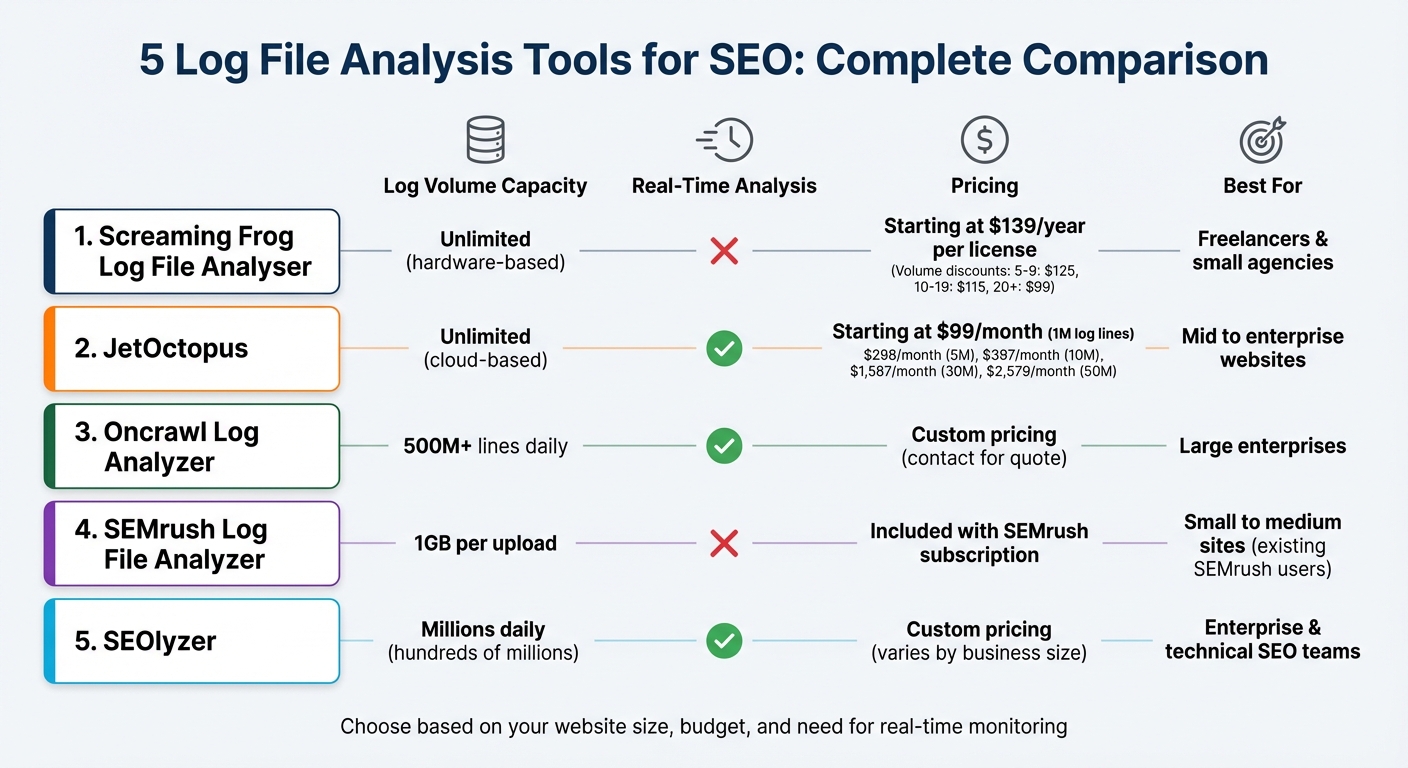
| Tool | Log Volume Capacity | Real-Time Analysis | Pricing | Best For |
|---|---|---|---|---|
| Screaming Frog | Unlimited (hardware-based) | No | $139/year per license | Freelancers & small agencies |
| JetOctopus | Unlimited (cloud-based) | Yes | Starting at $99/month | Mid to enterprise websites |
| Oncrawl | 500M+ lines daily | Yes | Custom pricing | Large enterprises |
| SEMrush Log File Analyzer | 1GB per upload | No | Included with SEMrush | Small to medium sites |
| SEOlyzer | Millions daily | Yes | Custom pricing | Enterprise websites |
Each tool offers unique strengths, from real-time monitoring to advanced segmentation and scalability. Choose the one that aligns with your website's size and technical needs for better crawl efficiency and SEO performance.
Log File Analysis Tools Comparison: Features, Pricing, and Best Use Cases
How log file analysis can supercharge SEO - Sally Raymer - brightonSEO September 2023

sbb-itb-5be333f
1. Screaming Frog Log File Analyser
Screaming Frog's Log File Analyser is a tool designed to process server logs directly on your computer, relying on your hardware for speed. It stores data in a local database, making it a powerful option for log analysis.
Log Volume Capacity
The free version of the tool allows analysis of up to 1,000 log events, which is fine for testing but falls short for larger websites. The paid version removes this limit entirely, with your hard drive capacity being the only restriction. As Screaming Frog puts it:
"The maximum number of log events you can analyse is dependent on hard drive capacity".
To work efficiently, plan for disk space usage of about 2.5 times the size of your uncompressed log file. For example, a 10 GB log file will require 25 GB of free storage. Using an SSD is highly recommended for faster performance, and native Apple Silicon support can double the speed of log imports.
Real-Time Analysis Capabilities
This tool doesn't support real-time monitoring. Instead, you manually import raw access logs - such as those from Apache, NGINX, IIS, Amazon ELB, or JSON formats - for local processing. With version 6.0, the tool introduced instant bot verification for Googlebot and Bingbot using public IP lists, which is faster than reverse DNS lookups. Additionally, the "Import History" feature lets you add new logs to an existing project over time, helping you track bot activity trends across weeks or even months.
Crawler Behavior Insights
The Log File Analyser automatically verifies search engine bots like Googlebot, Bingbot, Yandex, and Baidu, as well as AI crawlers like ChatGPT, Claude, GPTBot, and PerplexityBot. This ensures spoofed requests are filtered out. The tool provides detailed insights into crawler behavior, including:
- Crawl frequency for individual URLs
- Response codes (e.g., 404, 500, 301)
- Average response times in milliseconds
These metrics are invaluable for spotting slow-loading pages that could harm your crawl budget. Dan Sharp, Director at Screaming Frog, highlights this benefit:
"Slow responses will reduce crawl budget; so by analysing 'average response time' that the search engines are actually experiencing, you can identify problematic sections or URLs for optimisation".
The tool also identifies orphan pages - URLs that bots discover but aren't linked internally - by comparing log data with a site crawl. These insights provide actionable data for improving site performance and crawl efficiency.
Pricing and Scalability
The tool's pricing is straightforward, offering flexibility for different team sizes. A single license costs $139 per year, with discounts available for bulk purchases:
| Licenses | Price per License (USD) |
|---|---|
| 1–4 | $139 |
| 5–9 | $125 |
| 10–19 | $115 |
| 20+ | $99 |
Each license is tied to an individual user, but you can install it on multiple devices (e.g., a work computer and a personal laptop) as long as only the licensed user operates it. If your license expires, the software reverts to the free version. While you can still open existing projects, adding new data will require a renewal.
2. JetOctopus

JetOctopus stands out as a cloud-based platform tailored for enterprise-level log analysis, especially for websites managing over 100 million pages. With a track record of processing 380 billion log lines and crawling over 10 billion pages across 35,000 websites, it offers a robust solution for large-scale data needs.
Log Volume Capacity
One of JetOctopus's major advantages is its unlimited log line capacity - a rarity among similar tools. This means no matter how large your site is, you won’t face restrictions. The platform also removes limits on projects, domains, or users, bundling all features into a single subscription.
As Ann Smarty, a well-known SEO influencer, highlights:
"JetOctopus is one of the most efficient crawlers on the market... Its most convincing selling point is that it has no crawl limits, no simultaneous crawl limits and no project limits giving you more data for less money".
The platform’s ability to store up to 12 months of historical log data ensures you can monitor long-term trends in bot behavior while your subscription remains active.
Real-Time Analysis Capabilities
JetOctopus enables real-time log streaming using a simple two-line integration or Nginx setup, allowing you to monitor bot activity as it happens. This feature is particularly useful for identifying and resolving issues like slow load times, unexpected redirects, or 404 errors before they impact your site's performance.
Iryna Rastoropova, SEO Manager at Rozetka.com.ua, shares her experience:
"I appreciate the real time information about logs with intuitive interface. With JetOctopus at hand I have control on crawl budget and indexation".
To streamline workflows, JetOctopus integrates log data with Google Search Console, crawl data, and Google Analytics, consolidating all insights into one interface. This eliminates the hassle of toggling between multiple SEO tools.
Crawler Behavior Insights
JetOctopus monitors over 40 different types of bots, including well-known ones like Googlebot and Bingbot, as well as AI crawlers like ChatGPT, Claude, and Perplexity. Its AI Bots Analyzer tracks visits from LLM crawlers, helping users manage unauthorized access.
The Bot Dynamics report provides a visual overview of changes in Googlebot activity and highlights crawl budget inefficiencies, such as bots focusing on low-value pages instead of high-priority content. For instance, Preply.com achieved a 300% increase in website indexation within a year by leveraging JetOctopus's log and crawl data. Similarly, Sviatoslav Slaboshpytskyi, Head of SEO at a large iGaming product, used the platform to resolve technical issues and optimize crawl budget, resulting in organic traffic growth from 80,000 to 260,000 daily visits in just six months.
Pricing and Scalability
JetOctopus offers scalable pricing based on log volume, making it accessible for businesses of various sizes. Here’s a breakdown of its monthly pricing (billed annually):
| Log Volume | Monthly Price (USD) |
|---|---|
| 1 Million Log Lines | $99 |
| 5 Million Log Lines | $298 |
| 10 Million Log Lines | $397 |
| 30 Million Log Lines | $1,587 |
| 50 Million Log Lines | $2,579 |
For even larger requirements, "No Limits" packages are available. The platform also provides a 7-day free trial without requiring a credit card, ensuring users can explore its features risk-free. With high ratings - 4.4/5 on G2 and 4.8/5 on Capterra - users frequently commend its speed, visualization tools, and ability to handle massive datasets without hardware constraints.
3. Oncrawl Log Analyzer
Oncrawl Log Analyzer is tailored for medium to large websites that need a powerful tool to analyze server logs without losing precision. It’s built to handle enormous data volumes, offering complete transparency into every server request - something many traditional analytics tools miss due to data sampling or hidden fields.
Log Volume Capacity
Oncrawl can process over 500 million log lines daily. Its auto-scalable cloud infrastructure adjusts dynamically to meet your processing and storage needs, eliminating the hassle of hardware limitations.
The platform supports various log formats, including Nginx, Apache, and IIS, while ensuring GDPR compliance by not storing IP addresses. For enterprise users, Oncrawl offers secure FTP automation for log transfers, backed by dedicated team support.
Real-Time Analysis Capabilities
The "Live Logs" dashboard delivers up-to-the-minute insights into bot activity. Logs can be uploaded via FTP, web interface, or automated integrations like Amazon S3 and Splunk.
Oncrawl also provides automated custom alerts, notifying you of any data collection gaps or unusual drops in search engine bot activity. This feature is particularly useful during site migrations, where immediate feedback is crucial to confirm that search engines are correctly detecting new redirects and URL structures.
Mark Stanford, Organic Performance Lead (Technical) at Roast, emphasizes its utility:
"Oncrawl is a fast, scalable tool that helps our team deliver technical audits on large sites. Its speed makes it easy to spot crawlability and indexation issues."
Crawler Behavior Insights
Oncrawl tracks activity from major search engines like Google, Bing, Yandex, and Baidu, along with a dedicated AI bots dashboard to monitor crawlers such as OpenAI (ChatGPT), Gemini, and Perplexity. This feature helps you understand how generative AI systems interact with your content.
The tool identifies crawl budget inefficiencies, flagging "zombie pages" (linked internally but not visited) and "orphan pages" (visited but not linked). This enables you to decide whether to optimize or remove such pages. The "Fresh Rank" metric offers insights into indexation speed by tracking the time between a page’s publication, its first crawl, and its first organic visit.
Zbigniew Dróżdż, Senior SEO Specialist at Booksy, highlights its strengths:
"Oncrawl is key for analyzing large marketplaces and tracking Googlebot. Its strength: combining crawl data, bot hits, and external sources to uncover high-impact SEO actions."
Additionally, Oncrawl authenticates bot traffic, distinguishing legitimate search engine crawlers from spoofed IP addresses that may be scraping your site. This is a critical feature, as research indicates bad bots can consume up to 28.9% of a website’s bandwidth.
Pricing and Scalability
Oncrawl is aimed at medium to large websites seeking enterprise-level solutions. Pricing details aren’t publicly available - you’ll need to request a demo for a custom quote based on your log volume and specific needs. All log analysis plans include live monitoring and alerting features.
Kevin Indig, Growth Advisor, highlights its integration capabilities:
"Big bonus points for the seamless API. Even bigger bonus points for being able to cross-reference with the GSC API and even simple spreadsheets."
4. SEMrush Log File Analyzer
The SEMrush Log File Analyzer is a browser-based tool included in the SEMrush SEO Toolkit. It’s designed for periodic audits, offering quick insights without requiring constant monitoring.
Log Volume Capacity
This tool supports uploads up to 1GB, requiring users to manually upload access.log files from their servers. These files are typically found in directories like /logs/ or /access_log/. The tool works with formats such as Combined Log Format, W3C Extended, Kinsta, and Amazon Classic Load Balancer.
One important limitation is that you can only work on one project at a time. To analyze new logs, you’ll need to use the "Delete Data" option to clear the previous dataset.
Now, let’s look at how the tool transforms this data into actionable insights.
Real-Time Analysis Capabilities
The Log File Analyzer processes the uploaded logs - usually covering a 30-day period - and presents the data through detailed tables and graphs. These visualizations help identify trends like spikes or dips in crawler activity.
For example, one agency used the tool to uncover redirect chains that were slowing down crawl efficiency. By adding canonical tags and cleaning up outdated redirects, they improved crawl efficiency and saw a 15% boost in organic traffic within two months.
"The logs showed that Googlebot was hitting redirect chains and dead-end URLs tied to out-of-stock product variants, something the client's CMS didn't expose clearly. These issues were eating up crawl budget and signaling instability." - Ivan Vislavskiy, CEO and Co-Founder, Comrade Digital Marketing Agency
Crawler Behavior Insights
The tool monitors activity from Googlebot (both Desktop and Mobile) as well as AI bots like GPTBot, ClaudeBot, PerplexityBot, and OAI-SearchBot. One expert shared:
"Your log files can tell you how ChatGPT and Claude are engaging with your site on behalf of users. The screenshot below highlights how during a 30-day window, the ChatGPT-User agent hit this site 48,000+ times across nearly 7,000 unique URLs."
Key features include the "Hits by Pages" report, which pinpoints pages consuming excessive crawl budget, and the "Inconsistent status codes" filter, which flags URLs that alternate between statuses like 200 and 404. These patterns often indicate server issues or misconfigured redirects. Additionally, the "File types crawled" report ensures bots are prioritizing HTML content over resource-heavy files like JavaScript or CSS.
Pricing and Scalability
The Log File Analyzer comes as part of the SEMrush SEO Toolkit, and new users can test it with a 7-day free trial. For larger-scale needs, SEMrush offers advanced log analysis features through its "Site Intelligence and AI Optimization" plans.
While the tool’s 1GB upload limit and manual data handling may not suit massive enterprise websites, it’s an excellent fit for small to medium-sized sites looking for periodic crawl audits.
5. SEOlyzer
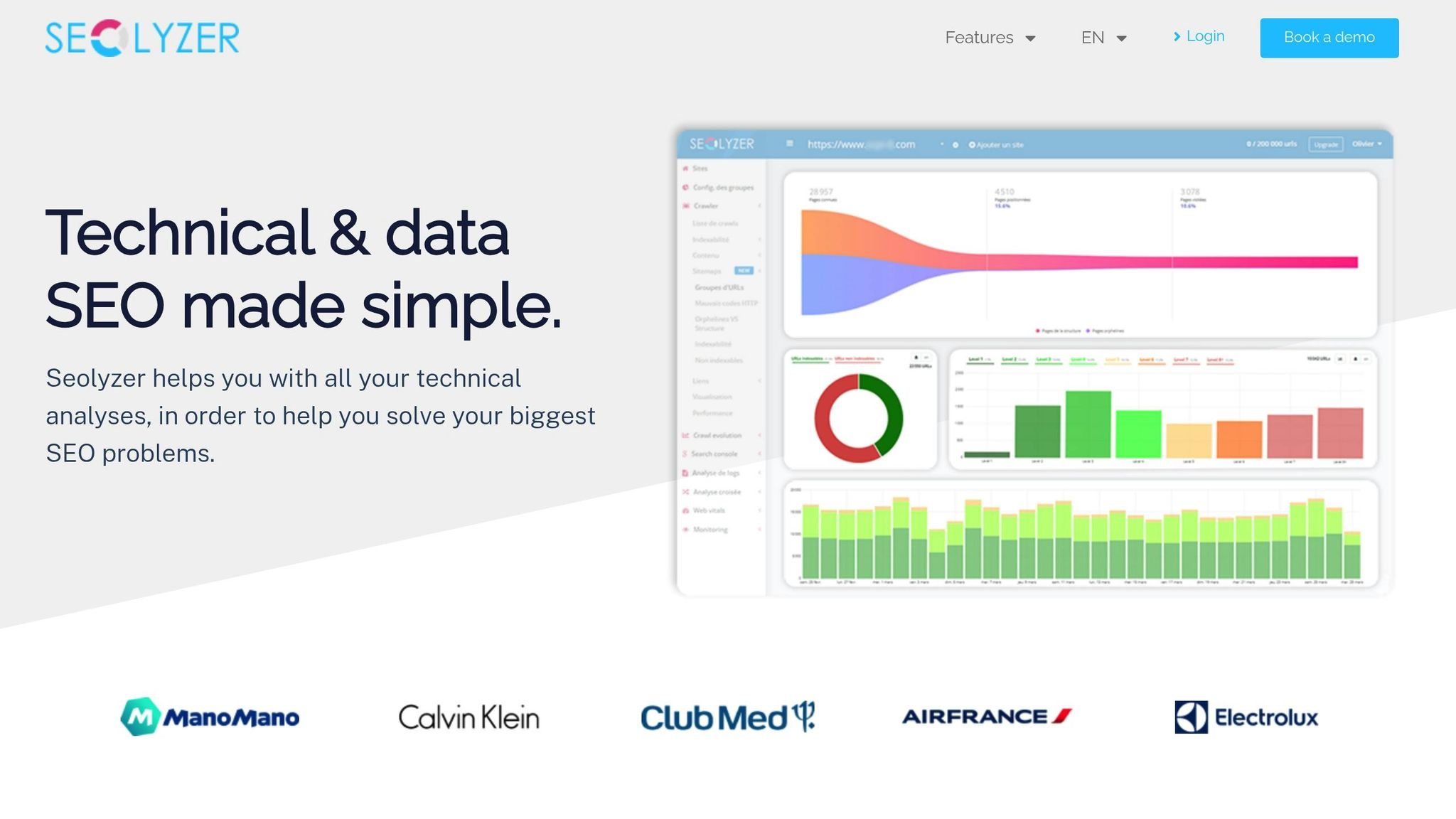
SEOlyzer takes server log analysis to the next level, turning raw data into actionable insights with a focus on real-time processing and server-side efficiency. This SaaS tool is designed for enterprise websites, handling enormous datasets directly on its servers, which means no need for high-performance hardware or manual uploads.
Log Volume Capacity
SEOlyzer is built to process hundreds of millions of log file lines daily. It integrates seamlessly with a wide range of data sources, including Nginx, Apache, Varnish, Cloudflare, and Amazon S3, making it adaptable to various server setups. This infrastructure enables users to extract insights quickly and effectively.
The tool’s integrated crawler is capable of managing websites with over 50 million pages. It also supports unlimited page segmentation, allowing users to group millions of URLs into hierarchical categories for in-depth analysis. All data is stored securely in France, ensuring GDPR compliance with automatic anonymization of personal information during processing.
Real-Time Analysis Capabilities
One of SEOlyzer's standout features is its ability to bypass the typical three-day delay found in Google Search Console data. This means you can immediately detect issues like 4xx and 5xx errors, addressing them before they impact your rankings.
"Say goodbye to the usual challenges to access and monitor how Google crawls your site! Seolyzer easily integrates and allows you to visualize and analyze your sites logs activity for SEO purposes, in real time." - Aleyda Solis, International SEO Consultant
This real-time functionality is especially useful during critical changes, such as HTTP to HTTPS migrations or implementing 301 redirects. You can confirm that redirects are functioning and that bots are discovering new URLs right away, without waiting for delayed data from Search Console.
Crawler Behavior Insights
SEOlyzer provides detailed insights into Googlebot’s behavior, highlighting which pages it prioritizes while identifying orphaned or underutilized pages. It also differentiates between desktop and mobile bots and flags "bad bots" or external threats that could strain your server.
By combining log data with SEO crawls and Google Search Console metrics, the platform offers a deeper context for analysis. Pierre Calvet, Head of SEO at Club Med, shared his experience:
"Tracking errors to be corrected, monitoring the number of sites, and monitoring everything thanks to scheduled crawls, crossed with log analysis: Seolyzer has really helped to facilitate my worldwide SEO task at Club Med."
The page segmentation feature allows users to categorize different types of URLs - like product pages or blog posts - and measure how specific SEO efforts impact these segments in real time.
Pricing and Scalability
SEOlyzer’s pricing is designed to scale with businesses of all sizes, from small websites to massive enterprises. Paid plans include advanced features like crawl comparison, cross-analysis, and API access at every tier. The API functionality has proven especially valuable for companies like Manomano. Pierre Bruat, their Head of SEO, noted:
"The Seolyzer API allows us to easily retrieve our entire internal linking, i.e. millions of links, in order to optimize it thanks to our Data Scientists."
With no need for additional hardware or storage, SEOlyzer supports businesses of all scales, ensuring a smooth, efficient experience.
Tool Comparison Table
Selecting the right log file analysis tool hinges on factors like your website's size, technical needs, and budget. Each tool brings unique strengths, including handling log volumes, offering real-time insights, analyzing crawler behavior, and pricing flexibility. Here's a breakdown to help you compare their capabilities at a glance.
Screaming Frog Log File Analyser gives you unlimited capacity with its paid version, constrained only by your local hard drive's storage. Priced at $139 annually for a single license, costs drop to $99 per license for teams of 20 or more. Since it requires manual log uploads, it’s a great fit for freelancers and small agencies looking for essential SEO tools to manage straightforward projects.
SEMrush Log File Analyzer integrates with SEMrush’s broader SEO Toolkit and supports log files up to 1GB per upload. Working entirely in-browser, it requires manual uploads and lacks real-time monitoring. This tool works best for SEMrush subscribers who need quick, no-installation audits.
JetOctopus operates as a cloud-based SaaS platform with a 7-day free trial. It’s designed for handling large log volumes via cloud integration and combines log data with Google Search Console metrics. However, it processes logs through uploads rather than real-time analysis, making it a strong choice for mid-sized businesses seeking flexible scaling options.
Oncrawl Log Analyzer caters to enterprise-level needs, managing over 500 million log lines daily with an auto-scalable infrastructure. It stands out as one of the few tools offering real-time analysis, enabling teams to detect issues and monitor site migrations within hours. Pricing is subscription-based and tailored to large-scale websites.
| Tool | Log Volume Capacity | Real-Time Analysis | Pricing Model | Best For |
|---|---|---|---|---|
| Screaming Frog | Unlimited (hardware-dependent) | No (Manual upload) | $139/year per license | Freelancers & small agencies |
| SEMrush | 1GB per upload | No (Manual upload) | Included with SEMrush subscription | Existing SEMrush users |
| JetOctopus | High (Cloud-based) | No (Upload-based) | Paid subscription with 7-day trial | Mid-market companies |
| Oncrawl | 500M+ lines per day | Yes | Paid subscription | Large enterprises |
| SEOlyzer | Hundreds of millions daily | Yes (Real-time) | Paid subscription | Enterprise & technical SEO teams |
SEOlyzer stands out with its real-time processing and direct integration with servers like Nginx, Apache, and Amazon S3, eliminating the need for manual uploads. Its pricing adjusts based on business size, and all plans include API access for advanced integrations.
Conclusion
Log file analysis offers the clearest picture of how search engines interact with your site in real time. Unlike crawl simulations, it highlights where bots face issues like redirect chains, crawl traps, or inefficiencies - factors that can waste crawl budget and hurt your rankings.
Choosing the right log analysis tool depends on your website's size and technical needs. As mentioned earlier, some tools are better suited for smaller projects, while others are designed for enterprise-level sites handling massive data.
"Log files surface the real problems and root causes that deserve your attention, helping you prioritize fixes faster and avoid chasing down errors that don't exist." - Kody Wirth, Sr. Digital Marketing Strategist, Semrush
Regular log monitoring is crucial for maintaining SEO performance, especially after a site migration or major update. It helps you quickly spot errors, track inefficient bot activity, and prioritize fixes by cross-referencing data with Search Console. As AI crawlers like GPTBot and ClaudeBot become more prevalent in 2026, log analysis has become essential for managing bandwidth and understanding how your site is represented in AI-driven search.
Whether you're refining your crawl budget, analyzing AI bot activity, or validating site changes, these five tools can equip you with the data you need to make smarter SEO decisions and improve search visibility.
FAQs
What’s the best log file analysis tool for my website’s size and needs?
The best log file analysis tool for you will depend on your website’s size and specific needs. If you’re running a smaller site or just starting out, tools with free versions, like Screaming Frog’s Log File Analyzer, are a solid choice. They allow you to handle up to 1,000 log events and perform basic audits without any cost. On the other hand, larger or more complex websites might benefit from paid options like JetOctopus or the full version of Screaming Frog, which provide advanced features such as detailed bot tracking, error detection, and insights into crawl behavior.
When choosing a tool, think about factors like real-time analysis capabilities, compatibility with your operating system, and how well it integrates with other SEO platforms. High-traffic sites or those needing deeper technical analysis will likely require more sophisticated tools. Make sure to pick one that matches your traffic volume and goals to get the most out of your SEO efforts.
How does real-time log analysis benefit SEO?
Real-time log analysis offers a clear window into how search engine crawlers interact with your site. It’s a powerful way to spot crawl issues, make better use of your crawl budget, and catch indexing problems before they escalate. Fixing these problems quickly can boost your site's visibility and performance in search results.
Another advantage is the ability to track changes in real time. This means you can address technical errors or bottlenecks as they occur, leading to smoother user experiences and potentially higher search rankings.
How does log file analysis help improve crawl efficiency for SEO?
Log file analysis gives you a behind-the-scenes look at how search engine bots interact with your website. By diving into server logs, you can see which pages are being crawled, how frequently, and whether there are any hiccups like errors or redundant requests. This insight helps you make sure your crawl budget - the number of pages a search engine will crawl on your site - is spent wisely, focusing on high-priority pages instead of wasting resources on less important ones.
It’s also a great way to uncover issues that might be holding your site back. For example, duplicate content, broken links, or irrelevant pages can all drain your crawl budget. By addressing these problems - like blocking unimportant pages with robots.txt or fixing broken URLs - you can guide search engines to focus on your most valuable content. This not only improves crawling but also helps with better indexing, which can boost rankings and bring in more organic traffic.
In essence, log file analysis is a key part of technical SEO. It ensures search engines crawl your site efficiently, prioritizing what matters most.