I use canonical tags for duplicate pages, noindex for pages that should stay out of search, and indexing for filters people search for. For example, /shoes?sort=price usually points to /shoes, while a black-shoes filter may deserve its own indexed page.
Here’s how I choose:
- Sort, tracking, and session URLs: Remove unnecessary parameters or point duplicates to the preferred URL.
- Filtered pages: Keep useful search landing pages indexable. Use
noindexfor low-value filters that shoppers still need. - Empty results: Separate temporary inventory gaps from invalid or removed pages, which generally need HTTP
404or410. - Setup checks: Keep noindexed pages crawlable, avoid conflicting directives, and align internal links and sitemaps with preferred URLs.
The catch? Neither canonical nor noindex stops excess URL generation. I limit unnecessary combinations, then use crawler checks and Google Search Console to compare <u>the rule I set with Google’s actual treatment</u>.
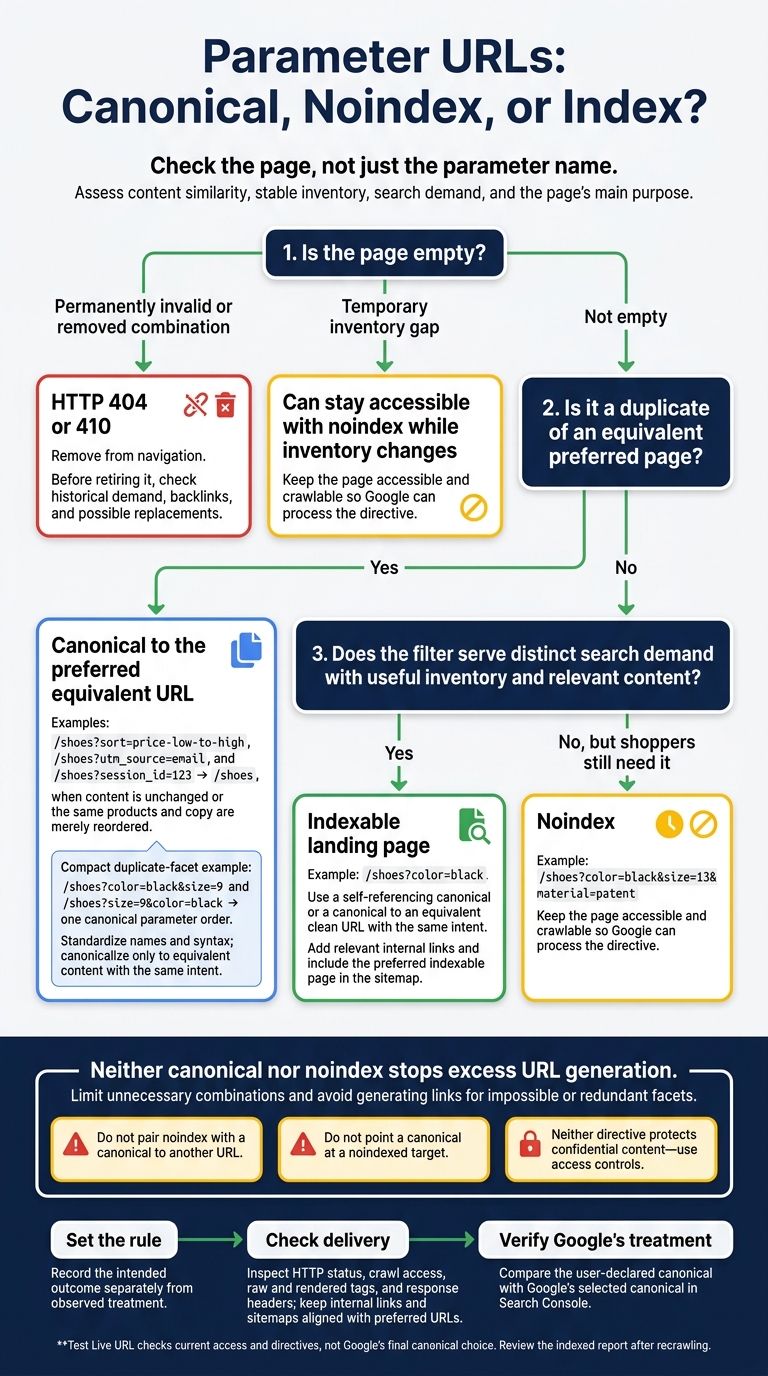
Parameter URLs: Canonical, Noindex, or Index?
“How can I prevent tracking parameters in Google Search results?”- SEO Office Hours Shorts
sbb-itb-5be333f
Canonical vs. Noindex: How to Choose
| Decision point | Canonical | Noindex |
|---|---|---|
| Intended result | Preferred duplicate URL in Search | Excluded from search results |
| Signal handling | Helps consolidate duplicate-page signals | Does not replace canonical consolidation |
| Main risk | Google selects a different canonical | Useful content is accidentally excluded |
| Crawl behavior | Does not block crawling | Requires crawling to process the directive |
Choose the rule that matches your goal, then check its setup below.
Canonical Tags for Duplicate Pages
For duplicate parameter URLs, including sort, tracking, and session variants, place <link rel="canonical" href="…"> in the page’s <head>. Check the target, not just the tag: the target should return HTTP 200 and allow crawling. Avoid unrelated targets and canonical chains. Internal links and XML sitemaps should point to the preferred URL.
In Google Search Console’s URL Inspection tool, compare the user-declared canonical with Google’s selected canonical. If they differ, check for competing signals in content similarity, internal links, and sitemap entries.
Noindex for Pages That Should Stay Out of Search Results
Use noindex for low-value filtered pages that need to stay accessible but should not appear in search results. Add <meta name="robots" content="noindex"> to the <head> or send X-Robots-Tag: noindex in the HTTP response header. Google must crawl the URL before noindex takes effect. Check template and header rules carefully: a rule that applies too broadly can also exclude useful category pages.
Avoid Conflicting Directives
Keep your signals consistent. Do not pair noindex with a canonical to another URL, or point a canonical at a noindexed target. If a filtered page serves a distinct search intent, use a self-referencing canonical.
Neither directive hides confidential content. Use access controls for that.
Choose Rules by Parameter Type
Check the page, not just the parameter name. Set pattern-wide rules based on content similarity, stable inventory, and search demand. Compare titles, headings, descriptive copy, product sets, and each page’s main purpose. Review query data, impressions, clicks, and rankings using top SEO tools and marketing resources. The same filter can produce both indexable landing pages and thin URLs.
Use these examples to match each parameter pattern to an indexation rule.
Sort, Tracking, and Session URLs
/shoes?sort=price-low-to-highshould canonicalize to/shoeswhen it contains the same products and copy in a different order. Apply the same treatment to/shoes?utm_source=emailand/shoes?session_id=123when the content is unchanged. Keep internal links clean and session identifiers out of URLs where possible. Protect private session data with authentication, notnoindex.
Facet Rules and URL Generation
For facet combinations,
/shoes?color=black&size=9and/shoes?size=9&color=blackshould use one canonical parameter order. Standardize parameter names and syntax, and canonicalize duplicate facets only to equivalent pages with the same intent and content. A low-value combination such as/shoes?color=black&size=13&material=patentcan usenoindexif shoppers still need to access it. Avoid generating links for impossible or redundant combinations: canonical and noindex do not stop crawl bloat.
Handle empty results based on why they’re empty. A temporarily empty filter can stay accessible with noindex while inventory changes. A permanently invalid or removed combination generally calls for HTTP 404 or 410 and removal from navigation. Before retiring it, check historical demand, backlinks, and possible replacements.
Filtered Categories Worth Indexing
If a filter attracts search demand, treat it as a landing page rather than a duplicate.
/shoes?color=blackmay deserve indexing if shoppers search for black shoes, inventory stays useful, and the page provides relevant content. Use a self-canonical or a canonical to an equivalent clean URL with the same intent. Thin or temporary filters can stay accessible withnoindex. Do not canonicalize distinct filtered content to a broad category merely because the URL contains parameters.
Implement and Check Parameter Rules
After choosing canonical or noindex, check how each template delivers the rule.
URL Validation Checklist
Before deployment, test a sample URL for each parameter pattern. Record the intended rule separately from Google’s observed treatment.
| Check | What to record |
|---|---|
| Intent | Sample URL, parameter purpose, and intended outcome: rank, consolidate, or stay out of Search |
| Rule and target | Canonical or noindex; absolute canonical target; target status and indexability |
| Crawl access | HTTP status, redirect chain, and robots.txt access |
| Links and sitemaps | Internal-link treatment, sitemap inclusion, and alignment with the preferred URL |
| Delivered signals | Raw and rendered canonical tags, robots meta, X-Robots-Tag, and Link headers |
| Conflicts | Unexpected redirects, blocked targets, noindexed canonicals, or conflicting directives |
| Google’s treatment | User-declared canonical, Google’s chosen canonical, whether indexing is allowed, and indexation status |
Check that the HTML head contains one valid canonical element. Its target should resolve directly, allow crawling, and have no unintended noindex. Inspect response headers and rendered HTML, since server or CDN rules can change what Google receives.
Test every supported sort option, single and combined facets, tracking and session parameters, reordered or duplicated parameters, empty values, and invalid combinations. Check the relevant mobile, desktop, and JavaScript-rendered templates. Repeat these checks after routing, template, or header changes - not just after the first rollout.
Then verify live pages using crawler output and Search Console.
Tools for Checking Individual URLs
Use top SEO marketing tools and crawlers that report raw and rendered directives, redirects, internal links, and sitemap presence. Group findings by parameter pattern to confirm that pages receive the chosen rules for consolidation, exclusion, or indexability.
In Google Search Console URL Inspection, compare the indexed report with Test Live URL. The live test checks current access and directives, not Google’s final canonical choice. After Google recrawls the URL, review Google’s chosen canonical and indexation status in the indexed report.
Conclusion: Match the Rule to the Search Goal
Choose the rule based on the page’s role in search. Use canonical tags to consolidate signals, noindex to exclude pages, and indexing only for parameter pages with clear search value. Google advises against using noindex to select a canonical: it excludes pages rather than consolidating their signals. Index only filters with distinct demand and differentiated content. Set deliberate canonicals, add relevant internal links, and include those pages in the sitemap.
Align crawl access with indexing signals. Then track canonical mismatches, indexed URL counts, and search performance, rather than checking only whether the tags remain in place. Confirm that Google follows the directive chosen for each page’s purpose.
FAQs
How long until Google processes my indexing changes?
After making indexing changes, select Validate Fix in Google Search Console. Processing can take up to 2 weeks, or longer for larger sites.
Search Console data can lag by 3-4 days, so removed URLs may still show as indexed. Before requesting re-indexing, use Test Live URL in the URL Inspection Tool to check your fixes right away.
When should I switch a filter from noindex to indexable?
Make a filtered page indexable when it serves a specific search intent or targets long-tail keywords with content that goes beyond the main category page. Index filtered views that draw meaningful organic traffic or answer a distinct user query, rather than duplicate an existing category page.
Before removing noindex, check that robots.txt allows crawling. Search engines need to crawl the page to detect that the directive is gone.
How can I reduce crawl bloat without breaking filters?
Prioritize canonical tags over noindex directives. Point filtered page variations to the clean category URL. This helps consolidate ranking signals and address duplicate content while keeping filters available to users.
For more control, use robots.txt to block specific low-value filter patterns and limit crawling of redundant combinations. Avoid noindex on these pages to preserve internal link discovery.