Most B2B podcast teams stop too early. I’d turn each episode into a short email that pulls out 3 to 5 clear takeaways, links back to a page on my site, and goes out 4 to 5 days after launch.
Here’s the whole play in plain English:
- I record the episode and get the transcript done right away
- I pull the best points from the transcript - not a full recap
- I write a 150 to 300-word email that stands on its own
- I add one CTA and links to the episode page, show notes, and related pages
- I keep approvals short unless legal or product claims are involved
- I track opens, clicks, page visits, and pipeline in the CRM
The point is simple: audio alone has a short shelf life. Email gives the episode another pass through an owned channel, and site links help turn that attention into traffic, search value, and sales work.
A few numbers from the piece stand out: podcast-engaged buyers can close 23% faster, and podcast-influenced deals can see 47% higher ACV. That’s why I’d treat this as a fixed workflow, not a one-off task.
If I were setting this up, I’d keep it tight: one transcript tool, one draft owner, one approval path, and one publish schedule the team can run every time.
Building an AI-generated Newsletter from 100s of Podcasts - Full Walkthrough (Podscan, n8n, Kit.com)
sbb-itb-5be333f
Roles, Ownership, and the Tools Stack
Once the episode is recorded, you need clear owners and a set tool stack. That’s what keeps the transcript from turning into a messy handoff and helps it move into a draft without friction.
Assign Clear Ownership with a Simple RACI
The host or SME owns the recording. The producer owns audio quality and timestamps. The content strategist owns buyer-journey fit. The writer or editor owns the draft. The email manager owns build, send, and reporting.
Brand, legal, or product reviewers should only step in when the work touches compliance, technical claims, or voice-sensitive copy. Otherwise, too many reviewers slow the process down.
| Task | Host/SME | Producer | Writer | Content Strategist | Email Manager | Legal/Brand |
|---|---|---|---|---|---|---|
| Episode Recording | R/A | S | I | I | I | I |
| Handoff & Timestamps | I | R/A | S | I | I | I |
| Transcript Review/Cleanup | I | S | R | A | I | I |
| Newsletter Drafting | C | I | R | A | S | I |
| Compliance/Brand Review | I | I | I | S | C | R/A |
| Final Build & Send | I | I | I | I | R/A | I |
Tools for Recording, Transcription, Drafting, Tracking, and Sending
Once ownership is set, lock in the tools for each handoff.
Riverside.fm or SquadCast are strong picks for high-quality multi-track remote recording. For transcription, Descript, Otter.ai, or Rev turn audio into text. Drafting and repurposing tools like Castmagic or Descript's built-in "Underlord" AI can produce a first-pass email draft straight from the transcript.
For tracking asset status and managing the content calendar, Notion or Airtable work well. HubSpot, Mailchimp, or Beehiiv handle final email assembly and scheduling. And when tools don’t connect on their own, Zapier or Make can automate file routing so nothing gets lost.
Compare Transcription Tools Before Standardizing the Workflow
Transcription is the first call that shapes every step after it. If the transcript is messy, the draft will be messy too.
Here are four common options for B2B podcast workflows:
| Tool | Accuracy Level | Key Features | Best Fit |
|---|---|---|---|
| Descript | ~95% | Text-based audio editing, "Underlord" AI show notes | Teams who edit audio and write at the same time |
| Otter.ai | High | Real-time transcription, speaker identification | Live interviews and meeting-style recordings |
| Rev | ~99% | Human-verified transcripts, fast turnaround | High-stakes content that needs near-perfect accuracy |
| Riverside | High | Local high-quality recording, AI transcriptions | Remote B2B interviews that need top-tier audio |
Pick one transcription tool and stick with it. That keeps cleanup consistent from episode to episode. Next, the transcript moves into the newsletter draft.
Step-by-Step: From Recorded Episode to Newsletter Draft
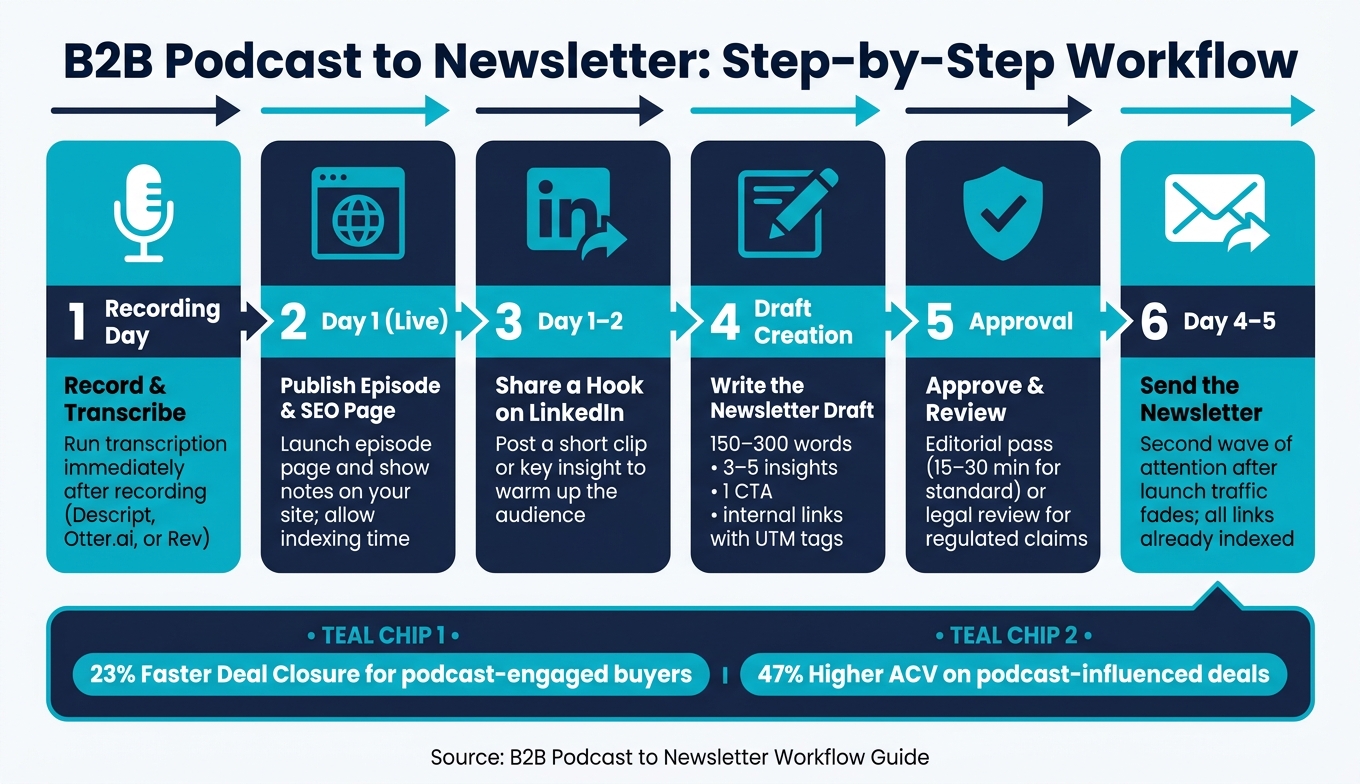
B2B Podcast to Newsletter: Step-by-Step Workflow
Finalize the Episode and Pull the Strongest Ideas
Once the transcript is cleaned up and ownership is clear, use it to find the newsletter angle. The timestamped transcript is your map. A transcript-led process is much faster than watching or listening to the full episode by hand.
Look for the parts with the most weight - bold claims, unexpected takes, hard numbers, and clear process walk-throughs. If you can access Spotify for Podcasters or YouTube Studio analytics, check the retention graph too. Replay spikes matter. They show where people went back and listened again, which often gives you your best hook.
From there, choose 3 to 5 standalone insights. Each one should tie to a buyer problem or a choice they need to make. A simple filter helps: if you can't answer, "So what does this mean for someone evaluating a purchase?" then cut it.
Those 3 to 5 insights become the center of the draft.
Turn Transcript Highlights Into a Self-Contained Email Draft
The email should be useful on its own, even if the reader never hits play. Start with the sharpest line. Then add 2 to 3 takeaways, one quote, and one CTA. Keep the draft between 150 and 300 words.
AI tools can help you get a first draft down fast from the transcript highlights. But don't let that draft move forward without a human editor. AI speeds up the writing. The editor checks facts, wording, and tone.
After that, attach the episode page and any related site assets.
Add Internal Links That Support SEO and Reader Journeys
Once the draft is set, connect each CTA to a site page on the same topic. That can include:
- The episode page
- Show notes
- Related blog posts
- Service pages
- Topic cluster content
This gives readers more than one path to keep going. It also helps build topical authority across connected pages instead of sending people to one standalone episode, where the choice is often simple: listen or leave.
Use a unique UTM on every link so you can track pipeline by asset in your CRM.
Approvals, Scheduling, and Publish Timing
Once the draft is done, the last calls are simple: who signs off and when the newsletter goes out.
Use a Short Approval Path That Matches Risk Level
The level of risk should shape the review process. Low-risk episodes usually need a quick editorial pass. Regulated claims need more eyes on them, including legal and leadership.
For most standard B2B episodes, a short review path is enough. An editor checks facts and voice, then marketing schedules the send. If SEO AI handles the first draft, total review and approval time can stay in the 15-30 minute range per episode. For higher-stakes sends in regulated B2B, add legal review and executive sign-off before distribution.
A simple safeguard helps here: set up your automation so AI-written drafts land in the email platform as Draft, never Live. That creates a required human check before anything is sent.
AI saves time on drafting, but editors still own accuracy and tone.
Schedule the Send Around the Episode and Site Publish Window
After approval, publish the episode pages first. Then time the newsletter to support those pages.
If you send the newsletter the same day the episode goes live, the launch window gets squeezed. A staggered rollout keeps the content in front of people for longer. It also gives your pages time to get indexed before the email starts sending traffic their way.
Here’s the simple sequence:
| Timing | Action |
|---|---|
| Recording Day | Run transcription right away |
| Day 1 (Live) | Publish the episode and the SEO landing page or show notes on your site |
| Day 1-2 | Share a short clip or hook on LinkedIn |
| Day 4-5 | Send the newsletter |
Sending on Day 4-5 gives the episode a second wave of attention after the first launch traffic fades. It also means every internal link in the email points to a page that is already live, indexed, and ready.
Compare Approval Workflows by Speed and Risk
Use the lightest workflow that still fits the risk.
| Path Type | Review Depth | Speed | Risk Level |
|---|---|---|---|
| Single-Approver | Marketer checks for voice and accuracy | Fast (<15 mins) | Moderate; relies on one person's judgment |
| Multi-Stage | Editorial, Legal, and Executive sign-offs | Slow (24-48 hours) | Low; multiple safety nets for compliance |
| Expedited | AI-generated with a 5-minute sanity check | Very fast (<5 mins) | High; reserved for low-risk, recurring segments |
Use the expedited path only for low-risk recurring content.
Measure Results and Build the Next Issue Faster
Track Email, Content, and Workflow Metrics Together
Once the email goes out, the next job is simple: use the data to make the next issue better. That means improving the draft, tightening the approval cycle, and setting up the next send with fewer slowdowns.
The main metrics fall into four groups. Email metrics like open rate, click-through rate, and clicks to specific episode or blog pages show what readers responded to. Website metrics like organic traffic to transcript pages, search impressions, and branded search volume show whether the content is building search value over time. Workflow metrics like draft turnaround time, approval speed, and send consistency show where the process gets stuck. Revenue metrics like assisted conversions, influenced pipeline, and deal velocity tie the newsletter back to CRM results.
| Metric Category | What to Track | Why It Matters |
|---|---|---|
| Open rate, CTR, clicks to blog/episode pages | Shows immediate reader engagement | |
| Website | Organic traffic, search impressions, branded search volume | Shows long-term search value and topical authority |
| Workflow | Turnaround time, approval speed, send consistency | Identifies production bottlenecks |
| Revenue | Assisted conversions, influenced pipeline, deal velocity | Connects content engagement to CRM outcomes |
In the CRM, tag engaged contacts as "Podcast Listeners." Add UTMs and CRM tags so each send connects back to traffic and pipeline by episode. Then track clicks, visits, and conversions in the CRM so you can see each episode's site and revenue impact. Branded search volume is also worth watching because it shows whether the workflow is building search demand.
After each issue, use the highest-signal metrics to update the checklist.
Build a Repeatable Operating Checklist
The aim is a workflow that anyone on the team can run without needing a walkthrough. A short checklist helps keep that bar the same for every episode.
Before an issue goes out, it should pass six checkpoints:
- Owner assigned
- Transcript complete
- Key insights selected
- Internal links added and UTM-tagged
- Approval confirmed
- Send date locked
After the send, review open rate, CTR, assisted conversions, and clicks to high-intent service pages.
A documented checklist is the simplest way to make the workflow repeatable, keep bottlenecks visible, and give the owner a clear place to update the process when something breaks. Log the result, update the checklist, and run the same process on the next episode.
FAQs
How do I pick the best takeaways from a podcast transcript?
Use the transcript as a map instead of sitting through the full episode again. Scan for high-signal moments - bold claims, data points, unusual guest reactions, and clean process breakdowns.
If you use semantic search or AI, zero in on places where the speaker gives a direct insight or a counterintuitive take. Pick takeaways that can stand on their own and link each one to a specific buyer problem or decision.
What should I do if my podcast email gets stuck in approvals?
If your podcast newsletter draft gets stuck in approvals, keep the workflow moving by generating draft assets on its own and saving human review for the final newsletter before it goes live.
In practice, that means creating a draft for each episode, sending the approver the draft link, and making approvals the only manual step. Everything else should flow upstream from transcript and summary to email draft to review to publish.
How can I prove this workflow drives pipeline, not just clicks?
Use lead attribution and push newsletter engagement data into your CRM. Add tracking elements like UTM parameters, gated resource links, or episode-specific demo requests. That way, sales can see which piece of content or which episode had a hand in the deal.
Then track business outcomes - not vanity metrics. Look at whether podcast-engaged prospects close in less time. Also watch guest relationship value, branded search volume, and how often AI search engines cite your show notes.