Schema markup helps search engines understand your website's content better, improving how it appears in search results. But errors in schema can harm your site's performance. Here's what you need to know:
- Why Validation Is Important: Invalid schema can block rich results and hurt your credibility. Even small mistakes can lead to big losses, like an 18% revenue drop due to a misplaced comma.
- Common Issues: Syntax errors, missing required fields, wrong date formats, and relative URLs are frequent problems.
- Tools for Validation: Use Google's Rich Results Test for rich feature eligibility and Schema Markup Validator for compliance with Schema.org standards. Third-party SEO marketing tools can add extra functionality.
- Validation Process:
- Check your schema in the HTML source.
- Test with validation tools before and after deployment.
- Monitor errors through Google Search Console.
- Fixing Errors: Focus on syntax, required properties, and proper formats. For example, use ISO 8601 for dates and absolute URLs for images.
Regular testing and automated validation can save time and prevent errors. Proper schema validation ensures your content is eligible for rich results, boosting visibility and click-through rates.
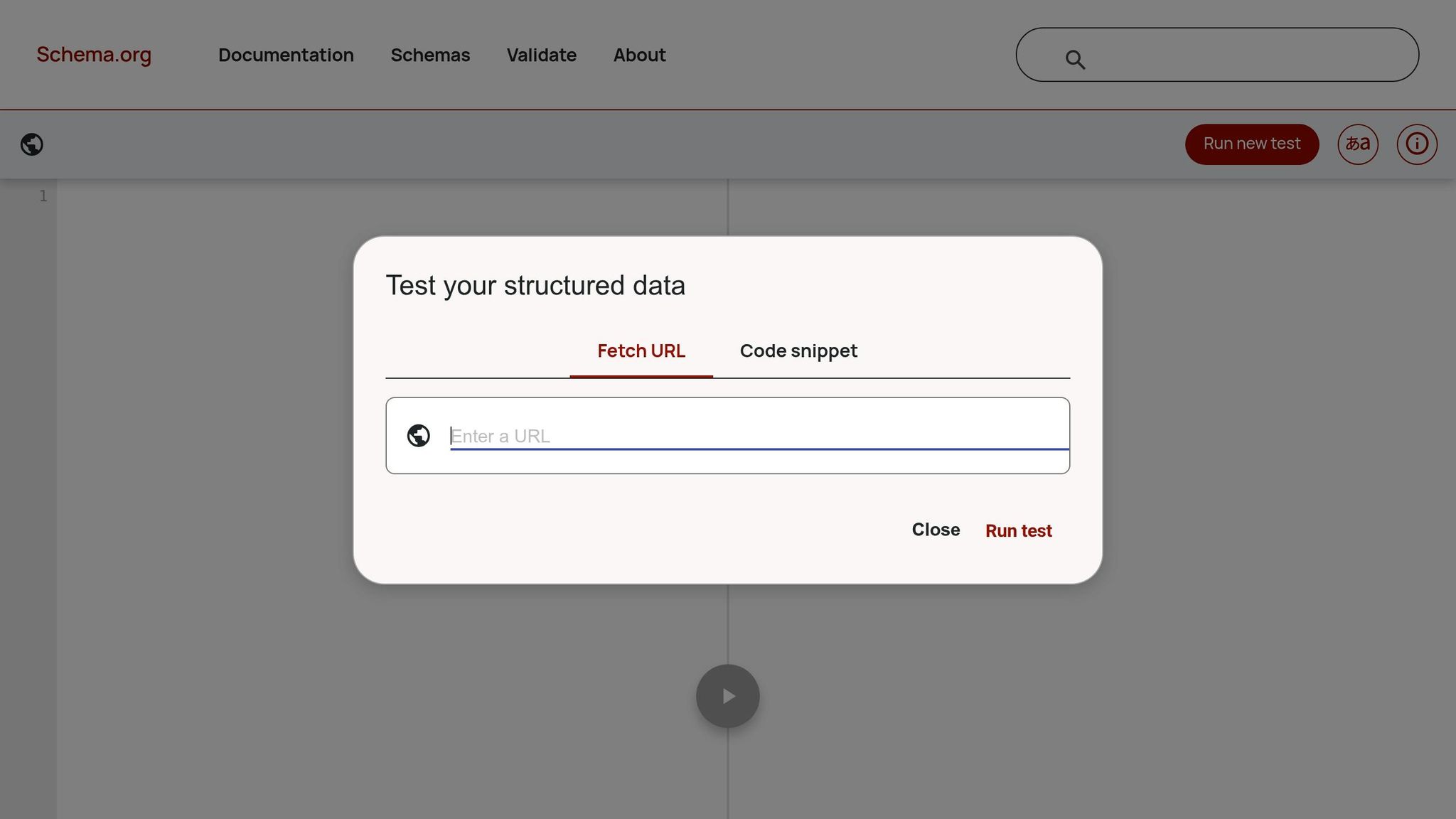
How to Use The New Schema Markup Validator
sbb-itb-5be333f
Schema Markup Validation Tools
Ensuring your schema markup is error-free is crucial for avoiding costly mistakes and maintaining accurate updates. The tools below are designed to make validation easier and more reliable. Google suggests starting with the Rich Results Test to see if your page qualifies for special search features, and then using the Schema Markup Validator to check compliance with Schema.org standards. Each tool plays a specific role in a well-rounded validation process, which we'll break down here.
Google's Rich Results Test
The Rich Results Test is all about determining whether your structured data can unlock rich search features like star ratings, carousels, or FAQ dropdowns. It supports JSON-LD, RDFa, and Microdata, and you can test either a live URL or a code snippet. One standout feature is its ability to flag missing Google-required properties, even if your schema meets Schema.org standards. Plus, it gives you a preview of how your page might look in search results.
A key insight? Around 73% of pages with technically valid schema still fail to qualify for rich results because they lack the specific properties Google requires. The tool also makes debugging easier by letting you click on errors to pinpoint their exact location in your source code.
Schema Markup Validator
The Schema Markup Validator (available at validator.schema.org) is the go-to tool for checking compliance with the entire Schema.org vocabulary. Unlike the Rich Results Test, this tool isn't limited to Google-supported types and doesn’t provide visual previews or Google-specific warnings. Instead, it focuses on general Schema.org standards, making it ideal for broader validation needs.
One of its strengths is the ability to extract and validate data injected via JavaScript, which is especially handy for dynamic content. Whether you're working with JSON-LD, RDFa, or Microdata, this tool ensures your markup aligns with Schema.org guidelines.
Third-Party Validators
If you're looking for extra features, third-party tools like those found in this SEO tools directory are worth exploring. These tools go beyond basic validation, offering features like JSON-LD syntax highlighting, prebuilt schema templates, and checks for entity connections. They’re particularly helpful for testing dynamic schema, allowing you to confirm changes right after deployment. For SEO professionals, these tools can streamline schema integration and testing workflows, saving time and reducing errors.
How to Validate Schema Markup Updates
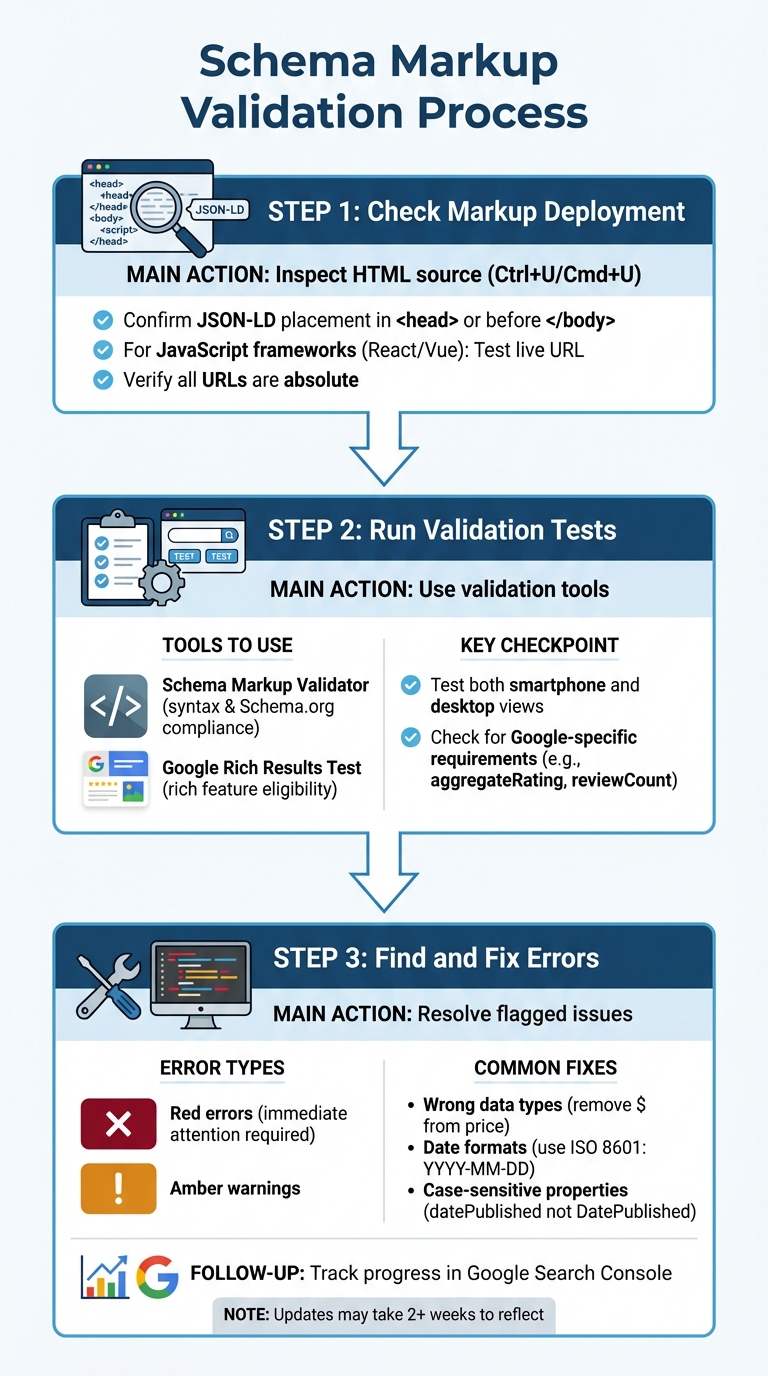
Schema Markup Validation Process: 3-Step Workflow
To ensure your schema markup updates are error-free, follow this simple three-step process. Validate your updates in layers: start by testing code snippets before deployment, then verify live URLs once published, and finally, monitor site-wide performance through Google Search Console. This method helps you catch syntax issues early and ensures Google's crawler can interpret your markup correctly after JavaScript rendering and caching.
1. Check Markup Deployment
First, inspect the HTML source (Ctrl+U/Cmd+U) to confirm that the JSON-LD block is placed correctly - either in the <head> or just before </body>. If you're working with a JavaScript framework like React or Vue, the schema might not appear in the initial HTML. In such cases, testing the live URL is crucial to confirm that Google's crawler can detect the markup once the page fully renders.
Also, make sure all URLs in your schema are absolute, as previously recommended.
2. Run Validation Tests
Once you've confirmed the deployment, use top SEO tools like the Schema Markup Validator and the Rich Results Test to ensure everything is in order. These tools help identify syntax issues and check for compliance with Google's specific requirements.
After passing the initial syntax check, run the Google Rich Results Test to verify your content's eligibility for rich search features. Test your live URL and switch between smartphone and desktop views to make sure the markup displays correctly on both devices.
The Rich Results Test is particularly useful because it flags Google-specific issues that general validators might miss. For example, a product page might have valid schema but still fail to qualify for rich results if it’s missing key properties like aggregateRating or if it uses "0" for the reviewCount, which violates Google’s policies. Running both tests ensures your schema is technically sound and ready for rich results.
After running these tests, resolve any flagged errors to ensure smooth integration.
3. Find and Fix Errors
Validation tools typically categorize issues as red errors or amber warnings. Red errors need immediate attention. Common problems include using the wrong data types (like adding a "$" symbol to a price field instead of just the number), incorrect date formats (use the ISO 8601 format: YYYY-MM-DD), or case-sensitive property names (e.g., using DatePublished instead of datePublished).
If you discover an error affecting a large number of pages, it’s often due to a template-level issue. Fixing the central template logic will resolve the problem across your site, saving you from editing individual pages. After making corrections, track your progress with Google Search Console’s Enhancements reports. Keep in mind that updates may take over two weeks to reflect.
Common Schema Markup Errors and Fixes
Even experienced developers can stumble into schema markup issues. Research indicates that 89% of all structured data errors stem from just seven recurring mistakes. Once you've used validation tools to pinpoint these errors, it's vital to understand and address them effectively. Fixing these common problems will also make the validation process smoother.
Syntax Errors
Proper syntax is the backbone of schema validation. Syntax errors can confuse search engines, preventing them from interpreting your JSON-LD code correctly. Some frequent offenders include:
- Trailing commas after the last property in an object.
- Missing commas between key-value pairs.
- Unclosed brackets that break the JSON structure.
Another frequent issue is unescaped quotes within text strings. For instance, if a product description includes something like "the best headphones", you need to escape the internal quotes with a backslash: "the \"best\" headphones". Skipping this step will break your schema. Always run your code through a validator before deploying it to catch these errors early on.
Missing Required Properties
Leaving out required fields can stop rich results from appearing in search results, even if the schema itself is technically valid. For example, the image property is missing in 67% of broken schemas. While some validation tools may mark "image" as recommended, it’s often essential for rich result eligibility.
Each schema type has its own set of required fields. For example:
- Products need a
nameand at least one of these:offers,review, oraggregateRating. - Articles require a
headline,author, anddatePublished. - Events must include a
name,startDate, andlocation.
Use Google Search Console's Enhancements report to identify missing properties for your URLs. Then, adjust your templates or individual pages to include these fields.
Invalid Values
Schema properties must follow specific formats to pass validation. Invalid values often occur when data isn’t formatted correctly. For example:
- Price fields should only include numbers - no dollar signs, commas, or other symbols. Instead of
"$1,299.99", use"1299.99", and specify the currency separately with"priceCurrency": "USD". - Dates must be in ISO 8601 format, such as
2026-04-07or2026-04-07T10:30:00-05:00for timestamps. Invalid date formats account for 54% of broken schemas.
Here’s a quick reference table for common property mistakes:
| Property | Invalid Example | Correct Example |
|---|---|---|
| Price | "$1,299.99" | "1299.99" |
| Date | "Jan 15, 2026" | "2026-01-15" |
| Availability | "In Stock" | "https://schema.org/InStock" |
| Image URL | "/product-image.jpg" | "https://site.com/product-image.jpg" |
Another common error is using relative URLs instead of absolute ones. For properties like image, logo, and url, always include the full protocol and domain (e.g., https://example.com/images/logo.png). Similarly, for properties like availability, use Schema.org enumeration URLs (e.g., "https://schema.org/InStock") instead of plain text.
Getting these details right can lead to noticeable improvements. For instance, one electronics retailer saw a 52% traffic increase in just a week after fixing a currency code error, changing USD to INR for their Indian audience.
Maintaining Schema Markup Over Time
Keeping schema markup functional isn’t a "set it and forget it" task - it demands consistent monitoring and updates. Even a small template error can affect thousands of URLs, and changes to your CMS, plugins, or themes can silently disrupt your markup.
"Schema breaks most often after template changes. Treat it like a testable contract." - Search Roost
Google won’t display rich results if your schema is incomplete or incorrect. Even a minor mistake - like a misplaced comma - can have big consequences. In one case, a single error in a product template caused an 18% drop in organic search revenue over a weekend.
Revalidate After Updates
Always retest your schema after any changes to your CMS, plugins, themes, or templates. Google Search Console is your best tool for monitoring the health of your schema. Keep in mind that it can take up to three weeks for Google to fully recognize changes. To speed things up, use the URL Inspection tool in Google Search Console to request reindexing after fixes - this can reduce recovery time from weeks to just days.
Set up email alerts in Search Console to catch schema issues as soon as they arise. Also, check your Enhancement reports weekly for any error spikes. Remember, errors remain active in Search Console until 90 days pass without new occurrences. Properly implemented schema can boost click-through rates by 20% to 30%.
To minimize manual work, consider automating your validation process.
Automate Validation in Workflows
Manual testing is time-consuming and doesn’t scale well. Instead, integrate schema validation into your CI/CD pipeline to catch issues before they go live. Start with pre-commit hooks that run basic JSON syntax checks (e.g., using python -m json.tool) to flag errors like missing braces or misplaced commas before code gets committed.
For staging environments, use scripts to fetch sample URLs, extract JSON-LD, and validate it against Schema.org standards. This ensures your pipeline halts if critical errors are found. If you’re using JavaScript frameworks like React or Next.js, tools like Puppeteer or Playwright can help extract and validate markup after pages are fully rendered.
You can also integrate the Google Search Console API into your dashboards to receive automated alerts for new schema errors after deployments. Focus your tests on a small set of representative URLs - like a product page, a blog post, and a category page - to streamline regular validation.
Regular Reviews and Updates
Even with automation, manual reviews are still necessary. Schedule monthly checks of your high-traffic pages to catch any overlooked issues. Conduct a full site audit every quarter to identify outdated properties and ensure your schema aligns with the latest Schema.org standards. Since both Schema.org and Google’s guidelines change over time, regular reviews are key to staying compliant.
| Review Frequency | Task | Tool |
|---|---|---|
| Weekly | Check for error spikes and new issues | Google Search Console |
| Monthly | Manually review high-traffic URLs | Rich Results Test / Schema Validator |
| Quarterly | Perform a full site audit for deprecated properties | Schema Markup Validator |
| Immediate | Validate after any CMS, plugin, or template changes | Rich Results Test |
Lastly, don’t forget to update your schema whenever you revise content. For instance, update the dateModified property for articles to ensure accurate parsing by search engines and AI tools. Regular updates and validations keep your schema working as intended.
Conclusion
Validating schema markup is the key to turning potential rich results into actual traffic. With around 64% of schema implementations containing errors, many websites are unintentionally losing out on valuable revenue. To prevent these costly setbacks, it’s essential to follow a structured validation process.
A solid validation workflow includes three critical steps: testing code snippets before publishing, verifying live URLs after deployment, and using Search Console for ongoing monitoring. Each tool serves a specific purpose - Google's Rich Results Test checks eligibility, the Schema Markup Validator ensures technical accuracy, and Search Console keeps you informed about performance over time. Together, they form a comprehensive approach to safeguarding your search performance.
"Structured data only helps if it stays correct over time. A testing workflow turns schema into a maintained system." - Search Roost
When valid schema can increase click-through rates by 20% to 30%, and a single error could result in an 18% revenue loss over a weekend, the importance of getting it right is undeniable.
Think of schema as a testable contract rather than a one-and-done task. Automating validations and scheduling regular audits as part of a technical SEO audit can ensure your structured data continues to work for you, protecting your search visibility and driving results long after implementation.
FAQs
What’s the fastest way to confirm Google can actually see my schema after a deploy?
To check your schema quickly, use Google's Rich Results Test. Simply input your live page URL, run the test, and review the output to confirm that Google recognizes your schema and finds no errors. While passing the test ensures your schema is valid, keep in mind that it might take Google 2 to 4 weeks to recrawl your site and display rich results.
Why does my schema validate but still not earn rich results?
Even if your schema passes validation, it doesn’t automatically mean your page will display rich results in Google. Google takes other factors into account, such as:
- Timeframe: It can take 2–4 weeks for changes to reflect.
- Content Alignment: Your content must genuinely match the schema markup.
- Errors and Penalties: Ensure there are no errors or manual actions affecting your site.
In short, validation is just one step toward eligibility - it’s not a guarantee.
How can I automate schema validation in CI/CD so bad markup never ships?
To streamline schema validation within your CI/CD pipeline, incorporate dedicated validation tools. These tools can use APIs or scripts to check your markup during the build process. Set error thresholds to block deployments with invalid schemas, ensuring only clean code moves forward. Scheduling regular checks can help catch issues caused by updates or changes over time. Additionally, automated alerts or dashboards can notify developers immediately about validation failures, allowing them to fix problems quickly and prevent flawed markup from making it to production.