If I had to give the short answer: I’d pick Ahrefs for link-focused B2B research and Semrush for SEO + PPC teams that need cleaner reporting.
For most B2B teams, this choice comes down to six things:
- Keyword gap analysis
- Backlink data
- Traffic estimates
- PPC research
- Reporting and team workflow
- Total cost
Here’s the core takeaway in plain English:
- Ahrefs is stronger for backlink tracking, link gap work, and traffic modeling for low-volume B2B terms.
- Semrush gives you a broader view across SEO, paid search, and presentation-ready reports.
- Base pricing is close: $129/month vs. $139.95/month on entry plans, and $249/month vs. $249.95/month on mid-tier plans.
- The extra costs are different: Ahrefs can get tight on credits, while Semrush can get expensive with seats and add-ons.
- In the article’s side-by-side data, Ahrefs showed 24–48 hour backlink updates and -18% traffic estimate variance, while Semrush showed 1–2 week backlink updates and -32% variance.
If you want the fastest way to decide:
- Choose Ahrefs if your team cares most about links, organic rivals, and traffic opportunity scoring.
- Choose Semrush if your team needs SEO, PPC, dashboards, and reports for leaders or clients.
Quick Comparison
| Criteria | Ahrefs | Semrush |
|---|---|---|
| Best fit | Link-heavy B2B SEO teams | SEO + PPC teams |
| Keyword gap use | Better for prioritizing opportunities | Better for broad discovery and intent filters |
| Backlink data | Larger edge in speed and depth | Good, but slower updates |
| Traffic estimates | Closer in the cited test | Less accurate in the cited test |
| PPC research | Limited | Much stronger |
| Reporting | More technical, export-led | Easier for PDFs and dashboards |
| Mid-tier plan | $249/month | $249.95/month |
| Main cost pressure | Credits | Seats and add-ons |
So the simple answer is this: Ahrefs helps me dig deeper into organic rival data, while Semrush helps me share findings across a B2B team with less extra work.
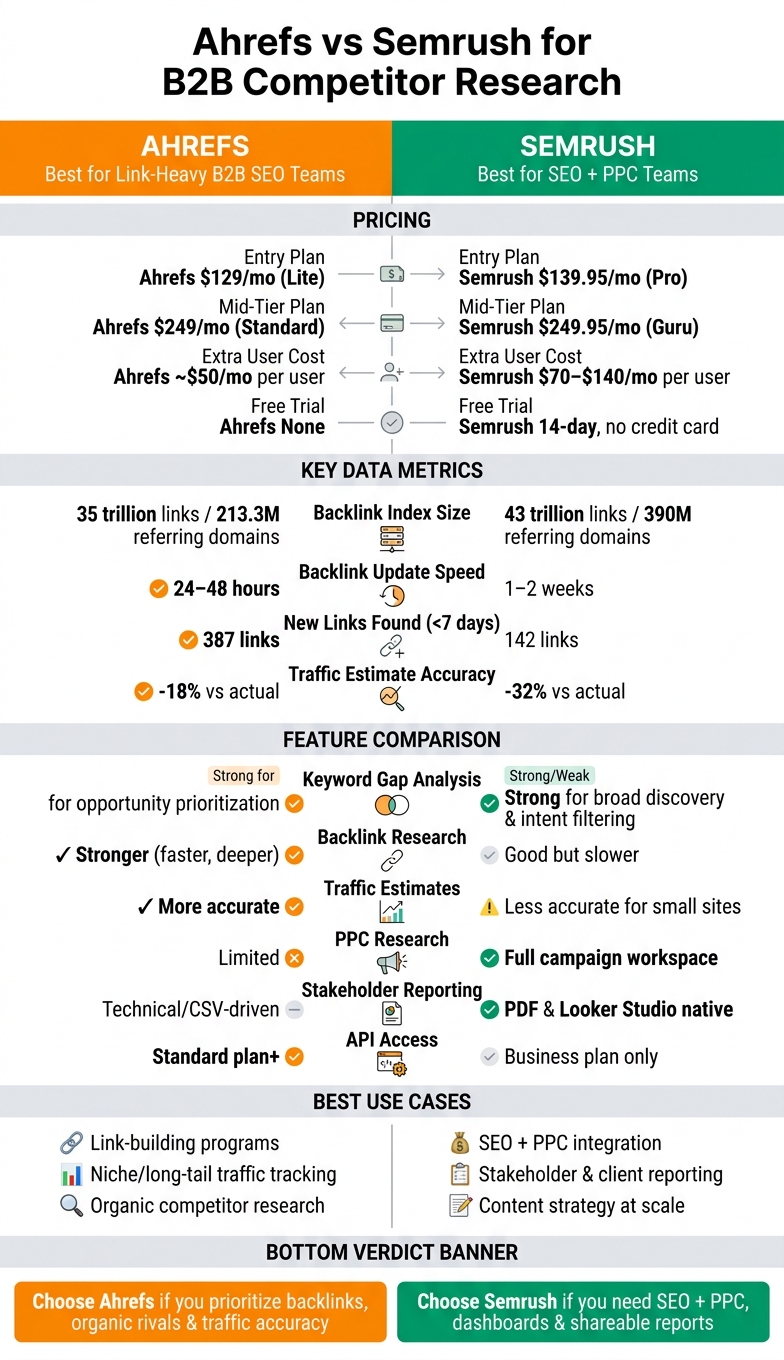
Ahrefs vs Semrush for B2B Competitor Research: Side-by-Side Comparison
Semrush vs Ahrefs: Best SEO Tool for Your Business in 2026?
sbb-itb-5be333f
Ahrefs for B2B competitor analysis
For B2B rival research, Ahrefs works best when you need to map a competitor’s content, links, and traffic sources. Its core tools - Site Explorer, Content Gap, Rank Tracker, and Site Audit - show what rivals rank for, where their links come from, and which pages bring in traffic. That makes it a strong fit for content and link mapping.
Its value shows up most clearly in three areas: keyword gaps, backlinks, and traffic signals.
Keyword gaps, backlinks, and traffic data in Ahrefs
The Content Gap tool shows keywords that several competitors rank for while your site doesn’t. If three or more rivals overlap on the same terms, that often points to a high-priority gap, especially for low-volume, high-intent topics. Then, the Top Pages report in Site Explorer helps sort informational content from commercial or transactional pages. That’s handy when you’re planning content for a long B2B sales cycle.
Ahrefs is also strong for backlink research. Its index covers more than 35 trillion external links from 213.3 million referring domains, and new links usually appear within 24 to 48 hours after publication. The Referring Domains, Anchor Text, and Linking Authors reports help teams spot which content formats earn editorial links and which journalists link to competitors most often. That can be useful for B2B PR outreach.
Traffic estimates matter too, especially when search volume makes a keyword look better than it is. Ahrefs’ clicks data improves traffic estimates by factoring in SERP features that cut organic click-through. If a results page is crowded with features, clicks data gives B2B teams a better read on whether a ranking is worth chasing.
Reporting, workflow fit, and Ahrefs pricing
Ahrefs tends to fit SEO teams that handle research and link building themselves, consultants, and teams running link-heavy programs. Exports are clean, and API access on the Standard plan lets larger departments send data into Looker Studio or custom dashboards. That said, the built-in reports lean technical. If you need to share findings with non-technical stakeholders, there’s usually extra work involved.
Pricing uses a credit-based model:
| Plan | Price | Users | Credits/Month | API & Historical Data |
|---|---|---|---|---|
| Lite | $129/month | 1 | 500 | No API; limited history |
| Standard | $249/month | 1 | 5,000 | API access; 6 months of historical data |
| Advanced | $449/month | 2 | 10,000 | API access; 2 years of historical data |
| Enterprise | ~$14,990/year | 5 | Custom | Custom credits and API |
The credit system can be a real limit for teams doing heavy research. Frequent Site Explorer pulls can burn through credits fast on lower tiers, which often pushes larger teams toward Standard or Advanced. And if you also need AI visibility tracking, Brand Radar adds another $199/month.
Semrush takes a broader reporting and collaboration angle, which changes how B2B teams use it. The main difference now is whether your team needs deeper link analysis or broader reporting.
Semrush for B2B competitor analysis
If Ahrefs leans harder into link data, Semrush is the broader pick for teams that want SEO, PPC, and reporting tools under one roof. It covers organic search, paid search, content, and technical SEO, which makes sense for B2B teams that run SEO and PPC side by side. Domain Overview gives you a fast read on any rival: Authority Score, estimated organic traffic, backlink profile, and paid search presence.
Keyword gaps, backlink analysis, and traffic benchmarking in Semrush
The Keyword Gap tool compares up to five domains at once. You can filter by "Missing" keywords to find terms all your competitors rank for that your site doesn't, or look at "Untapped" terms where only some rivals show up. That’s useful when you’re trying to spot the gap between your site and the rest of the market without digging through spreadsheets for hours.
Organic Research adds another helpful layer. You can isolate a competitor’s rankings in positions 4–20 by intent, which helps you find pages that are close to page-one traction but still beatable. For B2B teams, that tends to be where the best opportunities live - not impossible head terms, but pages you can realistically outrank.
Semrush says its backlink index includes 43 trillion backlinks from 390 million referring domains. The Backlink Gap tool shows which sites link to your competitors but not to you, and you can filter for Authority Score 40+ to build a pre-qualified outreach list. Its backlink index updates every 1 to 2 weeks, so the picture stays fairly current.
Traffic Analytics, part of the .Trends add-on, estimates direct, referral, social, and paid traffic, which gives you a broader view than keyword data alone. That matters in B2B because a rival’s growth may not be coming from search only. Maybe they’re getting a lift from paid campaigns, partner referrals, or social. One catch: estimates can miss the mark by 30–50% for smaller sites, so it’s smarter to treat them as directional signals, not exact numbers.
Another feature worth noting is Advertising Research. It shows competitor ad spend estimates, historical ad copy, and the keywords they’re bidding on. If your team plans organic and paid work together, this makes Semrush easier to use as one research hub instead of bouncing between tools.
That mix of SEO, PPC, and traffic data becomes even more useful when you need to turn raw findings into something a client, VP, or CMO can scan in a few minutes.
Reporting, collaboration, and Semrush pricing
Semrush is set up with reporting front and center. My Reports lets you drag and drop widgets into PDF reports, and there’s a native Looker Studio connector for teams that want live dashboards. You also get scheduled re-crawls and email alerts, which helps you keep tabs on changes without signing in every day. The trade-off is that the platform can feel dense at first, and most teams should plan on 4 to 8 weeks to get comfortable with it.
For many B2B teams, plan choice comes down to reporting limits just as much as data access.
| Plan | Price/Month | Projects | Tracked Keywords | Notable Features |
|---|---|---|---|---|
| Pro | $139.95 | 5 | 500 | Core SEO tools |
| Guru | $249.95 | 15 | 1,500 | Historical data, Content Marketing Platform |
| Business | $499.95 | 40 | 5,000 | API access, white-label reporting |
Costs can add up fast. Traffic Analytics (.Trends) adds about $200/month if you’re not on the Business plan, and extra user seats cost more on top of the base plan. For a mid-market B2B team, Guru is often the most practical starting point because it includes historical data and the Content Marketing Platform.
Ahrefs vs Semrush: head-to-head for B2B competitor research
Here’s the direct comparison for B2B competitor research. For most B2B teams, the choice usually comes down to two things: which top SEO tools surface better opportunities and which one is easier to share with the rest of the company.
Keyword gaps, backlink depth, and traffic estimates compared
For keyword gap analysis, Semrush does a better job with broad keyword discovery and intent filtering. Ahrefs is better when you need to sort those ideas by traffic potential and keyword difficulty with more confidence.
Backlink research leans toward Ahrefs. Its backlink index is deeper and updates faster. In side-by-side testing, Ahrefs found 387 new links less than 7 days old, while Semrush found 142 during the same period. If you're trying to spot a competitor's link-building push before it picks up speed, that difference matters.
Traffic estimates also lean toward Ahrefs. A live-site test found Ahrefs at -18% vs. actual traffic, while Semrush came in at -32%. For B2B teams tracking long-tail search demand, that gives Ahrefs an edge.
| Feature | Ahrefs | Semrush |
|---|---|---|
| Keyword gap workflow | Stronger for opportunity prioritization | Stronger for broad discovery and intent filtering |
| Keyword Intent Classification | Basic | Advanced, AI-powered |
| Backlink Freshness | 24–48 hours | 1–2 weeks |
| Traffic Estimate Accuracy | -18% vs. actual | -32% vs. actual |
| PPC Research | Basic ad intel | Full campaign workspace |
Reporting, team workflow, and total cost compared
Ahrefs is more API- and CSV-driven, which tends to fit engineering-led teams that want to build their own dashboards. Semrush is easier to turn into internal reports. It comes with a native Looker Studio connector and presentation-ready PDFs, so non-SEO stakeholders can follow along without much cleanup.
Pricing looks close at first glance. Ahrefs Standard costs $249/month, and Semrush Guru costs $249.95/month. The gap shows up when you add more users. Ahrefs charges about $50/month per extra user, while Semrush extra seats can cost $70 to $140/month per user.
| Factor | Ahrefs | Semrush |
|---|---|---|
| Reporting Style | API-heavy, technical CSV exports | Presentation-ready PDFs, native Looker Studio |
| Mid-Tier Price | $249/mo (Standard) | $249.95/mo (Guru) |
| Extra User Cost | About $50/mo | $70–$140/mo per user |
| Free Trial | None | 14-day, no credit card |
Which platform fits which B2B use case
This is where the choice gets more practical. Day-to-day workflow tends to matter more than a long feature list.
| B2B Use Case | Best For | Reason |
|---|---|---|
| Link-building programs | Ahrefs | Freshest backlink index and a trusted DR metric |
| SEO + PPC integration | Semrush | Integrated Advertising Toolkit; export directly to Google Ads |
| Niche traffic tracking | Ahrefs | More accurate for long-tail and low-volume B2B terms |
| Content strategy at scale | Semrush | AI-powered Topic Research and Writing Assistant |
| Stakeholder reporting | Semrush | Native Looker Studio connector and presentation-ready PDFs |
| Technical SEO audits | Semrush | Better issue prioritization and Core Web Vitals integration |
If your B2B team leans hard on backlinks and organic content, Ahrefs is the stronger pick. If you run SEO alongside paid campaigns and need reports that people outside SEO can read without extra work, Semrush fits better.
Conclusion: Choosing the right platform for your B2B team
After looking at keyword gaps, backlinks, traffic estimates, reporting, workflow fit, and cost, the answer is pretty clear: the better pick comes down to how your team works day to day.
If your team leans hard into link-focused research, Ahrefs is usually the better fit. If your team spends more time on client-ready reports, cross-channel visibility, and shared SEO/PPC work, Semrush tends to make more sense.
Key points to guide your tool decision
Ahrefs works well for B2B teams that want stronger backlink data, faster link discovery, and a more technical setup.
Semrush works well for teams that want broader SEO and PPC visibility, stronger reporting, and one workspace for both SEO and PPC.
Mid-tier pricing is almost the same, but total cost can climb in different ways. With Semrush, extra seats and add-ons can push the bill up fast. With Ahrefs, heavier credit use can do the same.
FAQs
Which tool is better for a small B2B SEO team?
It comes down to how your team works day to day.
Semrush is usually the better all-in-one option for teams that want organic SEO, PPC research, content marketing, and local SEO in one place. If you’d rather keep most of your work inside a single platform, Semrush often makes more sense.
Ahrefs, on the other hand, is better for backlink analysis and content research. It also has a cleaner interface, which can make training team members and sharing data a bit easier. If your team spends most of its time on link building and organic growth, Ahrefs is likely the better fit.
How accurate are competitor traffic estimates for niche B2B sites?
No SEO tool gives perfectly accurate traffic estimates for niche B2B sites. And none stays within a 10% margin of the ground truth on a steady basis.
Ahrefs is often seen as the better pick for search volume and ranking data on mid-tier domains. Semrush gives you a broader picture, including paid, social, and referral traffic.
The smart way to use them is simple: look for relative trends and competitive gaps, not exact forecasts. Then check those findings against your own analytics. Otherwise, you're treating estimates like hard numbers, and that can send you down the wrong path.
When do extra seats, credits, or add-ons become a real cost issue?
They turn into a real cost problem once your team grows past one or two users. That’s because both Ahrefs and Semrush increase pricing based on seat access, not just the features in your plan.
With Ahrefs, there’s another catch. Lite and Starter plans also run on credits, so heavier use can lead to added charges. And once you multiply the monthly seat cost by every team member who needs access, the total can climb fast.