Most multilingual ecommerce SEO losses come from setup problems, not translation alone. If I had to boil this article down, I’d say this: give each market its own crawlable URL, match hreflang and canonicals, localize search terms and buying details, and keep checking for template errors before they spread across thousands of pages.
A few numbers make the point fast: 76% of shoppers prefer product info in their own language, 40% won’t buy from a site in another language, and Shopify reports a 13% relative conversion lift when shoppers see a store in their own language. So if a store sends German users to English pages, shows the wrong currency, or blocks localized URLs from indexing, traffic and sales can drop at the same time.
Here’s the short version of what matters most:
- Use one crawlable URL per language or market - not one URL with switches, redirects, or parameters doing the work
- Set hreflang correctly - with valid codes, return tags, self-references, and
x-defaultwhere needed - Keep canonicals aligned - localized pages should usually point to themselves, not back to English
- Localize for search intent - not just words, but currency, sizing, units, payment methods, and product terms
- Fix internal linking - localized product and category pages need links from localized navigation, breadcrumbs, and switchers
- Watch indexability -
noindex, robots rules, redirects, and broken URLs can wipe out an entire locale section - Review the setup on a schedule - because one template change can affect thousands of URLs
If I were prioritizing fixes, I’d start with crawl blockers, hreflang errors, canonical conflicts, orphan pages, and cross-locale links. After that, I’d tighten keyword localization and on-page UX details that affect conversion.
This article is a checklist of the 10 mistakes that tend to hurt multilingual stores the most - and where I’d look first if localized pages are not ranking or converting.
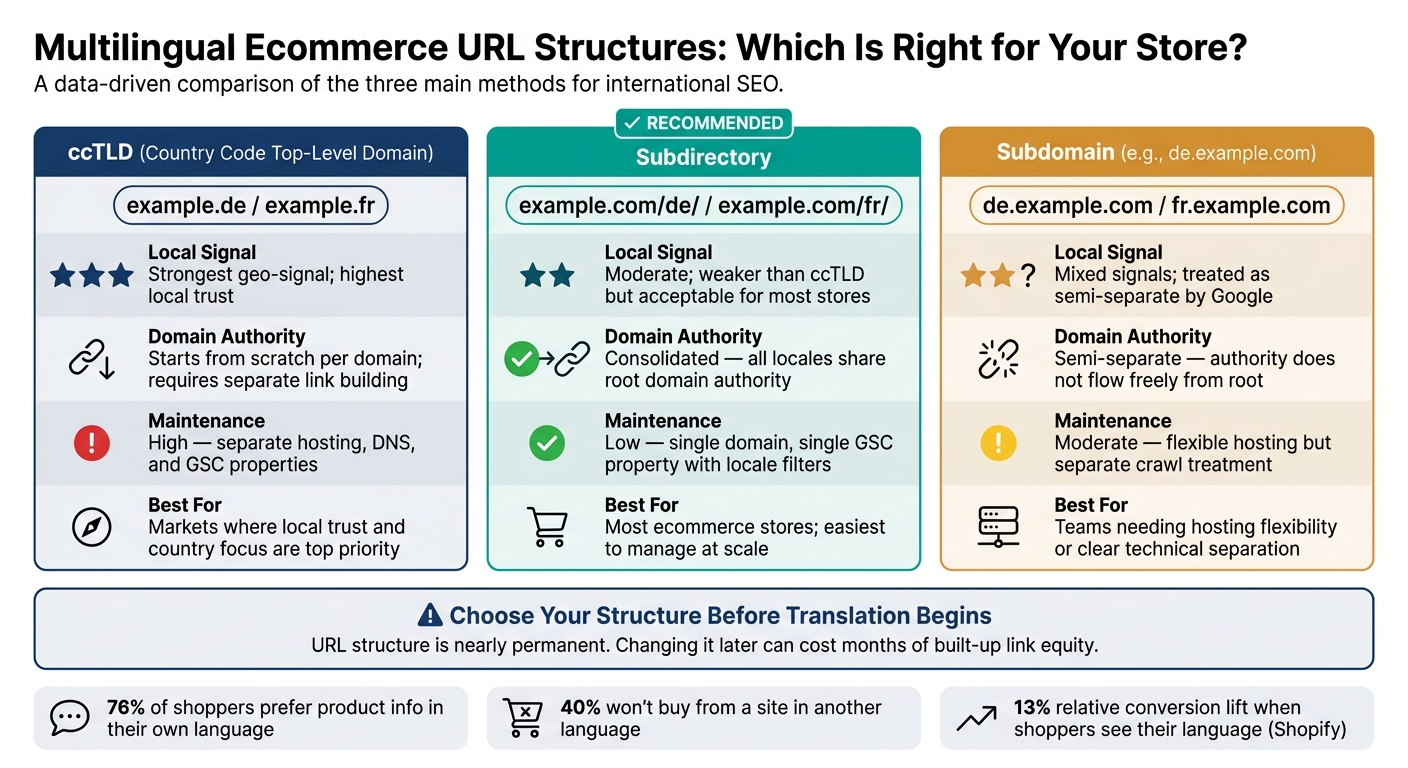
Multilingual Ecommerce SEO: URL Structure Comparison (ccTLD vs Subdirectory vs Subdomain)
How to Add Hreflang Tags to Your Website for Multilingual SEO
sbb-itb-5be333f
Why Multilingual SEO Errors Spread Faster on Ecommerce Sites
Ecommerce catalogs often contain thousands of SKUs. So when one multilingual setup goes wrong, the problem doesn't stay small. It can hit hundreds - or even thousands - of URLs at the same time.
Catalog scale repeats errors across URLs
Ecommerce sites run on templates. That means one bad hreflang setup or one hardcoded canonical tag in the template header can roll out across every product page and category page in one shot.
That's why template-level mistakes spread multilingual SEO issues so fast. A single error in the wrong place can ripple through the whole catalog.
Inventory changes and faceted pages add risk
Product catalogs change all the time. Items sell out, get removed, or move to new URLs. When that happens, hreflang clusters can break if alternate pages still point to missing URLs. And it doesn't take a pile of bad links to cause trouble.
One broken link can cause Google to ignore the cluster.
Faceted filters add another layer of risk. They can generate duplicate URLs across multiple languages, which burns crawl budget and weakens indexation. A catalog with 10,000 products in four languages can create 40,000+ URLs for crawlers to handle, and that puts indexation of new or updated products at risk.
Most of these problems start with weak locale targeting, which the next section covers.
1. Weak Language Targeting and Locale Strategy
When mistakes show up across templates, locale targeting becomes one of the first ranking calls that matters.
A lot of multilingual ecommerce sites get this wrong for a simple reason: they treat language and country as the same thing. They are not. Language targeting tells search engines what language the page uses. Country targeting tells them which market the page is meant for. So when a site uses en instead of en-US or en-GB, it weakens locale targeting and muddies market intent.
Impact on rankings by locale
Broad targeting can make regional versions compete against each other for the same query. In some cases, Google may rank neither page well. It can also treat regional versions as duplicates, which means only one version gets indexed. If your US and UK stores use the same copy and don't send the right locale signals, your UK pages may not show up in British search results.
IP-based redirects create another problem. They can stop Googlebot from finding non-US versions because it often crawls from US IPs.
Revenue risk for product and category pages
Bad locale signals add friction and chip away at trust. That shows up fast on product and category pages, where users expect the right language, currency, and market fit. Represent's German subfolder helped double organic traffic and lift conversions 30%.
Fix priority for ecommerce teams
Set your market structure before you start translation work. URL structure should be the first call, and it is close to permanent. Change it later, and you can lose months of built-up link equity.
For most ecommerce stores, subdirectories (example.com/de/) are the practical option. They keep domain authority in one place and are easier to manage than ccTLDs.
| Structure | Local Signal | Authority | Maintenance |
|---|---|---|---|
ccTLDs (.de, .fr) |
Strongest local trust signal | Starts from scratch | High |
Subdirectories (/de/) |
Weaker local signal | Consolidated domain authority | Low |
Subdomains (de.) |
Mixed | Semi-separate | Moderate |
Once the URL structure is locked in, hreflang setup and localized keyword research should come next, before any translation work starts.
2. Poor or Unlocalized Translation
Translation changes the words. Localization changes the shopping experience - currency, sizing, payment options, and tone - so it fits the market.
Impact on rankings by locale
Even if hreflang and technical SEO are set up the right way, direct translation can still miss local search intent. People in different markets often use different words for the same item. A simple example: the same product may be searched as "chaquetas mujer" in Spain and "chamarras" in Mexico.
If you optimize for the wrong regional term, you miss traffic in that market. It's that simple.
Bad translation can also hurt engagement. When copy sounds awkward or out of place, people leave fast. Search engines may read that behavior as a sign that the page doesn't match what users in that locale want, which can push rankings down.
That puts pressure on the next part of the system: technical signals.
Revenue risk for product and category pages
The business risk is direct. 76% of international shoppers prefer product information in their native language, and 40% will not buy from a site in another language.
Partial translation makes things worse. If a Spanish product page still has English navigation, the experience feels broken. That adds friction and weakens trust.
The same goes for buying details. Shipping terms left in English, size charts with only U.S. sizes and no EU match, or product measurements shown in the wrong units can stop a purchase cold. Revolve's Spanish site previously had this exact issue, with English menus and product quantities shown in ounces instead of liters.
Fix priority for ecommerce teams
Start with the pages that make money.
Use human translation or transcreation for checkout, top product pages, and navigation. AI can help with first drafts, but a native reviewer should approve the final copy.
| Content Type | Priority | Localization Focus |
|---|---|---|
| Checkout Flow | Critical | Local payment methods, currency, address formats |
| Product Pages (PDPs) | High | Localized specs, sizing, units, native reviews |
| Homepage/Navigation | High | Transcreated copy, local search intent |
| Support/Policies | Medium | Legal compliance, local contact hours |
| Blog/Guides | Low | Localized examples and cultural references |
Even strong localization can fall apart if search engines can't map each language version the right way.
3. Broken or Misconfigured Hreflang
Hreflang tells Google which language and country version of a page to show. If it’s set up wrong, Google can show your English product page to shoppers in France, or read localized pages as duplicate content and push them down in search results. Once each market has the right page copy, hreflang is what tells Google where each version belongs.
Impact on rankings by locale
An estimated 75% of international websites have hreflang errors, and those errors can split search visibility across markets. One of the most common problems is a missing return tag. If your English page points to a German alternate, the German page has to point back. If it doesn’t, Google ignores the annotation.
Other quiet failures cause trouble too. Using an invalid locale code like en-UK instead of en-GB can make Google ignore the tag. Missing self-referencing tags can also cause the whole cluster to fail validation.
Revenue risk for product and category pages
When the wrong version of a page shows up in the wrong country, conversions usually drop fast.
"The wrong page version surfaces in the wrong country, users land on content in the wrong language, and conversion rates crater - all because a handful of HTML attributes are missing, malformed, or asymmetric." - Digital Applied
That means misrouted traffic can wipe out conversion gains before a shopper even sees the right product page.
Technical complexity to diagnose
The rules behind hreflang are pretty simple. The hard part is that errors spread fast across big ecommerce catalogs. A single mismatch can throw off a large group of pages.
Canonical tags add another layer. If your canonicals conflict with hreflang, Google may follow the canonical and ignore the locale signal. So the two need to stay aligned on every localized page.
Here are the hreflang issues that break clusters most often:
| Hreflang Error | Impact | Fix |
|---|---|---|
| Missing return tags | Google ignores the cluster | Ensure Page B links back to Page A |
| Invalid locale codes | Tags are silently ignored | Use ISO 639-1 for language (en) and ISO 3166-1 for region (GB) |
| Relative URLs | Tag is invalid | Use absolute URLs, such as https://example.com/de/ |
| Missing self-reference | Cluster fails validation | Add a self-referencing tag |
Fix priority for ecommerce teams
For large catalogs, use XML sitemaps for hreflang instead of HTML <head> tags. It keeps page templates cleaner and makes updates much easier to manage across thousands of URLs. Add an x-default tag too, so users outside your stated language or region targets still have a fallback page.
A practical workflow looks like this:
- Crawl the site with Screaming Frog or Sitebulb to find missing return tags, missing self-references, and invalid codes
- Check the International Targeting report in Google Search Console to spot errors Google has already flagged
Fixing hreflang can clear up misrouting issues and improve indexation within 4 to 8 weeks. If the localized page still doesn’t rank after that, check the canonicals next.
4. Conflicting Canonical Tags Across Languages
Canonical tags tell Google which page to index. If a German or French page points its canonical tag to the English version, Google can treat the local page as a duplicate and ignore its hreflang signal. When that happens, you lose search visibility in the market that page was meant to serve.
Impact on rankings by locale
When canonical and hreflang signals conflict, the canonical tag usually wins. In plain English, Google is more likely to consolidate around the en-US page instead of the local one. That can push the localized page out of search results in its own market.
The first step is simple: audit each locale pair and make sure both signals line up.
Revenue risk for product and category pages
This issue doesn't just hurt rankings. It can also send shoppers to the wrong language, the wrong currency, or the wrong shipping details. And when a page feels off, trust drops fast. So do conversions.
Technical complexity to diagnose
The tricky part is scale. A few bad tags are easy to miss when you're dealing with thousands of product and category URLs.
Use Screaming Frog or Ahrefs Site Audit to pull both the canonical and hreflang tags for each URL. Then verify that every URL listed in those tags returns a 200 OK status. If a URL redirects or returns a 404, Google may ignore the hreflang cluster.
| Setup | Canonical Tag | Likely Result |
|---|---|---|
| Correct | Points to itself | Indexes each locale for its target market |
| Broken | Points to the English/master version | Treats localized pages as duplicates and may ignore hreflang |
Typical fix priority for ecommerce teams
Treat this as a high-priority template fix. Each localized page should self-canonicalize, and the URL in its hreflang tag should match that page. After that, review product and category page linking to make sure those pages connect to the right locale versions too.
5. Orphan Product and Category Pages
An orphan page is a page with no internal links pointing to it. In multilingual ecommerce, this usually happens when a translated product page goes live, but the local navigation and category links still send users to English URLs. Google then has a much harder time finding the local page through normal crawling, which can leave it unindexed or tough to find. Even hreflang set up the right way won’t help much if the localized URL has no internal path leading to it.
When that happens, the English page ranks instead of the local one. It picks up authority, while the localized version sits in the dark. If your German or French product pages are orphaned, shoppers in those markets may never reach the right version - and that lost traffic can turn into lost sales.
To find orphan pages at scale, compare your XML sitemap best practices with a full site crawl in Screaming Frog or Sitebulb. If a URL shows up in the sitemap but has zero incoming internal links, it’s orphaned. Google Search Console can also help here. Pages marked as "Discovered, not indexed" often point to weak or missing internal link paths.
Fix discovery first. Then rebuild local navigation so it points to the right URLs. Focus on the pages that matter most for revenue:
- Homepage
- Main category collections
- Top-selling product pages
After that, review your language switcher and localized navigation menus. These often send people to the locale homepage instead of the exact localized product or category URL. Once the links are fixed, track indexation by locale in Search Console to make sure those pages start showing up.
Once localized pages are reachable, the next check is whether their language, currency, and search terms line up with local intent.
6. Local Search Intent and Currency Mismatch
Impact on Rankings by Locale
Once crawlability is handled, the next issue is relevance. Each locale needs native search terms and the right currency. If a German page shows prices in USD or uses awkward translated keywords, it can struggle to rank in that market.
Search intent shifts more than a lot of teams think. Massimo Dutti, for example, uses "chaquetas mujer" for Spain and "chamarras" for Mexico - same product, different native search terms, and different buying language. That matters. If you translate keywords word-for-word instead of researching them in-market, pages can show up for the wrong searches or miss the main search demand altogether.
Revenue Risk for Product and Category Pages
Currency mismatch can hurt rankings and conversions at the same time. When shoppers land on a page with a foreign currency, trust drops. Many leave.
There’s also a search visibility issue. If your Product schema says priceCurrency: "USD" but the page itself shows euros, Google can cut rich result visibility and suppress product listings in search results.
How to Diagnose It
This problem usually sits where hreflang tags, canonical tags, and Product structured data meet. Use Google's Rich Results Test on each regional page and check that priceCurrency matches the ISO 4217 code for that market. It also needs to match the price shown on the page.
Typical Fix Priority for Ecommerce Teams
Start with the highest-impact fixes first:
- Correct schema and displayed currency so they match
- Localize keywords for each market instead of translating them directly
- Update trust signals such as units of measurement and local payment methods
Local payment methods can improve conversions.
If a site forces multiple languages onto one page, the next issue is URL-level language separation.
7. Serving Multiple Languages From One URL
If the language, currency, and schema are set up correctly but Google still sees only one version, the issue is often the URL.
Here’s the core problem: if each language lives on the same URL, Google can’t reliably index the correct version.
That setup tends to hide translated content from crawlers. It can also cause one language version to dominate search. On ecommerce sites, a single bad language-switching rule can affect the entire catalog. Rankings may get split across locales, or localized pages may drop out of search results altogether.
When localized pages aren’t indexed, native-language shoppers never see them. Traffic drops. Conversions usually drop too.
The usual causes include:
- IP redirects
?lang=parameters- JavaScript-based language switching
JavaScript switching can block indexing.
The fix is simple in principle: give each language its own crawlable URL, usually with subdirectories, and avoid forced redirects. Once each language has its own crawlable URL, your internal links also need to point to the matching locale version.
Use a banner, not a redirect.
8. Poor Navigation and Cross-Locale Internal Linking
Once URLs are split by locale, navigation needs to back that up. After each locale has its own crawlable URL, links in that section should stay in that section.
Impact on Rankings by Locale
Cross-locale links weaken local relevance and send crawlers into the wrong language area. When that happens, localized pages may not rank well in the market they were built for.
Revenue Risk for Product and Category Pages
The hit to revenue is pretty direct. If a French shopper clicks a breadcrumb on a product page and ends up on an English category page, that detour can knock them out of the funnel. In plain terms, navigation that crosses locale lines usually hurts both rankings and conversions.
Technical Complexity to Diagnose
Use Screaming Frog or Ahrefs to spot links that jump across language directories. Then verify that each internal link stays inside its own locale section.
Typical Fix Priority for Ecommerce Teams
This is a site-structure problem, not a page-level one. A page can be technically clean and still struggle in its target market if the navigation keeps sending mixed signals. Keep links inside each language directory, translate every navigation element, and make sure the language switcher sends users to the matching localized URL.
If localized pages still underperform after link cleanup, check for crawl blocks next.
| Navigation Element | Common Error | Fix |
|---|---|---|
| Language switcher | Links to homepage in target language | Lands on the equivalent page in the target locale |
| Breadcrumbs | Links to source-language parent category | Reflects the localized URL structure |
| In-content links | Points to source-language product/blog pages | Points to translated version of the same asset |
| Menus and footers | Hardcoded in source language | Fully translated per locale |
9. Indexability Blocks on Translated Pages
Once each locale has its own URL and internal links, the next place things break is crawl access.
A translated page can still vanish from search if redirects, canonicals, robots rules, or noindex tags stop Google from crawling or indexing it.
Impact on Rankings by Locale
The most common blocker is IP-based redirects. Geo-redirects can send Googlebot to the wrong version and stop it from reaching translated URLs.
Canonical tags can cause the same kind of damage. If a translated page points its canonical to the source-language version, you're telling Google to ignore the translated URL. In that case, Google may index only the source-language page.
Revenue Risk for Product and Category Pages
The business risk here is simple. 76% of consumers prefer to buy products in their native language, and 40% will never buy from sites in other languages. If your localized product and category pages aren't indexed, those shoppers won't find you through organic search.
And this can happen at scale. One robots.txt rule blocking a /fr/ directory can take out an entire locale section.
Technical Complexity to Diagnose
These issues often fail quietly. The page looks fine on the surface, but Google may skip it entirely. That’s why crawl data and server logs matter more than page-level checks.
| Blocker Type | What to Check | Why It Matters |
|---|---|---|
| IP-based redirects | Server logs - Googlebot IP request paths | Reveals whether Googlebot is being rerouted away from translated URLs |
| Canonical conflicts | Canonical tag on each translated URL | A canonical pointing to the source language tells Google to skip the local page |
| Robots / noindex | GSC Coverage Report - "Excluded" URL status | Identifies pages blocked by noindex or robots.txt |
| Crawl access | GSC URL Inspection / Coverage | Flags noindex, robots.txt blocks, and excluded status by locale |
Typical Fix Priority for Ecommerce Teams
Start by removing crawl blockers. If Google can't crawl a page, it can't rank.
Then bring back access to high-value product and category pages first, ahead of seasonal or lower-value URLs. If you're using IP-based redirects, swap them for a light banner prompt that suggests the local version without blocking users or bots.
Once access is back, keep an eye on indexation so the same problems don't creep back in as the catalog changes.
10. No Ongoing Validation or Monitoring
After launch, multilingual SEO still needs regular checks. Catalog updates and template changes can break hreflang, canonicals, and crawl paths.
Once a site goes live, the main risk is no longer setup. It’s drift. Small changes stack up, and over time they can throw locale signals out of sync. That’s why recurring audits belong in day-to-day SEO work, not in a one-time cleanup.
Impact on Rankings by Locale
One product launch, URL update, or redirect issue can disrupt locale clusters across thousands of pages. Broken hreflang often does damage quietly. Google ignores broken tags and may show the wrong locale instead. When teams stop checking after launch, visibility can drop fast.
Revenue Risk for Product and Category Pages
Every time a product is added, a URL changes, or a redirect fails, the hreflang cluster can slip out of sync. 76% of global consumers prefer buying products with information in their native language. That puts extra weight on product and category pages.
A few checks matter most here:
- Review server logs for blocked crawls on non-US locale URLs.
- Check canonicals and hreflang together in each crawl.
Typical Fix Priority for Ecommerce Teams
Use a fixed monitoring cadence so small errors are caught before they spread. Tie checks to catalog update cycles, not just calendar reminders.
| Monitoring Task | Frequency | Primary Tool |
|---|---|---|
| Hreflang return tags and self-references | Monthly | Screaming Frog / Sitebulb |
| Crawl coverage and "Discovered – currently not indexed" | Monthly | Google Search Console |
| Rank tracking by locale | Weekly | Ahrefs / Semrush |
| Locale cannibalization | Quarterly | Semrush / Ahrefs |
| Cross-locale link checks | Quarterly | Internal Link Analyzer |
Use separate Google Search Console properties for each locale folder or subdomain, such as /fr/ or /de/, so you get cleaner locale-level data instead of aggregated noise.
Tables and Checklists to Use Throughout the Article
Use these tables as a fast audit reference for the setup decisions behind errors 1–10: language targeting, translation, hreflang, canonicals, internal links, and indexability.
Core comparison tables
| Model | Hreflang Example | Best Use Case |
|---|---|---|
| Language-Only | hreflang="es" |
Blogs, SaaS with global pricing, informational content |
| Language-plus-Country | hreflang="es-MX" |
Ecommerce with regional shipping, taxes, and currency |
This first table helps you pick the right targeting model. If the same content works across multiple markets, a language-only setup often does the job. If pricing, shipping, tax, or product details change by market, language-plus-country is usually the better fit.
| Feature | U.S. Standard | International (EU/UK/Global) | SEO/UX Impact |
|---|---|---|---|
| Currency | USD ($) | EUR (€), GBP (£), JPY (¥), etc. | High: Price clarity and conversion |
| Date Format | MM/DD/YYYY | DD/MM/YYYY or YYYY/MM/DD | Medium: Incorrect formats can erode trust |
| Tax Display | Pre-tax (added at checkout) | VAT-inclusive (gross price) | High: Legal compliance and price transparency |
| Shipping/Units | Imperial (lbs, oz, inches) | Metric (kg, liters, cm) | Medium: Product specs and shipping costs |
| Sizing | US sizing | EU/UK/JP sizing | High: Impacts fit, returns, and conversions |
Small formatting details can cause big problems. A page can be translated well and still feel off if the price, sizing, or date format doesn't match what local users expect.
| Structure | Example | Pros | Cons |
|---|---|---|---|
| ccTLD | example.de |
Strongest geo-signal; high local trust | High cost; split authority; separate link building |
| Subdirectory | example.com/de/ |
Consolidates authority; easiest to manage | Weaker local signal than ccTLDs |
| Subdomain | de.example.com |
Flexible hosting; clear separation | Authority doesn't flow freely; treated as semi-separate |
Site structure matters early because it shapes how you handle indexing, authority, and market targeting later. Many teams default to subdirectories because they're easier to maintain, while ccTLDs make more sense when local trust and country focus matter most.
Hreflang errors quietly break international visibility.
| Error Type | Description | Impact | Fix |
|---|---|---|---|
| Missing Return Tags | Page A links to B, but B doesn't link back to A | Google ignores the cluster | Ensure reciprocal links on all variants |
| Invalid Codes | Using "uk" instead of "gb" for United Kingdom |
Tag is ignored | Use ISO 639-1 (lang) + ISO 3166-1 Alpha-2 (region) |
| Wrong Order | Using "GB-en" instead of "en-GB" |
Tag is ignored | Always use language-region format |
| No Self-Reference | Page doesn't include its own URL in the hreflang set | Validation failure | Add a self-referencing hreflang tag |
| Non-Canonical Target | Hreflang points to a redirect or 404 | Signal dilution | Point only to 200 OK canonical URLs |
This is the kind of issue that slips through launches and migrations. Everything can look fine on the page, but one bad hreflang value or one missing return tag can cause Google to ignore the whole setup.
A localized page that canonicalizes to English tells Google to ignore the local version.
| Scenario | Conflict | Result | Correct Action |
|---|---|---|---|
| Cross-Domain Canonical | /de/ page has canonical pointing to /en/ |
Google may not index the /de/ page |
Each localized page must self-canonicalize |
| Hreflang to Non-Canonical | Hreflang points to /page, but /page canonicals to /page/ |
Conflicting signals for crawlers | Ensure hreflang targets match canonical URLs exactly |
| Global Canonical | All regional versions canonical to the .com root |
Regional versions won't rank locally | Keep regional pages as their own canonicals |
Canonical mistakes are brutal because they override your intent. You can spend weeks building local pages, then wipe out their ability to rank with one bad canonical rule.
Audit checklists for recurring issues
Run this checklist after launches, migrations, and template edits.
| Category | Audit Item | Requirement |
|---|---|---|
| Navigation | Language/country switcher | Must be crawlable and easy to find |
| Navigation | Auto-redirects | Do not force locale based on IP; use a non-obtrusive banner instead |
| Indexability | lang attribute |
<html> tag must match the page's specific locale |
| Indexability | Robots.txt / noindex | Confirm translated pages aren't accidentally blocked |
| Indexability | XML sitemaps | Use separate sitemaps per locale and reference them in sitemap-index.xml |
| Orphan Pages | Hreflang mapping | Every page in the catalog must have counterparts mapped or be marked as unique |
| Schema | priceCurrency |
Must match the currency actually displayed on the regional page |
| RTL Support | dir="rtl" attribute |
Required on <html> for Arabic, Hebrew, and Persian pages |
Use these checks first, then validate them with crawl and localization tools.
Tools That Help Catch Multilingual Ecommerce SEO Issues
Start with the checklist. Then use tools to confirm issues across your site at scale.
Tools for crawling and technical validation
Use different tools for crawl checks, indexation, and localization. Screaming Frog, Sitebulb, and Ahrefs Site Audit can flag hreflang issues, canonicals, orphan pages, indexability problems, and localized keyword gaps across large product catalogs.
You’ll also want tools built for hreflang testing. Aleyda Solis's Hreflang Tag Generator, Merkle's Hreflang Tag Testing Tool, and Google Search Console help you check locale codes and see how Google reads each page variant. Search Console is especially useful for confirming how Google recognizes each locale. If you’re working in markets where Google isn’t the main search engine, check Bing, Yandex, or Baidu Webmaster Tools too.
Once you know where the crawl-level problems are, the next step is keeping them from showing up again.
Tools for localization and workflow control
Use one set of tools for translation quality and another for technical checks. DeepL can help with first-draft translations, but native speakers should still review the copy - especially if they know local search intent. That’s the difference between text that sounds fine and text that matches what people in that market actually search for.
For teams managing content across many markets, a Translation Management System (TMS) or a headless CMS like Contentful or Sanity can automate hreflang generation when new products are added.
For market-specific keyword research, Ahrefs and Semrush both offer country-level keyword databases. Sistrix is also worth using in European markets, especially in the DACH region.
For curated SEO tools, software, and agencies, use Top SEO Marketing Directory.
Conclusion
Multilingual ecommerce SEO works only when language targeting, localization, hreflang, canonicals, and internal links all line up for the same market. In ecommerce, template-level mistakes can spread across thousands of URLs fast, and one weak point can hold back an entire locale.
Fix the highest-impact issues first
Once you’ve mapped the common errors, the next step is triage. Some issues stop visibility. Others mainly hurt conversion.
Start with crawl blockers, hreflang errors, and canonical conflicts. Those decide whether localized pages can be found and indexed at all. Treat indexability, hreflang, and canonicals as blockers. Treat translation quality and keyword localization as conversion fixes.
Run repeatable checks as the catalog grows
After the core fixes are in place, the job is to keep them from slipping. New products, template updates, and market launches can break a clean setup overnight.
Run monthly crawls for hreflang reciprocity, self-canonicals, and localized metadata. Then use locale-specific Search Console views to spot indexing drops early. Add quarterly native-speaker reviews to catch keyword and cultural gaps. Audit on a schedule, because multilingual SEO tends to break fastest after launches and template changes.
FAQs
Which multilingual SEO issue should I fix first?
Fix your hreflang setup first. Start with the basics: every cluster should be complete and reciprocal, include self-referencing tags, and stay aligned with canonicals.
When hreflang breaks, search engines can show the wrong language or country URL, split ranking signals across versions, or ignore the connection between pages altogether. That’s why the first step is a focused audit of your key pages. Check that each localized URL is indexable, uses a self-canonical, and includes matching return tags from the other pages in the cluster.
Should I use subdirectories, subdomains, or ccTLDs?
For most ecommerce businesses, subdirectories are the best option. They keep authority on one domain, make site management simpler, and are easier to scale as you expand into new markets.
ccTLDs work better when you need strong geo-targeting and local trust, but they split authority and add extra work. Subdomains usually don’t perform as well for SEO. Whatever you choose, stay consistent and use hreflang correctly.
How often should I audit multilingual ecommerce SEO?
Make auditing part of your regular workflow, not a one-time task.
- Weekly: Check Google Search Console and watch for new 404s.
- Monthly: Crawl the site to check hreflang, compare indexed page counts across language subdirectories, and review performance by country.
- Quarterly: Run a full audit of hreflang reciprocity, keyword rankings, canonical consistency, and competition at the market level. Audit again after migrations, URL changes, or regional expansions.