If search engines can’t crawl and index your site properly, your SEO efforts will fall short. XML sitemaps and robots.txt are two core tools to fix this. Here’s the difference:
- XML Sitemap: A file that lists your site’s key URLs, helping search engines find and prioritize them.
- Robots.txt: A file that directs crawlers on which parts of your site to avoid.
Both work together to improve how search engines and AI bots (like GPTBot) interact with your site. Misconfigurations, however, can block important pages or waste crawl budgets, which is why a technical SEO audit is essential. This guide explains how to create, validate, and maintain these files to ensure efficient crawling and indexing in 2026.
Robots.txt and Sitemap.xml | Lesson 7/31 | SEMrush Academy
sbb-itb-5be333f
XML Sitemaps and Robots.txt Explained
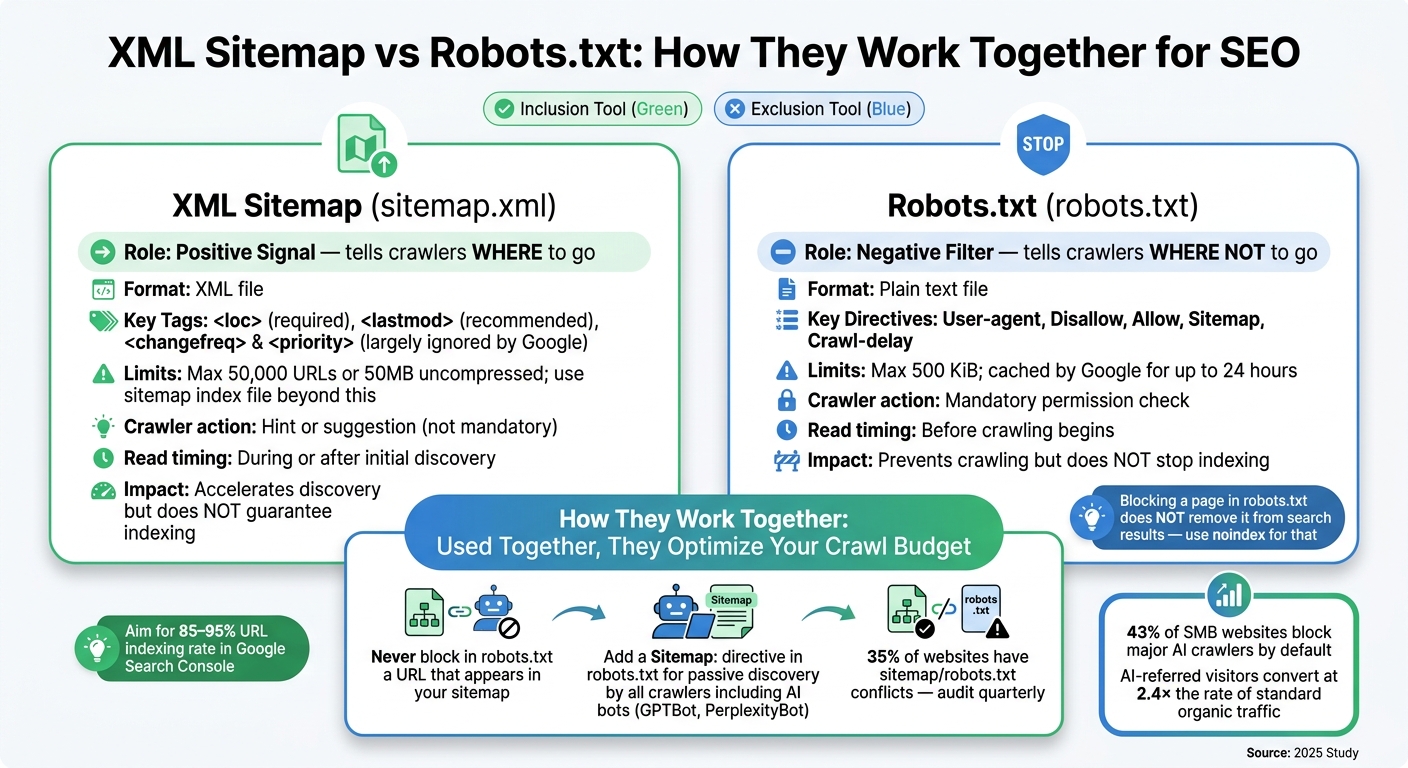
XML Sitemap vs Robots.txt: How They Work Together for SEO
What Are XML Sitemaps?
An XML sitemap is essentially a roadmap for search engine crawlers, listing out all the important URLs on your site in a file called sitemap.xml. This file helps crawlers navigate your site efficiently by providing a direct list of URLs.
Each URL entry includes several metadata fields. The <loc> tag is mandatory - it contains the full, absolute URL of the page. The <lastmod> tag indicates the date the page was last updated, which is particularly helpful for crawlers in detecting fresh content. While <changefreq> and <priority> tags can also be included, Google has stated that it largely ignores these, focusing primarily on <loc> and <lastmod>.
If your site exceeds 50,000 URLs or 50MB uncompressed, you'll need to split your sitemap into multiple files. In this case, a sitemap index file acts as a master directory, linking to individual sitemaps. These can be organized by content type, such as blog posts, product pages, or case studies.
What Is Robots.txt?
The robots.txt file is a simple text file placed at the root of your domain (e.g., https://example.com/robots.txt). It's the first file crawlers check before accessing your site and serves as a guide for which areas they should or shouldn’t explore.
Here are the four most common directives you’ll find in robots.txt:
User-agent: Specifies which crawler the rule applies to (e.g.,Googlebot,GPTBot) or applies to all crawlers with*.Disallow: Blocks a crawler from accessing specific paths or directories.Allow: Lets a crawler access a specific subdirectory within a blocked folder.Sitemap: Provides the absolute URL of your XML sitemap for easy discovery.
It’s important to remember that robots.txt only controls crawling, not indexing. Even if a page is blocked in robots.txt, Google can still index it if it’s linked from an external site. To ensure a page stays out of search results, you’ll need to use a noindex meta tag or an X-Robots-Tag header.
"Robots.txt is not an access control or security mechanism – rather, it is a voluntary 'request' to friendly crawlers (search engines and other bots) about crawl preferences." - RankStudio
Because robots.txt is publicly accessible, it’s not a secure way to hide sensitive directories like /admin/. Listing such paths could inadvertently expose them to malicious actors.
How XML Sitemaps and Robots.txt Work Together
While XML sitemaps and robots.txt serve different purposes, they complement each other. XML sitemaps act as a positive signal, guiding crawlers to important pages, while robots.txt serves as a negative filter, directing them away from certain areas. Together, they help search engines allocate their crawl budget more effectively, focusing on high-value pages instead of wasting resources on irrelevant or duplicate content.
For optimal results, make sure there’s no conflict between these two files. URLs listed in your sitemap should never be blocked by robots.txt, as this creates confusion for crawlers and undermines your site’s structure. Additionally, URLs in your sitemap should meet these criteria:
- Return a 200 status code
- Be canonical
- Exclude any
noindexdirectives
| Aspect | Robots.txt | XML Sitemap |
|---|---|---|
| Primary purpose | Control crawl access (exclusion) | Suggest URLs for discovery (inclusion) |
| Crawler action | Mandatory permission check | Hint or suggestion |
| Read timing | Before crawling begins | During or after initial discovery |
| Format | Plain text | XML |
| Impact on indexing | Prevents crawling but doesn’t stop indexing | Accelerates discovery but doesn’t guarantee indexing |
Crawlers typically start by reading robots.txt to identify restricted areas. If the file includes a Sitemap: directive, it helps crawlers locate your XML sitemap right away. Including this directive is a simple yet effective way to ensure all crawlers, including newer AI bots like GPTBot and PerplexityBot, can find your sitemap without requiring manual submission.
How to Create and Optimize XML Sitemaps
XML Sitemap Structure and Standards
A valid XML sitemap has a simple structure. It starts with a <urlset> tag that references the protocol standard and wraps each page entry within a <url> tag. Inside this, the <loc> element includes the full, absolute URL (e.g., https://example.com). This is the minimum requirement for a functioning sitemap.
Among optional tags, <lastmod> is the only one worth focusing on in 2026. It uses the W3C Datetime format (e.g., 2026-05-27T08:00:00-05:00) and should only be updated when the content changes. As Jacque, Lead of Capconvert, explains:
"Google's John Mueller has publicly stated multiple times that priority and changefreq are largely ignored by Google's crawler. lastmod, by contrast, is actively used to determine crawl scheduling."
Although <changefreq> and <priority> are still part of the protocol, they are mostly overlooked by major search engines, so there’s no need to spend time adjusting these fields.
For websites with more than 50,000 URLs or 50MB uncompressed, a sitemap index file is necessary. This file references multiple sub-sitemaps, and splitting them by content type (e.g., sitemap-products.xml or sitemap-blog.xml) makes diagnosing issues in Google Search Console much easier. A properly organized and up-to-date sitemap is crucial for both traditional search engines and AI crawlers.
"An XML sitemap that lists the wrong URLs is worse than no sitemap at all. The wrong list teaches Google to distrust your sitemap as a quality signal." - SEOGraphy
With this structure in mind, the next step is understanding how different platforms handle sitemap creation.
Generating XML Sitemaps Across Different Platforms
Once your sitemap structure is ready, the process for generating it depends on your platform. Most modern CMSs handle this automatically.
| Platform | Sitemap Generation Method |
|---|---|
| WordPress | Built-in support; advanced options available via Yoast SEO or Rank Math plugins |
| Shopify | Auto-generated at /sitemap.xml - no additional setup required |
| Wix | Automatically creates a detailed sitemap index |
| Next.js / Frameworks | Typically integrated into the build process using libraries |
For WordPress users, plugins like Yoast SEO and Rank Math not only generate sitemaps but also exclude noindex pages, update timestamps on publication, and organize sitemaps by post type. This real-time automation ensures your sitemap stays relevant, as outdated sitemaps can lead to missed crawl opportunities.
For custom or headless sites, sitemaps need to be generated programmatically. Be sure to use UTF-8 encoding and properly escape special characters in URLs (e.g., replace & with &). If your sitemap is large, enabling Gzip compression can reduce file size and speed up retrieval. Keeping your sitemap accurate and properly formatted ensures both traditional and AI crawlers can efficiently discover your key content.
Submitting and Validating XML Sitemaps
Once your sitemap is live, submit it to Google Search Console (GSC) and Bing Webmaster Tools. Submitting and validating your sitemap helps ensure crawlers can navigate your site effectively. In GSC, go to the Sitemaps section under the Indexing menu, paste your sitemap URL, and click "Submit." For sitemap index files, submitting the index alone is enough - search engines will find the sub-sitemaps automatically.
After submission, aim for 85–95% of your URLs to be indexed in GSC. If the percentage is lower, it could indicate issues like duplicate content or canonicalization errors.
Common problems to watch for include URLs returning 404 or 301 status codes, pages blocked by robots.txt, and inconsistencies between www and non-www URLs compared to your verified domain in GSC. Keep in mind, Google cannot process a sitemap index that references another sitemap index, so avoid nesting index files. Running a monthly audit with top SEO marketing tools can help identify and fix stale URLs before they harm your sitemap’s reliability.
How to Configure Robots.txt for Efficient Crawling
Once your XML sitemap is submitted and verified, the next step in managing how search engines interact with your site is configuring your robots.txt file. While the sitemap guides crawlers on what to visit, robots.txt focuses on what they should avoid. Striking the right balance between these two ensures search engines use your crawl budget effectively.
Robots.txt Directives and Syntax
The robots.txt file is a simple text file placed in your domain's root directory (e.g., example.com/robots.txt). It must be encoded in UTF-8, and paths are case-sensitive. For instance, Disallow: /Admin/ and Disallow: /admin/ are treated as separate rules.
Here are the five main directives you’ll use:
| Directive | Purpose | Example |
|---|---|---|
User-agent |
Specifies which bot the rule applies to | User-agent: Googlebot |
Disallow |
Blocks access to a specific path | Disallow: /search/ |
Allow |
Makes an exception to a Disallow rule |
Allow: /search/public/ |
Sitemap |
Points to your sitemap's location | Sitemap: https://example.com/sitemap.xml |
Crawl-delay |
Sets a delay between requests (ignored by Google) | Crawl-delay: 10 |
When creating rules, you can use * to match any sequence of characters and $ to anchor patterns to the end of a URL. For example, Disallow: /*\.pdf$ blocks URLs ending in .pdf while allowing others like /how-to-use-pdf-files to remain accessible.
Robots.txt Configuration Best Practices
To ensure your robots.txt file is optimized for efficient crawling, follow these guidelines:
David Galvin, a Technical SEO Specialist, emphasizes:
"Robots.txt controls crawling, not indexing: blocked pages can still appear in results."
Blocking a page in robots.txt prevents crawlers from accessing it, but if other sites link to that page, it may still appear in search results with a "No information is available" snippet. If you want a page removed from search results, allow it to be crawled and use a <meta name="robots" content="noindex"> tag instead.
Avoid blocking critical resources. Google needs access to CSS, JavaScript, and image files to render your pages correctly and evaluate performance metrics like Core Web Vitals. Blocking directories like /wp-content/ or /static/ can negatively impact your site's performance scores.
For e-commerce sites, using wildcard rules such as Disallow: /*?filter= or Disallow: /*?sort= is a smart way to prevent crawlers from wasting resources on countless filtered URLs. This keeps Google's focus on your core product pages, which are crucial for rankings.
As of 2026, robots.txt has also become a key tool for managing AI bots. There’s a distinction between training bots (e.g., GPTBot or Google-Extended), which collect data for AI models, and search bots (e.g., OAI-SearchBot or Claude-SearchBot), which power AI-driven search tools. To ensure your content appears in AI search results but isn’t used for training models, block training bots while allowing search bots.
Real-world example: In 2025, a Spanish e-commerce company migrating to Shopify accidentally carried over a Disallow: /catalog/ rule from their previous platform. This blocked Shopify’s /collections/catalog/ path, preventing 2,300 product pages from being crawled for six weeks. The issue was only discovered through Google Search Console.
Additional considerations:
- Google enforces a 500 KiB size limit on robots.txt files. Anything beyond this limit is ignored.
- Google caches robots.txt for up to 24 hours. If your server returns a 5xx error when Google tries to fetch the file, it may pause crawling your site for up to 12 hours.
Adding XML Sitemap References to Robots.txt
To complement your robots.txt configuration, include a reference to your XML sitemap. This helps crawlers discover your sitemap without relying solely on manual submissions through tools like Google Search Console or Bing Webmaster Tools.
"The robots.txt method is the most reliable passive discovery mechanism. Unlike Search Console submission, it doesn't require you to log into a tool." - Instant Sitemap
Here’s what to keep in mind:
- Always use the full absolute URL with the correct protocol. For HTTPS sites, the sitemap reference must begin with
https://. Relative paths like/sitemap.xmlare not valid. - The
Sitemap:directive applies globally to all crawlers, regardless of its placement in the file. - For sites with multiple sitemaps, either list each one on a separate
Sitemap:line or use a single sitemap index file. The index file is easier to manage and keeps things tidy.
Typically, place all Sitemap: directives at the bottom of the robots.txt file to separate them visually from other rules.
Here’s an example of a well-structured robots.txt file:
# Block AI training bots
User-agent: GPTBot
Disallow: /

User-agent: Google-Extended
Disallow: /

# Allow all other crawlers
User-agent: *
Disallow: /search/
Disallow: /*?filter=
Disallow: /*?sort=
Allow: /

# Sitemap declarations
Sitemap: https://example.com/sitemap-index.xml
Finally, double-check that the directory containing your sitemap isn’t blocked by any Disallow rule. If it is, crawlers won’t be able to access the sitemap at all.
How to Validate and Monitor XML Sitemaps and Robots.txt
Once you've set up your XML sitemap and robots.txt files, it's essential to validate and monitor them regularly. Websites are constantly evolving, and changes can introduce errors. Routine checks ensure these files function correctly, maintaining a strong SEO foundation.
SEO tools and services for validation
Google Search Console offers a straightforward way to validate your sitemap. Its Sitemaps report shows processing statuses like "Success", "Has errors", or "Couldn't fetch." Additionally, you can use the URL Inspection tool to confirm that specific URLs aren't unintentionally blocked by your robots.txt file.
For a deeper audit, Screaming Frog SEO Spider is an excellent tool. It cross-references your sitemap against robots.txt rules, flags blocked URLs, and identifies orphan pages. The free version supports up to 500 URLs, while the paid version (around $270 annually) allows unlimited crawls.
Other helpful tools include robots-txt-checker.com, which simulates how over 20 different user agents (including AI crawlers like GPTBot and ClaudeBot) interpret your rules. Additionally, browser-based XML validators like Kordu.tools and Pageradar can identify syntax errors, malformed tags, and namespace issues for free.
Once you've identified issues, it's time to tackle common errors.
Fixing Common Issues
Errors in your XML sitemap or robots.txt can disrupt search engine crawling and indexing. In fact, about 35% of websites experience such issues. One frequent problem arises when a URL appears in the sitemap but is blocked by a Disallow rule in robots.txt. As Senior SEO Consultant Sercan Kahraman explains:
"When the two disagree - a URL sits in the sitemap but is also blocked by robots.txt - Google treats it as a crawl error."
Below is a quick guide to common issues and their solutions:
| Issue | Impact | Fix |
|---|---|---|
| URL in sitemap blocked by robots.txt | Leads to crawl errors and wastes crawl budget | Remove the URL from the sitemap or unblock it in robots.txt |
| Redirects (3xx) in sitemap | Masks real 404 errors and reduces sitemap quality | Replace with the final 200 OK canonical URL |
| "Noindex" pages in sitemap | Sends conflicting signals to search engines | Remove noindex pages from the sitemap |
| Malformed XML | Prevents proper sitemap parsing | Fix unescaped characters (e.g., replace & with &) using an XML validator |
| Relative URLs in sitemap | Can confuse Google about the correct path | Use absolute URLs with the full https:// protocol |
| Size limit exceeded | Files with over 50,000 URLs or 50 MB may be ignored | Split into multiple sitemaps and use a sitemap index file |
Keeping Files Up to Date
Validating your files is just the first step - ongoing maintenance is equally important. Major site changes, like migrations, CMS updates, or URL restructures, often require updates to your XML sitemap and robots.txt. Conduct audits quarterly or after any deployment that impacts your URL structure.
For instance, a news website in 2025 had an outdated sitemap listing 40,000 redirected URLs, which hid 150 real 404 errors in Search Console. Similarly, inaccurate <lastmod> tags can hurt your sitemap's effectiveness. Google Search Advocate John Mueller has pointed out:
"Consistently inaccurate
<lastmod>causes Google to discount the field entirely; the fix is restoring accuracy and waiting weeks for trust to rebuild."
To avoid this, configure your CMS to update the <lastmod> tag only when meaningful content changes occur, not with every build or deployment. For larger sites, use the Google Search Console "Pages" report filtered by sitemap to identify "Submitted but not indexed" URLs. These may require quality improvements or canonical fixes to resolve indexing issues.
Conclusion: Key Takeaways for 2026 SEO
XML sitemaps and robots.txt files are essential tools for helping search engines and AI systems find and evaluate your content. When configured correctly, they can speed up indexing, better manage crawl budgets, and boost your rankings.
For 2026, some important practices to keep in mind include ensuring your sitemap only lists canonical URLs that return a 200 status code. Redirected, noindexed, or broken URLs should be excluded. Additionally, think of your robots.txt file as a way to manage access permissions for your content rather than as a security measure.
A study from 2025 revealed that 43% of small and medium-sized business websites block major AI crawlers by default. This is significant because visitors referred by AI systems convert at 2.4× the rate of standard organic traffic. Clearly, allowing AI crawlers access to your site should be a top priority for businesses.
To help maintain optimal settings, there are practical tools and expert resources available. For businesses needing technical SEO support - whether for managing crawl budgets or setting up hreflang tags - the Top SEO Marketing Directory is a great resource. It features a curated list of agencies and software providers that specialize in solving these technical SEO challenges, saving you time and effort.
The most successful sites in 2026 will treat their sitemaps and robots.txt files as dynamic assets. These documents should be audited quarterly, updated after major deployments, and aligned with how search engines and AI models interact with the web. Regular reviews and updates will be key to staying competitive in SEO.
FAQs
Do I need both an XML sitemap and a robots.txt file?
Both the robots.txt file and the XML sitemap play distinct but complementary roles in managing how search engines interact with your website. The robots.txt file guides crawlers on which areas of your site to skip, while the XML sitemap directs them to the pages you want indexed. Adding a link to your sitemap within the robots.txt file can streamline crawling and make it easier for search engines to index your content efficiently.
Why are my sitemap URLs “Submitted but not indexed” in Google Search Console?
When Google Search Console shows URLs as 'Submitted but not indexed', it means Google has seen these pages in your sitemap but opted not to include them in its index. This can happen for several reasons:
- Eligibility issues: Pages might be blocked by robots.txt, include noindex tags, or have canonical tags pointing elsewhere.
- Content quality: Pages with thin content, duplicate content, or those deemed low-priority by Google might not make the cut.
- Crawl scheduling: Google may not see a strong enough demand to crawl and index the page.
To dig deeper, use the URL Inspection tool to identify the specific reason for each page.
How do I block AI training bots but still allow AI search bots to crawl my site?
To prevent AI training bots from accessing your site while still allowing AI search bots, you can configure a robots.txt file to define permissions. For instance, you might block crawlers like GPTBot, ClaudeBot, and Google-Extended, while permitting bots such as OAI-SearchBot and PerplexityBot. Here's an example configuration:
User-agent: GPTBot
Disallow: /

User-agent: OAI-SearchBot
Allow: /

User-agent: *
Allow: /
It's important to remember that robots.txt is a request - it relies on the bots to comply and doesn't enforce restrictions.