If you need automated rank reports, pick based on 3 things first: location depth, reporting, and agency needs. Daily tracking is the baseline. For U.S. local SEO, city and ZIP-code tracking matter more than national averages. And with Google AI Overviews showing up in nearly half of searches, rank alone is no longer enough.
Here’s the short version:
- Best for all-in-one SEO: Semrush, Ahrefs, SE Ranking
- Best for rank-tracking depth: AccuRanker, Nightwatch, ProRankTracker
- Best for agency reporting: AgencyAnalytics, SE Ranking, Nightwatch
- Best for small teams: Mangools SERPWatcher, Wincher
- Best for shortlist building: Top SEO Marketing Directory
- Best for local SEO: Nightwatch and SE Ranking
- Best for on-demand checks: Semrush and AccuRanker
I’d use this lens when comparing tools:
- Daily updates at minimum
- City, ZIP, or grid tracking for local campaigns
- Desktop and mobile splits
- Scheduled email reports and alerts
- White-label dashboards if you manage clients
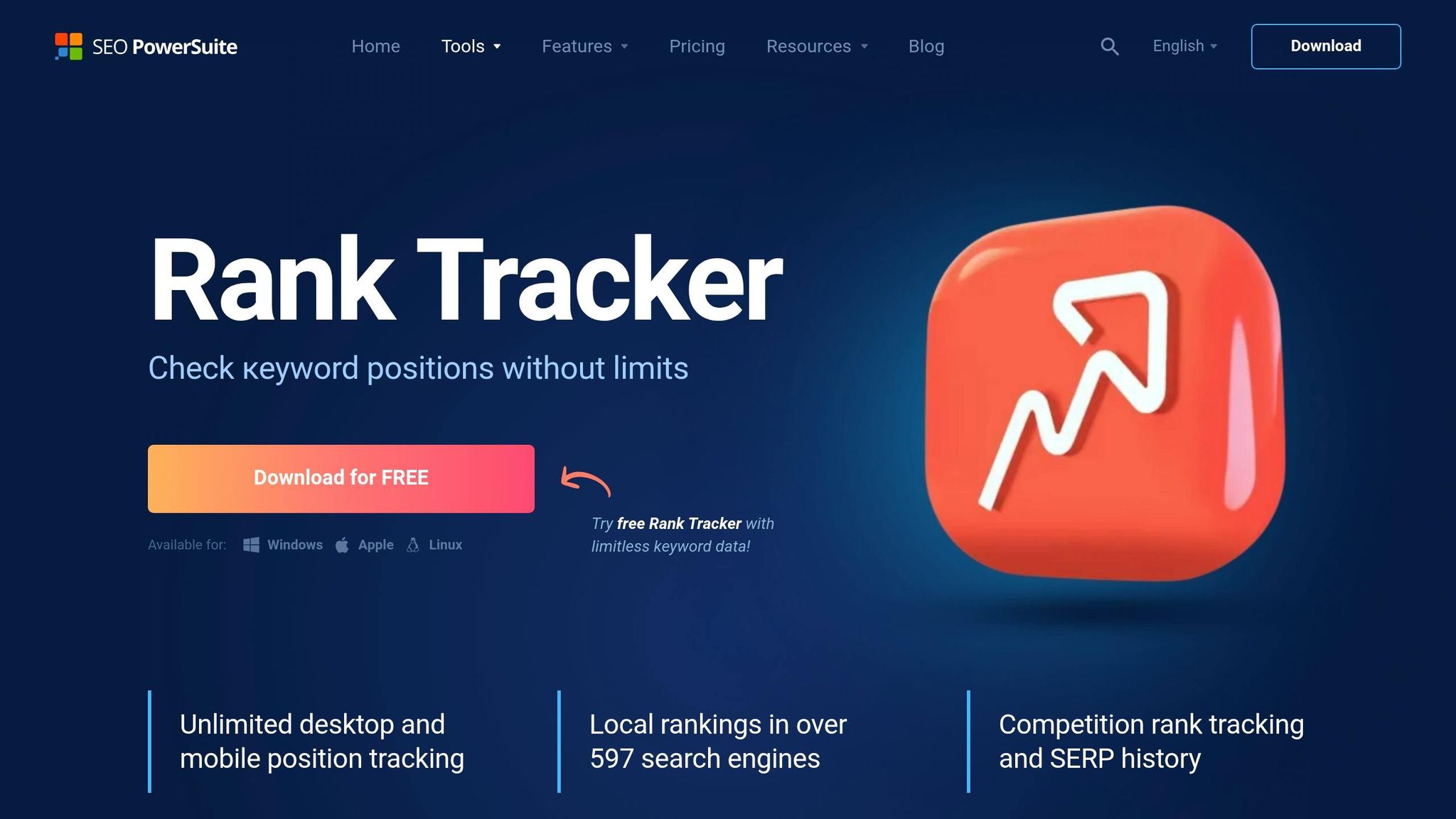
SEO Powersuite Rank Tracker Overview + Review
sbb-itb-5be333f
Quick Comparison
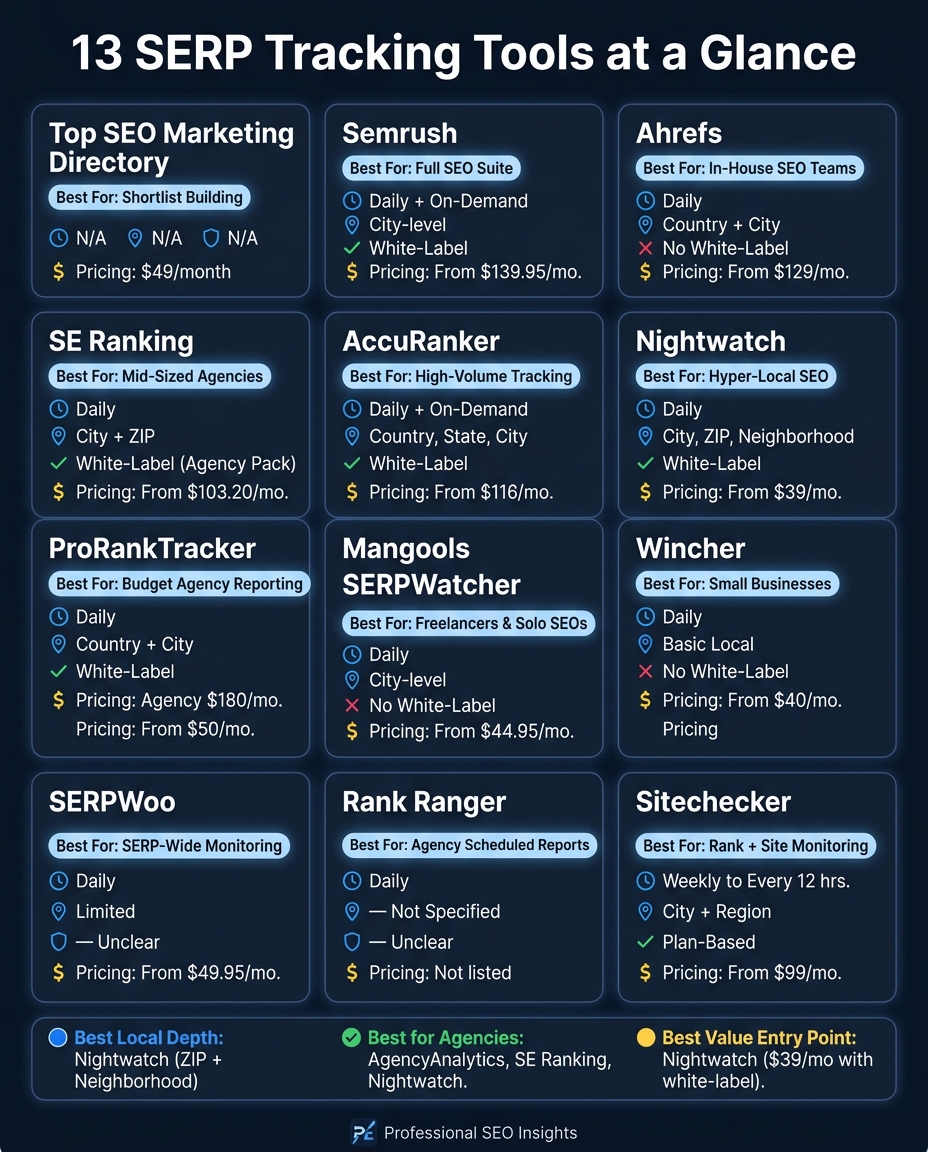
13 SERP Tracking Tools Compared: Features, Pricing & Best Fit
| Tool | Best For | Update Speed | Local Tracking | White-Label |
|---|---|---|---|---|
| Top SEO Marketing Directory | Shortlist building | N/A | N/A | N/A |
| Semrush | Full SEO suite | Daily + on-demand | City | Yes |
| Ahrefs | In-house SEO teams | Daily | Country + city | No |
| SE Ranking | Lower-cost agency work | Daily | City + ZIP | Yes |
| AccuRanker | High-volume tracking | Daily + on-demand | Country, state, city | Yes |
| Nightwatch | Hyper-local SEO | Daily | City, ZIP, neighborhood | Yes |
| ProRankTracker | Budget agency reporting | Daily | Country + city | Yes |
| Mangools SERPWatcher | Freelancers and solo users | Daily | City | No |
| Wincher | Small businesses | Daily | Basic local targeting | No |
| SERPWoo | SERP-wide monitoring | Daily | Limited | Not clear |
| Rank Ranger | Scheduled agency reports | Daily | Not clear | Not clear |
| Sitechecker | Rank + site monitoring | Weekly to every 12 hours | City + region | Plan-based |
| AgencyAnalytics | Client reporting hub | Daily/weekly/monthly | Depends on add-ons | Yes |
My takeaway: if you run client SEO, reporting can matter just as much as rank data. If you do local SEO, don’t settle for broad location averages. And if you’re still comparing options, start with a directory, then move to a live tracker that fits your workflow.
What to Look for in a SERP Tracking Tool
SERP tracking tools vary most in four areas: update speed, location depth, reporting, and agency features. Those are the points that decide whether a tool works for a small setup or can handle a larger workload.
Update Frequency and Scheduling
Start with refresh speed. Rank movement can happen fast, so old data loses its use fast too. Daily tracking is the minimum. Weekly reports can miss the exact moment a drop happened, which makes it much harder to connect that change to a site release or an algorithm update.
On-demand refreshes matter most during site migrations, big content launches, or volatile algorithm updates. If a keyword ties straight to revenue, some enterprise tools also offer hourly tracking. A practical setup is simple: track revenue-driving keywords daily, and check steadier informational terms less often.
Location and Device Tracking Depth
Look for city-, ZIP-, and device-level tracking. Rankings change by location and by screen type, and mobile and desktop SERPs often look different because of layout shifts and local packs.
For local service businesses, geo-grid tracking is especially useful. Instead of showing one citywide average, it maps rankings across a grid of coordinates. That gives you a much clearer view of where visibility actually holds up. Tools with this level of detail can generate reports that reflect local performance as it is, not just a national average.
Alerts, Dashboards, and Scheduled Reports
This is the point where rank tracking turns into reporting people can use. Automated alerts for major rank drops or traffic swings help teams react before the next reporting cycle lands.
The best alert setups usually watch groups of keywords moving together instead of firing on every single-keyword shift. That cuts down on noise and helps avoid alert fatigue.
Scheduled email reports - daily, weekly, or monthly - keep stakeholders in the loop without making them log in and pull data by hand. It also helps to check for integrations with Google Looker Studio and GA4 if your team wants ranking data next to other marketing metrics in one place.
Agency Fit and White-Label Reporting
Agency fit comes down to client count, reporting pace, and whether you need white-label delivery. Most agencies need a few basics:
- White-label reports
- Client portals
- Multi-user access with role-based permissions
Some platforms also offer white-label mobile apps, which lets clients check rankings under the agency's branding. The agency-focused tools below stand out most when white-label delivery and multi-client workflows matter. The biggest difference between them comes down to how well they handle these four needs.
1. Top SEO Marketing Directory
Top SEO Marketing Directory is a directory of SEO tools and agencies. It's not a live SERP tracker.
That means it won't give you live SERP data or real-time SEO monitoring. What it will do is help SEO teams and agencies narrow down their options before they pick a plan.
The directory sorts tools by use case, so it's easier to compare choices for:
- White-label reporting
- ZIP-code-level tracking
- Multi-client dashboards
- Agency workflows
Best use: Build your shortlist here before you move on to the live tracking tools below. Premium access costs $49/month.
Use it as a filter before comparing the live rank trackers below.
2. Semrush Position Tracking
If you want a live tracker inside a broader SEO platform, Semrush Position Tracking is a natural next step. It fits teams that want rank tracking as part of a full SEO suite, not as a stand-alone SEO marketing tool.
Update cadence
Rankings update daily, and you can run on-demand refreshes when you need a fresh read. Semrush stores 60 days of daily data and up to 140 weeks of weekly history.
Location and device tracking
Semrush tracks rankings across 200+ countries and regions, plus city-level U.S. targeting, on desktop, mobile, and tablet. If you want to track desktop, mobile, and tablet at the same time, you’ll need Guru or Business.
It also tracks visibility across Google AI Overviews, Google AI Mode, ChatGPT search, Bing, Baidu, and 140+ SERP features. That matters if your team wants to see more than blue-link rankings.
Alerts and automated reports
Semrush includes scheduled reports, PDF exports, and alerts for major ranking shifts. Sensor adds volatility monitoring, which helps when the SERPs start moving around fast.
You can also connect Position Tracking with Google Analytics and Google Search Console. That makes it easier to line up ranking changes with traffic and conversion data instead of looking at rankings in a vacuum.
White-label reporting and agency fit
For agencies, branded reporting is often table stakes. Semrush covers that with white-label dashboards and shared client views. It also connects with Looker Studio, which gives teams more room to build custom reports beyond the default templates.
Pricing starts at $139.95/month for Pro, $249.95/month for Guru, and $499.95/month for Business.
The trade-off is pretty simple: Semrush gives you a lot in one platform, but its reporting templates are less flexible than what you get from rank trackers built just for reporting.
For teams that want more rank-tracking depth and less suite overhead, the next tool goes in a different direction.
3. Ahrefs Rank Tracker
If you want a suite-native tracker without Semrush's reporting-first focus, Ahrefs Rank Tracker is the next option. It makes sense for teams already using Ahrefs for backlink analysis and content research and who want rank checks to happen inside the same workflow.
Update cadence
Ahrefs offers daily rank updates, though some plans need an upgrade or add-on to get them.
Location and device tracking
Ahrefs tracks keyword positions across 190+ countries and supports both country-level and city-level targeting. It also splits rankings by mobile and desktop.
Reports and exports
On the reporting side, Ahrefs includes interactive graphs, SERP snapshot history, exportable reports, and integrations with Google Search Console and Looker Studio.
Agency fit and reporting limits
Ahrefs tends to fit in-house teams better than agencies that need high-volume client reporting. The credit-based limits can make heavier workflows a bit clunky, and native white-label report delivery still means exporting data and formatting it outside the product.
Pricing starts at $129/month for Lite, then $249/month for Standard, $449/month for Advanced, and $1,499/month for Enterprise.
4. SE Ranking Rank Tracker
SE Ranking fits teams that want daily rank tracking and simple agency reporting without pushing costs too high. It pairs SEO reporting tools with pricing that works well for freelancers and smaller teams.
Update cadence
Daily rank updates are included on every plan, even the entry-level Core plan.
Location and device tracking
SE Ranking tracks rankings at the city and ZIP-code level across desktop, mobile, and tablet for Google, Bing, and YouTube. It also tracks 35+ SERP features and AI search visibility in ChatGPT, Perplexity, Gemini, Google AI Overviews, and Google AI Mode.
That level of tracking flows straight into scheduled reports, which helps teams turn ranking data into client updates without much manual work.
Alerts and automated reports
Insights automatically flags major ranking changes. Scheduled report delivery is included as well:
- The Core plan includes 10 scheduled reports
- The Growth plan includes 30 scheduled reports
- The Agency Pack add-on includes unlimited scheduled reports
White-label dashboards and agency fit
The Agency Pack starts at $69/month with annual billing. It adds white-labeling, a custom domain, branded client portals, and Agency Catalog placement.
Base plans start at $103.20/month for Core and $223.20/month for Growth with annual billing. For agencies that need white-label reporting but want to keep platform costs in check, SE Ranking makes a lot of sense.
5. AccuRanker
AccuRanker is built for fast rank tracking. It gives you daily automatic updates and on-demand refreshes, so it works well for teams that care more about speed and tracking depth than having an all-in-one suite.
Update cadence
Localized servers in supported countries help support high data accuracy.
Location and device tracking
AccuRanker tracks rankings across 50,000+ locations worldwide, including country-, state-, and city-level targeting for U.S. campaigns. It also separates desktop and mobile tracking, which matters when results shift by device. On top of that, it tracks local pack and map results.
SERP feature tracking covers Featured Snippets, Knowledge Panels, video carousels, and Google AI Overviews.
Integrations and team access
AccuRanker connects with Looker Studio, BigQuery, and its API, which is useful for agencies that need custom dashboards or BI pipelines. It also includes unlimited user seats, so agencies can add clients and teammates without extra per-seat fees.
White-label and agency fit
White-label options include custom domains and branded client logins. Pricing starts at $129/month for 1,000 keywords on a monthly plan, or about $116/month on an annual plan.
If you need broader reporting workflows, the next tool leans more into client management.
6. Nightwatch
Nightwatch is a strong fit for agencies that need hyper-local rank tracking and branded reporting.
Update cadence
Nightwatch runs daily rank checks on every plan. You also get unlimited competitor tracking, so you can watch rival rankings right next to your own keyword set.
Location and device tracking
Nightwatch tracks rankings across more than 107,000 locations in 170+ countries, down to the city, ZIP code, and neighborhood level. You can also set up to 100 custom GPS coordinates per project. That's handy for service-area businesses that need tighter local coverage.
Desktop and mobile tracking are split within each project, which makes side-by-side checks much easier.
That level of geographic detail works well with the platform's reporting setup.
Alerts and automated reports
Nightwatch connects with Google Analytics, Google Search Console, and Looker Studio. You can use its drag-and-drop builder to make automated, client-ready reports. It also tracks AI search visibility alongside standard SERP positions and website audit data.
White-label dashboards and agency fit
For agencies, the main draw is client-facing reporting. White-label branding comes with all plans, and unlimited user seats are included too. Pricing starts at $39/month for 250 keywords.
One tradeoff: the interface takes more time to learn than simpler tools.
7. ProRankTracker
ProRankTracker (PRT) is built for high-volume rank tracking and automated reporting at a lower price. It works well for agencies that need to track lots of keywords and send branded reports without paying for a full SEO suite.
Location and device tracking
PRT tracks rankings on Google, YouTube, Amazon, and Google Maps across desktop and mobile. It then turns that data into branded reports clients can read without much extra setup. The platform also includes a white-label mobile app, MyRanks, for iOS and Android.
Alerts and automated reports
One of PRT’s main strengths is automated reporting and alerts. That means less manual work for agency teams and fewer status checks done by hand. It also connects with Google Looker Studio, so you can build Looker Studio dashboards around the data.
White-label dashboards and agency fit
PRT offers full white-labeling, including the MyRanks mobile app. API access comes with agency plans, and the Agency Plan runs $180/month.
"PRT stands out... for agencies on a budget or those managing a very large number of keywords for the lowest cost." - DesignRush
The interface gets the job done, but it’s pretty plain, and new users may need a little time to get comfortable with it. And if your team also needs technical SEO audits or top keyword research tools, PRT is usually better as part of a stack, not the only tool in it.
If a cleaner, easier interface matters more, the next tool leans in that direction.
8. Mangools SERPWatcher
Mangools SERPWatcher makes sense for teams that want something lighter after using a more agency-first rank tracker. It keeps things simple: clean charts, daily updates, and alerts that are easy to scan. That setup works well for solo SEOs, freelancers, bloggers, and small teams.
Update cadence
SERPWatcher updates rankings daily. For steady keyword monitoring, that's usually enough.
Location and device tracking
It tracks desktop and mobile rankings across 50,000+ locations, with city-level targeting in most countries, including the U.S. If you need ZIP code-level tracking, though, this tool doesn't offer it. That can be a downside for more specialized local SEO work.
Alerts and automated reports
Each morning, SERPWatcher sends a daily email summary that flags major ranking gains and losses from the day before. It also includes scheduled reports and alerts.
One feature that stands out is the Dominance Index. It's a weighted visibility score that gives you a quick read on overall performance.
White-label dashboards and agency fit
SERPWatcher does not include white-label reports or client scheduling, so it's a better fit for bloggers, freelancers, and small teams than for agencies.
Pricing starts at about $44.95 to $49/month when billed annually. Higher tiers include $69/month for 500 keywords and $129/month for 1,500 keywords.
If your main goal is simple tracking without extra reporting layers, it does the job. If you need more agency-ready reporting, the next tool goes further.
9. Wincher
Wincher is a simple daily rank tracker built for small businesses and solo site owners.
Update cadence
Rankings update daily and automatically.
Location and device tracking
Wincher tracks rankings on desktop and mobile, and it supports location targeting.
Alerts and automated reports
It sends automated email reports and lets you track competitor rankings too.
White-label dashboards and agency fit
Wincher handles basic automated reporting, but it doesn't offer much for white-label dashboards or custom reports. That makes it a better fit for freelancers and small in-house teams than agencies juggling lots of client accounts.
Pricing starts at about $40/month. If your team needs deeper agency reporting, the next tool gives you more room to work.
10. SERPWoo
After the simpler rank trackers, SERPWoo fits teams that want a fuller view of the SERP in their reports. Instead of showing only your own position, it tracks the top 20-100 results for a keyword. That gives you SERP-wide visibility, which is useful when you need to see the whole field, not just one ranking. Its main strength is SERP monitoring and reporting, not deep location or device tracking.
Update cadence
Rankings update daily.
Automated reports
SERPWoo automates rank monitoring and SEO reporting, and its API can feed external dashboards. That makes it a better choice when your reports need SERP context, not just up-and-down rank changes.
White-label dashboards and agency fit
White-label dashboards are not documented. If your agency needs branded client reports, confirm that before you buy.
Pricing starts at $49.95/month. There is no free trial.
11. Rank Ranger
If your team has outgrown a lightweight rank tracker and needs more control over scheduling, Rank Ranger is the next step.
Update cadence
Rank Ranger gives you daily rank updates plus custom report scheduling for automated reports. That makes it a good fit for agencies and enterprise teams that need scheduled, branded reporting across many clients.
Search engine coverage
It tracks Google, Bing, and Yahoo.
Next, compare it with tools built more for simpler rank tracking and client reporting.
12. Sitechecker Rank Tracker
If you want rank tracking tied to site monitoring and reporting, Sitechecker is a strong fit. It combines rank tracking with site monitoring in one place, which makes it useful for teams that don't want to juggle separate tools.
Update cadence
Refresh speed depends on the plan:
- Basic - $99/month, updated weekly
- Standard - $249/month, updated daily
- Premium - $449/month, updated every 12 hours
That setup is pretty simple. If you only need a weekly read on rankings, Basic may be enough. If you're sending frequent client updates or watching movements more closely, the higher tiers make more sense.
Location and device tracking
Sitechecker tracks desktop and mobile rankings at the city and region level across multiple countries. That's useful for many local and multi-location campaigns.
But it stops at city and region level, so it's weaker for hyperlocal tracking. If you need rank data down to a tighter area, that gap can matter.
Those limits show up most when automated alerts and client reports need to reflect local performance with precision.
Alerts and automated reports
The platform sends email or Slack alerts for traffic drops, indexation issues, content changes, and technical errors on Standard plans and above.
It also pulls more than the usual 1,000 GSC rows and stores up to 36 months of history, including date-range comparisons. That's handy if you need a longer view of performance without jumping between tools.
White-label dashboards and agency fit
White-label features depend on plan. Basic and Standard users get branded PDF reports, while Premium adds a custom domain and full interface branding.
Sitechecker also includes client portals and unlimited users, which gives agencies a cleaner way to share access and reporting without extra seat limits.
13. AgencyAnalytics Rank Tracker
If your agency wants rank data inside a client reporting hub - not in a separate tool - AgencyAnalytics is the most reporting-first option in this group. It offers 80+ integrations, including Google Search Console, GA4, Semrush, and Ahrefs. The rank tracker is an optional add-on, not the main product.
Update cadence
Reports can run daily, weekly, or monthly.
Alerts and automated reports
AI Summary and Ask AI turn report data into plain-English updates. You can also schedule reports to go out daily, weekly, or monthly.
White-label dashboards and agency fit
AgencyAnalytics leans hard into white-label reporting. You can use custom domains, logos, brand colors, and branded report emails. Clients also get live access portals, so they can check dashboards anytime instead of waiting for the next report.
For agencies with more than a few accounts, pricing is where the tool starts to matter. Plans are billed annually and come with client caps:
| Plan | Price (billed annually) | Clients Included |
|---|---|---|
| Freelancer | $59/month | 5 |
| Agency | $179/month | 10 |
| Agency Pro | $349/month | 15 |
| Enterprise | Custom pricing | Custom |
Additional clients beyond the plan limit cost $20/month each across all tiers. The rank tracker add-on costs $41.67/month per 500 keywords. This setup makes sense when you want one branded dashboard for rankings, analytics, and backlink data.
Next, compare these tools side by side by tracking depth, reporting, and agency features.
Side-by-Side Comparison of All 13 Tools
This directory is here to help with shortlist building, not live rank tracking.
The table below compares the tools on the features that matter most.
| Tool | Update Cadence | Local Tracking Depth | Device Tracking | Alerts | White-Label | Best Fit |
|---|---|---|---|---|---|---|
| Semrush | Daily + on-demand | City-level | Desktop, mobile, tablet | Automated email reports | Yes | In-house teams & full-service agencies |
| Ahrefs | Daily | Country- & city-level | Desktop, mobile | - | No (export only) | In-house rank tracking |
| SE Ranking | Daily | City- & ZIP-code level | Desktop, mobile, tablet | Automated email reports | Yes (Agency Pack) | Mid-sized agencies |
| AccuRanker | Daily + on-demand | Country-, state-, city-level | Desktop, mobile | - | Yes | Enterprise & high-volume tracking |
| Nightwatch | Daily | City-, ZIP-, neighborhood-level | Desktop, mobile | - | Yes | Local SEO teams |
| ProRankTracker | Daily | Country- & city-level | Desktop, mobile | Automated alerts | Yes | High-volume keyword portfolios |
| Mangools SERPWatcher | Daily | City-level | Desktop, mobile | Automated email reports | No | Freelancers & solo SEOs |
| Wincher | Daily | City-level | Desktop, mobile | Automated email updates | No | Small business owners |
| SERPWoo | Daily | - | - | - | - | SERP monitoring & reporting |
| Rank Ranger | Daily | - | - | - | - | Agency reporting |
| Sitechecker Rank Tracker | Weekly to every 12 hrs (plan-dependent) | City- & region-level | Desktop, mobile | Email & Slack alerts | Yes (plan-dependent) | Teams combining rank & site monitoring |
| AgencyAnalytics Rank Tracker | Daily, weekly, or monthly | - | - | - | Yes | Agency reporting hubs |
- = not specified in the source material.
Three differences stand out.
First, local tracking depth is what separates tools built for hyperlocal campaigns from tools with a broader view. Nightwatch and SE Ranking go down to ZIP-code level, while others stop at country or city.
Second, white-label support creates a clear split. Semrush, SE Ranking, AccuRanker, Nightwatch, ProRankTracker, Sitechecker, and AgencyAnalytics support it. Mangools and Wincher do not.
Third, update cadence is pretty similar across the group, with most tools updating daily. AccuRanker and Semrush add on-demand refreshes, which helps when you need to react faster.
The next section breaks these tools down by strengths and tradeoffs.
Pros and Cons by Tool Type
Use this breakdown to match each tool type to your reporting workflow. There are five main buckets here, and each one makes a different trade-off.
What changes when you group tools by workflow instead of by feature list? The picture gets a lot clearer. You stop asking, “Which tool has the most features?” and start asking, “Which tool fits the way we actually report?”
| Tool Type | Tools | Reporting Depth | Local Tracking | White-Label | Best Fit |
|---|---|---|---|---|---|
| All-In-One Suite | Semrush, Ahrefs, SE Ranking | High - audits, links, and rank data in one place | City to ZIP-code level | Available on higher tiers | In-house teams needing a full SEO stack |
| Dedicated Rank Tracker | AccuRanker, Nightwatch, ProRankTracker | High - rank-specific and fast | ZIP-code to neighborhood-level | Strong, often included | Agencies and local SEO teams |
| Agency Reporting Platform | AgencyAnalytics | Very high - multi-channel dashboards | Depends on integrations | Full, including custom domains | Multi-client agencies |
| Lean/Solo Tools | Mangools, Wincher | Basic to moderate - straightforward rank tracking | Moderate | Limited or none | Small businesses and freelancers |
| Directory/Marketplace | Top SEO Marketing Directory | Niche - discovery and comparison, not rank data | N/A | N/A | Teams researching and shortlisting tools |
All-in-one suites make the most sense when you want rankings, backlinks, and site audits in one workflow. They’re a solid fit for in-house teams that don’t want to juggle multiple platforms.
Dedicated rank trackers stand out on speed and local precision. That matters if you care about ZIP-code or neighborhood-level movement. The trade-off is simple: they show ranking movement well, but they usually do less to explain why rankings changed.
Lean tools like Mangools and Wincher are easier to get started with and cost less to run. That makes them a good fit for freelancers and small businesses. The downside is that you usually give up depth, along with some white-label options.
Agency reporting platforms are built for multi-client dashboards with branded reporting. They do that job well. But if your team needs deep SEO research, they’re often not the first place you’ll want to work.
Top SEO Marketing Directory is not a rank tracker. It’s a directory. Use it to narrow your shortlist before you compare live tracking tools.
Final Takeaways
Here’s the simple way to decide: choose based on how you work.
If you want one platform for most of your SEO tasks, go with a suite. If speed and high-volume tracking matter most, use a dedicated rank tracker. If you run client accounts and need reporting, pick an agency hub. And if you just need simple position checks, a lean tool will do the job.
For U.S. local SEO, ZIP-code or city-level tracking matters more than national averages. That’s where local rank shifts show up.
Pricing goes up as your scope expands. White-label features and larger teams also push costs higher.
Use Top SEO Marketing Directory to cut down your shortlist before you buy.
FAQs
How often should SERP rankings update?
Review keyword rankings weekly so you can catch big moves - like a jump or drop of five or more spots. That gives you enough signal to act without getting distracted by the day-to-day noise. Small daily swings are normal, so there's no need to chase every change.
Daily data still has a place. Use it to spot longer-term patterns and set alerts for sharp drops or technical problems. Then zoom out each month to review organic traffic and your broader SEO plan. For longer-range planning, do a quarterly review.
If you're in a fast-moving space like e-commerce or tech, bi-weekly checks can make sense.
What local tracking level do I need?
Track rankings from the places your customers actually search from - at least at the city or ZIP code level.
If you serve multiple parts of a market, go a step further and use a geo-grid across your service area. That gives you a much better read on how visibility shifts from one part of your territory to another.
It also helps to track Google local pack rankings and organic rankings as separate things. They don't behave the same way, so lumping them together can hide what's going on.
For tools, Nightwatch supports city and ZIP code tracking. BrightLocal supports city, ZIP code, and Maps tracking.
When do white-label reports matter?
White-label reports matter when you need to keep your brand front and center while handling lots of clients. Instead of sending bland platform exports, agencies can share SEO reports with their own logo, URL, fonts, and colors.
They save time, too. Rather than pulling messy data into a report by hand, teams can automate the process and send polished, client-ready updates that show performance trends, build trust, and make the work feel clear and worth the spend.