Most structured data problems come from the same few issues - missing required fields, bad formatting, old schema, and duplicate markup. If I had to boil this study down to one point, it’s this: most errors start in templates, themes, CMS settings, or plugins, then spread across many pages at once.
Here’s the short version:
- Missing required properties can stop rich result eligibility for types like Product, Article, FAQPage, and LocalBusiness
- Format and nesting errors often show up in dates, prices,
Offer,Review, andAggregateRating - Deprecated schema often sticks around after site rebuilds, plugin installs, or CMS changes
- Duplicate markup usually comes from multiple tools outputting the same schema on one page
- Page-level validators help with single URLs, while top SEO tools show patterns across hundreds or thousands of pages
- The best fix path is to correct the source template first, then re-test after CMS, plugin, or theme changes
A few details matter most for teams in the U.S.:
- Product pricing should use values like 1299.99 with "USD", not "$1,299.99"
- Dates should use ISO 8601
- LocalBusiness data should use a valid +1 phone format and complete address fields
- Google Search Console tracks parse failures in its Unparsable structured data reporting, which shows how often syntax problems happen
If you work in SEO, web, or content ops, the takeaway is simple: don’t treat schema as a one-page task. Treat it like site infrastructure. That means field mapping before launch, validator checks in QA, and post-release checks after any markup-related update.
How-To Fix Structured Data Missing Field Errors
sbb-itb-5be333f
Most Common Validation Errors Found Across Tools
Across the audited sites, the same four error groups keep showing up in every SEO tool and service: missing required properties, bad formats or broken nesting, old schema patterns, and duplicate or conflicting markup.
Missing Required Fields on Key Schema Types
The same schema types fail again and again across tools. The biggest gaps show up on Article, Product, FAQPage, and LocalBusiness markup. Google is direct about this: if a required property is missing, the entity is not eligible for rich results, even when the rest of the markup is valid.
Some WordPress schema plugins make this worse by outputting empty strings for blank fields. Google treats those the same as missing properties.
| Missing Property | Schema Type | Likely SEO Impact |
|---|---|---|
headline or name, datePublished, author.name, image, publisher.logo |
Article / BlogPosting | Ineligible for article rich results and Top Stories |
name, offers.price, offers.priceCurrency, offers.availability |
Product | Reduced eligibility for product rich results and price display |
acceptedAnswer.text |
FAQPage | FAQ snippets become ineligible |
address, telephone, openingHours, geo |
LocalBusiness | Local visibility and enhancements can be incomplete |
review, aggregateRating |
Product | Ratings and review enhancements may not appear |
Bad Formats, Broken Nesting, and Wrong Schema Types
Format errors are common, especially with dates and prices. Validators expect ISO 8601 dates, plus a numeric offers.price with offers.priceCurrency set as a separate field.
Nesting problems usually happen when AggregateRating, Review, or Offer sits outside the entity it is supposed to describe. Type mismatches are another common issue. That happens when a page is marked up with the wrong schema type.
Deprecated Schema Types and Properties
Modern crawl tools like Ahrefs Site Audit now flag "Type is deprecated" and "Property is deprecated" as separate issue categories. That makes this error group much easier to spot in large audits.
Old schema tends to stick around after CMS migrations, theme changes, and plugin installs. One system adds new markup while the old markup keeps running in the background. Validators may show only warnings, and during a busy launch window, warnings often slide down the list.
Duplicate or Conflicting Markup on the Same Page
Duplicate or conflicting markup usually comes from themes, SEO plugins, and tag-manager snippets all generating overlapping entities with different values for the same fields.
The markup may still parse. But once the same page sends mixed signals, validation gets weaker and rich result output becomes less consistent. Crawl-based tools are the best way to catch this at scale because they can flag pages with multiple entities of the same type and show which system generated each block.
These errors usually start in templates and CMS logic, which is why the next section breaks them down by page type and platform.
Where Errors Cluster: Page Templates and CMS Patterns
Template-based schema problems don’t stay isolated. If one shared component is wrong, every page that uses it inherits the same issue. In practice, errors tend to cluster by page type and CMS setup.
Error Patterns by Page Type
These issues usually trace back to the same core problem types: missing fields, bad formatting, and duplicate markup.
- Article / BlogPosting: missing
author,headline,image, ordatePublished - Product: missing
offers.price,offers.priceCurrency, oroffers.availability, or a price formatted with symbols or commas - LocalBusiness: missing
streetAddress,addressLocality,addressRegion,postalCode,addressCountry, or a valid+1telephone - FAQPage: missing
acceptedAnswer.text, duplicate questions, or FAQ markup on pages that don’t display FAQ content
Error Patterns by CMS and Plugin Setup
Each CMS tends to produce its own repeatable markup problems. Defaults, theme logic, and plugin behavior usually shape the pattern.
| CMS | Frequent error pattern | Likely root cause |
|---|---|---|
| WordPress | Duplicate or conflicting Organization, Product, and FAQ markup on the same URL |
Multiple SEO plugins, themes, and add-ons outputting overlapping JSON-LD |
| Shopify | Product pages with incomplete offers data or duplicate Product schemas |
Theme snippets and apps generating overlapping or misformatted markup |
| Wix | Default LocalBusiness markup with incomplete details or duplication issues |
Built-in schema is limited, with limited customization and field-length limits |
Why Template-Level Errors Spread Across Large Sites
A missing image field in one shared post template can affect every article tied to that template. That’s why audits should look at templates and reusable components first, not just individual URLs. Google says this plainly:
"fixing the template will resolve all associated pages."
The practical move is simple: group errors by URL pattern, find the template or component behind them, and fix the source. That saves you from patching pages one by one.
That distinction matters because single-URL validators and crawl audits often show the same template issue from different angles.
How Validator Tools Differ and What Audits Should Prioritize
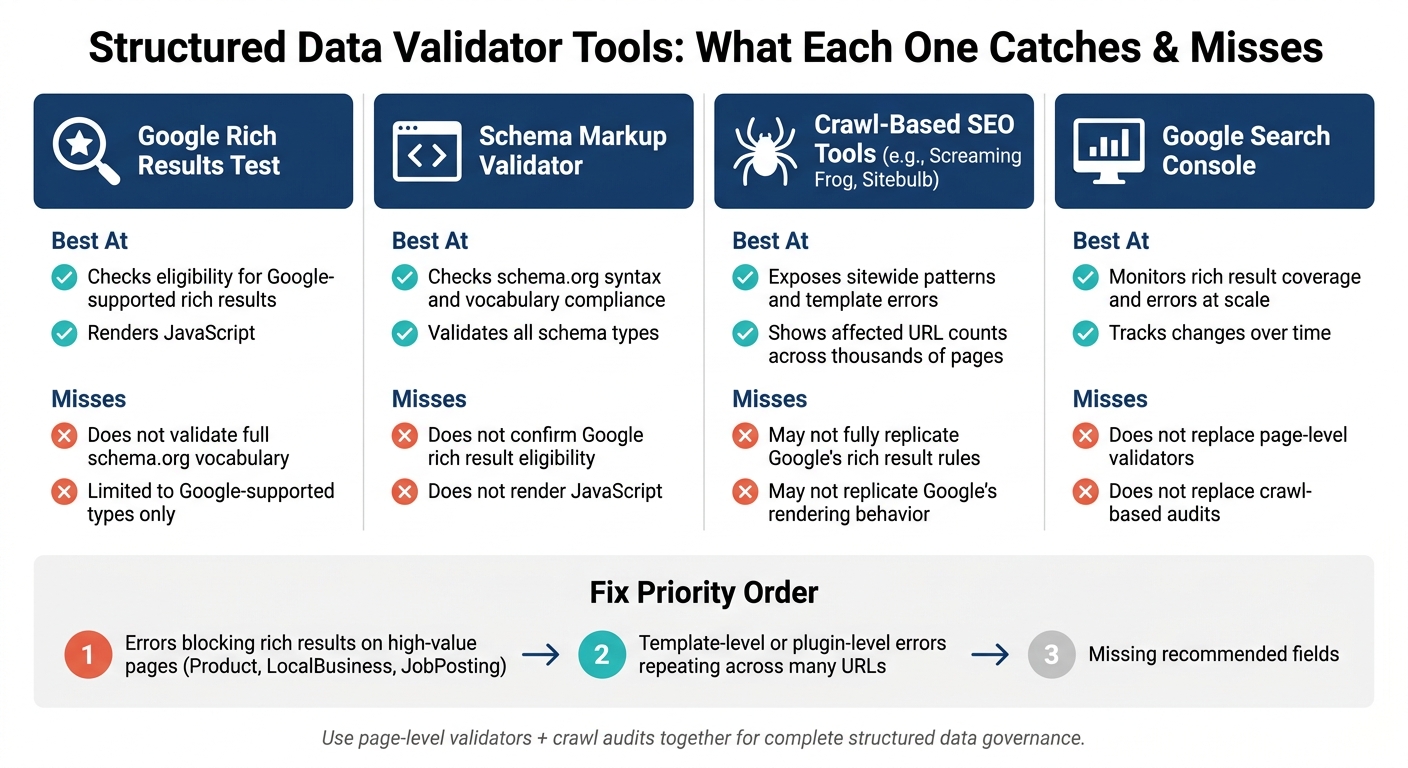
Structured Data Validator Tools: What Each One Catches & Misses
No single validator covers every audit goal. Some tools check one URL at a time. Others scan an entire site. That gap matters because the same markup can pass in one tool and fail in another.
Single-URL Validators vs. Crawl-Based Audits
Google Rich Results Test and Schema Markup Validator both work at the page level. You plug in one URL and review that page's markup.
That makes them useful when you want to confirm two things:
- whether the markup on a specific page is valid
- whether that page can qualify for Google's supported rich results
But page-level testing has a limit. It won't show you whether the same issue appears across 10, 100, or 10,000 URLs.
That's where crawl tools come in. The study found repeated template-level failures, so crawl-based audits are the fastest way to size the problem across a site. Tools like Screaming Frog and Sitebulb can scan thousands of URLs in a single pass. They surface repeated template errors and show how many pages are affected.
What Each Tool Catches and Misses
The differences make more sense when you line them up side by side:
| Tool category | Best at | Misses |
|---|---|---|
| Google Rich Results Test | Checks eligibility for Google-supported rich results and renders JavaScript | Doesn't validate the full schema.org vocabulary; limited to supported types |
| Schema Markup Validator | Checks schema.org syntax and vocabulary compliance across all types | Doesn't confirm Google rich result eligibility; does not render JavaScript |
| Crawl-based SEO tools | Exposes sitewide patterns, template errors, and affected URL counts | May not fully replicate Google's rich result rules or rendering behavior |
| Google Search Console | Monitors rich result coverage and errors at scale over time | Doesn't replace a page-level validator or crawl-based audit |
Google's own guidance splits the job this way: use Rich Results Test for Google Search rich result types, and use Schema Markup Validator for general schema.org validation and for types Google doesn't use.
How to Prioritize Fixes from Audit Results
When tools disagree, fix order matters.
Start with errors that block rich result eligibility on high-value page types like Product, LocalBusiness, and JobPosting. Those issues can change how pages show up in search, so they deserve attention first.
After that, move to template-level or plugin-level errors that repeat across many URLs. One fix in the source can clean up thousands of pages at once. That's usually a much better use of time than fixing pages one by one.
Missing recommended fields should come later.
A simple way to rank work:
- page value
- affected URL count
- root cause
For example, one missing price on one product page is a content issue. The same missing price across every product page points to a template or plugin problem. That's why audit results should be ranked by business impact and root cause, not just by how many flags a tool spits out.
A Practical Fix Process for U.S. SEO and Web Teams
Once your audit shows what’s broken, the next job is simple: stop the same issues from coming back. A clean process helps teams avoid missing fields, bad formatting, and duplicate markup over and over.
Use three controls here: map fields before launch, test rendered markup in QA, and check again after any CMS, plugin, or theme update.
Map Schema Fields to Source Data Before Deployment
Template mistakes don’t stay small. If one field is mapped wrong, that error can spread across a whole site. That’s why source mapping should be done once, documented clearly, and reused across templates. The map should serve as the source of truth for both implementation and QA.
For each template, tie every required property to a live source field:
- Article:
headlinepulls from the CMS title field;author.namecomes from the author profile object;datePublishedmaps to the CMS publish timestamp;dateModifiedmaps to the last-updated timestamp. - Product:
offers.priceconnects to the live price table as a plain numeric value, such as1299.99, not"$1,299.99 USD";priceCurrencyis set to"USD";offers.availabilitypulls from stock status in the commerce platform. - LocalBusiness:
telephoneis normalized to+1-XXX-XXX-XXXXin markup;addressfields map to the location management system, not a free-text field.
Store that field map in a place both SEO and dev teams can reach. If a CMS field gets renamed or a commerce platform changes its data model, that document helps keep the markup from breaking quietly in the background.
Validate Formats and Nesting in Pre-Launch QA
QA should review the rendered JSON-LD script block from a live staging URL, not just whatever sits in the template file. Then compare that output against the source map to make sure the markup matches what the site is supposed to publish.
For each template, test sample URLs in both Google Rich Results Test and the Schema Markup Validator. Check that date fields use ISO 8601, that offers.price stays numeric with priceCurrency set to "USD", and that nested fields sit under the correct parent entity.
A simple but useful check is the field-removal test. Remove a source field for a moment - price, author, or another key value - and see what happens to the structured data. If the markup doesn’t change, that usually means the value is hardcoded somewhere. And if it’s hardcoded, it’s only a matter of time before it goes stale.
Recheck Markup After CMS, Plugin, or Theme Changes
Structured data often breaks after releases. That last check closes the loop.
Make validator checks a required part of every release that touches templates, plugins, or themes. After each template, plugin, or theme release, run a targeted crawl with structured data extraction and re-validate sample URLs for each key schema type. Then review Search Console Enhancements after release so you can spot new invalid items before they hurt rich result coverage across large groups of pages.
It also helps to keep one authoritative source for each schema type. When conflicts show up, turn off overlapping outputs in other plugins and run validators again to confirm the duplicates are gone. That’s how teams catch template drift before it spreads across the site.
Conclusion: What This Structured Data Validation Study Means for SEO Governance
These errors come from repeatable template and CMS patterns. Missing required fields, invalid nesting, old schema types, duplicate markup, and CMS-driven repetition all lead back to the same problem: teams treat structured data like a one-time page task instead of a system that needs rules and oversight. When a template is wrong, that mistake spreads across the site. That's why validation needs to be managed at the system level, not page by page.
And that's where the risk sits too. Industry audits show valid markup is still inconsistent, which turns structured data into a governance issue, not a one-and-done fix. Google's Rakuten Recipe case study showed that cleaner structured data can improve traffic and engagement. That doesn't mean teams should do more manual checking. It means they should manage structured data the same way they manage analytics and tag deployment. The answer is process, not more page-by-page review.
Key Takeaways for Marketers, CMOs, and Operators
For U.S. teams, the main point is simple: fix the template once, and you can fix thousands of pages in one move. That's the leverage. Put time into correct data mapping, clean nesting, and up-to-date schema types at the template level, and those gains spread across the site. That can improve rich result eligibility, clean up Search Console reporting, and cut the time spent chasing single-page errors.
Cross-tool validation should be part of standard governance. Use both page-level validators and technical SEO audit before major template or plugin changes go live. If your team is comparing options, Top SEO Marketing Directory can help with vendor shortlisting. It includes a section for teams looking at SEO tools, software, and agencies for structured-data auditing and governance.
FAQs
Which schema errors hurt rich results most?
Missing required fields are the main reason pages miss out on rich results. If key fields aren’t there, the page can become ineligible for rich snippets.
Other common problems include:
- Incorrect value types
- Schema-content drift
- NAP inconsistencies
- Syntax errors like missing commas or unclosed brackets
These issues can break markup, trip spam flags, or lead to manual actions.
How can I tell if a schema issue is template-wide?
Run a site crawl with tools like Screaming Frog or SEMrush Site Audit to check whether the same error shows up across multiple pages.
You should also look at your CMS. In many cases, one default markup template gets used across the whole site. If you see the same issue on lots of URLs, that usually points to a template-level problem, not a one-page mistake.
Which validator should I use first?
Use JSONLint first to validate your raw JSON-LD and catch syntax errors like missing commas, mismatched quotes, or unclosed brackets.
Then test the live page with Google's Rich Results Test for missing fields or eligibility issues, and use the Schema Markup Validator to check against official standards.