One guest post link can help more than one page - if I route it well. My takeaway is simple: keep guest-post links tight, send them to pages that match intent, use natural anchors, favor deep pages, spread links across the site, and fix errors fast.
Here’s the full article in one quick scan:
- Use a low link count - usually 2-4 links from the guest post to my site
- Prioritize the right pages - start with service pages and core guides
- Write clear anchor text - not “click here,” and not stuffed with exact-match terms
- Match the link to the paragraph and intent - the destination should fit what the reader expects
- Link to deep pages - not just the homepage or broad category pages
- Spread links across sections - service pages, pillar content, and support pages
- Avoid common mistakes - broken links, too many links, weak anchors, and unindexed targets
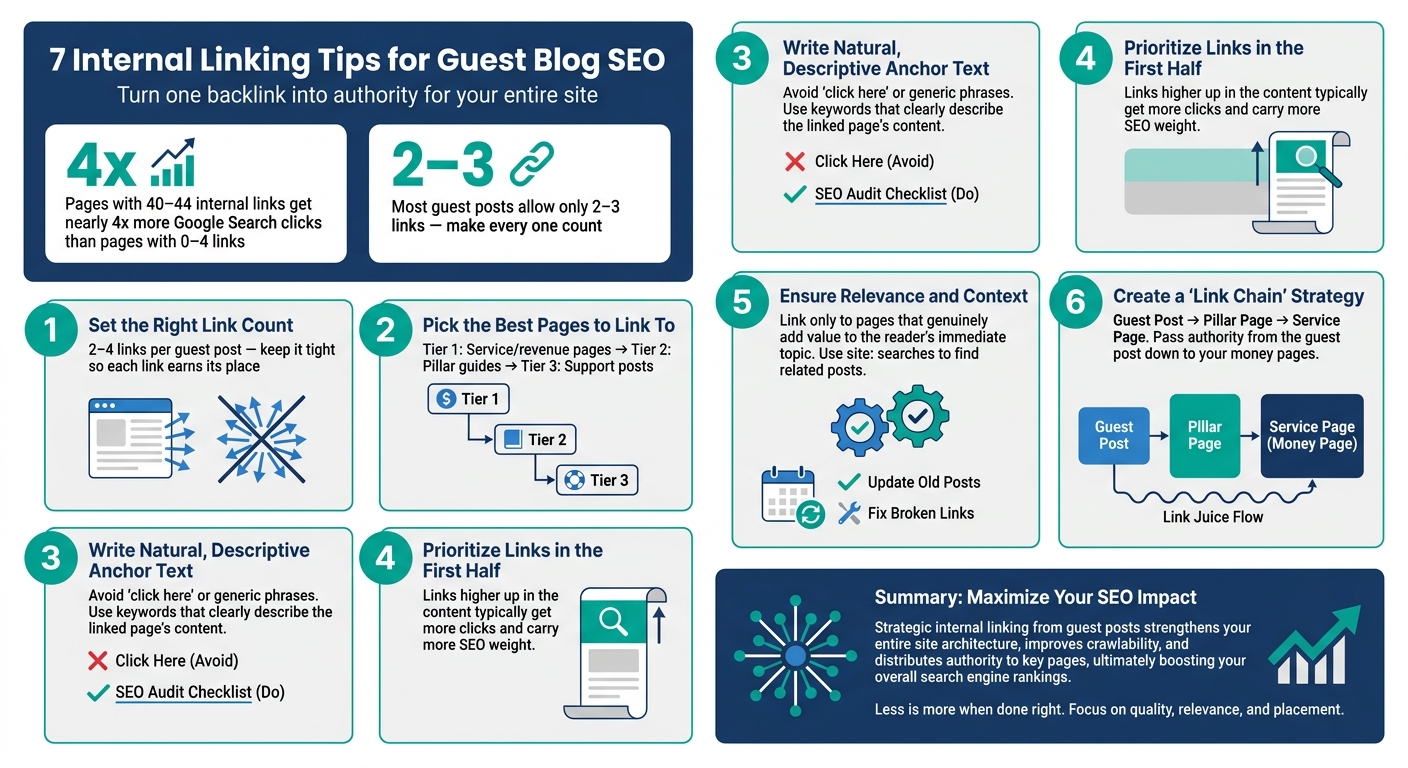
Two data points stand out. Pages with 40-44 incoming internal links can get nearly 4x more Google Search clicks than pages with 0-4. And if a guest post only allows 2-3 links, each one has to pull its weight.
If I had to boil the piece down to one rule, it’s this: don’t waste a hard-earned backlink on a weak internal path.
7 Internal Linking Tips for Guest Blog SEO
Internal Linking: The SEO Power Move
sbb-itb-5be333f
Why Internal Linking Matters After a Guest Post Goes Live
A guest post usually gets you one backlink. Internal links help you pass that authority to the pages you want to rank.
If the guest post starts ranking well, link from it to the service page or conversion page you want to help next. That turns one good link into support for other pages that matter more to the business.
Internal links also help crawlers understand how your site fits together. They show search engines which pages sit under the same topic and how those pages connect. For readers, those links create a clear path from an informational post to a page built to convert.
With that in mind, the next step is figuring out how many internal links to add.
1. Set the Right Number of Internal Links
Once the post goes live, keep your link count conservative: 2-4 links from the guest post to your site.
Longer posts can handle a few more links, but it's smart to keep the total tight so each one earns its place and helps the reader.
Before publishing, check the publisher's contributor guidelines. Many sites cap guest-post links at 2-3.
After you set the count, link to pages that closely match the topic and search intent.
2. Pick the Best Pages to Link To
Once you've set the number of links, the next step is simple: pick pages that can actually use the authority.
A clean way to do this is with a three-tier filter.
- Tier 1: SEO marketing services and revenue pages
- Tier 2: pillar guides and core resources that help build topical authority
- Tier 3: supporting posts and FAQs
In most cases, Tier 1 and Tier 2 pages should be your default targets. They line up with business goals and search intent. The key is fit - pick a page that matches the guest post topic, not just a page you want to push.
Inside those tiers, put extra weight on pages that don't pick up links on their own. That usually means deep pages - specific service, location, or feature pages. These pages often struggle to attract natural backlinks, so a well-placed contextual link can do more work there than it would on a page that already gets attention.
There's also a strong internal linking signal here. Pages with 40-44 incoming internal links earn nearly 4 times more Google Search clicks than pages with only 0-4.
One more filter: skip sales or pricing pages unless the guest post clearly helps with a purchase decision. If not, link to a page that broadens the topic and gives the reader more to work with.
Once the destination is set, match the anchor text to the page intent.
3. Write Natural, Descriptive Anchor Text
Anchor text is the clickable text in a link. It should tell readers - and search engines - what they’ll find after they click.
That’s why generic phrases like "click here", "this article", and "read more" aren’t ideal. They don’t give much context. At the same time, stuffing in exact-match commercial keywords or forcing them into clunky sentences can look manipulative. Exact-match anchors have a place, but use them sparingly and only when they sound normal.
A better option is often partial-match anchor text, like "our guide to internal linking best practices" or "SEO tools and strategies for service pages." It gives a clear topic signal without sounding over-optimized.
| Anchor Type | Example | Best Used When |
|---|---|---|
| Branded | "YourBrand" | Building recognition and keeping the link natural |
| Partial Match | "our detailed link-building strategies guide" | Signaling the topic without over-optimizing |
| Natural/Generic | "this resource" or "according to this analysis" | Keeping the sentence smooth and readable |
| Exact Match | "best link building services 2026" | Use sparingly; only when it fits naturally |
One more point: anchor text doesn’t work on its own. The sentence around it matters too. The best links feel like a normal part of the paragraph while still matching the page topic and search intent.
4. Align Every Link With Context and Search Intent
Placement matters just as much as anchor text. Add links where a related source fits naturally, not where you’re trying to squeeze in a URL. In a guest post, the best internal link usually feels like an obvious next step from the paragraph around it.
Then check whether that placement lines up with what the searcher wants. Look at the top results for the target query and match your destination page to the main intent behind that search.
| Intent Type | What Google Typically Ranks | Best destination page |
|---|---|---|
| Informational | How-to guides, definitions | Deep-dive educational blog post or case study |
| Commercial | Listicles, comparisons | Product comparison or "Best of" page |
| Transactional | Product pages, pricing | Service page or checkout/signup page |
| Navigational | Brand homepages, login | Homepage or main category hub |
After that, send the link to the deepest page that actually satisfies the intent. If the paragraph reads fine without the link, cut it. Don’t jam transactional links into educational copy.
When the placement makes sense, use the most specific page you have.
5. Link to Deep Pages Instead of Top-Level Pages
After you match context and intent, pick the page depth that gives the link the most pull. A link to the homepage or a broad category page spreads authority across too many URLs. A deep page keeps that value focused on one target instead of a broad hub.
That matters for two reasons. First, deep links send authority to the pages that matter most. Second, direct links can help bots find and index deeper pages sooner.
Here’s the simple way to think about it:
- Homepage: broad spread
- Category page: moderate focus
- Deep page: strongest concentration
Only link to live pages. If the URL is broken, the guest post loses its value.
Once you’ve picked the target, spread guest-post links across different sections of the site.
6. Distribute Links Across Different Site Sections
After you pick your deep pages, spread links across different page types - not just one part of the site. If every internal link points to the same area, that section gets overloaded while other parts stay underlinked.
A better approach is to spread links across:
- service pages
- pillar guides
- supporting content
That said, good distribution can still fall flat if the links are placed poorly.
7. Avoid Common Internal Linking Errors
Once you’ve spread links across the site, review the links one by one.
Broken links waste authority and annoy readers. Check every URL before submission, and fix any 404s or slow pages using top SEO tools.
Overlinking can water down authority and make the page feel spammy. Keep your links pointed at the pages that matter most.
Generic anchor text - phrases like "click here" or "read more" - gives search engines very little context. Use anchor text that tells people, and Google, what they’ll get after the click. But don’t swing too far the other way. Exact-match anchors used too often can look forced and may trip spam filters.
Linking to unindexed pages is another easy miss. If the target page isn’t indexed, the link can’t pass much value. Check indexation within 14 days after the post goes live.
Use this checklist to spot the quiet mistakes that cut into a guest post’s value.
| Error | Why It Hurts | Fix |
|---|---|---|
| Broken links | Wastes authority and frustrates readers | Audit all URLs before submission |
| Overlinking | Dilutes authority and looks spammy | Keep the link count focused |
| Generic anchors | Gives no context to search engines | Use descriptive, natural anchors |
| Exact-match overuse | Looks forced; triggers spam filters | Use sparingly and only when natural |
| Unindexed destinations | Passes no meaningful value | Verify indexation within 14 days post-live |
| Context mismatch | Confuses readers and weakens topical signals | Link only where the destination fits naturally |
Quick Reference Table for Internal Linking Decisions
Use this table as a fast pre-publish check for the seven rules above.
| Guest Post Length | Recommended Internal Links | Best Targets | Watch For |
|---|---|---|---|
| 500–900 words | 2–4 links | Blog posts, category pages, service pages | Use descriptive anchors |
| 900–1,500 words | 4–6 links | Pillar guides, deep pages | Keep links contextually relevant |
| 1,500+ words | 6+ links | Topic clusters, FAQs, case studies | Avoid broken links |
Authority is limited. The more links you add, the more that authority gets split across each destination. So keep your link count tight and point links to pages that matter most.
Conclusion
Earning a guest post backlink is just the first step. What you do next with internal links shapes how much SEO value that guest post can pass. That’s the line between getting a backlink and building a link that keeps doing its job.
In practice, these seven tips work best as a system. When you use them together, each guest post does more than point to one page. It can support the pages that matter most and strengthen your site’s SEO in a more useful way.
When you apply internal links with care, they help both search visibility and reader engagement. A clean internal linking setup helps search engines understand your site, and it helps readers find related content faster. Good internal links support discoverability and user experience.
FAQs
How do I choose the best page to link to?
Choose pages that give the reader actual help - like cornerstone content, detailed blog posts, or service pages with useful takeaways.
The link should feel natural in the sentence around it. Skip pages that don't match the topic, especially sales or pricing pages. And don't stuff in links just to chase SEO. In most cases, one or two helpful links do the job better than a pile of them.
When should I link to a service page vs. a blog post?
Link to blog posts or other educational content when you want to add context, back up a point, or help readers dig deeper.
Use service pages only when they line up with what the reader would naturally want next. If a guest post starts to feel like a pitch, it loses trust fast. Stick with relevant, high-value links so the post stays useful and has a better shot at getting accepted.
How can I tell if my anchor text sounds natural?
Anchor text should read like a normal part of the sentence - not like it was shoved in for SEO. A simple gut check helps: would a reader naturally want to click it to learn more?
Skip exact-match commercial keywords. They can feel stiff and over-optimized. Instead, use a mix of branded terms, partial-match phrasing, and generic anchors.
If an editor changes the wording, go with it. That kind of natural variation is usually a good sign.