If I need rank history for monthly, quarterly, or year-over-year SEO reports, I’d narrow this list of SEO tools fast: AWR for long data retention, AccuRanker for agency reporting, Semrush for campaign-based tracking, and Ahrefs for teams already in that stack.
Here’s the short version:
- Ahrefs - solid history views, PDF/CSV exports, starts at $129/month
- Semrush - daily tracking early on, then weekly snapshots, starts at $139.95/month
- Nightwatch - deep location tracking and white-label reports
- Serpstat - rank tracking inside a broader SEO suite
- Mangools SERPWatcher - simple trend reporting for smaller teams
- AccuRanker - long active history, scheduled reports, starts at $224/month
- Advanced Web Ranking - keeps history for the life of the account
What I’d check first:
- How long ranking data stays saved
- Whether historical SERP snapshots are included
- If reports export to PDF, CSV, or Google Sheets
- Whether tracking splits by device, city, and keyword groups
- What happens if keywords or campaigns change
A lot of tools show where you rank today. Fewer show how rankings moved over 6, 12, or 36 months. That’s the part that makes reports easier to build - and drops easier to explain.
Analyze Google Ranking History for ANY Keyword (Ahrefs’ Position History = Unlocked)
sbb-itb-5be333f
Quick Comparison
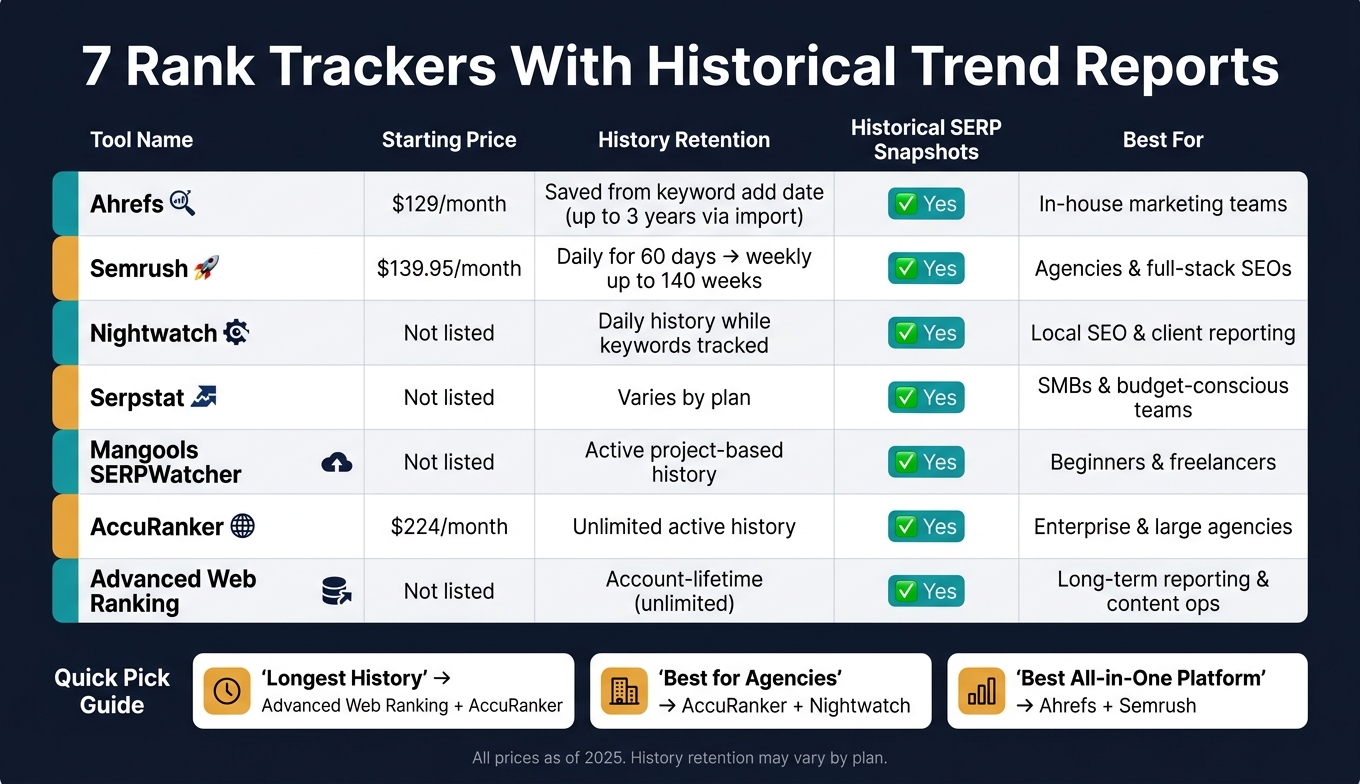
7 Best Rank Trackers With Historical Data: Side-by-Side Comparison
| Tool | History | SERP history | Best for |
|---|---|---|---|
| Ahrefs | Saved from keyword add date, with some imported history options | Yes | In-house teams |
| Semrush | Daily for 60 days, then weekly up to 140 weeks | Yes | Agencies and multi-use SEO teams |
| Nightwatch | Daily rank history while tracked | Yes | Local SEO and client reporting |
| Serpstat | Varies by plan | Yes | Teams using one suite for many SEO tasks |
| Mangools | Active project-based history | Yes | Beginners and freelancers |
| AccuRanker | History kept while domain and keywords stay active | Yes | Agencies and larger teams |
| Advanced Web Ranking | Account-lifetime history | Yes | Long-term reporting |
My takeaway: if you care most about long lookback windows, start with Advanced Web Ranking and AccuRanker. If you want an easier path inside a broader SEO platform, look at Ahrefs or Semrush. If you need local tracking and client-facing reports, Nightwatch belongs on the shortlist.
That’s the frame I’d use before picking a tool.
What to Look for in a Rank Tracker With Historical Reporting
Not every rank tracker gives you a useful view of the past. Some only show current rankings. The better tools keep enough data for monthly, quarterly, and year-over-year review. That history is what lets you spot patterns instead of reacting to one-off rank swings.
Use the filters below to compare the tools or browse our SEO Marketing Directory for more options.
Stored Ranking History and Retention Limits
Start with a simple check: how long does the platform keep your ranking data? This varies by plan. Some tiers give you unlimited history, while others set a cap.
You should also check what happens when keywords get deleted. In some tools, deleted keywords still keep their past data. In others, that history disappears with the keyword. That small detail can make reporting a lot harder later.
Trend Charts and Historical SERP Views
Raw positions tell you where a keyword ranks. Trend charts show where things are headed.
Look for tools that chart position over time, show visibility trends across your keyword set, and track competitor movement next to your own. Historical SERP snapshots add another layer. They let you see the results page on a certain date, which helps explain changes caused by featured snippets, layout shifts, or competitor updates.
Once you can see movement over time, the next step is turning that data into something you can share.
Reporting Options for Monthly and Quarterly Updates
For reporting, look for support for:
- CSV and PDF exports
- Scheduled email reports
- Looker Studio integration
- White-label reporting for client accounts
Those features make it much easier to build monthly and quarterly updates without pulling data by hand each time.
Segmentation by Location, Device, and Keyword Groups
After reporting, check how well the platform breaks trends into smaller segments.
Device splits matter because mobile and desktop rankings often move in different ways. Location settings matter too, especially if you track rankings at the national, city, or ZIP code level. Keyword grouping is just as useful. It lets content teams report by topic or content cluster instead of looking only at sitewide averages.
1. Ahrefs Rank Tracker
Ahrefs Rank Tracker lets you track keyword positions across 190+ locations on desktop and mobile, with history saved from the moment you add a keyword.
If you use a Site Explorer import, you can extend native history to as much as 3 years, based on your plan and when the keyword was added. There’s one catch: imported history covers only the main location - for example, the United States as a whole, not a specific city - and desktop rankings only, because Site Explorer doesn’t collect mobile data. Still, it gives you a simple way to line up current rankings with older trend data in one place.
The Position History graph and Ranking History reports show how keywords move over time, including ranking URLs, dates, and positions for a given keyword. The Ranking History report also helps you spot the biggest gains and drops after content updates or algorithm shifts. If you’re tracking sets of related pages, keyword group position charts and page history charts make that easier by showing performance at the group level instead of forcing you to check one keyword at a time.
You can export CSV data or build PDF reports from Rank Tracker widgets and Site Explorer data. For U.S. reporting, format exports with MM/DD/YYYY dates and USD values. Agencies can also add competitor domains to each project, so client reports show gains and losses against rivals, not just raw ranking numbers.
Pricing starts at $129/month. Weekly updates come by default, and daily updates are available as a paid option on higher plans.
Next, compare Semrush Position Tracking if you want a different reporting workflow.
2. Semrush Position Tracking
Semrush Position Tracking starts collecting data the moment you set up a campaign. There’s no backfill for rankings from before that date. It keeps daily data for 60 days, then switches to weekly snapshots - usually taken on Wednesdays - for up to 140 weeks. That gives you a solid history, but there’s a catch: it works best when your campaign settings stay the same.
If you change a campaign’s location, the history resets. So if you track more than one market, set up separate campaigns for each one. The same logic applies to competitors. Historical competitor data starts on the day the campaign is created, so adding rivals early gives you a longer side-by-side view.
The main trend views center on Visibility, Estimated Traffic, and Average Position, with breakdowns by device and location. You can also slice reports with tags and keyword groups, like brand vs. non-brand or by landing page. And if rankings shift and you want to know why, historical SERP views help you spot snippet changes and competitor movement over time.
For reporting, you can export key tabs to PDF and tables to CSV, Excel, or Google Sheets. Business users can schedule spreadsheet exports on a daily, weekly, or monthly cadence. Guru and Business plans also support historical rank imports by CSV, which helps if you’re moving over from another rank tracker.
Pricing starts at $139.95/month for Pro with up to 500 keywords, $249.95/month for Guru with up to 1,500, and $499.95/month for Business with up to 5,000. Guru and Business also add multi-targeting, historical imports, and higher export limits.
Next, compare Nightwatch for a different mix of historical depth, SERP views, and reporting workflows.
3. Nightwatch
Nightwatch stores daily rank history and saved SERP snapshots, which makes it easy to look back at results by date. Its SERP Preview feature helps you line up past snapshots and spot competitor shifts, featured snippet changes, and local pack movement. On top of that, Nightwatch shows rank movement day by day in chart form.
It also tracks daily positions, stores mobile SERP history, and supports 107,000+ locations at the city and ZIP code level.
On the reporting side, Nightwatch turns that history into scheduled, client-ready reports. It has a dedicated SEO reporting module with white-label support, Basic, Progress, and Competitor templates, plus scheduled delivery. Performance Graphs add trend charts for average position, visibility, and clicks.
Reports can be built from a specific URL, a View, or a Global View. From there, you can filter by date range and send them automatically on a weekly or monthly schedule. Export formats include PDF, CSV, HTML, and API output.
Agencies can also use client portals to give clients direct access to live data. For content ops teams, Views and Global Views are handy for splitting data by topic cluster, product category, or region, then exporting each segment on its own.
The main drawback is SERP preview retention, not rank history. By default, the UI stores about 5 months of SERP previews.
4. Serpstat Rank Tracker
For teams that want ranking history tied to day-to-day SEO work, Serpstat Rank Tracker fits that setup well. It keeps keyword history inside a broader SEO suite, so rank history, keyword research tools, site audits, and backlink data sit in one workspace.
If you want a lighter tracker with a different reporting style, compare Mangools SERPWatcher next.
5. Mangools SERPWatcher
Mangools SERPWatcher makes historical rank trends easy to read with its Performance Index. That’s one score that blends keyword positions with search volume.
It tracks desktop, mobile, and location-based rankings with daily updates. You also get shareable reports and email alerts when rankings move in a major way.
Mangools doesn’t list a public retention limit in its docs, so SERPWatcher works better for trend reporting than for long-term audit work. Next up: Serpstat, which handles rank history inside a broader SEO suite.
6. AccuRanker
AccuRanker works well for teams that want long-term keyword history and fast reporting. It keeps ranking history for as long as the domain and keywords stay active in your subscription, and that history starts from the day you add the domain. If you cancel, user-specific data stays available for 30 days, so it’s smart to export any key datasets before the account closes. For teams watching rank trends over long periods, that takes a lot of manual work off the table.
The platform gives you a few useful ways to view movement over time. The Ranking Distribution chart shows how keywords move across position bands. On the keyword level, daily rank history includes competitor overlays, which makes side-by-side checks easier. SERP Analysis shows past result-page changes, including competitors, featured snippets, and layout shifts. AccuRanker also added backfilled Top 30 daily and Top 100 bi-weekly data starting September 13, 2025, so any deeper comparison should use that date as the line in the sand.
On the reporting side, those trend views can be turned into scheduled exports and shared dashboards. AccuRanker supports scheduled reports on weekly, monthly, or quarterly cadences. It also offers PDF, CSV, and Google Sheets exports, plus a drag-and-drop report builder.
Agencies that need more control can also send data through the API into custom reporting setups.
Pricing starts at $224/month for Professional and $764/month for Expert, with higher keyword limits at each tier. One thing to watch: each keyword-location-device combination counts as its own slot. So if you track the same keyword across several cities or devices, your total can climb fast.
Next, compare Advanced Web Ranking for deeper historical reporting and more granular exports.
7. Advanced Web Ranking
Advanced Web Ranking (AWR) stands out on historical retention. It keeps ranking data for the life of your account on every plan.
That matters if you do quarterly reviews, year-over-year checks, or long-term client reporting. You’re not bumping into a short lookback window when you need to see how rankings changed over time.
Use the snapshot below to compare AWR's retention with the other trackers.
Side-by-Side Feature Snapshot
Use this snapshot to compare history retention, SERP views, and reporting depth. It’s a quick way to trim your shortlist and line each tool up with how your team handles reporting.
| Tool | Historical Retention | Historical SERP Snapshots | Reporting Features | Best Fit |
|---|---|---|---|---|
| Ahrefs | Active subscription | Yes | Trend charts + distribution views | In-house marketing teams |
| Semrush | Campaign life | Yes | Visibility, trend, and competitor reports | Agencies / full-stack SEOs |
| Nightwatch | While keywords stay tracked | Yes | Custom segments + aggregated views | Local SEO / growth teams |
| Serpstat | Plan-dependent | Yes | Ranking history, competitor trends | SMBs / budget-conscious teams |
| Mangools | While the tracking project stays active | Yes | Performance Index, daily changes | Beginners / freelancers |
| AccuRanker | Unlimited active history | Yes | Share of Voice, ranking distribution | Enterprise / large agencies |
| Advanced Web Ranking | Unlimited history | Yes | Visibility, comparison, and trend reports | Content ops / long-term analysis |
If active history matters most, AccuRanker and Nightwatch stand out. If your team cares more about looking back over a long window, Advanced Web Ranking is the better pick.
The next section breaks that shortlist down by team type and reporting need.
Which Tool Fits Your Team
The comparison above cuts down the options, but the best choice still comes down to how your team works every day. Team size matters. Reporting needs matter. And history length matters too.
Best Options for In-House Marketing Teams
Mangools SERPWatcher is the easiest pick for in-house teams that want clear historical trend reports without much setup or training. Its Performance Index rolls keyword rankings and search volume into one score, so sharing updates with leadership is much simpler.
If your team needs a longer lookback window, Advanced Web Ranking is the better fit. It keeps long-term history, which helps when you review performance over repeated reporting cycles.
Best Options for Agencies and Client Reporting
AccuRanker works well for agencies that need fast client reporting and clean dashboard integrations. It’s built for teams that move quickly and need reports out the door without extra friction.
If your team wants deeper analysis, Nightwatch is a solid option for dashboards, exports, and repeatable reporting. For teams that care more about content clusters and long-term trend lines, the next section is the better way to sort your options.
Best Options for Content Ops and Long-Term Trend Analysis
For content ops teams, the main issue is simple: how much history do you need to keep?
Mangools SERPWatcher works well for straightforward recurring reports. But if you need long-range trend review, Advanced Web Ranking makes more sense because you don’t have to worry about data retention limits.
Simple Dashboards vs. Deeper Reporting: Key Tradeoffs
Simple dashboards like Mangools give up granular control in exchange for speed. You get a clear score and an easy trend line to follow.
Deeper platforms like AccuRanker offer more tracking detail and more integration options, which makes them a better match when reporting needs get heavier. Put simply, simple dashboards lean toward speed. Deeper reporting leans toward control.
Conclusion
Each tool comes with trade-offs. Some give you deeper history. Some make reporting simpler. Others give you more to work with inside the dashboard.
What matters most is this: a rank tracker should keep enough history to show where things are heading, not just where rankings sit today.
The best choice usually comes down to three things: history length, reporting workflow, and dashboard depth. Pick the tool that lines up with how often you report and how much past data you need, then use that trend data to make SEO performance easier to prove.
FAQs
How much rank history do I really need?
Historical data matters because it helps you spot trends, set realistic benchmarks, and measure progress over time.
Many basic plans store only 3-6 months of data. In practice, that's often too little for year-over-year analysis. If you want a clear view of growth, you need enough history to account for seasonality and to separate short-term swings from longer-term performance changes.
Do deleted keywords keep their past data?
It depends on the rank tracking tool. Search results don't clearly confirm whether deleted keywords still keep their past data.
Retention rules vary by platform, and they may also depend on your subscription tier. So it's best to check the tool's documentation or contact support to confirm whether deleting a keyword also removes its historical records.
Which tracker is best for year-over-year reports?
That’s Rank! is the best choice here for year-over-year reports.
It gives you unlimited historical data plus visual trend analysis, which makes it a good fit for comparing rankings across a full year - and even longer.